
ChatGPT + Tableau= A Match Made in AI Heaven! 🤖💻🔥


Hey there! Are you ready to embark on an exciting journey to merge the power of ChatGPT with the world of Tableau?
😃 Together, we’ll weave our way through this playful guide and learn how to integrate ChatGPT into Tableau step by step.
So, grab a ☕ and let’s get started!
🎯 Our Goal: Integrating ChatGPT into Tableau 💬
As young adults, we know the struggle of dealing with mountains of data, yet we crave the wisdom hidden within them.
Tableau helps us visualize this data, but what if we could bring in the conversational prowess of ChatGPT to make it more interactive and fun? That’s our mission today!
🧩 Step 1: Make Friends with TabPy 🐍
To help ChatGPT and Tableau communicate, we need a mediator, and that’s where TabPy comes in.
TabPy is a Python library that allows us to execute Python scripts within Tableau.
Here’s how to install and set it up:
1.1. Install TabPy by opening your command prompt or terminal and entering:
pip install tabpy
1.2. Start the TabPy server by running:
tabpy
🤖 Step 2: OpenAI Package — Knock, Knock! Who’s There? 🚪
To use ChatGPT in our Python script, we need the OpenAI Python package.
Let’s knock on OpenAI’s door and get it installed!
2.1. Run the following command in your command prompt or terminal:
pip install openai
🧪 Step 3: Creating a ChatGPT Potion 🧙♂️
Now, let’s cook up a Python script to interact with ChatGPT.
import openai

openai.api_key = "your_openai_api_key"
def chat_gpt_query(prompt):
    response = openai.Completion.create(
        engine="text-davinci-002",
        prompt=prompt,
        max_tokens=100,
        n=1,
        stop=None,
        temperature=0.5,
    )
    return response.choices[0].text.strip()
Replace your_openai_api_key with your actual API key.
📨 Step 4: Delivering the ChatGPT Potion to TabPy 💌
It’s time to share our ChatGPT potion with TabPy.
from tabpy.tabpy_tools.client import Client

client = Client('http://localhost:9004/')
client.deploy('chat_gpt_query', chat_gpt_query, 'Queries ChatGPT using OpenAI API', override=True)
Run this script to deploy the ChatGPT function on the TabPy server.
🤝 Step 5: Connecting Tableau to TabPy — Let’s Get Social! 🎉
Now, let’s make sure Tableau and TabPy are BFFs!
5.1. Open Tableau Desktop.
5.2. Go to the “Help” menu, and select “Settings and Performance” > “Manage Analytics Extensions Connection.”
5.3. Choose “TabPy/RServe,” and enter the server address and port for your TabPy server (default is http://localhost:9004/).
5.4. Click "Sign In" or "Test Connection" to ensure Tableau can connect to TabPy.
🧠 Step 6: Use the ChatGPT Function in Tableau — Let the Magic Begin! 🌟
Time to put Chat GPT to work! Let’s use the ChatGPT function in Tableau’s calculated fields.
6.1. Create a new calculated field in Tableau.
6.2. Use the SCRIPT_* functions to call the ChatGPT function. For example, to pass a string parameter, use the following syntax:
SCRIPT_STR("return chat_gpt_query(_arg1)", [Your String Parameter])Replace [Your String Parameter] with the string parameter you want to pass to ChatGPT.
🥳 Voilà! We’ve successfully integrated ChatGPT into Tableau using TabPy. Now let’s explore some relatable ways to use ChatGPT in Tableau.
🌈 ChatGPT & Tableau — A Colorful Collaboration 🎨
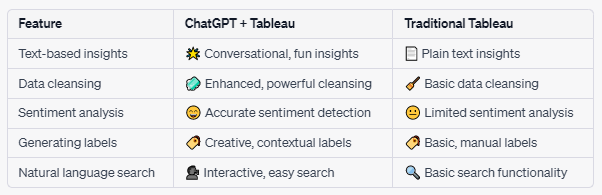
🔍 1. Text-based insights: Make data talk! 🗣️
We’ve all stared at a boring spreadsheet, right? 😴 With ChatGPT and Tableau, we can generate human-readable insights based on our data, like natural language summaries or highlighting trends and anomalies.
🧹 2. Data cleansing: Clean up your act! 🚿
Tired of messy textual data? ChatGPT can help you clean and preprocess it in Tableau! Extract keywords, categorize data points, or fix typos and misspellings. Say goodbye to the chaos! 🙌
❤️ 3. Sentiment analysis: Feel the vibe! 🌡️
Ever tried to understand customer reviews or social media comments? ChatGPT can help you analyze sentiment, so you know whether your brand or products are loved or loathed. 😍😡
🏷️ 4. Generating labels or descriptions: Name that tune! 🎵
ChatGPT can automatically generate labels or descriptions for your data points, making it easier to understand the context. No more guessing games! 🕵️♀️
🔎 5. Natural language search: Just ask! 🙋
Why not implement a natural language search interface that allows users to search and filter data in Tableau using text queries? ChatGPT can parse these queries and return relevant data. So, go ahead, ask away! 🎤
📊 Comparison Table: ChatGPT vs. Traditional Tableau 🤼♂️
Remember, using ChatGPT in Tableau may add extra processing time to your visualizations, so optimize performance by caching results or using an intermediate database.
Always be mindful of the API usage limits and potential costs associated with the OpenAI API.
Now, go have a blast with ChatGPT and Tableau! You’re all set to create engaging, interactive, and warm visualizations that’ll make your data dance!
FAQs about ChatGPT and Tableau Integration
Q: What are some use cases for integrating ChatGPT with Tableau?
A: Some possible use cases include generating natural language descriptions of visualizations, answering complex questions in natural language, and creating interactive dashboards that respond to users’ queries in real-time.
Q: Do I need to be an expert in Python to integrate ChatGPT with Tableau?
A: No, you don’t need to be an expert in Python to integrate ChatGPT with Tableau. However, some familiarity with Python and TabPy can be helpful. You can also find pre-built Python scripts online that you can use in your Tableau dashboards.
Q: Can I use ChatGPT to generate text in languages other than English?
A: Yes, ChatGPT can generate text in multiple languages. However, the quality of the generated text may vary depending on the language and the training data available.
Q: What are some best practices for integrating ChatGPT with Tableau?
A: Some best practices include starting small and building up, testing your integration thoroughly, and considering the privacy and security implications of using a cloud-based language model like ChatGPT.
Bringing ChatGPT and Tableau Together
Integrating ChatGPT with Tableau can help us unlock new ways to analyze and visualize data.
By using ChatGPT to ask complex questions in natural language and Tableau to visualize the answers, we can create interactive dashboards that respond to users’ queries in real-time. While the integration process may seem daunting at first, starting small and building up can help you learn the necessary skills and troubleshoot any issues that may arise.
So, what are you waiting for? Give it a try and see how ChatGPT and Tableau can help you unlock new insights from your data.
I hope this article has been helpful to you. Thank you for taking the time to read it.
💰 Free E-Book 💰
If you enjoyed this article, you can help me share this knowledge with others by:👏claps, 💬comment, and be sure to 👤+ follow.
Who am I? I’m Gabe A, a seasoned data visualization architect and writer with over a decade of experience. My goal is to provide you with easy-to-understand guides and articles on various data science topics. With over 250+ articles published across 25+ publications on Medium, I’m a trusted voice in the data science industry.
💰 Free E-Book 💰
Stay up to date. with the latest news and updates in the Programming space — follow the Everything Programming publication.


