
ChatGPT As OCR For PDFs: Your New ETL Tool for Data Analysis
Coding in English at the speed of thought
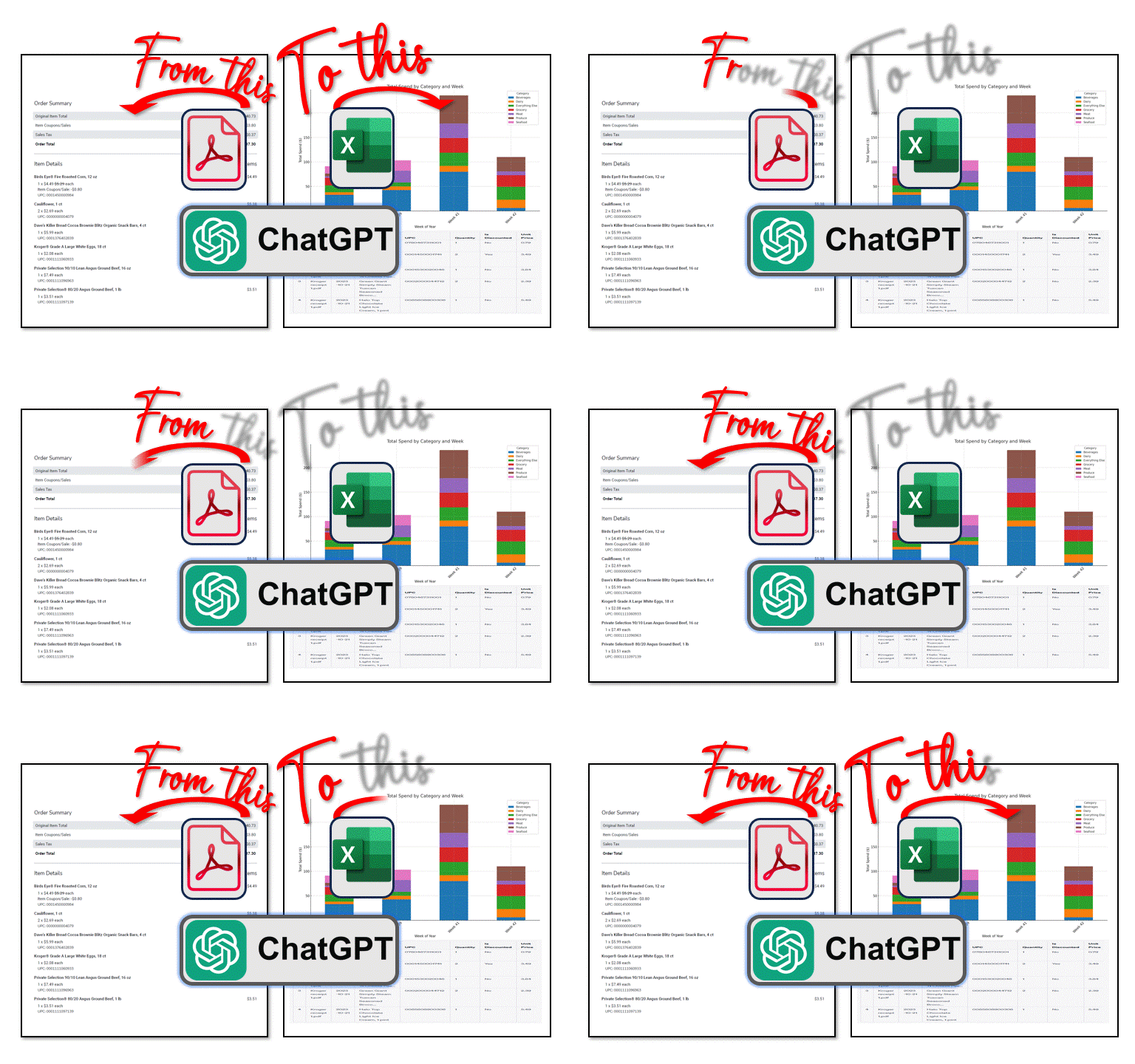
For a recent piece of research, I challenged ChatGPT to outperform Kroger’s marketing department in earning my loyalty. Could a generative AI, when fed my transaction history, create a marketing strategy more compelling than weekly coupons for eggs and produce?
The broader question was whether ChatGPT could advise marketers in creating valuable customer insights and consumer marketing strategies for growth and retention using real-world data for mass personalization. The experiment would use my own purchase receipts to test ChatGPT’s ability to conduct business analysis on a limited data set.
But I was halted in my tracks at the start with a common data analysis challenge:
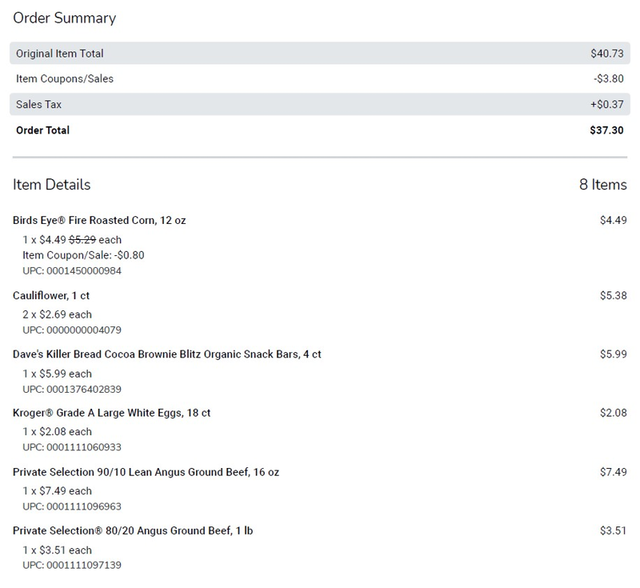
- The receipts were stored as unstructured Adobe PDF documents. Getting the data properly formatted was the first crucial step.
- The data was limited to product description, SKU, and pricing. Data enrichment would be required for aggregate analysis, visualizations, and insights.
This piece covers the following:
- The Challenge: Convert PDF Receipts to Actionable Data
- Using ChatGPT for OCR & ETL
- Translating English to Python Code with ChatGPT
- Deriving Insights & Visualizations From The Data
Using ChatGPT, No Coding Experience Required
A data integration tool or development environment would ordinarily be useful for these ETL (Extract, Transform, Load) tasks, but that requires time, resources, software, and coding skills — commodities in short supply for someone who has not touched a coding keyboard in over a decade.
I’d need ChatGPT to ingest the PDFs, extract text from the pages using OCR (Optical Character Recognition), and then identify patterns to transform the text to data, all in the English language, not code.
What follows is an approach to using ChatGPT as a coding partner, receiving conversational prompts that it automatically converted to Python code. The democratized ability to generate and execute fully functioning logic and the speed at which this was completed for a set of complex tasks astounded me. I co-created (I use the term liberally) fully functional Python code, without knowing a lick of Python.
“As a business analyst and subject matter expert who has never developed in Python, I don’t know if the code created by ChatGPT is efficient. I don’t know if it’s pretty. I don’t know even if the code scales. But as a business analyst, if the code functions to help me accomplish my task — I don’t care.”
Some code examples are shared in this piece to showcase the speed of automation, but you’ll never have to write a line of code. Traditional development environments and specialized resources are unnecessary. For your projects, you’ll code in English, with ChatGPT as your co-creator, translating directives to yield the desired business outcome.
ChatGPT Creates OCR Logic: From PDF to Text
The first step involved uploading a sample PDF and informing ChatGPT that the objective was to “infer insights.” ChatGPT was not able to extract data natively, but did suggest using image-based OCR as a next step.
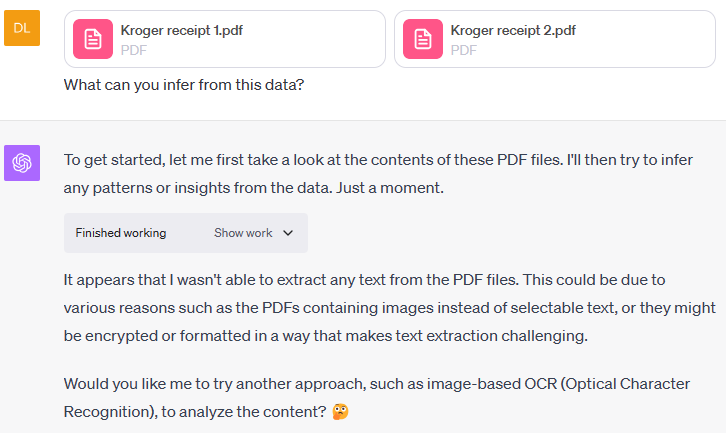
ChatGPT further recommended using the pytesseract library, which is a Python binding for Google's Tesseract-OCR Engine, along with pdf2image converting PDF pages into images. OCR would then be utilized to convert images of characters to text with Tesseract.
I’d never heard of this function, which seemed to be as powerful as an Infinity Stone, but who was I to argue?
The initial piece of logic rendered by ChatGPT confirmed the OCR was working. Characters were being recognized, but not quite yet in a coherent manner. Fortunately, the data appeared to be in columnar format, providing a good foundation for data transformation.
# EXAMPLE OUTPUT FROM SUCCESSFUL OCR ROUTINE

Page 1:
wr ro jer

{et Order Type: In Store
Order Date: October 21, 2023

Original Item Total
Item Coupons/Sales
Order Coupons

Sales Tax

Order Total

Item Details

0780467311001

1x $0.79 each
UPC: 0780467311001

Birds Eye® Veggie Made Frozen Original Mashed Cauliflower, 12 oz
2 x $3.49 $4-29 each
...
The next step, also advised by ChatGPT, was to convert that text into a series of rows that could be processed iteratively by a parsing routine downstream. This row-by-row approach became the recommended strategy after an initial attempt to process all pages resulted in a timeout failure. This seems reasonable; I assume that each user session likely has its own memory constraints in the sandbox environment.
#CODE AUTOMATICALLY DEVELOPED BY CHATGPT TO CREATE ROWS OF DATA FROM THE OCR

import re
import pandas as pd
from PIL import Image
import pytesseract
from pdf2image import convert_from_path

# Function to perform OCR using Pytesseract
def ocr_pdf_to_text_with_page_number_v2(pdf_path):
    ocr_output = []
    images = convert_from_path(pdf_path)

    for page_num, image in enumerate(images):
        text = pytesseract.image_to_string(image)
        lines = text.split('\n')
        for line in lines:
            ocr_output.append({"text": line, "page": page_num + 1})

    return ocr_output
Here’s how that works:
- Import Libraries: The
pdf2imagelibrary converts PDF files into a list of images. PIL (Pillow) is used for opening, manipulating, and saving image files. - Convert PDF to Images: The function
convert_from_pathfrompdf2imagetakes the path of a PDF file that is uploaded to ChatGPT in this session or subsequent sessions and returns a list of images, each corresponding to a page in the PDF. - OCR Loop: The function then iterates through each image using
image_to_string()to perform OCR on the image and extract the text. Then, the text from each page is added toocr_text, prefixed with the page number. This was useful for debugging purposes when I could ask ChatGPT to output the ‘first 10 rows of page 2’ for validation. - Return OCR Text: Finally, the full text collected in
ocr_textis returned.
# SAMPLE OUTPUT OF DATA IN THE OCR STRING AFTER PROCESSING
[
{'text': 'wr ro jer', 'page': 1},
{'text': '', 'page': 1},
{'text': '{et Order Type: In Store', 'page': 1},
{'text': 'Order Date: October 21, 2023', 'page': 1},
{'text': '', 'page': 1}
...
...
{'text': '1x $1.99 $2-49 each', 'page': 2},
{'text': 'Item Coupon/Sale: -$0.50', 'page': 2},
{'text': 'UPC: 0001111058711', 'page': 2},
...
]
Guiding ChatGPT to Parse Documents
Mapping document patterns isn’t just a technical exercise; is a critical step in data transformation. Simply instructing ChatGPT to “find the products” wasn’t going to result in success. It needed the human eye to direct the logic flow for a data transformation.
After scrutinizing the receipt and some sample output OCR output, I had a good starting point to begin coaching ChatGPT to extract and transform the text into a dataset, using English and pseudocode.
The data was fairly well structured, as you’ll see in the mapping example below. Each product sequence begins with a Description and is always followed by a Quantity and Unit Price. The last line is always the UPC number.
The one tricky part was the variability of discounts and coupons. The “Item Coupon/Sale” row would not be found for a product sold at full price, but a product with a discount would. Even more challenging was how multi-unit sales were rendered. If three packages of frozen peas were purchased along with a coupon or discount, there would be a single line for “Quantity = 3”, but 3 individual “Item Coupon” rows.
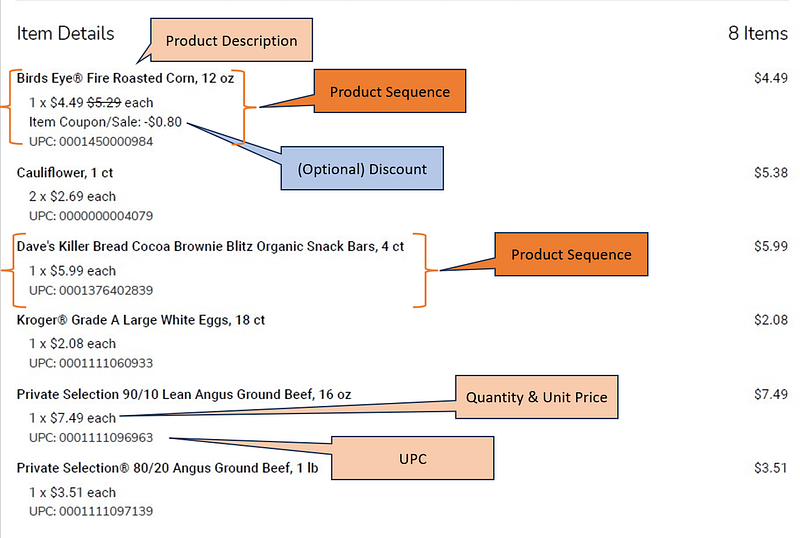
The mapping above was converted to an English text prompt that was debugged in a few iterations. This interaction felt conversational, as if I was speaking to a coding colleague. In the future, I may try this using speech-to-text to eliminate my fingers as the middleman for even faster-paired development.
# MEGAPROMPT TO CHATGPT EXPLAINING THE LOGIC TO USE FOR OCR TO DATA CONVERSION
Parsing logic, row by row and save rows and fields to a data table.
1. Skip empty rows
2. Metadata is found above the row "Item Details"
3. Detail transaction data is found below row "Item Details" and
above row "Order Coupons"
4. From the Metadata, find the row that begins with the text "Order Date:"
 The text following the ":" is the 'Order Date' for the Data table.
 Convert the format of Month day, Year to a Date
5. The row  "Item Details" signals the start of our product detail set.
There is 1-n number of Products in the set and they follow this pattern:

PRODUCT DESCRIPTION ROW: [PRODUCT DESCRIPTION] <-- Required (once)
QTY PRICE ROW: QTY "x" [$Unit Price] [$Original Price (optional)] " each"
DISCOUNT ROW: OPTIONAL (n rows) that begin with "Item Coupon" & "$"
UPC ROW: "UPC:" + [UPC] <-- Required

This is the detailed pattern for one product detail line sequence:

Row 1: [alphanumeric] // This row is MANDATORY ONCE
contains the 'Product Description'
Row 2: [number] " x " "$"[number] " $"[number(optional)] " each" //
This row is MANDATORY ONCE and contains the 'Quantity', 'Unit Price'
 and 'Original Price'  in that order. Quantity and Unit Price are MANDATORY.
Original Price is OPTIONAL. We do not care about the Original Price.
The word "each" will always be on this line.
Rows (n) OPTIONAL (n rows) that begin with "Item Coupon" // This is OPTIONAL.
This row must contain a "$" . If this row is found,
then "Is Discounted" = 'Yes', otherwise it is 'No'
Row(x) "UPC:" + [alphanumeric] // this row is MANDATORY once
and contains the 'UPC'.

You will then loop through this routine again, to load the next Product Line
details, n number of times. Continue the logic to parse and populate the data
table, until you encounter a row that contains "Order Coupons".
This text signals the end of the dataset, and no further parsing should be
performed.

IMPORTANT NOTES:
1. The Quantity and Price Line ALWAYS FOLLOWS a PRODUCT DESCRIPTION line.
If it does not, then this is not a new product line sequence.
2. Lines that begin "UPC:" ALWAYS terminate the current product line sequence.
3. A single product details do NOT span multiple pages.
4. Every product line sequence must follow this pairing logic:
 a) The first line has an alphanumeric string, and
 b) The VERY NEXT LINE MUST BE a Quantity_Price line that satisfies the
regex test.
So, if you satisfy test condition 4a, peek to the next row.
If it is not satisfied, eliminate the first line and continue your logic tests.
Automating Data Transformation With ChatGPT
After a handful of debugging rounds and trial and error over the course of about an hour, ChatGPT wrote roughly 70 lines of Python code to convert the PDF receipt into a structured data table.
# FINAL RECEIPT PARSING CODE AUTOMATICALLY CREATED BY CHATGPT

def adjusted_parse_ocr_text_with_page_number_v2(ocr_data, file_name):
    data_table = []
    debug_output = []
    current_state = "metadata"
    order_date = None
    product_description_candidate = None
    quantity = None
    unit_price = None
    is_discounted = "No"
    upc = None
    current_page = 1
    quantity_unit_price_pattern = re.compile(r"(\d+)[\s|x]*\$([\d.]+)")

    def reset_product_variables():
        nonlocal product_description_candidate, quantity, unit_price, is_discounted, upc
        product_description_candidate = None
        quantity = None
        unit_price = None
        is_discounted = "No"
        upc = None

    for line in ocr_data:
        text = line["text"].strip()
        page_num = line["page"]

        if not text or text.startswith("$"):
            continue

        if page_num == 1:
            if current_state == "metadata":
                if "Order Date:" in text:
                    date_str = text.split(":", 1)[1].strip()
                    try:
                        order_date = datetime.strptime(date_str, "%B %d, %Y").date()
                    except ValueError:
                        order_date = "Error in date format"
                if "Item Details" in text:
                    current_state = "product"
                    reset_product_variables()
                    continue

        if page_num > current_page:
            current_page = page_num
            current_state = "product"
            reset_product_variables()

        if current_state == "product":
            if "Order Coupons" in text:
                break
            elif not product_description_candidate:
                product_description_candidate = text.strip()
            elif not quantity:
                match = quantity_unit_price_pattern.search(text)
                if match:
                    product_description = product_description_candidate
                    quantity = int(match.group(1))
                    unit_price = float(match.group(2))
                else:
                    product_description_candidate = text.strip()
                    continue
            elif "Item Coupon" in text:
                is_discounted = "Yes"
            elif "UPC:" in text:
                upc = text.split(":", 1)[1].strip()
                data_row = {
                    "File Name": file_name,
                    "Order Date": order_date,
                    "Product Description": product_description,
                    "UPC": upc,
                    "Quantity": quantity,
                    "Is Discounted": is_discounted,
                    "Unit Price": unit_price
                }
                data_table.append(data_row)
                reset_product_variables()

    return data_table
As a business analyst and subject matter expert who has never developed in Python, I don’t know if the code created by ChatGPT is efficient. I don’t know if it’s pretty. I don’t even know if the code scales. But as a business analyst, if the code functions to help me accomplish my task — I don’t care.
The resulting sample data set that emerged from this test confirmed the transformation was working as expected.
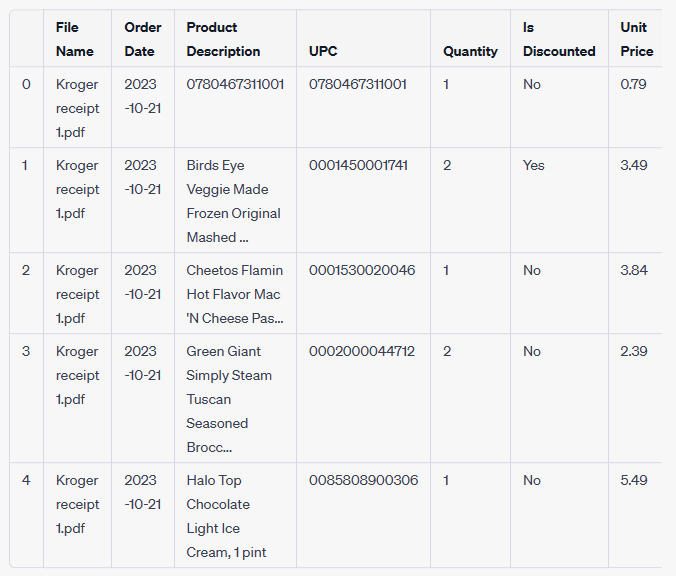
Once the code was validated, ChatGPT provided a single text file that contained the complete source code. This allowed the code to be executed at any time in the future, against similarly formatted receipt files, all without requiring specialized software or development environments.
The execution of code to achieve an outcome is as simple as starting a new ChatGPT session, uploading the code file to ChatGPT, and requesting that it execute against a PDF.
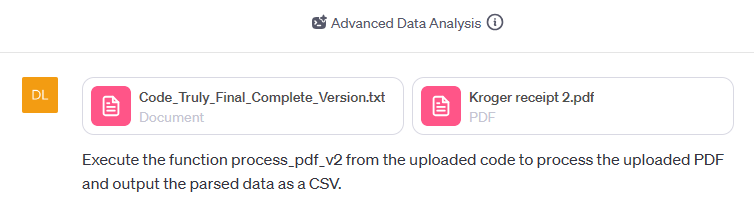
Batch Processing Repeatable Code
With the code now portable, I could fire up a new chat session and upload more receipts for processing. I uploaded five additional receipts and requested ChatGPT to execute them iteratively rather than in batch, due to the sandbox timeout limitations.
ChatGPT loaded the code into memory, identified required library dependencies, and brought it all into the environment scope.
# Importing required packages directly to resolve dependencies
import re
from datetime import datetime
import pandas as pd
from PIL import Image
import pytesseract
from pdf2image import convert_from_path

# Executing the entire uploaded code to bring all functions into scope
exec(code_content)

# Verifying that the function process_pdf_v2 is now available
'process_pdf_v2' in locals()
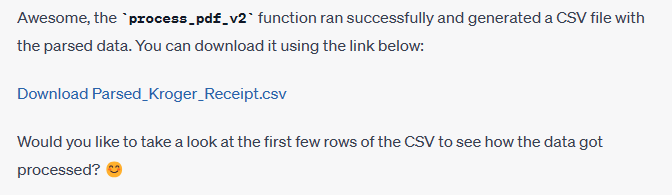
ChatGPT then executes the parsing function and deposits the results in a CSV formatted file. This file could be downloaded for review and validation — a good practice given ChatGPT’s habit of periodically flushing session data.
Like any good peer programmer, ChatGPT suggested I review the output for validation. Once the data was confirmed, we continued with the receipt processing.
ChatGPT created the Python script to loop through the files in its sandbox store for import. Once all files had been successfully processed, I asked ChatGPT to read all of the CSVs it had just created into memory for further data review and analysis.
# Importing the generated CSV files into memory as DataFrames
csv_paths = [
    '/mnt/data/Parsed_Kroger_Receipt.csv',
    '/mnt/data/Parsed_Kroger_Receipt_3.csv',
    '/mnt/data/Parsed_Kroger_Receipt_4.csv',
    '/mnt/data/Parsed_Kroger_Receipt_5.csv'
]

# Creating an empty DataFrame to hold all the data
combined_df = pd.DataFrame()

# Reading each CSV and appending it to the combined DataFrame
for csv_path in csv_paths:
    temp_df = pd.read_csv(csv_path)
    temp_df['source_csv'] = csv_path.split('/')[-1]  # Adding a column to indicate the source CSV
    combined_df = pd.concat([combined_df, temp_df])

# Resetting the index
combined_df.reset_index(drop=True, inplace=True)

# Showing the first few rows of the combined DataFrame
combined_df.head()
ChatGPT shared the first few records of the DataFrame for visual confirmation, which wraps the text given screen width limitations.
RESULT
        File Name  Order Date  \
0  Kroger_Receipt  2023-10-11
1  Kroger_Receipt  2023-10-11
2  Kroger_Receipt  2023-10-11
3  Kroger_Receipt  2023-10-11
4  Kroger_Receipt  2023-10-11

                                 Product Description         UPC  Quantity  \
0                Birds Eye® Fire Roasted Corn, 12 oz  1450000984         1
1                                  Cauliflower, 1 ct        4079         2
2  Dave's Killer Bread Cocoa Brownie Blitz Organi...  1376402839         1
3             ‘oger® Grade A Large White Eggs, 18 ct  1111060933         1
4  Private Selection 90/10 Lean Angus Ground Beef...  1111096963         1

  Is Discounted  Unit Price                 source_csv
0           Yes        4.49  Parsed_Kroger_Receipt.csv
1            No        2.69  Parsed_Kroger_Receipt.csv
2            No        5.99  Parsed_Kroger_Receipt.csv
3            No        2.08  Parsed_Kroger_Receipt.csv
4            No        7.49  Parsed_Kroger_Receipt.csv
Data Enrichment: Adding Dimensions to Raw Receipts
Data from the receipts include product description, UPC and price which is a wealth of detailed data, but less useful for aggregate analysis. A product category, like “Fruits” rather than “apples,” “bananas,” or “pears,” would be preferred. ChatGPT should be able to infer this to enrich the set based on its language model capabilities.
Prompted to take a stab at a ‘‘categories” dimension from keywords found in the product descriptions, ChatGPT generated a preliminary list for text analysis.
# Define a function to categorize products based on keywords
def categorize_product(product_description):
    product_description = product_description.lower()

    # Define categories and keywords
    categories = {
        'Grocery': ['bread', 'cereal', 'pasta', 'rice'],
        'Dairy': ['milk', 'cheese', 'yogurt', 'butter', 'egg'],
        'Meat': ['beef', 'chicken', 'pork', 'fish'],
        'Vegetables': ['carrot', 'cauliflower', 'broccoli', 'corn'],
        'Fruits': ['apple', 'banana', 'orange', 'berry'],
        'Snacks': ['chips', 'cracker', 'cookie', 'popcorn'],
        'Beverages': ['juice', 'soda', 'water', 'coffee', 'tea'],
        'Frozen': ['ice cream', 'frozen'],
        'Miscellaneous': []
    }

    # Categorize the product
    for category, keywords in categories.items():
        for keyword in keywords:
            if keyword in product_description:
                return category

    return 'Miscellaneous'

# Apply the function to the DataFrame
combined_df['Product Category'] = combined_df['Product Description'].apply(categorize_product)

# Showing the first few rows of the updated DataFrame
combined_df.head()
Fine Tuning Data With a Human Touch
Given the challenges of fixed-width and screen wrapping, the complete working file was downloaded as a CSV for easier visual review. The first pass at product categories was close, but not perfect. Even with advanced AI capabilities, there are moments where human intuition and expertise are irreplaceable. ChatGPT needed additional context clues to update the product categories.
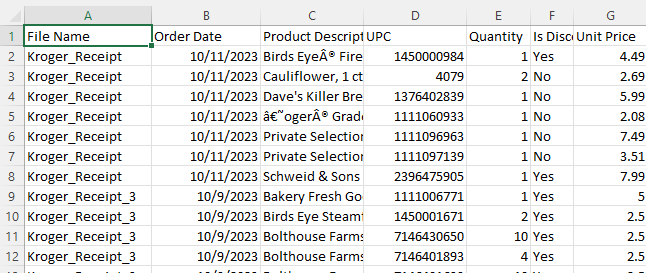
This too, felt conversational, as if I were guiding a junior developer through the nuances of data enrichment. This exercise was as simple as prompting “if you see the word ‘cake’, that is ‘Bakery’.
Not only can ChatGPT discern the syntax of “if this then that”, I can shorthand the prompt as if I was talking to a colleague. ChatGPT knows that when I say ‘update that’, I mean the ‘product category.’ Game changer. I’m still transforming data in plain English!
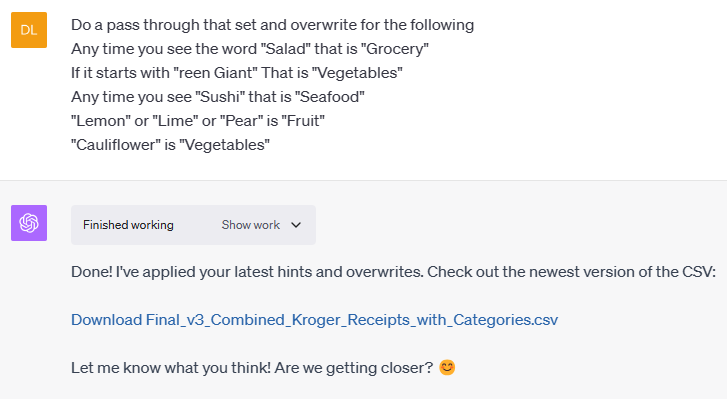
After a few iterations to cleanse the product category field, we were ready for aggregate data analysis.
Visualizing Data with ChatGPT
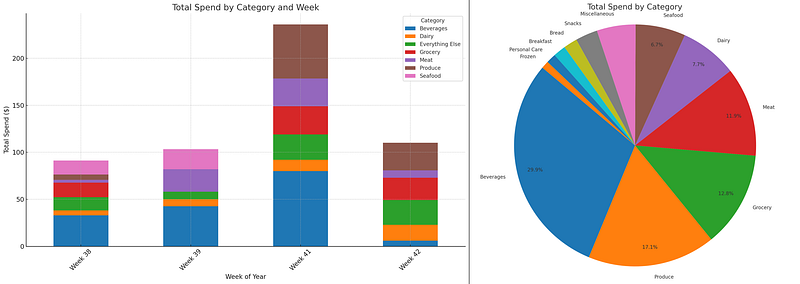
Advanced Data Analysis not only allowed for this code creation and execution, but in the same session we could now visualize the data in order to make complex data understandable and actionable.
Here too, instructions can be prompted in English, “please plot a stacked bar chart ascending by week, starting with the earliest week, showing the sum of quantity x unit price by category. So, week 1 would show the aggregate dollar volume of Bread, Beverage, and so on. The second should be a pie chart of the total for all weeks by Category with the Percentage displayed.”
After a moment, ChatGPT shared a few charts that were refined for further analysis.
Gleaning Insights From Data
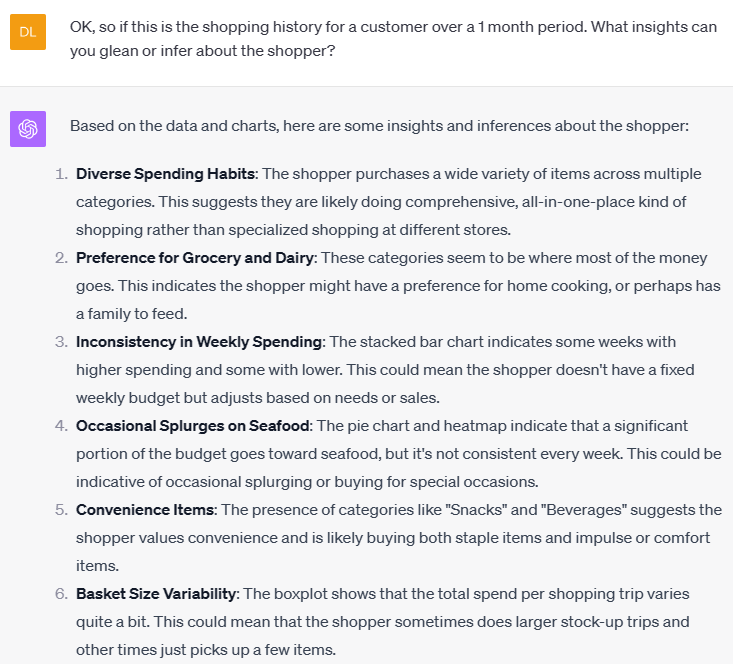
Charts and graphs are fascinating but require visual inspection to detect insights. We can leverage ChatGPT to infer patterns in the data and offer unique points of view. Ultimately, the goal of this ETL exercise is to generate insights, analysis, or integrate with other data sources.
With minimal coaching, we can ask ChatGPT to interrogate the data and offer a perspective on the insights it uncovers.
Business Analysis Without Barriers
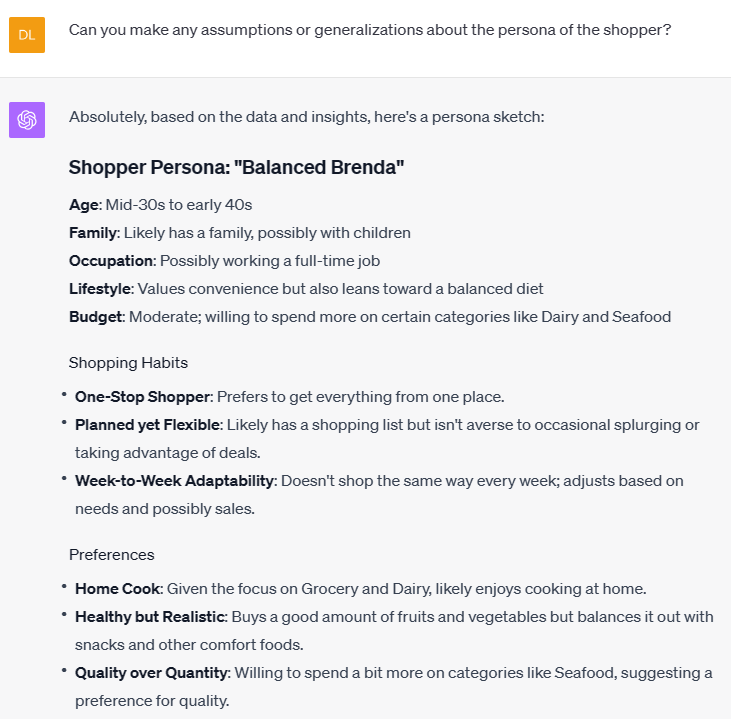
Thus began a journey into the business analysis part of the exercise. The endgame was not the development of Python code for character recognition or PDF conversion using OCR. That was just a required step on the path to analysis of a dataset to inform new insights and direction.
Translating unstructured data stored in an Adobe PDF was the first obstacle preventing me from my real task — creating a shopper persona and developing a marketing strategy.
As someone who spent the early part of his professional career in data integration, transformation, and data analysis with tools like SQL, Integration Services, regex, Excel, and .NET — among a laundry list of others — it is fascinating now to develop transformation logic at the speed of thought using English (or your native tongue) to program.
If you enjoyed this piece, you might like the companion piece (part 2), which details the analysis, persona development, and marketing strategy and attempts to answer the question: is ChatGPT superior at marketing and loyalty than Kroger?


