
Change Data Capture (CDC) in Snowflake
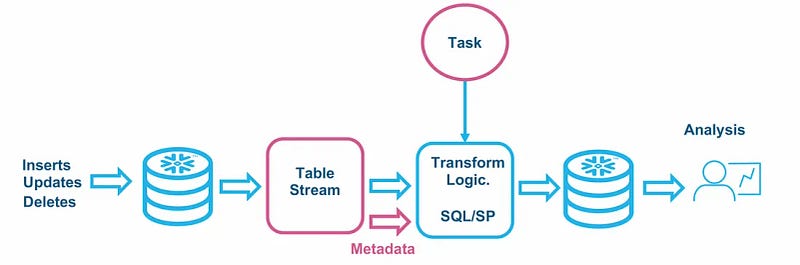
In Snowflake, Change Data Capture (CDC) can be implemented using various approaches and features within the platform. Snowflake provides functionalities that enable users to capture and track changes in the data, facilitating real-time data integration and analytics. Here are key features and considerations related to CDC in Snowflake:
1. STREAMs in Snowflake:
- A STREAM in Snowflake is a logical change data capture mechanism. It can be associated with a table to track changes (inserts, updates, deletes) made to the table.
- When changes occur in the associated table, the changes are captured in the STREAM, allowing consumers to subscribe to the STREAM and react to the changes.
- STREAMs provide a straightforward way to implement CDC within Snowflake without the need for external tools.
2. Time Travel and History Tables:
- Snowflake supports time travel and the concept of history tables, which allows users to query data as it existed at a specific point in time.
- By querying a table with a specific timestamp, you can retrieve the state of the data at that particular moment, effectively achieving a form of CDC.
- Useful for historical analysis and understanding changes in the data over time.
3. External CDC Tools:
- Snowflake can integrate with external CDC tools or change tracking solutions.
- External tools like Apache Kafka or proprietary CDC solutions can capture changes in the source systems and push those changes to Snowflake.
- Allows for more complex CDC scenarios and integration with diverse data sources.
4. Snowpipe for Real-Time Data Loading:
- Snowpipe is a service provided by Snowflake for real-time data ingestion.
- Snowpipe can be configured to automatically load data from external files (e.g., streaming data) into Snowflake tables.
- Supports continuous loading of data, making it suitable for real-time data integration scenarios.
5. Task Scheduler for Periodic Data Loading:
- What is it: Snowflake supports task scheduling for automated data loading and transformation.
- How it works: Users can schedule tasks to run at specified intervals to load data or perform ETL processes.
- Benefits: Suitable for periodic CDC scenarios where data is loaded into Snowflake at scheduled intervals.
Considerations and Best Practices:
- Schema Design: Design your Snowflake schema to accommodate historical data, considering the use of STREAMs or history tables.
- Data Retention Policies: Set appropriate data retention policies for STREAMs or history tables to manage storage costs.
- Monitoring and Logging: Implement robust monitoring and logging to track changes, errors, and the performance of your CDC processes.
- Security and Compliance: Ensure that CDC processes adhere to security and compliance standards, especially when dealing with sensitive data.
Example Using STREAMs:
-- Create a table
CREATE TABLE my_table (
   id INT,
   name STRING,
   last_modified TIMESTAMP DEFAULT CURRENT_TIMESTAMP()
);
-- Create a STREAM to capture changes
CREATE OR REPLACE STREAM my_stream ON TABLE my_table;
-- Insert, update, or delete records in the table
INSERT INTO my_table VALUES (1, 'John');
UPDATE my_table SET name = 'Jane' WHERE id = 1;
DELETE FROM my_table WHERE id = 1;
-- Query the STREAM to see captured changes
SELECT * FROM my_stream;
This is a simple example demonstrating the use of a STREAM in Snowflake to capture changes in a table. Depending on your specific use case and requirements, you may choose different approaches or combinations of features to implement CDC in Snowflake.
You can access the official Snowflake documentation at Snowflake documentation :
And Streams part here :
If you found this article insightful, don’t forget to show your appreciation with a clap! Your support encourages us to keep sharing valuable content. For more enlightening concepts and updates on new articles, make sure to follow us here. Stay informed and engaged with our latest insights in the dynamic world of data and cloud technologies. Join our growing community and be the first to benefit from our upcoming articles! 🌟👏🔗
Twitter: https://twitter.com/N14Solutions
Linkedin: https://www.linkedin.com/company/n14solutions
Medium: https://medium.com/@n14solutions


