avatarJon Middaugh

Free AI web copilot to create summaries, insights and extended knowledge, download it at here

2450

Abstract

d <code>fontSize</code> field</li></ul><p id="9d7a">We add a typical click listener and click handler to our button. This can be done in a variety of ways but I used <code>getElementById</code> .</p><p id="2161">I passed a reference to the button as a parameter to the click handler. Inside the click handler, I accessed the style prop on the button. The style prop is a JS way of changing CSS values on the button.</p><p id="2e50">In particular, I updated <code>jsButton.style.fontSize = "1.5rem";</code> . This overwrote the 18px font size that was applied to the button by the <code>button</code> CSS selector.</p><p id="60fa">We can see the in dev tools that JS <code>style.fontSize</code> overrides CSS styling because it is like inline styling:</p><figure id="47fc"><img src="https://cdn-images-1.readmedium.com/v2/resize:fit:800/1*9NFDaXQa4agjCNYF2wDO6Q.png"><figcaption>JS style.fontSize</figcaption></figure><p id="b56c">Here’s the code for this example:</p><div id="f8d1"><pre>//html <button <span class="hljs-built_in">id</span>=<span class="hljs-string">"jsFontSize"</span> <span class="hljs-built_in">type</span>=<span class="hljs-string">"button"</span>> JS Font Size! </button></pre></div><div id="7c1f"><pre><span class="hljs-comment">//JS</span> const handleJSBtnClick = <span class="hljs-function">(<span class="hljs-params">jsButton: HTMLButtonElement</span>) =></span> { jsButton.style.fontSize = <span class="hljs-string">"1.5rem"</span>; <span class="hljs-built_in">console</span>.<span class="hljs-built_in">log</span>(<span class="hljs-string">"Bigger!"</span>); };</pre></div><div id="0103"><pre>const jsFSButton = document.getElementById(<span class="hljs-string">"jsFontSize"</span>) <span class="hljs-keyword">as</span> HTMLButtonElement; <span class="hljs-keyword">if</span> (jsFSButton) { jsFSButton.addEventListener(<span class="hljs-string">"click"</span>, <span class="hljs-function"><span class="hljs-params">()</span> =></span> handleJSBtnClick(jsFSButton)); }</pre></div><h1 id="0894">Change HTML Button Font Size with CSS</h1><p id="6f82">Changing HTML Button Font Size with CSS requires a little bit of JavaScript if we are doing it dynamically in response to a click event.</p><p id="4b58">Once again we need a click listener and click handler. Now we need a class in our CSS file and a bit of JS to apply that class.</p><p id="0eb9">I created a class called <code>bigFont</code> and ga

Options

ve it a <code>font-size: 1.5rem</code>value. In the click handler I access the button’s classList and add the <code>bigFont</code> class. The syntax for this is <code>cssFSButton.classList.add("bigFont");</code> .</p><p id="21c0">We can see the new class applied in dev tools and also see that it’s font size is overriding the button selector’s font size.</p><figure id="2de5"><img src="https://cdn-images-1.readmedium.com/v2/resize:fit:800/1*GS4_Mp308_uhMYhllityMQ.png"><figcaption>CSS class overrides element selector</figcaption></figure><p id="2077">Here’s the code for this example:</p><div id="9734"><pre><span class="hljs-comment">//HTML</span> <<span class="hljs-keyword">button</span> id=<span class="hljs-string">"cssFontSize"</span> tabindex=<span class="hljs-string">"-1"</span>> CSS <span class="hljs-keyword">Font</span> Size! </<span class="hljs-keyword">button</span>></pre></div><div id="5d7b"><pre><span class="hljs-comment">//JS</span> <span class="hljs-keyword">const</span> handleCSSBtnClick = ( <span class="hljs-keyword">event</span>: MouseEvent, cssFSButton: HTMLButtonElement ) => { cssFSButton.classList.<span class="hljs-keyword">add</span>(<span class="hljs-string">"bigFont"</span>); };</pre></div><div id="d185"><pre>const cssFSButton = document.getElementById(<span class="hljs-string">"cssFontSize"</span>) <span class="hljs-keyword">as</span> HTMLButtonElement; <span class="hljs-keyword">if</span> (cssFSButton) { cssFSButton.addEventListener(<span class="hljs-string">"click"</span>, <span class="hljs-function"><span class="hljs-params">(event: MouseEvent)</span> =></span> { handleCSSBtnClick(event, cssFSButton); }); cssFSButton.addEventListener(<span class="hljs-string">"keypress"</span>, <span class="hljs-function"><span class="hljs-params">(event: MouseEvent)</span> =></span> { event.preventDefault(); }); }</pre></div><div id="535f"><pre><span class="hljs-comment">//CSS</span> <span class="hljs-selector-class">.bigFont</span> { <span class="hljs-attribute">font-size</span>: <span class="hljs-number">1.5rem</span>; }</pre></div><p id="7d99">Here’s a live <a href="https://codesandbox.io/s/vanilla-js-b-fs-23vgsi?file=/src/button.tsx">Code Sandbox example</a>. For further reading, here’s <a href="https://smartdevpreneur.com/easily-disable-a-button-with-javascript-or-css-3-examples/">how to disable and HTML button with CSS or JS</a>.</p></article></body>

Change Button Font Size with JavaScript or CSS: 2 Easy Ways!

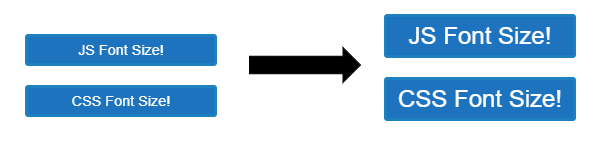
Sometimes it’s good to revisit HTML, CSS, and JavaScript and remember how to do the basics without the help of third-party libraries. In this tutorial I will update a button’s font size in two ways:

  • Using JavaScript to update a button’s style.fontSize attribute
  • Using CSS to update a button’s classList with a class that increases font size
Change HTML Button Font Size with JavaScript or CSS

The buttons in this example start out with 18px font applied using the button selector seen below in my CSS file:

button {
  font-size: 18px;
  border-radius: 4px;
  background-color: #1e73be;
  color: white;
  padding: 6px 12px;
  cursor: pointer;
  border: 4px solid #1e80be;
  width: 240px;
  margin: 12px;
}

Before we explore the technical how-to, I want to mention that it is usually better to control element font size with CSS and values such as rem ,em , and % than pixel values. If you use rem the font size of your buttons will scale with the root font size and you likely won’t need to use JS to change the font size.

However, if you have a use case where you want to increase button font size using JavaScript, read on!

Change HTML Button Font Size with JavaScript

We can change button font size using vanilla JS with three simple tools:

  • a click listener
  • a click handler
  • accessing the style attribute and fontSize field

We add a typical click listener and click handler to our button. This can be done in a variety of ways but I used getElementById .

I passed a reference to the button as a parameter to the click handler. Inside the click handler, I accessed the style prop on the button. The style prop is a JS way of changing CSS values on the button.

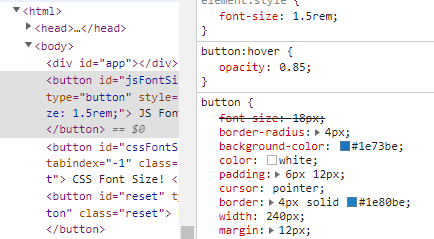
In particular, I updated jsButton.style.fontSize = "1.5rem"; . This overwrote the 18px font size that was applied to the button by the button CSS selector.

We can see the in dev tools that JS style.fontSize overrides CSS styling because it is like inline styling:
JS style.fontSize

Here’s the code for this example:

//html
<button id="jsFontSize" type="button">
  JS Font Size!
</button>
//JS
const handleJSBtnClick = (jsButton: HTMLButtonElement) => {
  jsButton.style.fontSize = "1.5rem";
  console.log("Bigger!");
};
const jsFSButton = document.getElementById("jsFontSize") as HTMLButtonElement;
if (jsFSButton) {
  jsFSButton.addEventListener("click", () => handleJSBtnClick(jsFSButton));
}

Change HTML Button Font Size with CSS

Changing HTML Button Font Size with CSS requires a little bit of JavaScript if we are doing it dynamically in response to a click event.

Once again we need a click listener and click handler. Now we need a class in our CSS file and a bit of JS to apply that class.

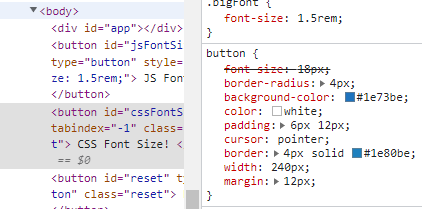
I created a class called bigFont and gave it a font-size: 1.5remvalue. In the click handler I access the button’s classList and add the bigFont class. The syntax for this is cssFSButton.classList.add("bigFont"); .

We can see the new class applied in dev tools and also see that it’s font size is overriding the button selector’s font size.
CSS class overrides element selector

Here’s the code for this example:

//HTML
<button id="cssFontSize" tabindex="-1">
  CSS Font Size!
</button>
//JS
const handleCSSBtnClick = (
  event: MouseEvent,
  cssFSButton: HTMLButtonElement
) => {
  cssFSButton.classList.add("bigFont");
};
const cssFSButton = document.getElementById("cssFontSize") as HTMLButtonElement;
if (cssFSButton) {
  cssFSButton.addEventListener("click", (event: MouseEvent) => {
    handleCSSBtnClick(event, cssFSButton);
  });
  cssFSButton.addEventListener("keypress", (event: MouseEvent) => {
    event.preventDefault();
  });
}
//CSS
.bigFont {
  font-size: 1.5rem;
}

Here’s a live Code Sandbox example. For further reading, here’s how to disable and HTML button with CSS or JS.

HTML
Font Size
CSS
JavaScript
Html Button
Recommended from ReadMedium