
Chaining your way to better writing with ChatGPT
This article was co-authored with Annelie Tinworth, Senior UX Content Designer at Volvo Cars, localisation legend, and word nerd extraordinaire.

So this morning, I hopped onto a Meets call with my partner-in-design Annelie Tinworth, and we had the following conversation (transcript courtesy of Google Meets, with a touch of editing for creative liberty):
Me: Morning! How’s it going?
Annelie: Not bad, not bad, need more coffee… and–
Me: Did you see the new Slack interface?
Annelie: … No, it doesn’t look like it’s rolled out to me yet. Maybe I can find where to update…
Me: What’s a good meal to prepare for vegans who don’t like garlic and hate mushrooms?
Annelie: You what?
Me: Actually, could you summarise the main themes of Much Ado About Nothing?
Annelie: Is that… Shakespeare?
Me: Back to the recipe, they also don’t eat soy…
*Annelie disconnects*
I know what you’re thinking. I’m a stunning conversationalist. I changed the topic with each response on purpose to prove a point, though: it’s confusing. Annelie thought I was losing it, and rightly so.
There’s a reason we don’t converse like this: for one, no one would talk to us more than once. For another, it kind of renders the whole social interaction useless.
Instead, we continue along the same topic, and if we change the topic, we signpost it and transition a bit more smoothly than abruptly interrupting. In other words, we continue a common conversational chain.
But what does this have to do with AI?
Conversational chaining with ChatGPT
It’s no coincidence that ChatGPT uses a conversational interface for us to generate content. It’s familiar, it’s instantly intuitive, and it’s possible to dive right in, as we’re all familiar with the question-and-answer format.
And just like human conversations, you will get the most out of ChatGPT if you apply the same idea of conversational chaining.
This means that if I start a chat with one idea, I should keep to that idea in that same thread when I build on or refine the idea with ChatGPT.
Let’s imagine we’re writing UX content for a meditation app. We want ideas for a title for an onboarding screen in which the user needs to choose what kind of meditation plan to follow.
We write the following prompt, following the Message-Context-Goal framework:
Write a title for a screen where a user has to select between 3 kinds of meditation plans in a mobile app.
This is part of the app’s onboarding flow, following a screen where the user enters their motivation to try meditation. The three meditation plans relate to combating stress, easing anxiety, and helping sleep. The users of the app are typically young adults between 18–30 years old. The brand aims to be approachable and empathetic, incorporating puns to add a touch of delight. The title must be 80 characters or less.
After reading this title, users must select one of the options on the screen to start their first meditation session.
We get the output:
“Meditation Menu: Stress-Less, Anxiety Ease, Sleep Serenity”
I don’t know about you, but I’m not thrilled with that suggestion. The purpose of this screen is that the user has a choice to make, and we’re not communicating that clearly at all with this title.
Enter conversational chaining! I can give my feedback and iterate on this same output, creating a chain.
This string needs to make it clear that the user needs to make a choice between the plans on this screen. Rewrite to frontload with this action.
Notice how I’ve structured this follow-up. I’ve provided my criticism and then reiterated how I want ChatGPT to alter the output. I get the response:
Choose Your Chill: Select a Meditation Plan — Stress, Anxiety, Sleep
It’s an improvement. Although it’s far from perfect (*cough* repeating the action *cough*), it gives me an idea I can continue with outside of ChatGPT.
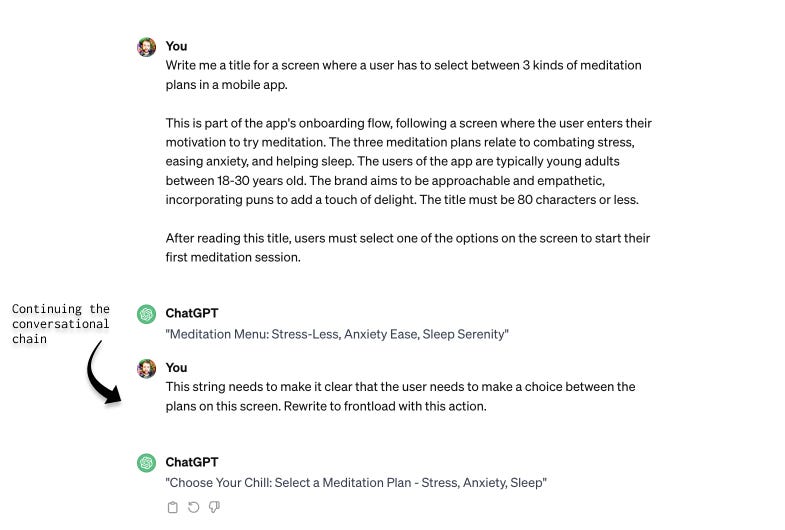
So, chaining lets me give feedback and iterate on the previous output, as you can see. Let’s take a look at some other ways beyond giving general critique you can make use of chaining.
Chain to change the length
In the past, I would often continue the chain to change the length of the output, for example:
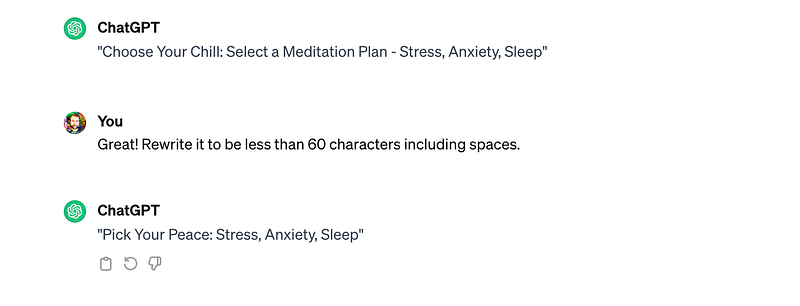
And as you can see, I specified “60 characters including spaces”, just to be crystal clear.
However, recently, we’ve found that ChatGPT has issues with respecting character counts and word limits. In this case, the output is indeed now under 60 characters, so my chained prompt was respected. A lot of the time, this won’t happen. You’ll need to check in other tools (like Google Docs) to make sure the character count has been respected and edit the output yourself.
While it’s not perfect for concise contexts such as generating text for a string with a very precise and strict character limit, using descriptors like “short” and “long” (or “shorter” and “longer”) leads to more reliable results.
For example, you can continue your chain with “Make it shorter” until it’s your desired length.
Chain to change the tone
Another common reason to chain is to experiment with tone. This can take a little while for me as a writer, so I find ChatGPT helpful for giving me some quick inspiration.
You can use relative language in your chain prompt to subtly change the tone, for example, “more playful”, or “less formal”.
Now, chaining with tone does come with a caveat… Check out my example here to see what you think of the output:
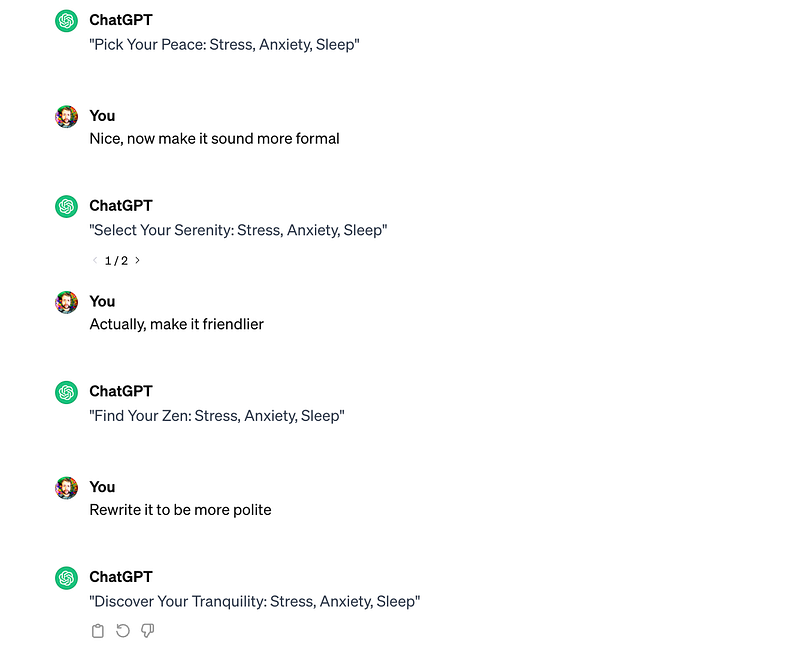
In my opinion, it doesn’t sound so different across the more formal, more friendly, and more polite options. In part, that’s due to the limits I’ve already given: a 60-character UI title doesn’t exactly give much scope to play around with tone.
It does highlight a limitation: in the same chain, the tool had a (limited) memory of what came before in the chain. Rather than writing the copy from scratch with a new tone, it’s rewriting something that already had a distinct tone, to sound more like something else.
In effect, that means when I ask for something to sound formal, and then chain it to be friendly, I’m not getting a formal output followed by a friendly output, but rather, a formal output followed by a formal-and-friendly output.
If you need to radically change the tone, break the chain and start a new conversation. More on that in a moment, though.
Ah, and if you’re interested in deepening your understanding of tone and voice, particularly in a UX context, check out this article from Haley Hougardy. This will give you more inspiration when it comes to experimenting with and prompting for tone.
Chain to change the reading level
Reading level is a way of describing how easy to understand a text is, and typically, we use the American education system as the level. Typically, you might aim for text to have an 8th-grade reading level, which means that someone with an 8th-grade education would have no trouble reading and comprehending it.
(If you’re outside of the US, 8th grade corresponds roughly with the school year for a 13 or 14 year old.)
And guess what — you can ask ChatGPT to refine output according to reading level.

See how the output now contains simpler vocabulary? This is a gem for helping produce accessible text.
Check out this resource from Yale for more on reading level and other readability-related insights.
Chain to ask for more variants
Why continue with just one output when you can continue with 10? You can ask for as many variants as you want (within reason).
For example, I asked for 10 more variants of my meditation title:
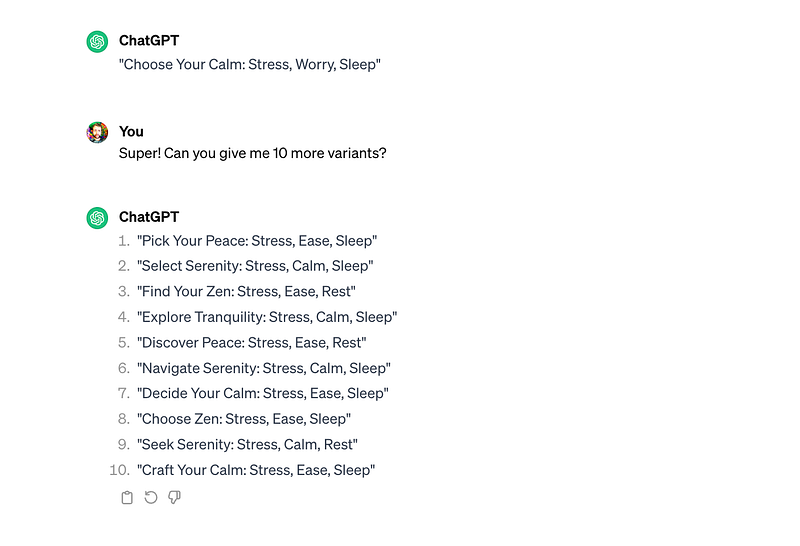
If there are particular variants you want to continue chaining to refine, simply refer to them by number to continue, for example:
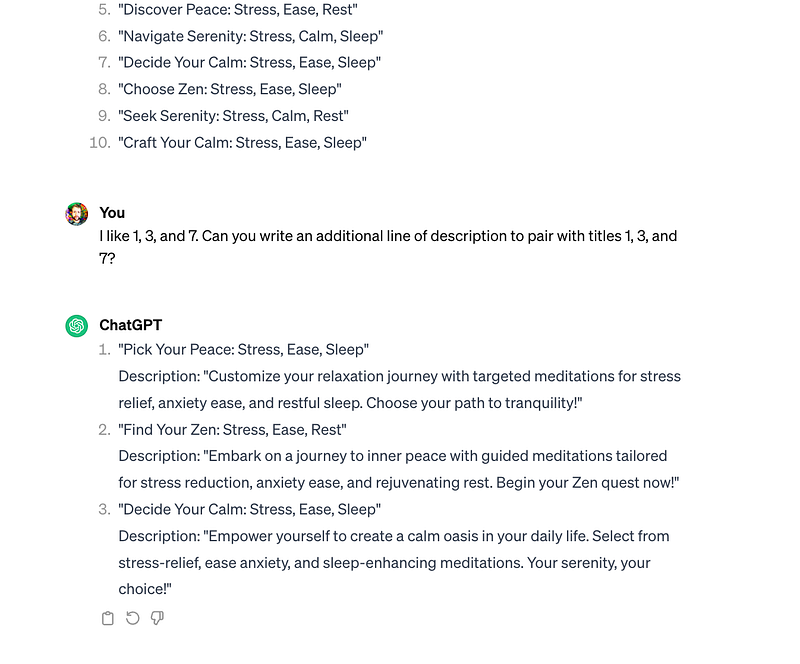
New idea? Break the chain
Remember that terrible conversation I had with Annelie at the beginning? There, I was changing topics constantly, so I was not chaining, and keeping to, one idea.
I was stacking multiple different unrelated topics and ideas together in one conversation.
Stacking applies to ChatGPT too. Just as we mentioned with tone, there can be interference from your previous prompts and outputs within a conversational chain, if you change topic completely, you’ll also have the influence of everything in that same chain.
It may be tough to notice any difference, but if you continue introducing many many different ideas into the same conversation, weird things start to happen.
In the same conversation as my meditation request, I asked for some different things, and eventually… well…
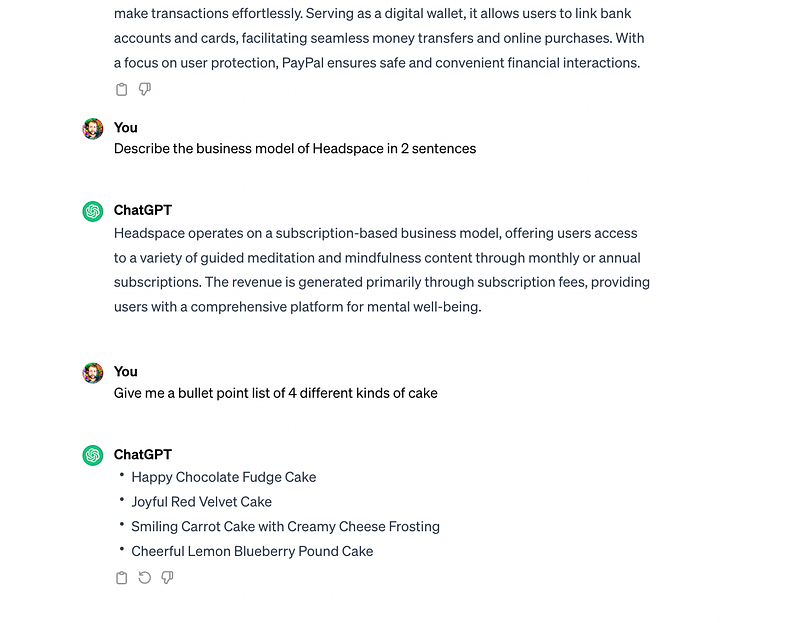
Earlier in the chain, I gave instructions about tone and some of the other unrelated requests I made also included instructions about tone. It’s therefore not a surprise that my simple request for “4 kinds of cake” returned “Smiling carrot cake” and “Cheerful pound cake”.
If you’re asking for something else, you need to break the chain. How? Simple. Start a new chat!
One idea, one conversation, one chain.
Key takeaways
Let’s sum up what we’ve covered (and then I’m heading out to find a happy chocolate fudge cake, my goodness that sounds scrumptious right about now).
Conversational chaining refers to continuing to build on or refine the same idea within one chat.
You can use chaining to change the length of the output (with “shorter” and “longer”), and the reading level. Additionally, you can ask for multiple variants.
You can also experiment with tone, but you need to keep in mind that this has its limitations due to stacking.
Stacking refers to introducing new ideas into an unrelated conversational chain. It can cause interference and result in low-quality output.
To avoid stacking, stick to one idea per conversation. To start a new chain, simply start a new chain.
This article and all examples are from ChatGPT-3.5 unless otherwise specified.
If you want to learn more about content design with ChatGPT, check out our complete intro, or take a look at our exploration of roleplaying with ChatGPT.