avatarJason Bodie

Free AI web copilot to create summaries, insights and extended knowledge, download it at here

4469

Abstract

ut there are a few things to keep in mind. First, make sure that all of your images are the same size, and that they fit within the designated frame size of Instagram Stories. You may also want to consider adding text or other design elements to your template for added impact.</p><p id="8ff7"><b>3. Save your file as a PDF file.</b> When you’re finished creating your carousel template, save it as a PDF file so that it’s easy to upload and use on Instagram.</p><p id="6288"><b>4. Upload your template to Instagram Stories.</b> Once your template is saved as a PDF file, open up <a href="https://www.instagram.com/"><b>Instagram</b></a> Stories and select the + icon at the top left corner of the screen. Then select Import Story and select the PDF file of your carousel template from your phone or computer.</p><p id="40a1"><b>5. Edit and personalize your template as desired.</b> Now it’s time to add some personalization! Select one of your images to be the cover image for your carousel, then use the text and design tools available in Instagram Stories to add some extra flair to your template.</p><p id="c9c0"><b>6. Post away!</b> Once you’ve finished editing your carousel template, hit Share and post it on Instagram for all your followers to see!</p><h1 id="c605">Tips For Creating Eye-Catching Carousel Templates On Instagram</h1><h2 id="33ce">1. Use high-quality images:</h2><p id="f857">The first step to creating an eye-catching carousel template on Instagram is to use high-quality images. This will ensure that your template looks professional and polished. If you don’t have any high-quality images of your own, consider using stock photos or hiring a professional photographer. If you need images, check out <a href="https://unsplash.com/"><b>Unsplash</b></a>, they have free high-quality images from across the internet.</p><h2 id="8a8e">2. Use a consistent color scheme:</h2><p id="7d25">Another way to make your carousel template stand out is to use a consistent color scheme. This will help to create a cohesive look and feel for your template. You can choose any colors you like, but it might be a good idea to stick to two or three colors max.</p><h2 id="fbfa">3. Use interesting fonts:</h2><p id="478f">In addition to using high-quality images and a consistent color scheme, you can also add interest to your carousel template by using interesting fonts. There are many different fonts available online, so take some time to browse through them and find one that suits your template perfectly.</p><h2 id="7fa3">4. Keep it simple:</h2><p id="8ef7">While it’s tempting to add lots of elements to your carousel template, it’s important to keep it simple. This will make your template easy to navigate and will ensure that the focus remains on your images. Try not to include more than four or five elements in your template.</p><h2 id="92a5">5. Use animation:</h2><p id="a3ee">If you want to take your carousel template up a notch, consider using animation. This can add an extra level of interest and excitement to your template. There are many different animation tools available online, so take some time to explore them and find one that suits your needs. Canva allows you to create animations.</p><h1 id="3903">How To Use Carousel Templates For Instagram</h1><p id="06c2">There are a few things to keep in mind when using carousel templates for Instagram:</p><p id="89d3">1. Make sure your images are all the same size. This will ensure that they look uniform when they are displayed in the carousel.</p><p id="453e">2. If you want to include text or a caption, make sure it’s included in all of the images. This will help keep your branding and messaging consistent across the carousel.</p><p id="8cb1">3. Keep your images focused on one topic or idea. When people are scrolling through their <a href="https://www.instagram.com/"><b>Instagram</b></a> feeds, they don’t want to see a mishmash of images all about different things. They want to see a cohesive message or story.</p><p id="c383">4. Use high-quality images. This is especially important if you’re using the carousel for advertising or promoting a product or service. The better the quality of your images, the more likely people are to stop and take a look.</p><h1 id="6d3a">Here are 5 key takeaways from carousel templates for Instagram</h1><p id="9ace">1. Carousel templates are a great way to showcase multiple images or videos on Instagram.</p><p id="0773">2. Carousel templa

Options

tes can be used to create a slideshow or to tell a story with your images or videos.</p><p id="6d9a">3. Carousel templates are easy to use and can be customized to fit your needs.</p><p id="6cea">4. Carousel templates can be used to promote your business or to share your latest work.</p><p id="e203">5. Carousel templates are a great way to engage with your followers and create a more interactive Instagram experience.</p><h1 id="9f29">Carousel Templates For Instagram Conclusion</h1><p id="e857">There are a few different types of carousel templates you can use on Instagram. All of which can be found at <a href="https://partner.canva.com/jasonbodie"><b>Canva</b></a>. They have the largest selection of social media templates on the internet. You should be able to find something there.</p><figure id="0922"><img src="https://cdn-images-1.readmedium.com/v2/resize:fit:800/1*9QozEBI6NGGYo5IGJM01ew.jpeg"><figcaption>Contact Me on Fiverr</figcaption></figure><p id="16eb">Thanks for reading. Consider subscribing to Medium as it’s an amazing platform to learn and grow as a professional. You can join using my affiliate link here — <a href="https://medium.com/@jasonrbodie/membership"><b>Subscribe to Medium</b></a>. Please like and follow → Thanks.</p><blockquote id="3372"><p>If you surf the internet unsecured, consider using <b>Nord VPN</b> as it keeps you and your family safe. Follow this affiliate link to <a href="https://go.nordvpn.net/SH4ZR"><b>learn more about NordVPN</b></a>.</p></blockquote><h1 id="1f9d">Related Blog Articles</h1><div id="4866" class="link-block"> <a href="https://readmedium.com/top-5-banner-makers-for-twitter-guide-5edd00f83c33"> <div> <div> <h2>Top 5 Banner Makers For Twitter (Guide)</h2> <div><h3>Twitter is a social media platform that allows users to share short messages, or “tweets,” with their followers.</h3></div> <div><p>medium.com</p></div> </div> <div> <div style="background-image: url(https://miro.readmedium.com/v2/resize:fit:320/1*wAQucikqubVeB94mcvw7jw.jpeg)"></div> </div> </div> </a> </div><div id="22a9" class="link-block"> <a href="https://readmedium.com/anime-twitter-banner-and-header-guide-2b24aea7c600"> <div> <div> <h2>Anime Twitter Banner And Header (Guide)</h2> <div><h3>Twitter is a great way to keep in touch with friends, family, and followers. But what do you do when you want to share…</h3></div> <div><p>medium.com</p></div> </div> <div> <div style="background-image: url(https://miro.readmedium.com/v2/resize:fit:320/1*N-XyHy7r_1A_ze5qVxo4AA.jpeg)"></div> </div> </div> </a> </div><div id="2465" class="link-block"> <a href="https://readmedium.com/best-browser-alternatives-to-google-chrome-mac-windows-11-linux-ios-andriod-89048e29986e"> <div> <div> <h2>Best Browser Alternatives To Google Chrome (Mac, Windows 11, Linux, iOS, Andriod)</h2> <div><h3>There are a number of alternatives to Google Chrome on the market. Some are more popular than others, but each has its…</h3></div> <div><p>medium.com</p></div> </div> <div> <div style="background-image: url(https://miro.readmedium.com/v2/resize:fit:320/1*JidGB1pFbZQkE7lZ439Z9w.jpeg)"></div> </div> </div> </a> </div><div id="dfaf" class="link-block"> <a href="https://readmedium.com/buy-and-sell-canva-social-media-templates-on-etsy-228f67a1e03e"> <div> <div> <h2>Buy And Sell Canva Social Media Templates On Etsy</h2> <div><h3>If you’re looking to create beautiful social media posts but don’t have the time or design skills, look no further! You…</h3></div> <div><p>medium.com</p></div> </div> <div> <div style="background-image: url(https://miro.readmedium.com/v2/resize:fit:320/1*0kF-xkcxStPNlSBqd0EUfA.jpeg)"></div> </div> </div> </a> </div><p id="d25d"><a href="https://medium.com/@jasonrbodie"><b>Link to my Medium Blog.</b></a></p></article></body>

Carousel Templates For Instagram (Guide)
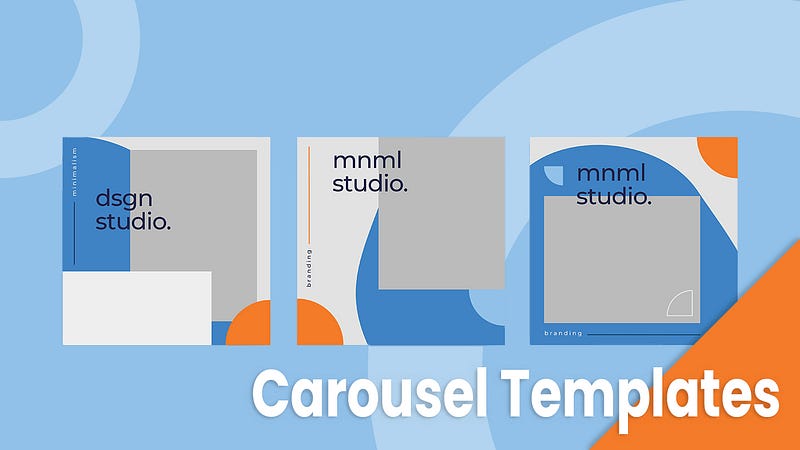
Carousel Templates For Instagram

Are you looking for a way to add a touch of personality to your Instagram feed? If so, you may want to consider using a carousel template. Carousel templates allow you to create a series of images that play like a slideshow. All have the same theme.

This can be a great way to show off your products or to tell a story. There are a number of different carousel templates available online. Some are free, while others require a paid subscription.

The cost of the template is often worth it, as they are often high quality and easy to use. If you’re looking for a way to add some extra flair to your Instagram feed, consider using a carousel template from Canva. If you’re in a rush and want the best place to create templates, follow this affiliate link to learn more about Canva. Canva is the number one source for carousel templates online.

Some links in the post are affiliate.

What are Carousel Templates For Instagram

A carousel template is a template that can be used on Instagram to create a carousel post. A carousel post is a post that contains up to 10 images or videos that can be swiped through. Carousel templates are available on a number of websites and can be customized to fit the user’s needs.

Best Practices For Carousel Templates On Instagram

If you’re looking to add a carousel template to your Instagram posts, there are a few things you should keep in mind. Here are some best practices to follow:

1. Plan Your Carousel: Like with any other type of post, it’s important to plan your carousel ahead of time. Make sure all the images or videos you include are high quality and cohesive with the overall message you’re trying to send.

2. Keep it Short and Sweet: While carousels can be a great way to share more content than a traditional Instagram post, that doesn’t mean you should go overboard. Try to keep each slide to around 20–30 seconds, or less if possible.

3. Use Interesting Captions: Since carousels take up more space on someone’s feed than a standard post, it’s important to make sure your captions are interesting and engaging. Ask questions, make puns, or use emojis to get people engaged.

4. Experiment With Different Types of Carousels: Not all carousels are created equal. Try experimenting with different types like slideshows, videos, or galleries to see what works best for your brand and audience.

5. Use Calls to Action: CTAs can be a great way to encourage people to interact with your content. Ask viewers to swipe left for more, click through to learn more, or simply leave their thoughts in the comments section.

If you enjoy reading. Consider subscribing to Medium as it’s an amazing platform to learn and grow as a professional. You can join using my affiliate link here — Subscribe to Medium. Please like and follow → Thanks.

How To Create A Carousel Template For Instagram

1. Choose your template software. There are a number of different software programs that can help you create carousel templates for Instagram. Some popular options include Adobe Photoshop, InDesign, and Illustrator. If you would like something much easier, Canva is by far the most user-friendly graphic design platform on the internet today. They have 1000s of templates to choose from. Follow my affiliate link to learn more about Canva.

2. Create your layout. The layout of your carousel template is up to you but there are a few things to keep in mind. First, make sure that all of your images are the same size, and that they fit within the designated frame size of Instagram Stories. You may also want to consider adding text or other design elements to your template for added impact.

3. Save your file as a PDF file. When you’re finished creating your carousel template, save it as a PDF file so that it’s easy to upload and use on Instagram.

4. Upload your template to Instagram Stories. Once your template is saved as a PDF file, open up Instagram Stories and select the + icon at the top left corner of the screen. Then select Import Story and select the PDF file of your carousel template from your phone or computer.

5. Edit and personalize your template as desired. Now it’s time to add some personalization! Select one of your images to be the cover image for your carousel, then use the text and design tools available in Instagram Stories to add some extra flair to your template.

6. Post away! Once you’ve finished editing your carousel template, hit Share and post it on Instagram for all your followers to see!

Tips For Creating Eye-Catching Carousel Templates On Instagram

1. Use high-quality images:

The first step to creating an eye-catching carousel template on Instagram is to use high-quality images. This will ensure that your template looks professional and polished. If you don’t have any high-quality images of your own, consider using stock photos or hiring a professional photographer. If you need images, check out Unsplash, they have free high-quality images from across the internet.

2. Use a consistent color scheme:

Another way to make your carousel template stand out is to use a consistent color scheme. This will help to create a cohesive look and feel for your template. You can choose any colors you like, but it might be a good idea to stick to two or three colors max.

3. Use interesting fonts:

In addition to using high-quality images and a consistent color scheme, you can also add interest to your carousel template by using interesting fonts. There are many different fonts available online, so take some time to browse through them and find one that suits your template perfectly.

4. Keep it simple:

While it’s tempting to add lots of elements to your carousel template, it’s important to keep it simple. This will make your template easy to navigate and will ensure that the focus remains on your images. Try not to include more than four or five elements in your template.

5. Use animation:

If you want to take your carousel template up a notch, consider using animation. This can add an extra level of interest and excitement to your template. There are many different animation tools available online, so take some time to explore them and find one that suits your needs. Canva allows you to create animations.

How To Use Carousel Templates For Instagram

There are a few things to keep in mind when using carousel templates for Instagram:

1. Make sure your images are all the same size. This will ensure that they look uniform when they are displayed in the carousel.

2. If you want to include text or a caption, make sure it’s included in all of the images. This will help keep your branding and messaging consistent across the carousel.

3. Keep your images focused on one topic or idea. When people are scrolling through their Instagram feeds, they don’t want to see a mishmash of images all about different things. They want to see a cohesive message or story.

4. Use high-quality images. This is especially important if you’re using the carousel for advertising or promoting a product or service. The better the quality of your images, the more likely people are to stop and take a look.

Here are 5 key takeaways from carousel templates for Instagram

1. Carousel templates are a great way to showcase multiple images or videos on Instagram.

2. Carousel templates can be used to create a slideshow or to tell a story with your images or videos.

3. Carousel templates are easy to use and can be customized to fit your needs.

4. Carousel templates can be used to promote your business or to share your latest work.

5. Carousel templates are a great way to engage with your followers and create a more interactive Instagram experience.

Carousel Templates For Instagram Conclusion

There are a few different types of carousel templates you can use on Instagram. All of which can be found at Canva. They have the largest selection of social media templates on the internet. You should be able to find something there.

Contact Me on Fiverr

Thanks for reading. Consider subscribing to Medium as it’s an amazing platform to learn and grow as a professional. You can join using my affiliate link here — Subscribe to Medium. Please like and follow → Thanks.

If you surf the internet unsecured, consider using Nord VPN as it keeps you and your family safe. Follow this affiliate link to learn more about NordVPN.

Related Blog Articles

Link to my Medium Blog.

Instagram
Influencers
Online Money
Marketing
Graphic Design
Recommended from ReadMedium