avatarDeborah Oyegue

Free AI web copilot to create summaries, insights and extended knowledge, download it at here

1801

Abstract

to check for errors you may have missed, you can share your draft link with a friend and offer to do something in return for them. The better, if they are writers as well.</p><p id="189b">Do not impose on them by expecting the corrections made immediately. You have to value their time and send the draft link in advance so they have enough time to get it done for you.</p><p id="4903">It doesn’t matter if it is only 100 words or 500 words, you have to respect their time. Do not let them feel pressured into doing anything for you.</p><h1 id="cdf3">Use a Reading software to edit</h1><p id="65de">I am referring to the speech-to-text function of the reading software. I use ‘e-reader Prestigio’ on my mobile device. Although there is only a version for <a href="https://bit.ly/3kgwYuc">android</a> users.</p><figure id="ce72"><img src="https://cdn-images-1.readmedium.com/v2/resize:fit:800/1*W00B42HgTJs29-jY1dHDFw.png"><figcaption>Image credit: Screenshot by Author</figcaption></figure><p id="851e">I simply save the document as a PDF file and mail myself a copy. I download the file and open the copy via the app.</p><p id="e03b">While I play out the words, I edit directly into the word processor, but you can edit on Medium’s editor to reduce the back and forth.</p><p id="5cdb">What the software does is that it reads out my text, and highlights it as it does so, this way I can spot any error I might have missed.</p><p id="523a">The catch here is that because a BOT is reading, you have to pay attention to the screen because it gets some pronunciations skewed. For example, when a word bleeds into another line and is separated by a hyphen.</p><p id="3c3d">This way I check for flow — how my sentences ease into subsequent sentences, and pacing. I also check for little typographical errors

Options

I may have missed.</p><p id="cdfc">Whether you use Microsoft Word or Google Docs, you have an option to convert your files to pdfs. However, if you write directly on Medium’s editor, I suggest you copy and paste the story into a word processor and save as a pdf document. Once the file has been converted, you can then run it through a reading software.</p><p id="7967"><b>Other devices</b></p><p id="fd46">This feature is available on Google Docs, so users of the web version can cut out the unnecessary steps and activate the speak feature of the application and have their work read out to them directly via the word processor. But for it to work, you have to download the <a href="https://bit.ly/33tRMsd">ChromeVox Classic extension</a>.</p><p id="d5b8"><b>Click on Tools — Accessibility setting — Turn on screen reader support</b></p><figure id="e0ba"><img src="https://cdn-images-1.readmedium.com/v2/resize:fit:800/1*jow8fL0gxgwEfbV8MYFGCQ.jpeg"><figcaption>Image credit: Screenshot by Author</figcaption></figure><p id="a630">Then access the function from the ‘Accessibility’ menu.</p><p id="5c8d"><b>Accessibility — Speak — Speak selection</b></p><figure id="3a41"><img src="https://cdn-images-1.readmedium.com/v2/resize:fit:800/1*qNdKsMLIorJXnthd9-jrQQ.jpeg"><figcaption>Image credit: Screenshot by Author</figcaption></figure><p id="d802">Also, I wrote an <a href="https://readmedium.com/writing-and-editing-hacks-you-can-implement-in-seconds-literally-e20c018308e0">article</a> on an editing hack I discovered. If you haven’t seen that yet, it would be nice to check it out as well.</p><p id="833d">I hope this helps, and since we all are in an unending quest for knowledge, if you have better suggestions on how writers can achieve error-free works please let us know.</p></article></body>

Can’t Hire an Editor? Do This Instead

A longer hack to editing
Image credit: Canva

Editors are writers’ heroes. But it is not feasible to get an editor when you are not yet earning enough on your writing.

There are different types of editing: developmental editing, copy editing, evaluation editing, comprehensive editing, and proofreading. Each varies with complexity.

Proofreading is the most common type of editing requirement for articles. It is what I would be referencing in this post. If you do not have an on-demand editor, there are two things you can do:

1. Incentivize Your Friends

2. Use a Reading Software

Note: This is written on the assumption that you have run your document through Grammarly and cleared all critical errors. Grammarly is a necessary tool for every writer. It not only corrects easy-to-miss errors, but it also makes you write better by pointing out your writing mistakes. You can download the chrome extension here if you haven’t gotten it yet. It would work directly on any web application that requires writing i.e Gmail, Google Docs, and even Medium Editor.

Incentivize Your Friends

Even though they obviously might not need it, it shows you value their time and appreciate the help they are giving to you.

For instance, when you are done with your initial edits and need extra eyes to glaze through to check for errors you may have missed, you can share your draft link with a friend and offer to do something in return for them. The better, if they are writers as well.

Do not impose on them by expecting the corrections made immediately. You have to value their time and send the draft link in advance so they have enough time to get it done for you.

It doesn’t matter if it is only 100 words or 500 words, you have to respect their time. Do not let them feel pressured into doing anything for you.

Use a Reading software to edit

I am referring to the speech-to-text function of the reading software. I use ‘e-reader Prestigio’ on my mobile device. Although there is only a version for android users.
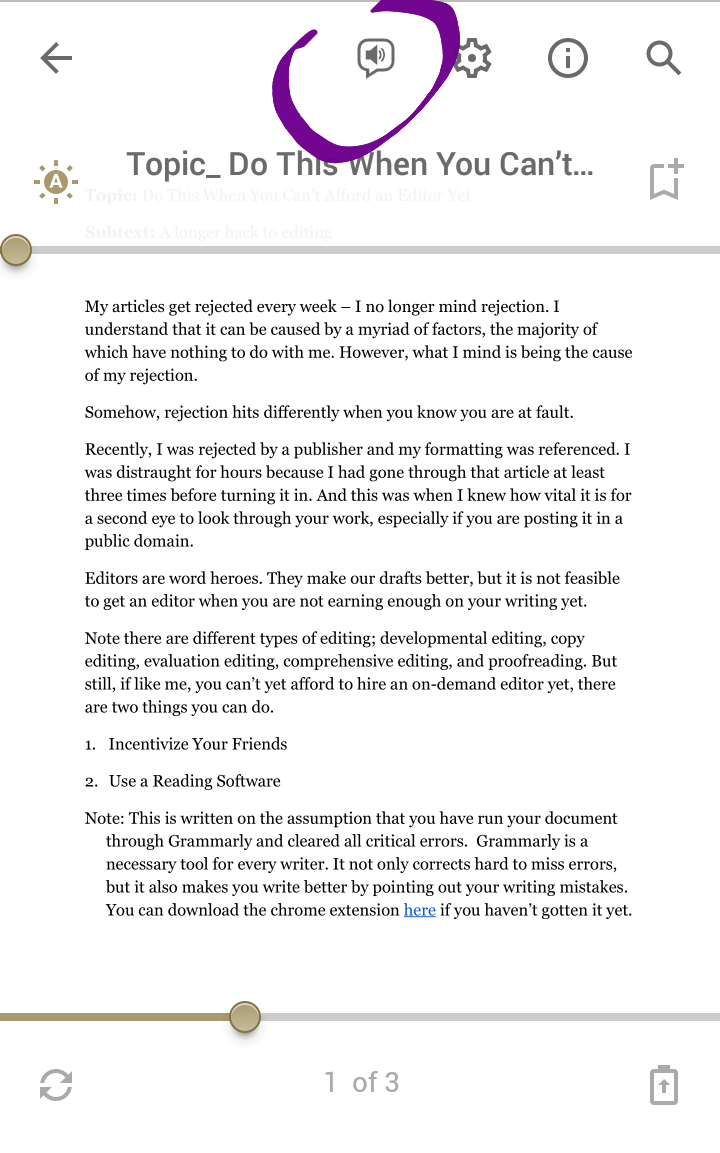
Image credit: Screenshot by Author

I simply save the document as a PDF file and mail myself a copy. I download the file and open the copy via the app.

While I play out the words, I edit directly into the word processor, but you can edit on Medium’s editor to reduce the back and forth.

What the software does is that it reads out my text, and highlights it as it does so, this way I can spot any error I might have missed.

The catch here is that because a BOT is reading, you have to pay attention to the screen because it gets some pronunciations skewed. For example, when a word bleeds into another line and is separated by a hyphen.

This way I check for flow — how my sentences ease into subsequent sentences, and pacing. I also check for little typographical errors I may have missed.

Whether you use Microsoft Word or Google Docs, you have an option to convert your files to pdfs. However, if you write directly on Medium’s editor, I suggest you copy and paste the story into a word processor and save as a pdf document. Once the file has been converted, you can then run it through a reading software.

Other devices

This feature is available on Google Docs, so users of the web version can cut out the unnecessary steps and activate the speak feature of the application and have their work read out to them directly via the word processor. But for it to work, you have to download the ChromeVox Classic extension.

Click on Tools — Accessibility setting — Turn on screen reader support
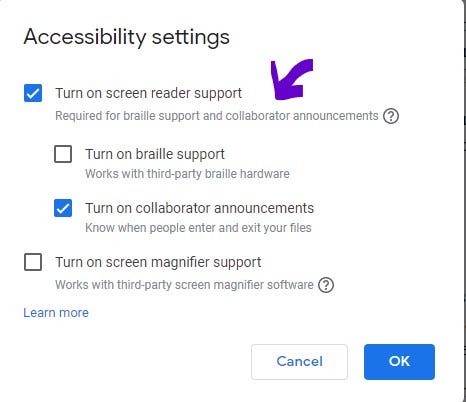
Image credit: Screenshot by Author

Then access the function from the ‘Accessibility’ menu.

Accessibility — Speak — Speak selection
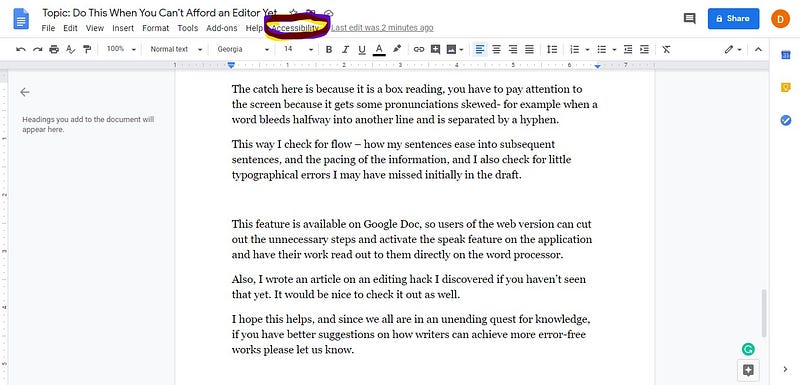
Image credit: Screenshot by Author

Also, I wrote an article on an editing hack I discovered. If you haven’t seen that yet, it would be nice to check it out as well.

I hope this helps, and since we all are in an unending quest for knowledge, if you have better suggestions on how writers can achieve error-free works please let us know.

Editing And Proofreading
Editing
Writing Tips
Article Writing
Recommended from ReadMedium