avatarMad Machine

Free AI web copilot to create summaries, insights and extended knowledge, download it at here

903

Abstract

set functions by default: the first mode decreases the volume, and the second mode (Fn+F11) displays the desktop. These two modes can be reversed depending on your settings.</p><p id="3149">Even altering the function keys in the physical keyboard settings didn’t send the F11 key to iLO!</p><p id="59e1">This behavior would be similar if F11 is needed to be sent to a virtual machine running in Parallel or VMWare Fusion.</p><p id="f724">This could be a problem for other function keys as well.</p><h2 id="ea08">The Solution</h2><p id="abfa">You can easily fix the issue by disabling the mapping of the F11 function key.</p><p id="c660">On MacOS Ventura, start the <b>Systems Settings</b> app and search for “Desktop & Dock”:</p><figure id="d94d"><img src="https://cdn-images-1.readmedium.com/v2/resize:fit:800/1*[email protected]"><figcaption>By Author</figcaption></figure><p id="cb54

Options

">Simply select the <b>Shortcuts</b> button. You will then have the option to either change the key or disable it entirely, as I did in the following example by setting it to the minus sign (‘-’).</p><figure id="a384"><img src="https://cdn-images-1.readmedium.com/v2/resize:fit:800/1*[email protected]"><figcaption>By Author</figcaption></figure><p id="a6a3">The option to show the desktop may be desirable for some users. You can either customize the shortcut on the keyboard, or you can switch to using the hot corners instead.</p><p id="a1af">I hope this has been helpful.</p><blockquote id="23b6"><p>Please consider joining Medium as a paying member. It’s 5 a month OR 50 a year for unlimited access. And if you use the following <a href="https://fongyang.medium.com/membership">link</a> it will go a long way in supporting me as a writer. Thank you!</p></blockquote></article></body>

Cannot Send F11 Function Keystroke To Apps On MacOS?

Have you been struggling to send F11 function keystrokes to some apps on macOS?

Photo by Christin Hume on Unsplash

While I was installing a new version of Rocky Linux on an HPE server via iLO, I had to press F11 at the BIOS screen in order to select the virtual cdrom boot device:
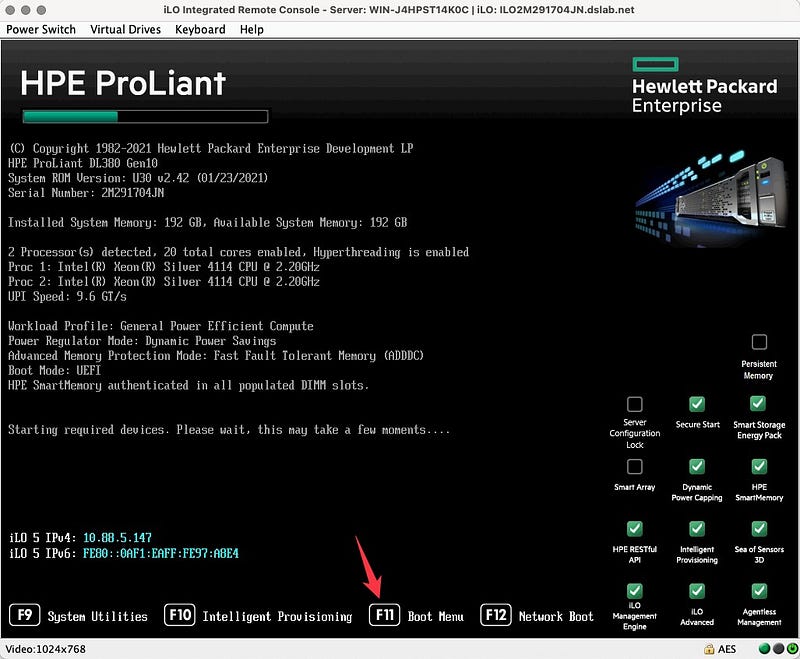
By Author

F11 comes with two preset functions by default: the first mode decreases the volume, and the second mode (Fn+F11) displays the desktop. These two modes can be reversed depending on your settings.

Even altering the function keys in the physical keyboard settings didn’t send the F11 key to iLO!

This behavior would be similar if F11 is needed to be sent to a virtual machine running in Parallel or VMWare Fusion.

This could be a problem for other function keys as well.

The Solution

You can easily fix the issue by disabling the mapping of the F11 function key.

On MacOS Ventura, start the Systems Settings app and search for “Desktop & Dock”:
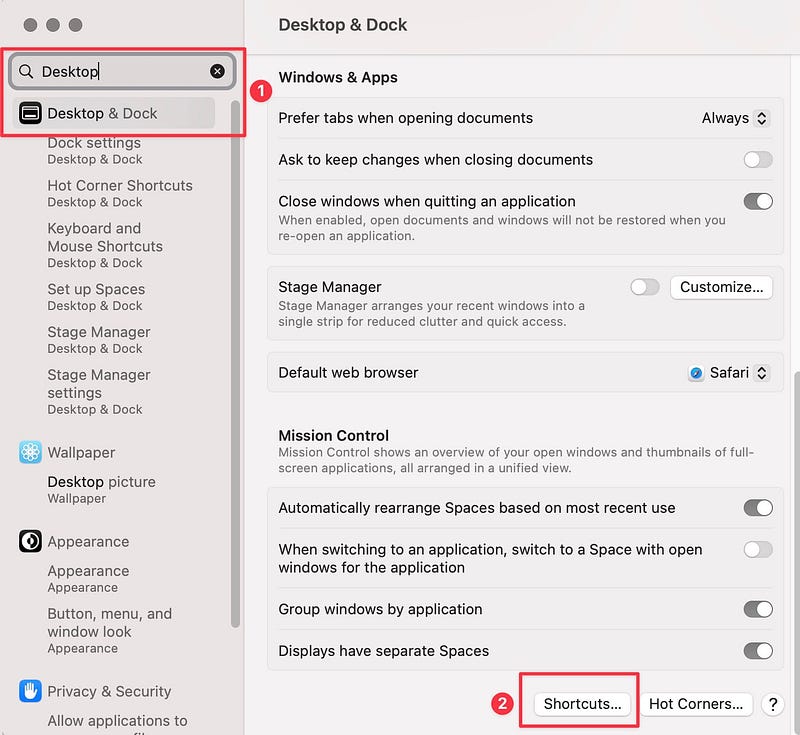
By Author

Simply select the Shortcuts button. You will then have the option to either change the key or disable it entirely, as I did in the following example by setting it to the minus sign (‘-’).
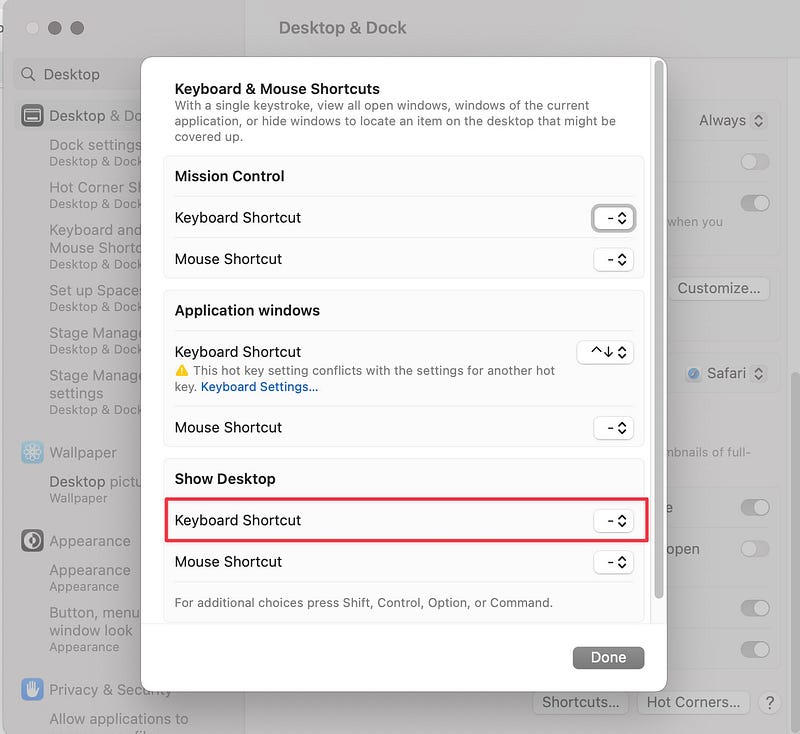
By Author

The option to show the desktop may be desirable for some users. You can either customize the shortcut on the keyboard, or you can switch to using the hot corners instead.

I hope this has been helpful.

Please consider joining Medium as a paying member. It’s $5 a month OR $50 a year for unlimited access. And if you use the following link it will go a long way in supporting me as a writer. Thank you!

Macos
Mac Tips
Recommended from ReadMedium