avatarChristian Martinez Founder of The Financial Fox

Free AI web copilot to create summaries, insights and extended knowledge, download it at here

4897

Abstract

ss="hljs-built_in">print</span>(<span class="hljs-built_in">df</span>)</pre></div><p id="16ec"><b>Matching and Reconciliation: </b>Python can be used to compare and match data between different financial records or systems. This might involve comparing transactions, account balances, or other financial data points to identify discrepancies.</p><p id="a865">And here is some sample code for this:</p><div id="c541"><pre><span class="hljs-comment"># Sample transactions lists</span> transactions1 = [ {<span class="hljs-string">'date'</span>: <span class="hljs-string">'2023-01-01'</span>, <span class="hljs-string">'description'</span>: <span class="hljs-string">'Purchase'</span>, <span class="hljs-string">'amount'</span>: <span class="hljs-number">100.00</span>}, {<span class="hljs-string">'date'</span>: <span class="hljs-string">'2023-01-05'</span>, <span class="hljs-string">'description'</span>: <span class="hljs-string">'Withdrawal'</span>, <span class="hljs-string">'amount'</span>: <span class="hljs-number">50.00</span>}, {<span class="hljs-string">'date'</span>: <span class="hljs-string">'2023-01-10'</span>, <span class="hljs-string">'description'</span>: <span class="hljs-string">'Deposit'</span>, <span class="hljs-string">'amount'</span>: <span class="hljs-number">200.00</span>}, ]

transactions2 = [ {<span class="hljs-string">'date'</span>: <span class="hljs-string">'2023-01-01'</span>, <span class="hljs-string">'description'</span>: <span class="hljs-string">'Purchase'</span>, <span class="hljs-string">'amount'</span>: <span class="hljs-number">100.00</span>}, {<span class="hljs-string">'date'</span>: <span class="hljs-string">'2023-01-06'</span>, <span class="hljs-string">'description'</span>: <span class="hljs-string">'Withdrawal'</span>, <span class="hljs-string">'amount'</span>: <span class="hljs-number">30.00</span>}, {<span class="hljs-string">'date'</span>: <span class="hljs-string">'2023-01-10'</span>, <span class="hljs-string">'description'</span>: <span class="hljs-string">'Deposit'</span>, <span class="hljs-string">'amount'</span>: <span class="hljs-number">200.00</span>}, ]

<span class="hljs-comment"># Create sets of unique transaction identifiers (e.g., date and description)</span> set1 = {(t[<span class="hljs-string">'date'</span>], t[<span class="hljs-string">'description'</span>]) <span class="hljs-keyword">for</span> t <span class="hljs-keyword">in</span> transactions1} set2 = {(t[<span class="hljs-string">'date'</span>], t[<span class="hljs-string">'description'</span>]) <span class="hljs-keyword">for</span> t <span class="hljs-keyword">in</span> transactions2}

<span class="hljs-comment"># Find common transactions between the two lists</span> common_transactions = set1.intersection(set2)

<span class="hljs-comment"># Find discrepancies by comparing transaction amounts</span> discrepancies = [] <span class="hljs-keyword">for</span> date, description <span class="hljs-keyword">in</span> common_transactions: amount1 = <span class="hljs-built_in">sum</span>(t[<span class="hljs-string">'amount'</span>] <span class="hljs-keyword">for</span> t <span class="hljs-keyword">in</span> transactions1 <span class="hljs-keyword">if</span> (t[<span class="hljs-string">'date'</span>], t[<span class="hljs-string">'description'</span>]) == (date, description)) amount2 = <span class="hljs-built_in">sum</span>(t[<span class="hljs-string">'amount'</span>] <span class="hljs-keyword">for</span> t <span class="hljs-keyword">in</span> transactions2 <span class="hljs-keyword">if</span> (t[<span class="hljs-string">'date'</span>], t[<span class="hljs-string">'description'</span>]) == (date, description)) <span class="hljs-keyword">if</span> amount1 != amount2: discrepancies.append((date, description, amount1, amount2))

<span class="hljs-comment"># Display the common transactions and discrepancies</span> <span class="hljs-built_in">print</span>(<span class="hljs-string">"Common Transactions:"</span>) <span class="hljs-keyword">for</span> date, description <span class="hljs-keyword">in</span> common_transactions: <span class="hljs-built_in">print</span>(<span class="hljs-string">f"<span class="hljs-subst">{date}</span> - <span class="hljs-subst">{description}</span>"</span>)

<span class="hljs-built_in">print</span>(<span class="hljs-string">"\nDiscrepancies:"</span>) <span class="hljs-keyword">for</span> date, description, amount1, amount2 <span class="hljs-keyword">in</span> discrepancies: <span class="hljs-built_in">print</span>(<span class="hljs-string">f"<span class="hljs-subst">{date}</span> - <span class="hljs-subst">{description}</span>: Amount in List 1 = <span class="hljs-subst">{amount1}</span>, Amount in List 2 = <span class="hljs-subst">{amount2}</span>"</span>)</pre></div><p id="bd4e"><b>Automated Checks: </b>You can write scripts to perform automa

Options

ted checks and validation of financial data. For example, you can check for missing transactions, duplicates, or inconsistencies in account balances.</p><p id="bc49"><b>Reporting: </b>Python can generate reconciliation reports and summaries, highlighting discrepancies and providing detailed information about the reconciliation process.</p><p id="adde"><b>Integration: </b>Python can integrate with accounting and financial software to automate the reconciliation process further. For example, you can connect Python scripts to accounting software like QuickBooks or Xero through APIs.</p><p id="c8c5"><b>Customization: </b>Python allows for high levels of customization. You can tailor your reconciliation process to meet the specific requirements of your organization, including handling complex financial data structures and rules.</p><p id="3bc3"><b>Visualization: </b>Python libraries like Matplotlib or Seaborn can be used to create visualizations that help in understanding and communicating the reconciliation results.</p><p id="e071">This is some sample code:</p><div id="1a6c"><pre><span class="hljs-keyword">import</span> matplotlib.pyplot <span class="hljs-keyword">as</span> plt

<span class="hljs-comment"># ... (Previous code for matching and finding discrepancies) ...</span>

<span class="hljs-comment"># Display the common transactions and discrepancies</span> <span class="hljs-built_in">print</span>(<span class="hljs-string">"Common Transactions:"</span>) <span class="hljs-keyword">for</span> date, description <span class="hljs-keyword">in</span> common_transactions: <span class="hljs-built_in">print</span>(<span class="hljs-string">f"<span class="hljs-subst">{date}</span> - <span class="hljs-subst">{description}</span>"</span>)

<span class="hljs-built_in">print</span>(<span class="hljs-string">"\nDiscrepancies:"</span>) <span class="hljs-keyword">for</span> date, description, amount1, amount2 <span class="hljs-keyword">in</span> discrepancies: <span class="hljs-built_in">print</span>(<span class="hljs-string">f"<span class="hljs-subst">{date}</span> - <span class="hljs-subst">{description}</span>: Amount in List 1 = <span class="hljs-subst">{amount1}</span>, Amount in List 2 = <span class="hljs-subst">{amount2}</span>"</span>)

<span class="hljs-comment"># Create a bar chart to visualize discrepancies</span> dates = [<span class="hljs-string">f"<span class="hljs-subst">{date}</span> - <span class="hljs-subst">{description}</span>"</span> <span class="hljs-keyword">for</span> date, description, _, _ <span class="hljs-keyword">in</span> discrepancies] amounts1 = [amount1 <span class="hljs-keyword">for</span> _, _, amount1, _ <span class="hljs-keyword">in</span> discrepancies] amounts2 = [amount2 <span class="hljs-keyword">for</span> _, _, _, amount2 <span class="hljs-keyword">in</span> discrepancies]

plt.figure(figsize=(<span class="hljs-number">10</span>, <span class="hljs-number">6</span>)) plt.barh(dates, amounts1, label=<span class="hljs-string">'Amount in List 1'</span>, color=<span class="hljs-string">'b'</span>, alpha=<span class="hljs-number">0.6</span>) plt.barh(dates, amounts2, label=<span class="hljs-string">'Amount in List 2'</span>, color=<span class="hljs-string">'r'</span>, alpha=<span class="hljs-number">0.6</span>, left=amounts1) plt.xlabel(<span class="hljs-string">'Amount'</span>) plt.title(<span class="hljs-string">'Discrepancies in Transactions'</span>) plt.legend(loc=<span class="hljs-string">'upper right'</span>) plt.tight_layout()

<span class="hljs-comment"># Show the bar chart</span> plt.show()</pre></div><p id="81af">This is the result:</p><figure id="7c53"><img src="https://cdn-images-1.readmedium.com/v2/resize:fit:800/1*Qgr0_JM6uURbPhJ8a8PRFg.png"><figcaption></figcaption></figure><p id="c973"><b>Error Handling: </b>Python can be used to implement error-handling mechanisms, which can be crucial when dealing with large volumes of financial data.</p><h1 id="2283">In Plain English 🚀</h1><p id="d9c9"><i>Thank you for being a part of the <a href="https://plainenglish.io"><b>In Plain English</b></a> community! Before you go:</i></p><ul><li>Be sure to <b>clap</b> and <b>follow</b> the writer ️👏<b>️️</b></li><li>Follow us: <a href="https://twitter.com/inPlainEngHQ"><b>X</b></a><b> | <a href="https://www.linkedin.com/company/inplainenglish/">LinkedIn</a> | <a href="https://www.youtube.com/channel/UCtipWUghju290NWcn8jhyAw">YouTube</a> | <a href="https://discord.gg/in-plain-english-709094664682340443">Discord</a> | <a href="https://newsletter.plainenglish.io/">Newsletter</a></b></li><li>Visit our other platforms: <a href="https://stackademic.com/"><b>Stackademic</b></a><b> | <a href="https://cofeed.app/">CoFeed</a> | <a href="https://venturemagazine.net/">Venture</a></b></li><li>More content at <a href="https://plainenglish.io"><b>PlainEnglish.io</b></a></li></ul></article></body>

Can Python Automate Accounts Reconciliation in Finance?

The short answer is yes.

I’ll show you how.

From previous articles you might know that Python is a really powerful programming language with a wide range of libraries and tools that can be used to automate and streamline financial processes, including accounts reconciliation.

Here’s how Python can be used for this purpose:

Data Extraction: Python can be used to extract financial data from various sources such as spreadsheets, databases, or APIs. Libraries like Pandas can be particularly helpful for data manipulation and cleaning.

Test it with your data with this sample code:

import pandas as pd

# Specify the path to your CSV file
csv_file_path = 'your_data.csv'

# Read the CSV file into a Pandas DataFrame
try:
    df = pd.read_csv(csv_file_path)
except FileNotFoundError:
    print(f"File '{csv_file_path}' not found.")
    df = None

# Check if the DataFrame was successfully loaded
if df is not None:
    # Display the first few rows of the DataFrame to inspect the data
    print("Sample data from CSV:")
    print(df.head())

    # You can now manipulate and work with the 'df' DataFrame for further processing
else:
    print("Data extraction failed. Check the file path.")

Data Transformation: You can manipulate and transform the data as needed to prepare it for reconciliation. Python allows you to perform calculations, apply filters, and make necessary adjustments to ensure data consistency.

For example:

import pandas as pd

# Sample data in a Pandas DataFrame
data = {
    'date': ['2023-01-01', '2023-01-05', '2023-01-10'],
    'description': ['Purchase', 'Withdrawal', 'Deposit'],
    'amount': [100.00, -50.00, 200.00]
}

df = pd.DataFrame(data)

# Transformations:
# 1. Convert the 'date' column to datetime format
df['date'] = pd.to_datetime(df['date'])

# 2. Convert negative amounts to positive (for consistency)
df['amount'] = df['amount'].abs()

# 3. Create a new 'transaction_type' column based on amount
df['transaction_type'] = df['amount'].apply(lambda x: 'Credit' if x > 0 else 'Debit')

# 4. Group by 'date' and calculate the daily balance
df['daily_balance'] = df.groupby('date')['amount'].cumsum()

# Display the transformed DataFrame
print("Transformed Data:")
print(df)

Matching and Reconciliation: Python can be used to compare and match data between different financial records or systems. This might involve comparing transactions, account balances, or other financial data points to identify discrepancies.

And here is some sample code for this:

# Sample transactions lists
transactions1 = [
    {'date': '2023-01-01', 'description': 'Purchase', 'amount': 100.00},
    {'date': '2023-01-05', 'description': 'Withdrawal', 'amount': 50.00},
    {'date': '2023-01-10', 'description': 'Deposit', 'amount': 200.00},
]

transactions2 = [
    {'date': '2023-01-01', 'description': 'Purchase', 'amount': 100.00},
    {'date': '2023-01-06', 'description': 'Withdrawal', 'amount': 30.00},
    {'date': '2023-01-10', 'description': 'Deposit', 'amount': 200.00},
]

# Create sets of unique transaction identifiers (e.g., date and description)
set1 = {(t['date'], t['description']) for t in transactions1}
set2 = {(t['date'], t['description']) for t in transactions2}

# Find common transactions between the two lists
common_transactions = set1.intersection(set2)

# Find discrepancies by comparing transaction amounts
discrepancies = []
for date, description in common_transactions:
    amount1 = sum(t['amount'] for t in transactions1 if (t['date'], t['description']) == (date, description))
    amount2 = sum(t['amount'] for t in transactions2 if (t['date'], t['description']) == (date, description))
    if amount1 != amount2:
        discrepancies.append((date, description, amount1, amount2))

# Display the common transactions and discrepancies
print("Common Transactions:")
for date, description in common_transactions:
    print(f"{date} - {description}")

print("\nDiscrepancies:")
for date, description, amount1, amount2 in discrepancies:
    print(f"{date} - {description}: Amount in List 1 = {amount1}, Amount in List 2 = {amount2}")

Automated Checks: You can write scripts to perform automated checks and validation of financial data. For example, you can check for missing transactions, duplicates, or inconsistencies in account balances.

Reporting: Python can generate reconciliation reports and summaries, highlighting discrepancies and providing detailed information about the reconciliation process.

Integration: Python can integrate with accounting and financial software to automate the reconciliation process further. For example, you can connect Python scripts to accounting software like QuickBooks or Xero through APIs.

Customization: Python allows for high levels of customization. You can tailor your reconciliation process to meet the specific requirements of your organization, including handling complex financial data structures and rules.

Visualization: Python libraries like Matplotlib or Seaborn can be used to create visualizations that help in understanding and communicating the reconciliation results.

This is some sample code:

import matplotlib.pyplot as plt

# ... (Previous code for matching and finding discrepancies) ...

# Display the common transactions and discrepancies
print("Common Transactions:")
for date, description in common_transactions:
    print(f"{date} - {description}")

print("\nDiscrepancies:")
for date, description, amount1, amount2 in discrepancies:
    print(f"{date} - {description}: Amount in List 1 = {amount1}, Amount in List 2 = {amount2}")

# Create a bar chart to visualize discrepancies
dates = [f"{date} - {description}" for date, description, _, _ in discrepancies]
amounts1 = [amount1 for _, _, amount1, _ in discrepancies]
amounts2 = [amount2 for _, _, _, amount2 in discrepancies]

plt.figure(figsize=(10, 6))
plt.barh(dates, amounts1, label='Amount in List 1', color='b', alpha=0.6)
plt.barh(dates, amounts2, label='Amount in List 2', color='r', alpha=0.6, left=amounts1)
plt.xlabel('Amount')
plt.title('Discrepancies in Transactions')
plt.legend(loc='upper right')
plt.tight_layout()

# Show the bar chart
plt.show()

This is the result:
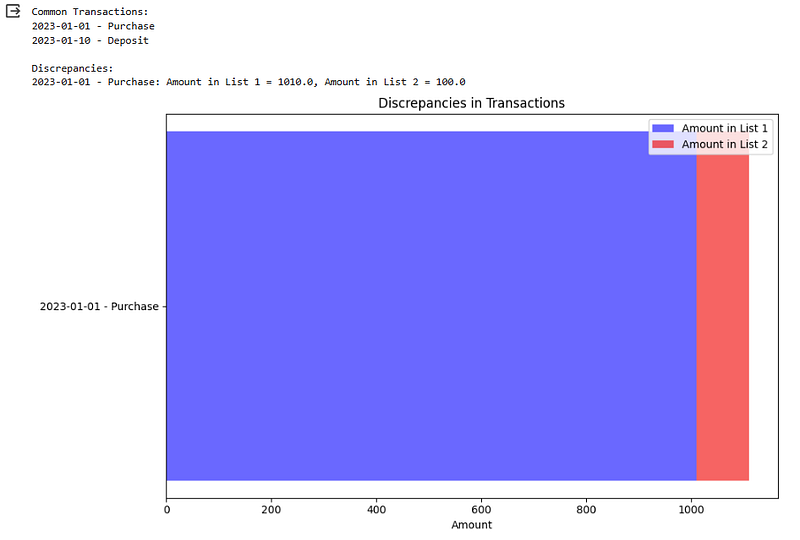
Error Handling: Python can be used to implement error-handling mechanisms, which can be crucial when dealing with large volumes of financial data.

In Plain English 🚀

Thank you for being a part of the In Plain English community! Before you go:

Python
Python Programming
Finance
Financial Planning
Automation
Recommended from ReadMedium