C2 Hunting: How to Find C2 Servers with Shodan
Threat actors are getting smarter. The days of blocklisting or threat hunting for IP addresses and domains you find in cyber threat intelligence reports are gone. You must get ahead of the bad guys and start performing C2 hunting.
A Command and Control (C2) server is an attacker’s lifeline. It allows them to control systems they have compromised, upload hacking tools, and exfiltrate sensitive data.
Wouldn’t it be great if you could hunt down this essential network infrastructure?
Well, let me introduce you to C2 hunting. A powerful threat hunting technique that allows you to stay one step ahead of the bad guys with publicly available information and investigative rigor.
Let’s dive in!
The complete version of this article can be viewed for free on: https://kravensecurity.com/c2-hunting-using-shodan/
What is C2 Hunting?
A cyber attack typically happens in stages (a cyber kill chain). The attacker will perform reconnaissance to find security gaps, exploit them to gain initial access, and then pillage systems to achieve their objectives.
One of the key stages of a cyber attack is the Command and Control (C2) stage.
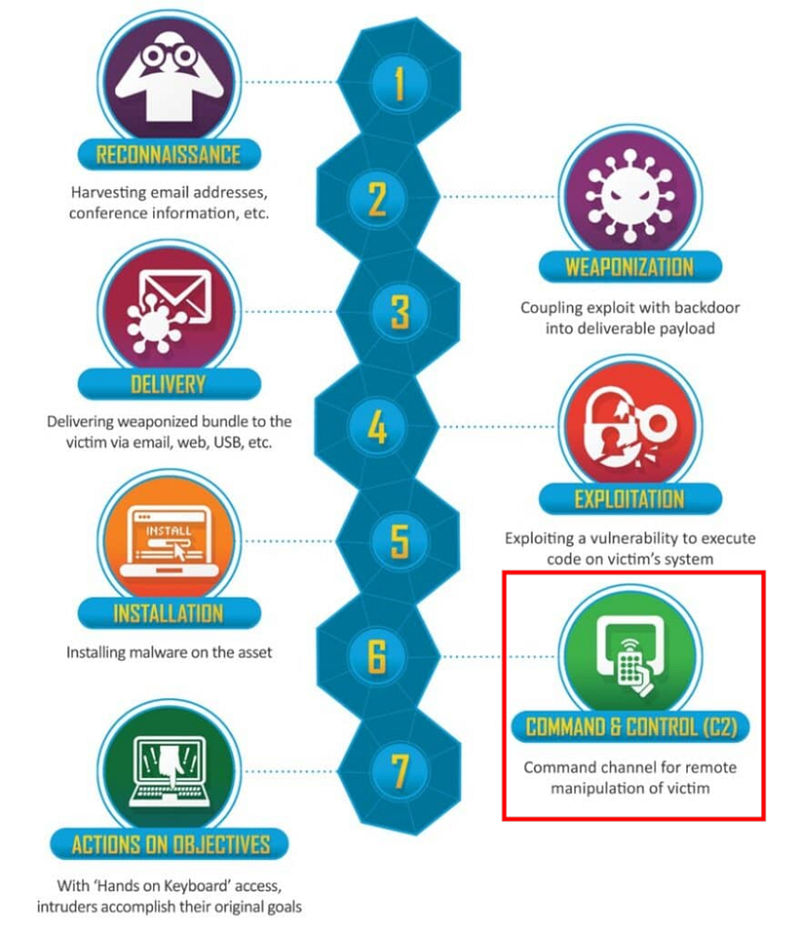
At the C2 stage, attackers will try to establish communication channels between the systems they have compromised and their command infrastructure. This allows them to remotely control compromised systems and perform post-exploitation activities, such as data exfiltration, escalating privileges, and lateral movement.
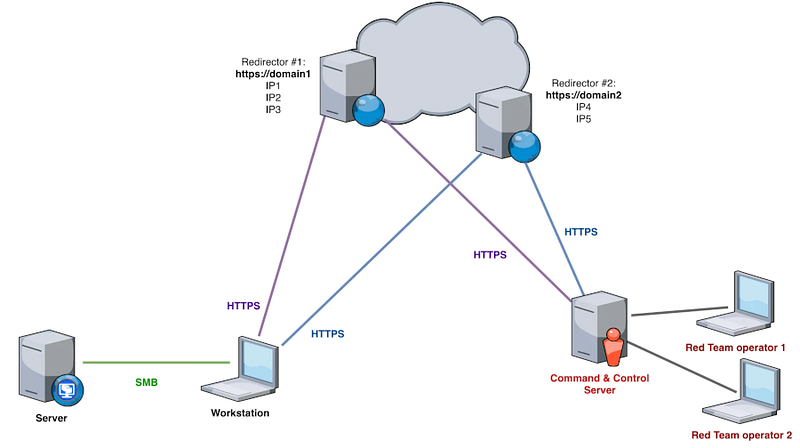
This is done by installing an agent (or implant) on the compromised system that connects back to a C2 server. The attacker can then log into this server and interact with the compromised system via the agent. They can issue commands, gather data, and deploy malicious activities on infected machines.
Cyber threat intelligence reports often include a list of C2 servers in their Indicators of Compromise (IOCs) section. These are domains or IP addresses that a threat was seen communicating with during an investigation and have been deemed malicious.
You should use the indicator lifecycle to hunt for these IOCs in your environment to ensure you are not compromised, but remember that this report is just a snapshot of time.
A report contains whatever indicators the analysts could find when they performed their investigation. It is time-bound. An attacker may have changed their IP addresses and domain names or even spun up entirely new infrastructure since then.
Get a FREE template for writing cyber threat intelligence reports here.
C2 servers are a very valuable resource in an attacker’s arsenal. An adversary will use randomly generated domain names, dynamic IP addresses, proxy servers, C2 redirectors, and even VPNs to protect them.
This prevents defenders from simply blocking a single known malicious IP address or domain name to stop adversaries from connecting back to these servers and launching attacks from them.
- You need a way to detect C2 servers that is not reliant on known malicious IP addresses or domains.
- You need a way to proactively find these servers before they can cause harm and continuously hunt for them to find new IOCs.
- You need a way to move up the Pyramid of Pain and target network artifacts that are more challenging for an adversary to change.
Thankfully, I have just the thing to help you (and no, I’m not selling you anything)!
The Pyramid of Pain is a framework for describing the effectiveness of various indicators for detecting or tracking malicious activity based on how difficult it is for an adversary to change them. You can learn more about it in Elevate Your Threat Detections Using the Almighty Pyramid of Pain.
Various tools exist that routinely scan the entire Internet. They use automated “crawlers” to gather data about open ports, services, banners (information about the software running on a device), and other metadata from public-facing devices that respond to network probes.
They then index this data and make it searchable through a web GUI, API, or command line tool so users can query it using filters and keywords to find specific devices or vulnerabilities.
These include:
- Shodan: A search engine that allows users to discover and explore internet-connected devices, such as servers, routers, webcams, industrial control systems, and other Internet of Things (IoT) devices.
- FOFA: A search engine similar to Shodan but with a different geographic focus. It is widely used in China and the broader Asia-Pacific region and can produce different results.
- Censys: Another search engine and data platform for discovering and analyzing devices, services, and systems that are publicly accessible on the internet. It provides more detailed data on SSL/TLS certificates.
But how do Internet crawlers help you?
Well, for a C2 server to be effective, it must be on the public-facing Internet. This way, the C2 agents installed on compromised machines can communicate with it, and the adversary can launch attacks. As such, these C2 servers will be scanned by Internet crawlers, and you can hunt for them to get ahead of an attacker before they can use their C2 infrastructure against you.
Most adversaries will re-use similar infrastructure. Be it SSH keys, SSL certificates, HTTP landing pages, header data, banners, etc. If you can model the attacker infrastructure they have used during an attack (as reported by a threat intel report), you can then hunt for other IPs or domains that use similar infrastructure that are not included in the original report.
This could be IPs, domains, or infrastructure the analyst missed when writing their original report or entirely new infrastructure that has been spun up after the report was published. Either way, it gives you fresh IOCs to hunt for in your environment and detect.
This is known as C2 hunting and falls under the broader category of external threat hunting.
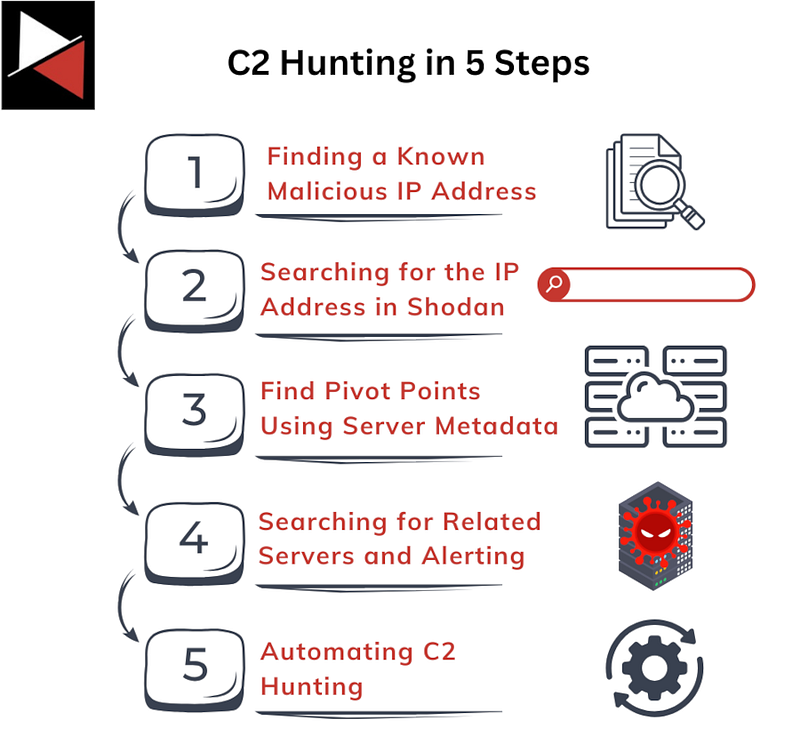
The process is simple:
- You find a known malicious IP or domain.
- Find the C2 server that the IP or domain is attached to using an Internet crawling tool.
- Inspect the server’s metadata to find pivot points that you can use to hunt for similar C2 infrastructure.
- Search for related servers using the Internet crawling tool and set up alerts if any of your systems try to connect to this server.
- Automate the hunt so that you are alerted whenever new C2 infrastructure is created.
Let me show you how to do this from beginning to end using Shodan!
Check out this video by Chris Duggan (TLP:RED) as he showcases C2 hunting: TLP R3D — Analysis of BlueNoroff Hidden Risk Indicators!
What is Shodan?
Shodan is a search engine that allows you to discover and explore internet-connected devices. It indexes devices based on their IP addresses and the services or software they expose to the internet, making it an ideal tool for hunting adversary infrastructure.
To start using Shodan, you must set up an account by navigating to https://account.shodan.io/register.
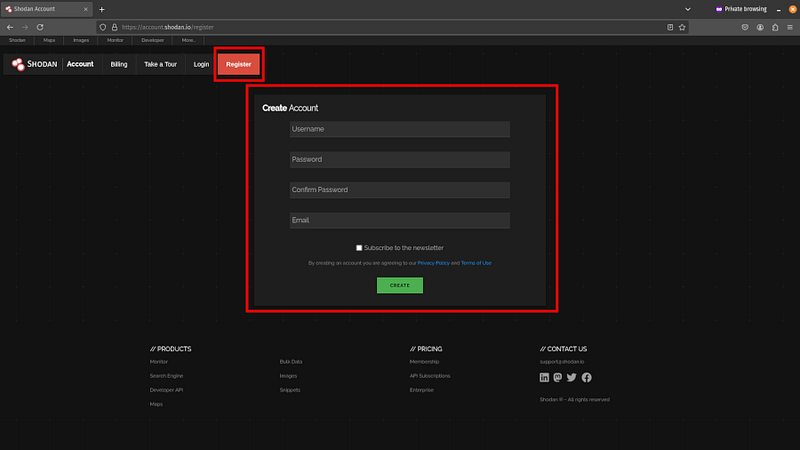
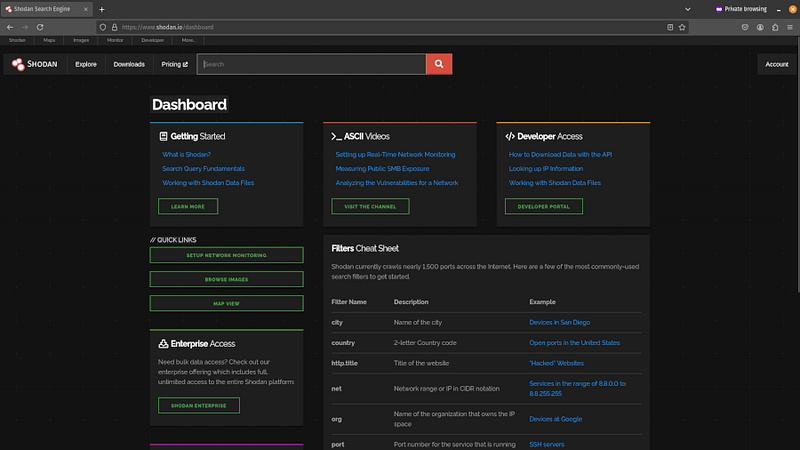
Once an account is created, you can use Shodan’s web GUI to search for things by going to https://www.shodan.io/dashboard.
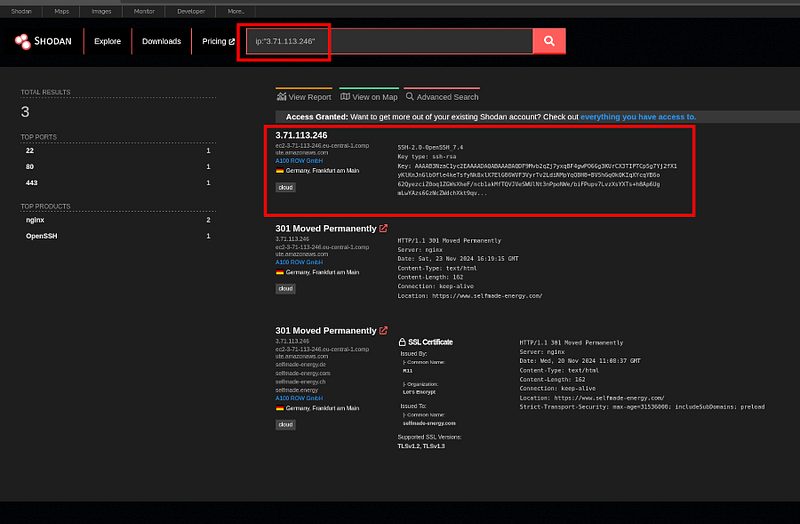
You can search for an IP address with the query: ip:"<ip-address>".
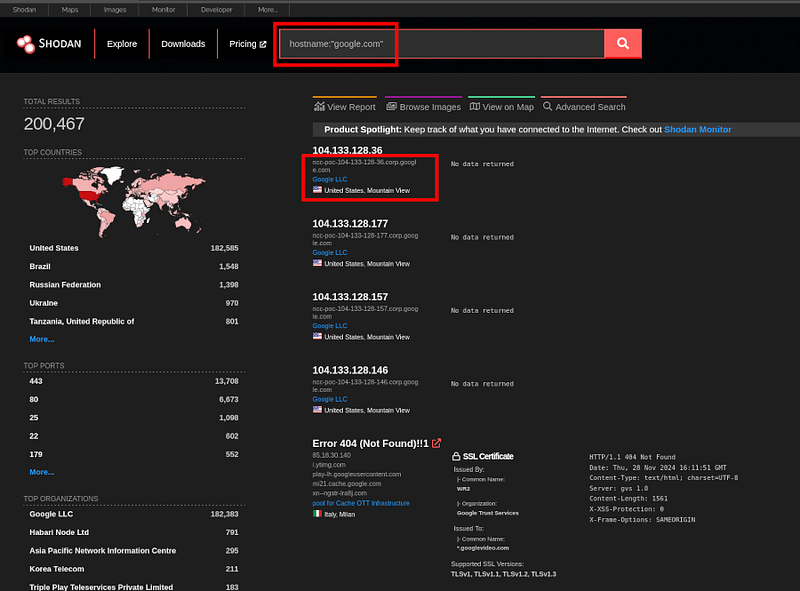
You could search for a domain or hostname with the query: hostname:"<domain>".
You can even search for websites with the HTTP title “hacked by” with the query: http.title:"hacked by".
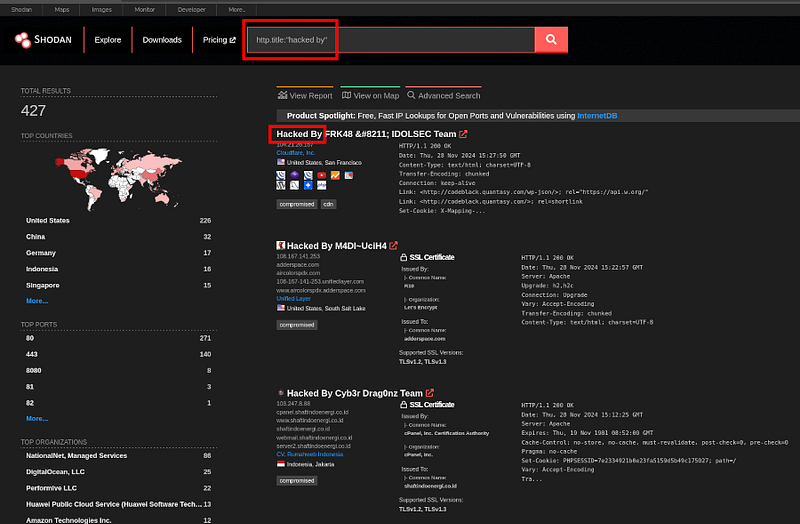
Check out all the available filters here, or use the Advanced Search option for an even more powerful search.
Let’s see how you can use this tool for C2 hunting.
C2 Hunting Using Shodan
To perform C2 hunting using Shodan, you can follow the 5-step process mentioned previously. Let me walk you through it.
Step 1: Finding a Known Malicious IP Address
To begin, you need to find a known malicious IP address related to a C2 server. You will usually find this at the end of cyber threat intelligence reports along with the other IOCs.
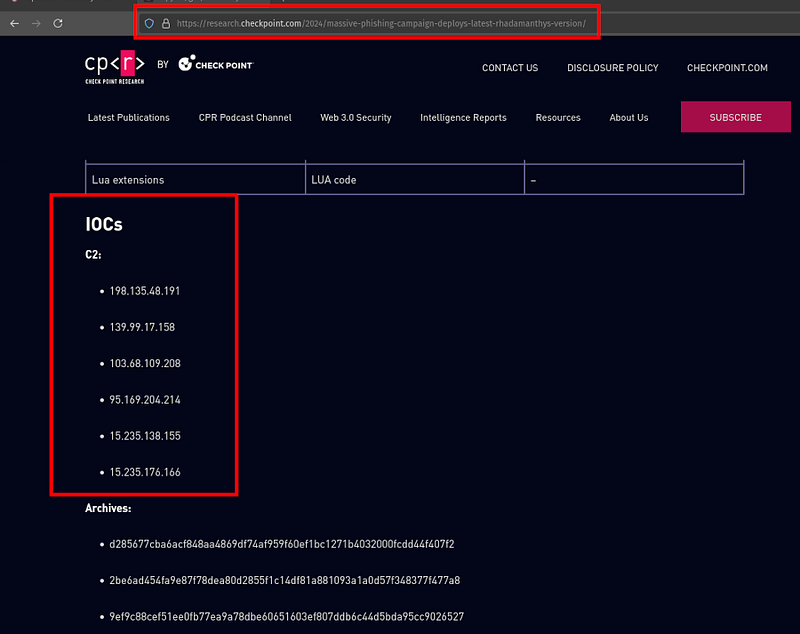
Aim to find reports that are recent. This will give you the best chance at finding C2 servers that are still live on Shodan so you can model their infrastructure and find pivot points. You also want to use IP addresses that are not dynamic.
Why Dynamic IP Addresses Are Bad?
Dynamic IP addresses are temporarily assigned to a device by a Dynamic Host Configuration Protocol (DHCP) server each time the device connects to the network. Servers that have been configured to use dynamic IP addresses by their Internet Service Providers (ISP) will be hard to find in Shodan. You want static IPs that resolve to a low number of domains.
You can check if an IP address is a good candidate by searching for it in VirusTotal, navigating to the Relations tab, and checking how many domains resolve to that IP address.
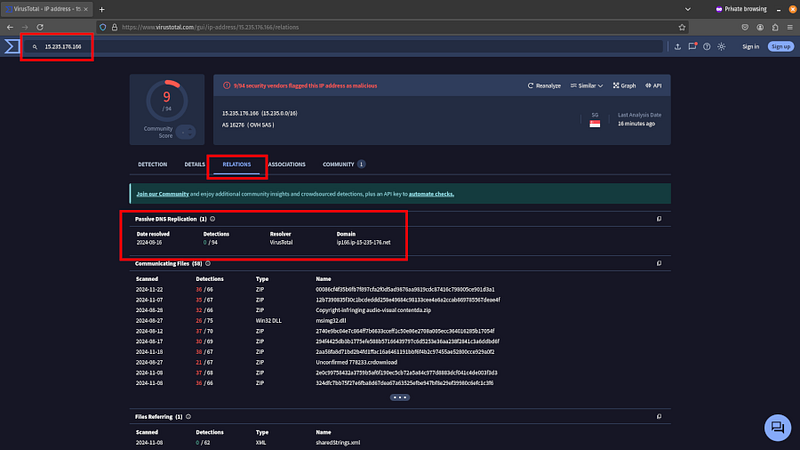
The lower the number. and the more recent the date resolved, the better. You want to use IP addresses that resolve to at less than 100 domains.
If searching for a domain or IP address on VirusTotal doesn’t return any useful information, try searching for it on Twitter (X) to see if it’s been reported before or linked to an attack campaign.
Once you find a suitable IP address, you can start building your investigation. I recommend using a tool like Maltego (or a simple text file) to keep track of the IP addresses and IOCs you find and the hunts you run in Shodan. This will make it easier when it comes time to report your findings and automate your C2 hunting.
Step 2: Searching for the IP Address in Shodan
Next, you need to search for the IP address you found in Shodan.
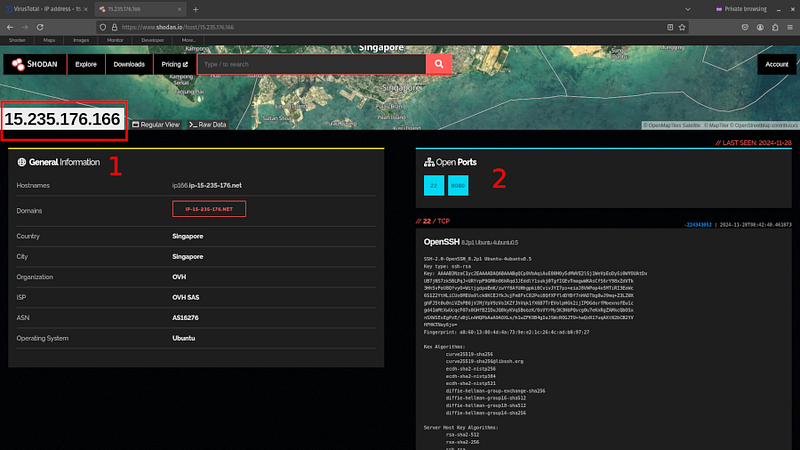
This will return (1) General Information about the IP address (e.g. geolocation, organization, ISP, ASN, and operating system) and (2) details about open ports. It is the technical information on ports that is of most interest to us because it contains configuration data you can use for pivoting.
If you see self-signed certificates, dodgy hosting providers, or countries known for suspicious activity, these are good signs the infrastructure is malicious.
Step 3: Inspect the Server’s Metadata to Find Pivot Points
Once you locate the malicious C2 server, you want to start digging into its configuration data to find potential pivot points that you can use to hunt for similar C2 infrastructure.
Look for things that stand out. It could be an SSL certificate, HTTP header details, the HTML page, or SSH keys. Anything that makes this server unique.
For instance, if the server is running HTTPS on port 443, you could click on the link Shodan provides to search for that web page’s HTML hash. If other servers also host this unique HTML page, they may be related to the adversary.
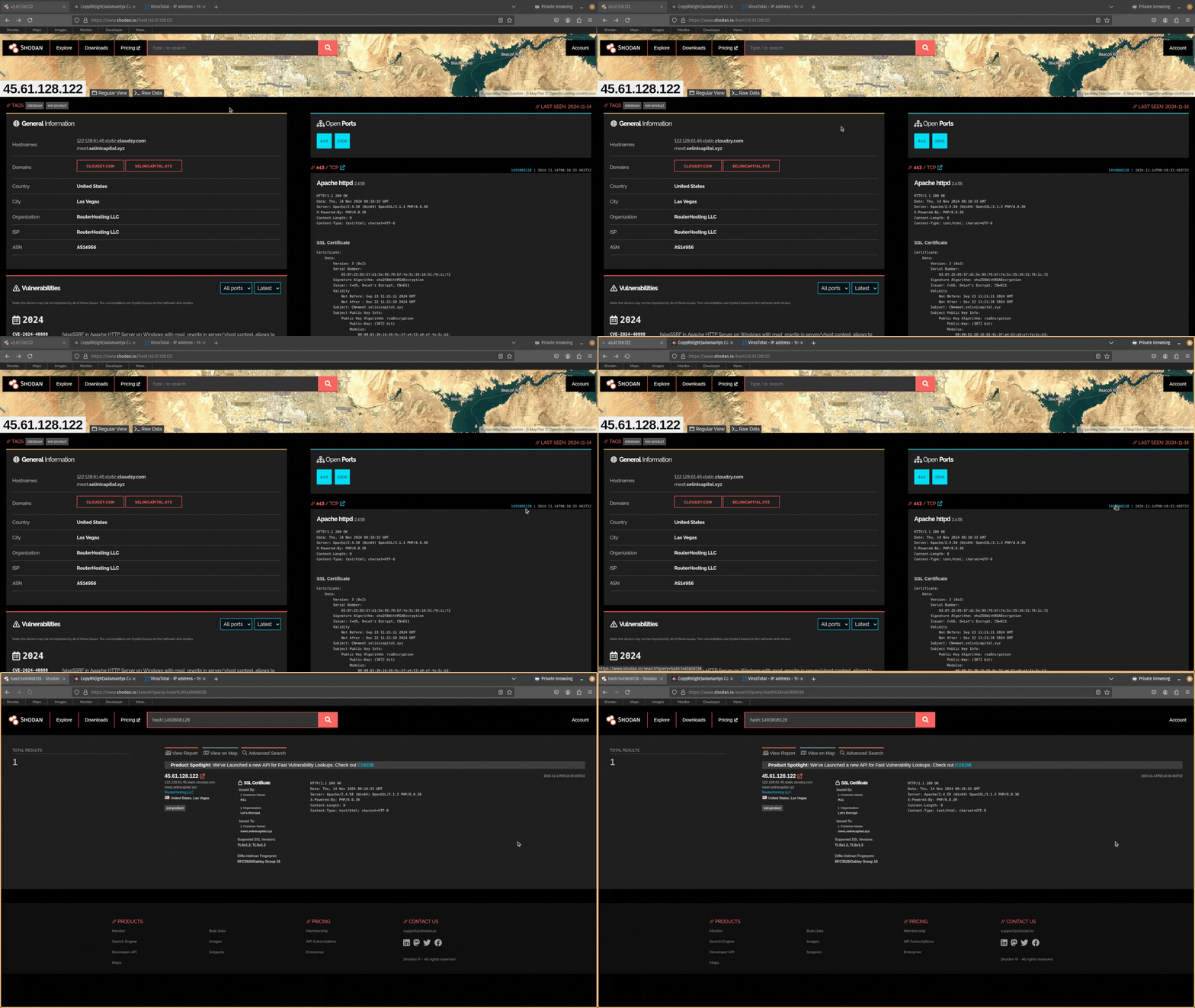
There are tons of things you can hunt for using the server’s metadata (and even more if you include the raw data Shodan provides). However, to keep things simple, let’s look at the four most common pivot points you can hunt for:
- Header information
- HTML pages
- SSH keys
- SSL certificates
C2 Hunting Using Header Information
If you see port 80 or 443 is open on the server you are investigating, you can use the HTTP header information to search for related infrastructure.
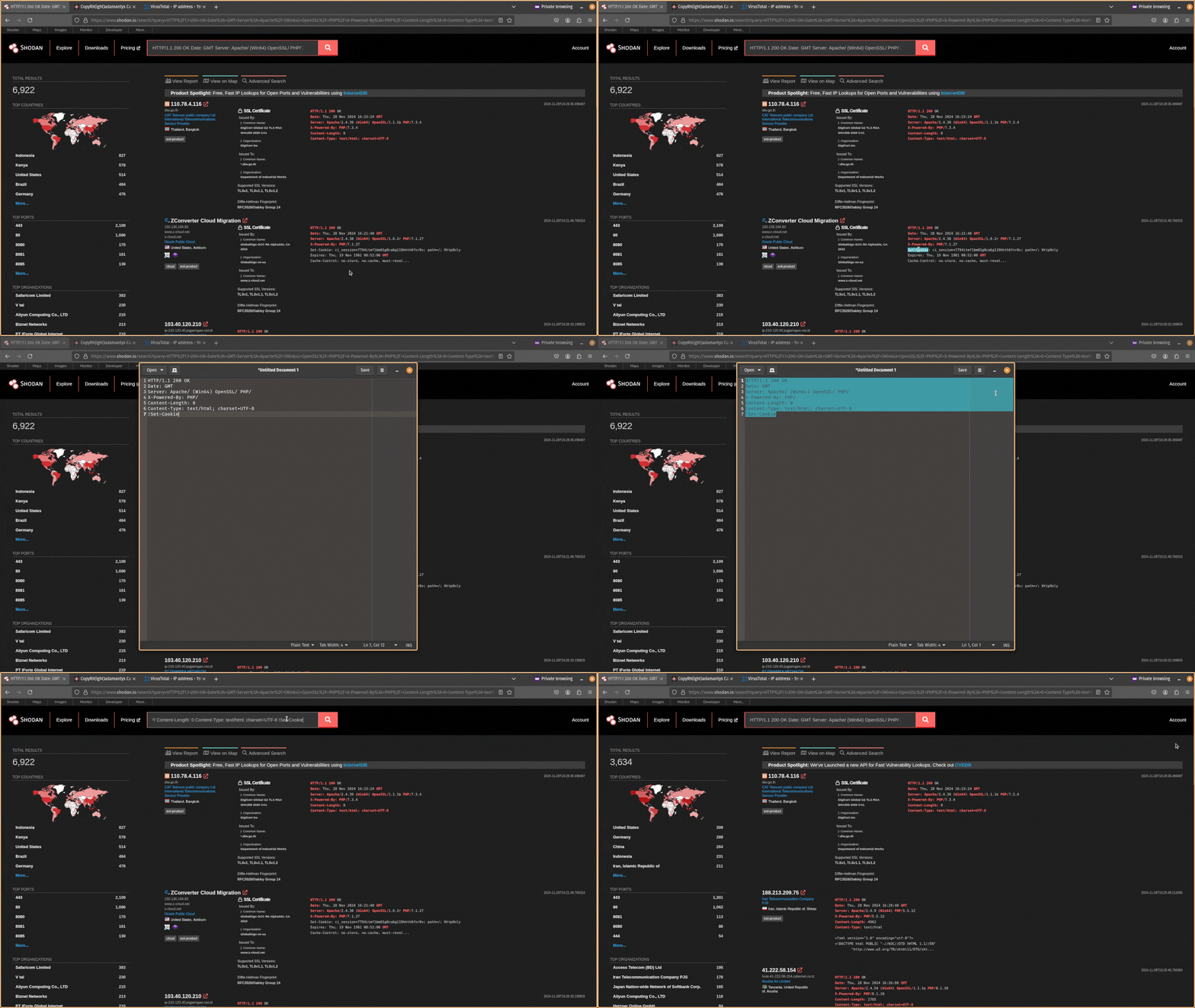
Start by copying the header information from Shodan into your notetaking tool.
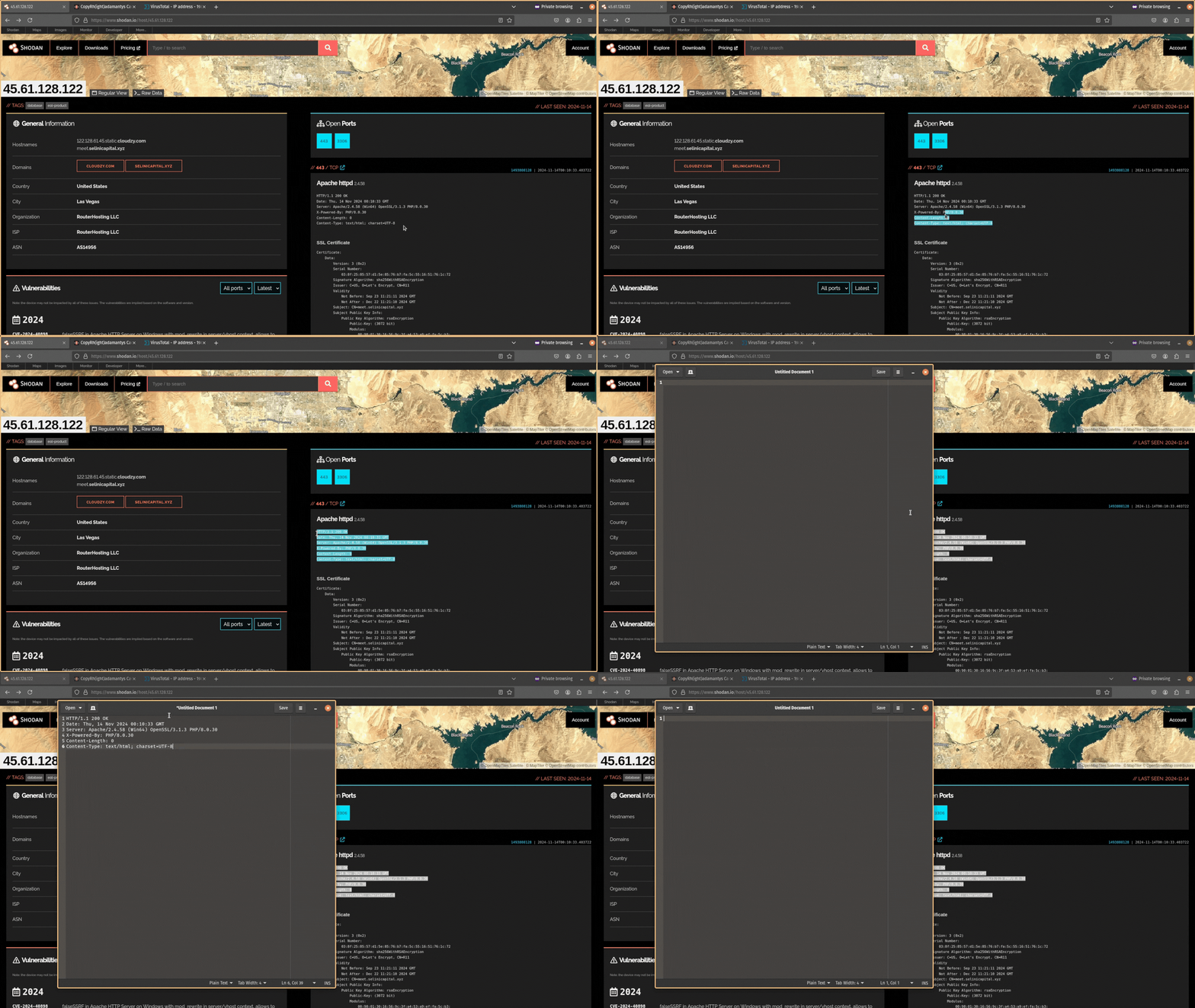
Next, remove the data from this header information. You want it to just be Date: GMT.
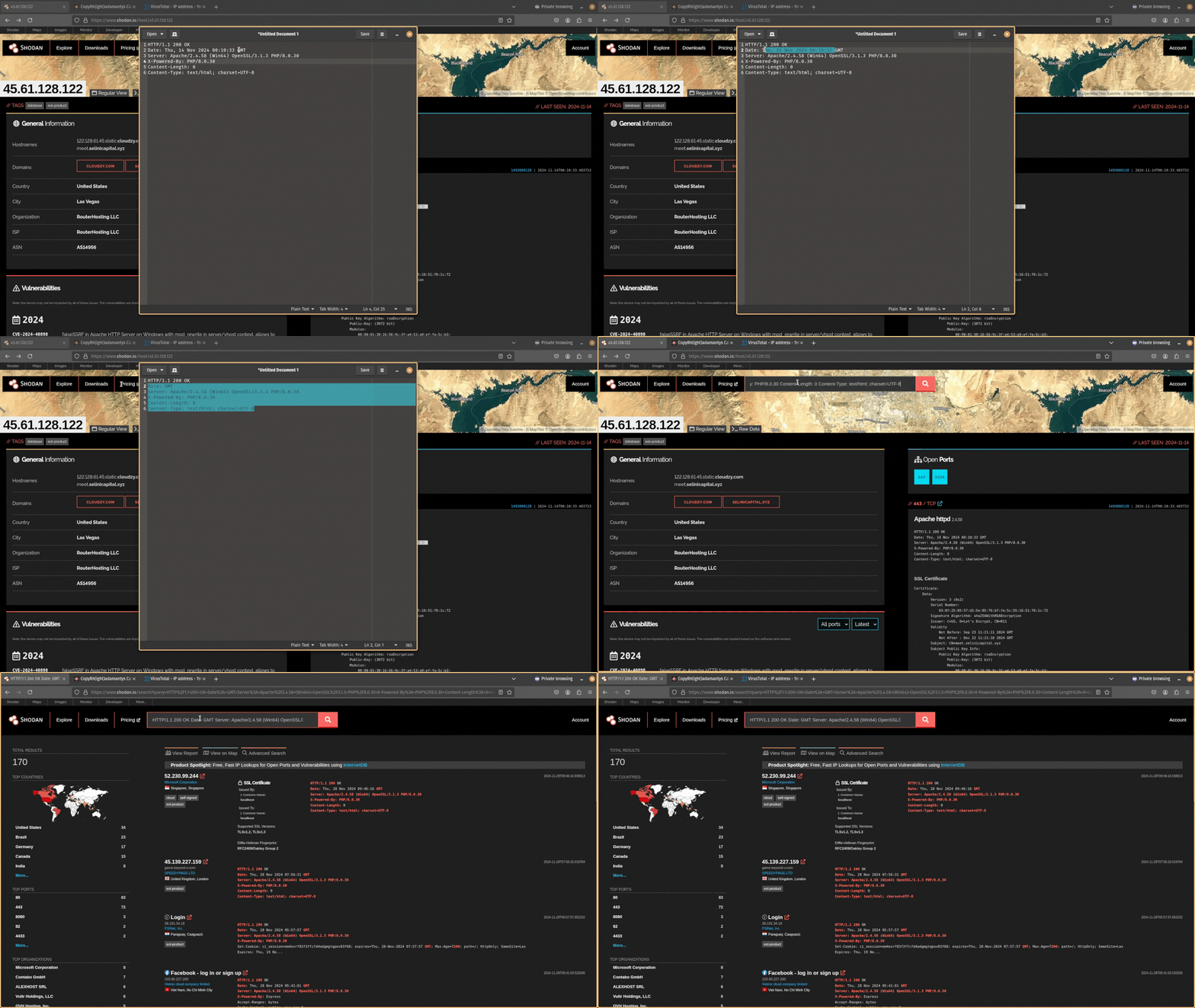
Then copy and paste this data back into Shodan and search for it. Does any other public-facing infrastructure contain the same header information?
If you don’t get any results, and your search query is too unique, try expanding your search by removing the specific software version numbers. For example, PHP/8.1.17 would become PHP/.
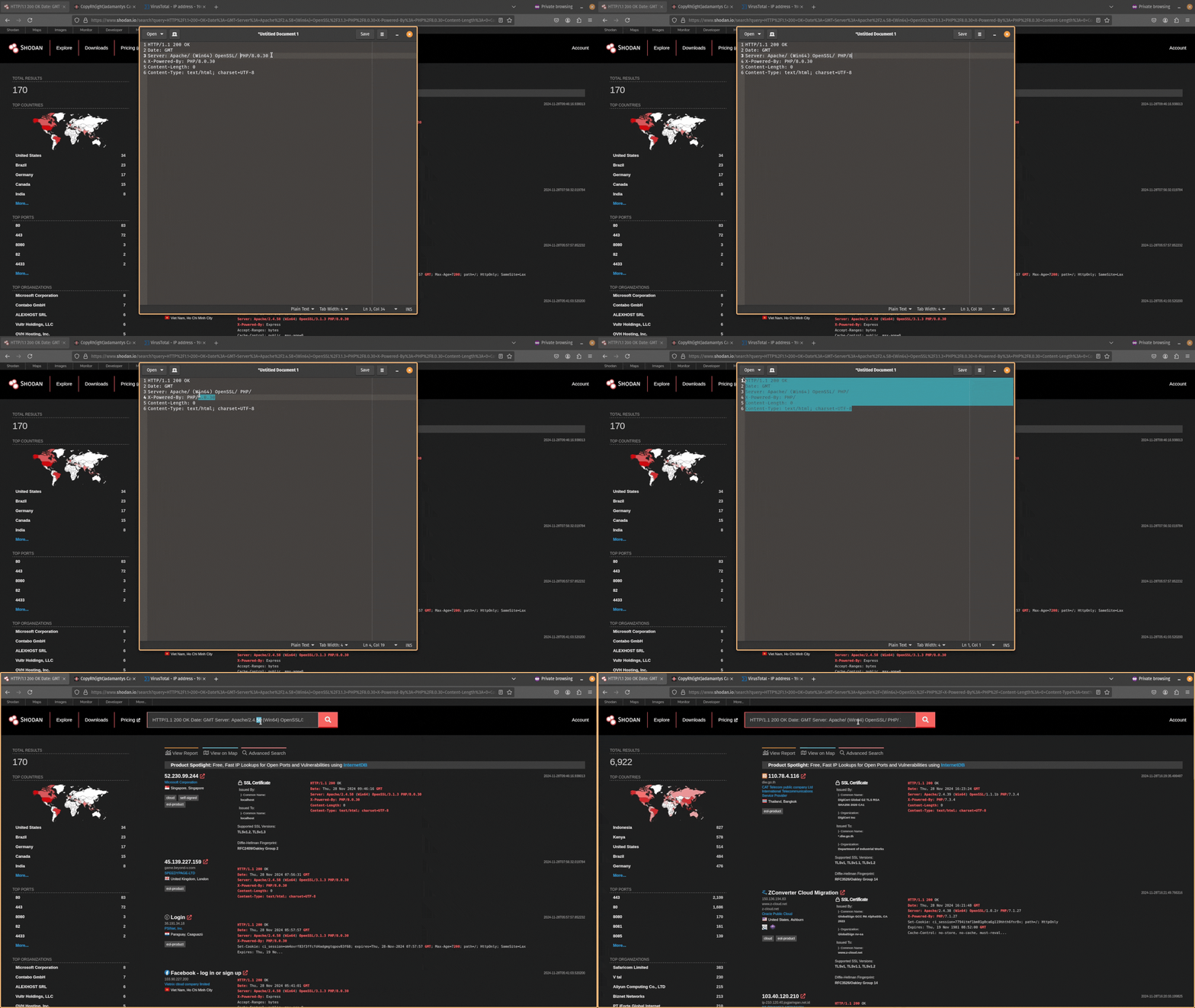
Remember to save your searches as you go!
You want to try to find responses that are similar but still relatively unique. After expanding your search, you will likely have too many results and need to filter out infrastructure that is unrelated. You can exclude data using the NOT operator ! in Shodan.
You can also use other metadata alongside HTTP header information like a server’s JARM to narrow down your search even more.
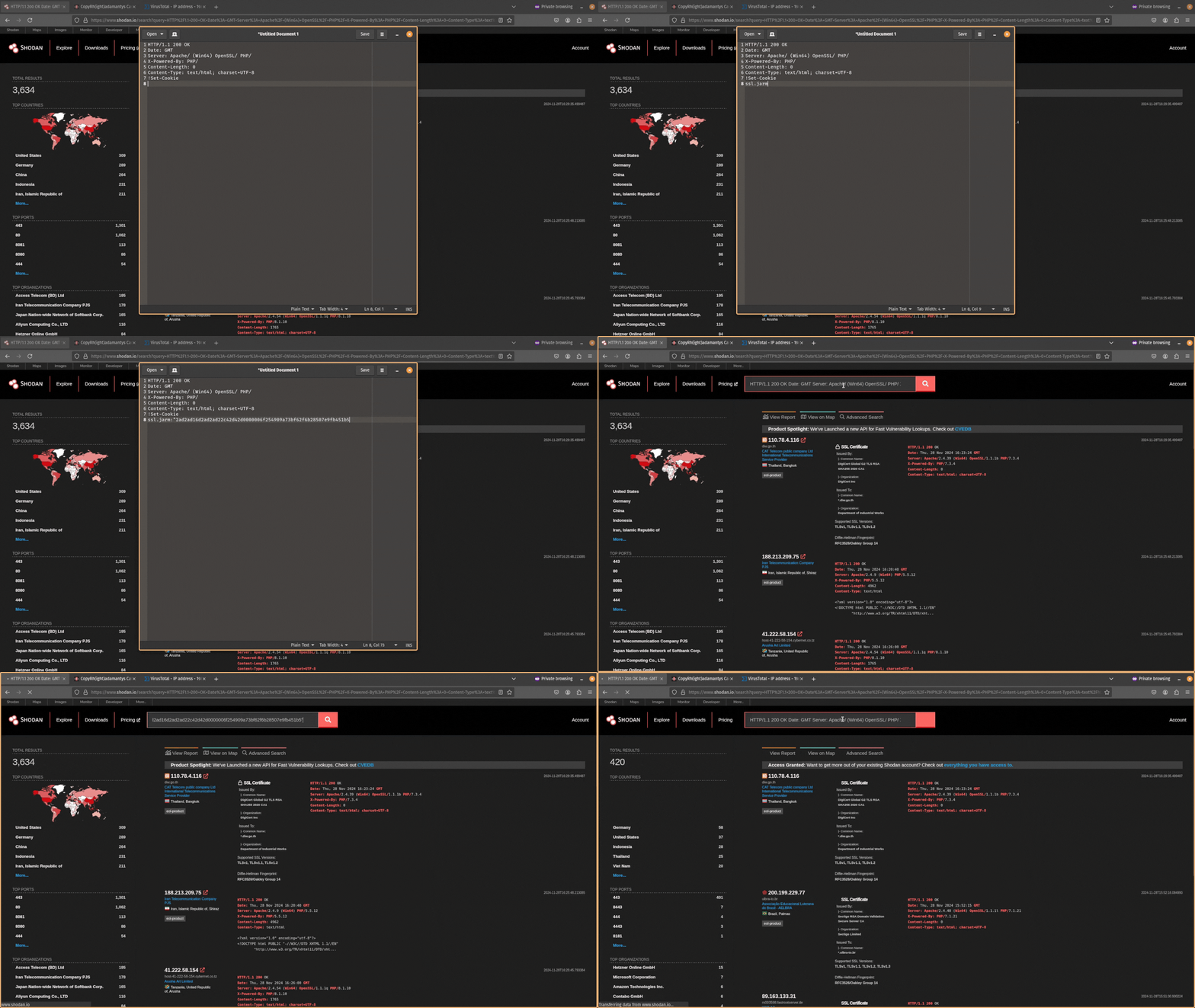
If Shodan doesn’t return results try FOFA or VirusTotal or Censys, or urlscan.io. You are not limited to one tool. These alternatives can also provide you with the JARM hash or SSL certificate of the server. It’s always good to supplement your hunts with other tools!
C2 Hunting Using HTML Pages
If a server is running HTTP, you are not just limited to HTTP header information as a pivot point. You can also use the hash of the server’s HTML page to find related infrastructure.
Shodan makes searching for the HTML page hash easy. Just click on the link to the right-hand side of the port.
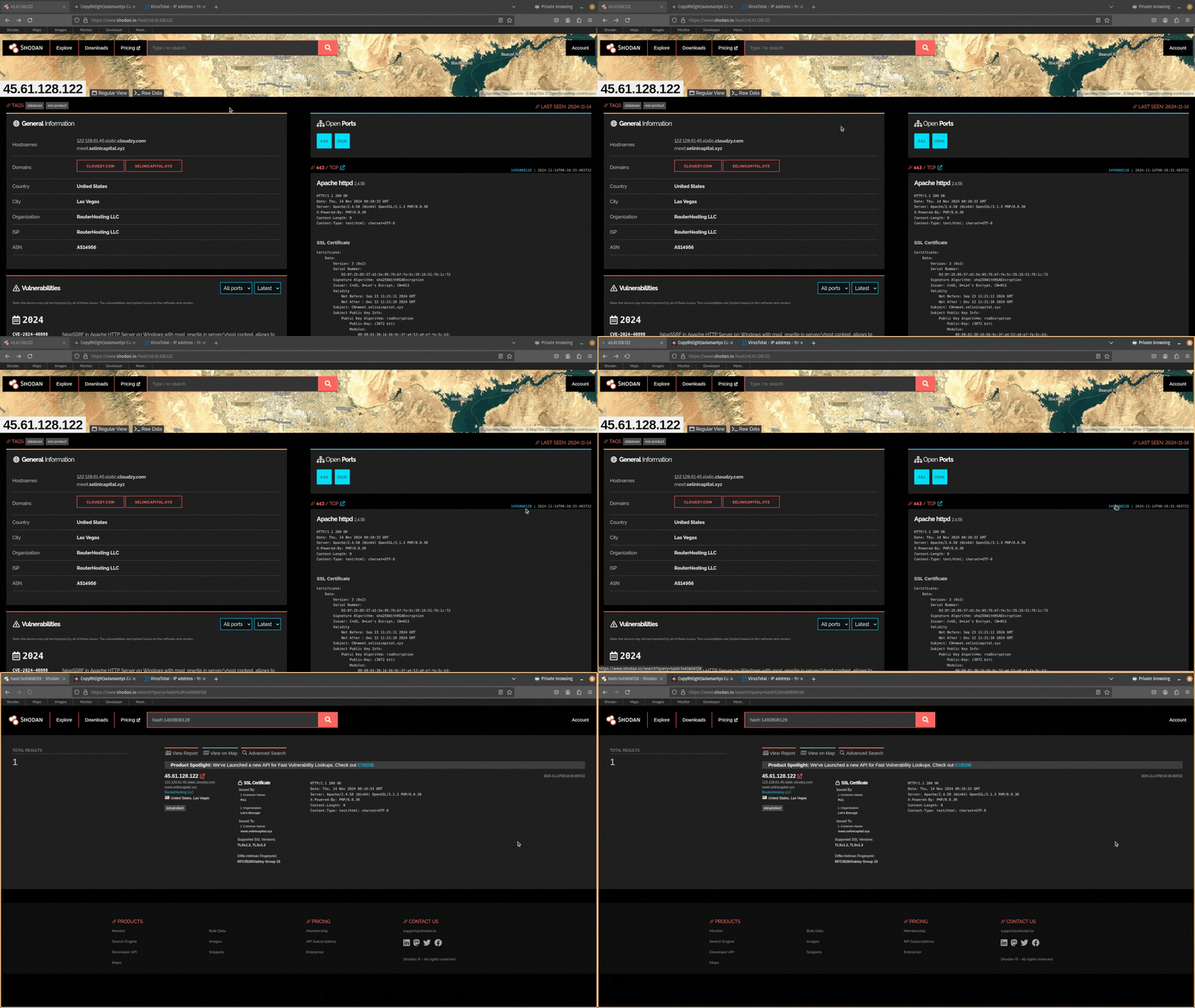
Is this a unique HTML page, is it shared by some other servers, or do a log of servers use it?
If it’s a generic landing page you will get a lot of results back. This is not that useful. Also, if you see a 0 where the HTML page hash should be, this means there is no HTML file.
If the HTML page is unique, it’s worthwhile digging into what makes it unique and searching for that. To do this, open the Raw Data tab in Shodan and scroll down to the HTML section.
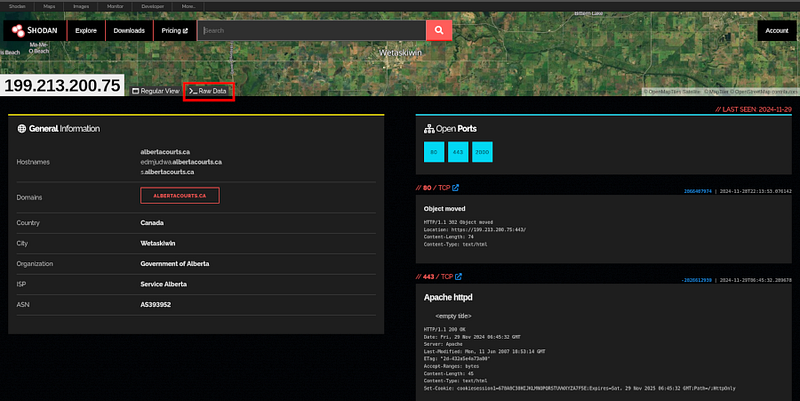
The Raw Data tab is only available if you have a paid membership.
C2 Hunting Using SSH Keys
SSH is the de facto standard for configuring remote servers. As such, you may come across port 22 open on a server you are investigating and the SSH service running. This gives you another potential pivot point.
Sometimes adversaries are lazy and use the same SSH key to control multiple C2 servers. Shodan allows you to take the hash of the public SSH key and search for it. Just click on the link.
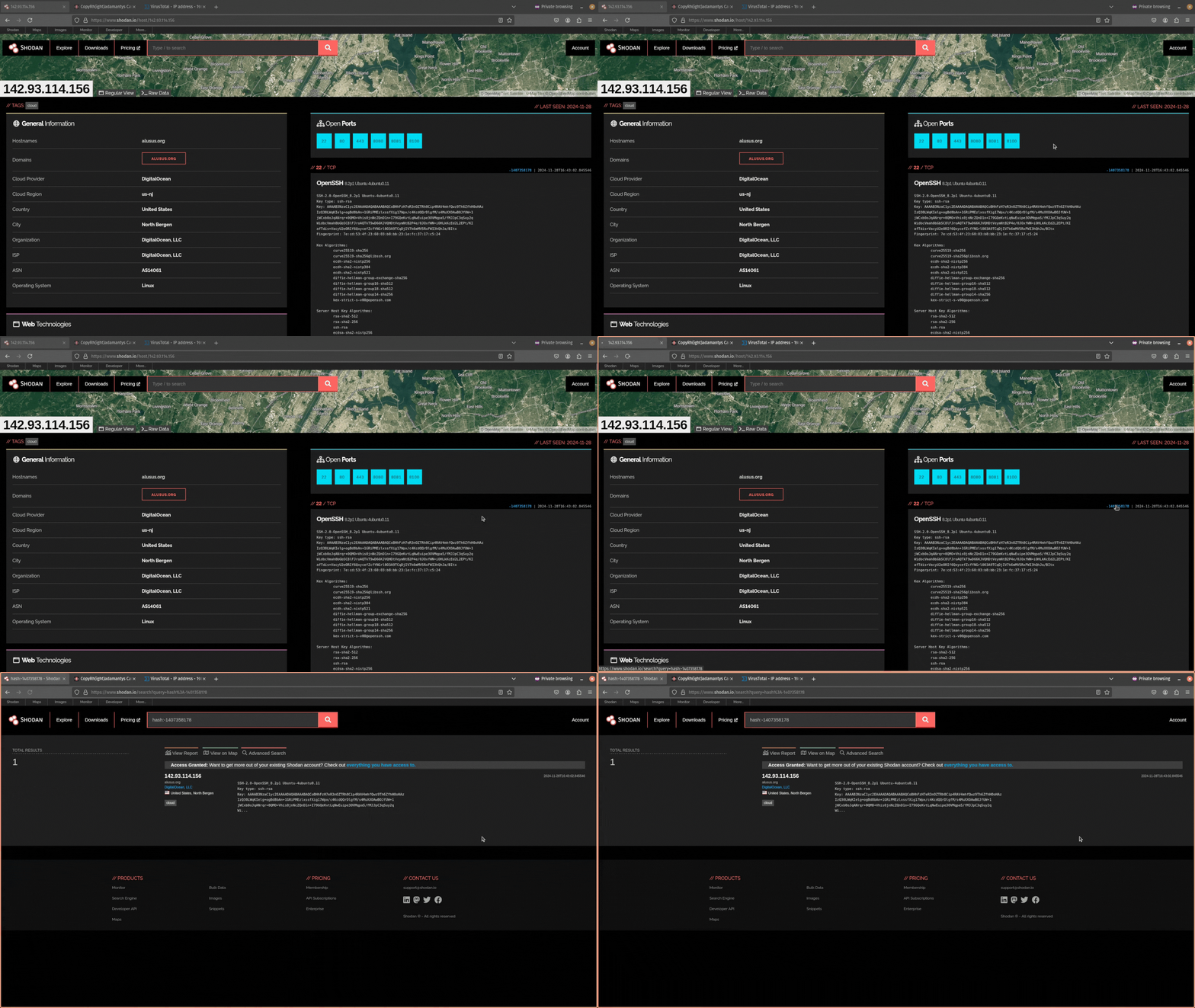
Did you find any infrastructure that uses the same SSH key to login?
C2 Hunting Using SSL Certificates
If there is no header information, HTML page, or SSH key to pivot from, don’t worry. If there is a service running that uses SSL certificates (e.g. HTTPS, RDP, etc.) you can use this as a pivot point.
Go into the Raw Data and scroll down to the port 443 section (if you are using the SSL certificate for HTTPS). From here, find the fingerprint object within the cert JSON object.
If you don’t have access to the raw data in Shodan, you can find SSL certificates on other tools like FOFA or Censys.
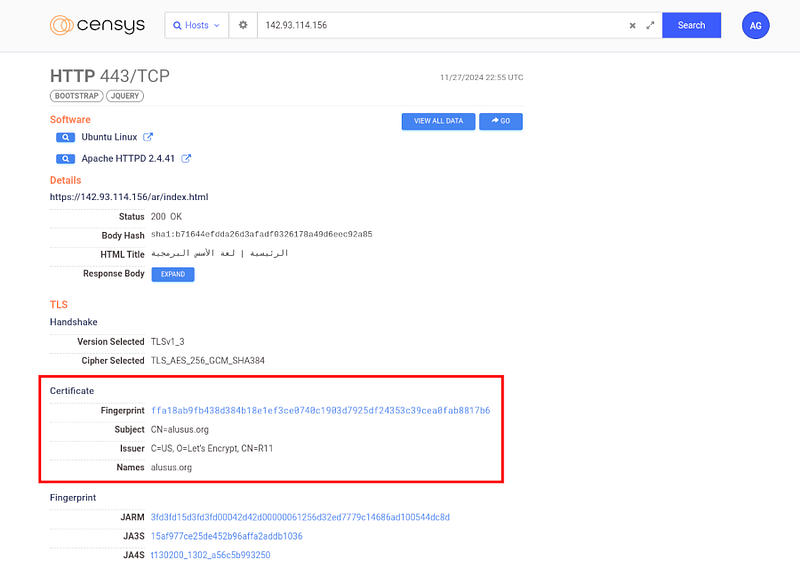
Then you can use the query ssl:
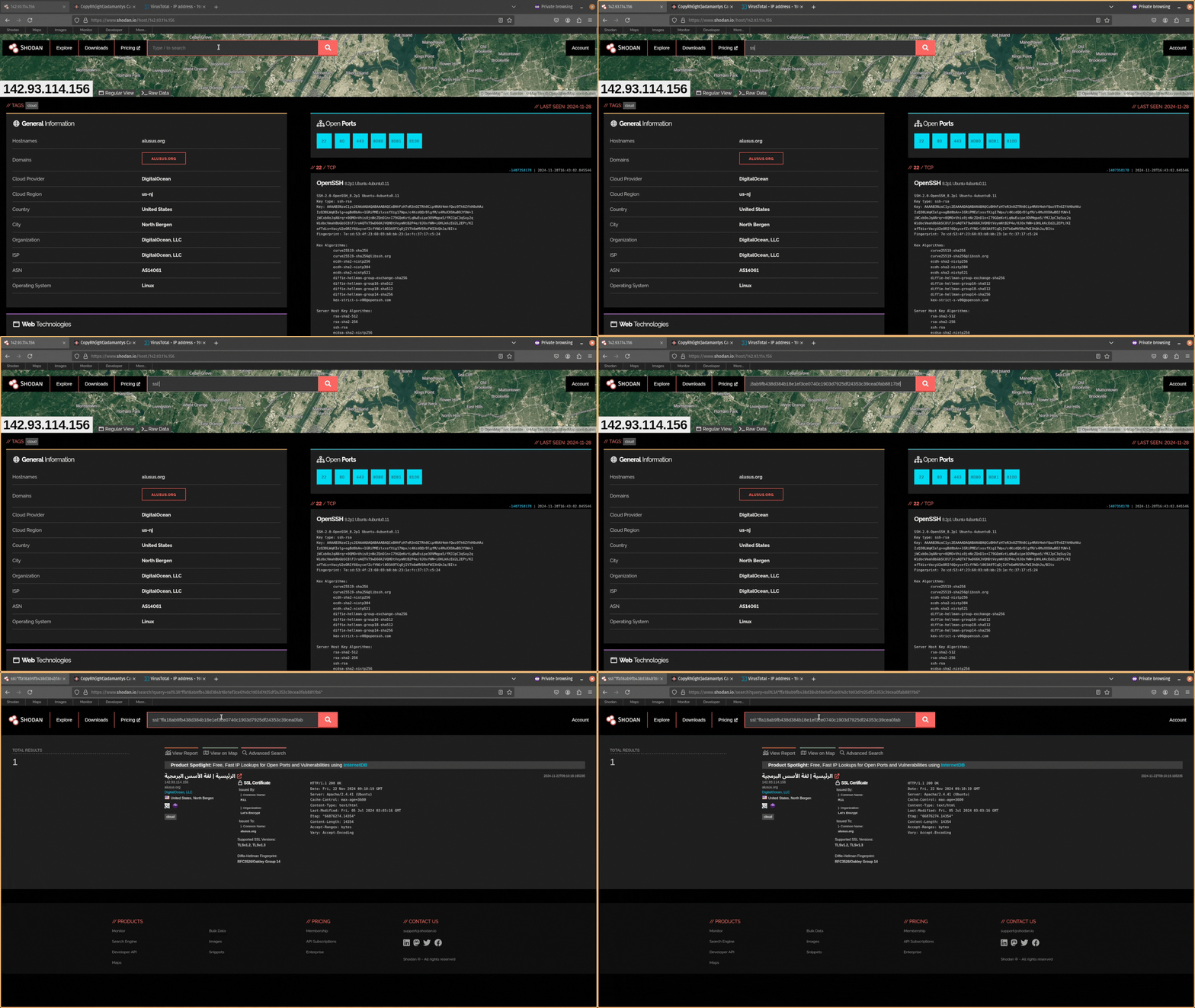
If the IP address is included in the certificate, then it will come back as unique. But you can use other data in the SSL certificate like the Organization name (e.g. “self-signed certificate”) or JA3S and JARM fingerprint hashes.
JA3S is a method of fingerprinting the SSL/TLS server based on the specific characteristics of the server’s SSL/TLS handshake. JA3S works by creating a hash of various parameters in the SSL/TLS handshake like the SSL/TLS version, Cipher suites supported by the server, extensions used in the handshake, supported elliptic curves, and supported point formats.
It is used to generate a unique fingerprint of the SSL/TLS server that can be used to identify it, track its activity, or detect any potential changes in the server’s configuration. You can query JARM hashes in Shodan with the syntax
ssl.ja3s:"<hash>".
Similar to JA3S, JARM is a SSL/TLS server fingerprinting method that allows you to uniquely identify servers based on the TLS handshake. It works by capturing and analyzing the server’s response during the handshake process and then generating a unique hash based on certain characteristics of the TLS connection.
The main difference is the hashing algorithm used with JA3S using MD5 and JARM using SHA256. Usually, JARM is preferred over JA3S because of it’s strong hashing algorithm, resulting in fewer false positives. You can query JARM hashes in Shodan with the syntax
ssl.jarm:"<hash>".
Combining attributes together is an effective way to pivot from SSL certificate data. You can also combine them with element (e.g. HTTP header information) to build powerful search queries in Shodan Here, I have combined HTTP header information with an exclusion ! and JARM hash.
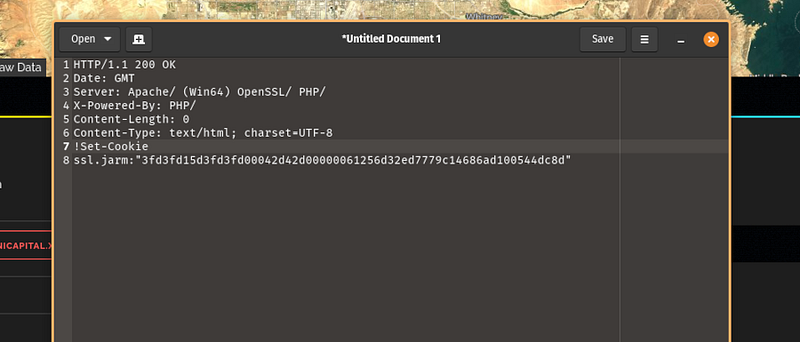
There is a lot more you can search for in Shodan. You could pivot from an RDP service’s domain name or the robots.txt file of a website or company name an SSL certificate is registered with. I highly recommend exploring what pivot points you can find by digging into the raw data in Shodan!
Step 4: Searching for Related Servers and Alerting
Once you have a pivot point that is reliable and produces a manageable number of results, you can begin investigating the results returned to see if they are likely connected or not.
Take each new IP you find with similar infrastructure, add it to your investigation notes, and use cyber threat intelligence tools like VirusTotal to gather additional context.
Other popular threat intelligence sources you can use to collect additional context about an IP address include Talos Intelligence, GreyNoise, AbuseIPdb, and AlienVault OTX.
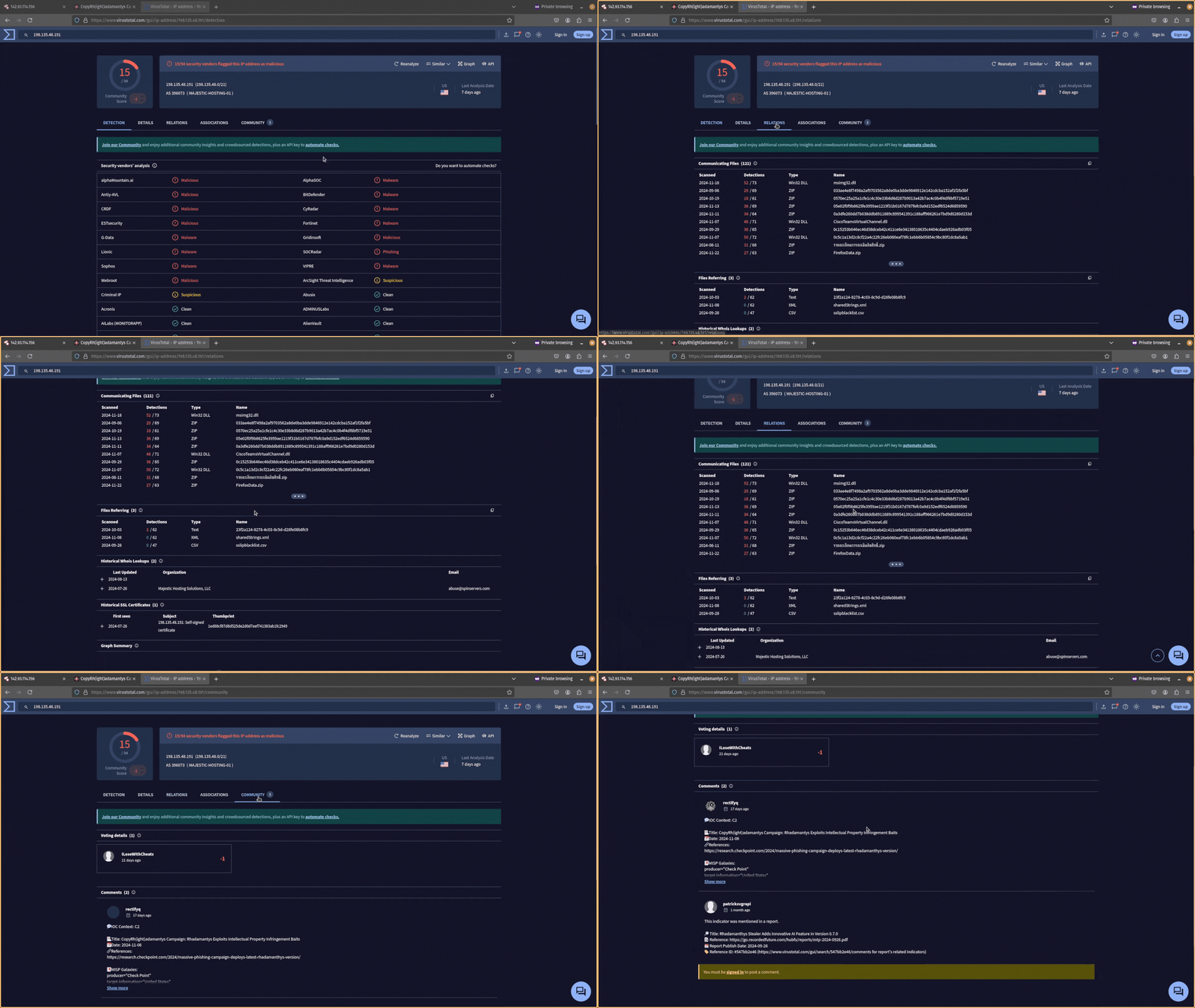
- Check if there are any detections on this IP address from anti-virus providers. Remember that just because there are no detections though, it doesn’t mean it’s not malicious.
- See if any threat intelligence reports mention this IP address in the Community tab. Can you get a threat actor name or malware strain?
- Use the Relations tab to see if there are any domains with recent activity that resolve to it or files communicating with it. With a paid VirusTotal license, you can run YARA rules to hunt for the communicating files and their attributes.
If you are happy the IP is likely to be connected to the threat you are tracking, add it to your investigation notes and save the hunt (Shodan search query) you used to find it. You will use this later.
You can judge how good your query is based on how many malicious results are found alongside that infrastructure.
Finally, add the new IOCs you find to your detection or hunting tools to search for them in your environment. They might not be flagged as malicious by your anti-virus or EDR vendor yet, but you certainly want to be alerted to them if they pop up in your environment!
Step 5: Automating C2 Hunting
The final step is to automate the C2 hunting you just did so you can repeat it with minimal effort.
You can do this in Shodan using the platform’s command line tool, API, or Python library. These options allow you to interact with Shodan programmatically so you can automate your workflow and perform C2 hunting on a continuous basis (e.g. a cron job that executes a bash script).
To use these tools, you need two things:
- An API key (which you can find in your Shodan dashboard).
- A paid membership.
Once these two requirements are satisfied, you can start using the Shodan API to execute the successful hunts (searches) you performed through the web GUI. Save these hunts somewhere and build an automation to have them run daily. Then set up an alert whenever new infrastructure is found. This is how you stay ahead of the adversaries!
Any new infrastructure found you can investigate and add the IOCs to your detection tools. This is a quick and easy win that forces adversaries to change how they deploy their C2 infrastructure and allows you to proactively defend against attacks.
Conclusion
The days of gathering cyber threat intelligence reports and blindly adding the IOCs to your detection tools are over. You need to get smarter with how you use these IOCs!
One way you can use them is through C2 hunting. This powerful threat hunting technique proactively seeks out adversary C2 servers so you can stay a step ahead of the bad guys and be alerted whenever new C2 infrastructure is seen.
This article explored how you can do that using a simple 5-step process that used Shodan to hunt for HTTP header information, HTML pages, SSH keys, and TLS certificates. It even explored how you can automate your C2 hunting using the Shodan API to streamline your threat hunting activities.
I encourage you to get stuck in and try C2 hunting for yourself using the tool discussed. Then, try adding it to your organization’s threat hunting activities. Good luck!
To learn more about cyber threat intelligence, check out https://kravensecurity.com/
If you enjoyed this content and want to see more, consider clapping for this article or following me. If you want to stay up-to-date with all things cyber threat intelligence and threat hunting, subscribe to my newsletter!

Interested in learning the dark arts of penetration testing and red teaming? Check out these courses offered by Zero-Point Security. They will teach you all things red teaming from creating exploits to emulating real-world threat actors.
If you want more of a challenge, take on one of their certification exams and land your next job in cyber:
Do you want to learn more cyber security skills today? Check out The All-Access Membership Pass by TCM Academy. It will provide access to courses on all things cyber security, including hacking/pentesting, malware analysis, digital forensics, programming/scripting, and GRC!
If you’re looking to level up your skills even more, have a go at one of their certifications: