
Butterfree: A Spark-based Framework for Feature Store Building

Machine learning models are both dependent and sensitive to the data received. As a consequence, data acquisition processes and feature engineering perform a major role in the ML lifecycle. Many transformations can be applied to data through the model’s development activities and, in many cases, it’s important to perform all these transformations for inference purposes as well. This post covers in more detail our machine learning pipeline in order to understand more how we train and serve models at QuintoAndar.
We have many different data sources within distinct scopes of our business. In order to ease creating datasets for training and retrieving their current state for online, low latency predictions we created Butterfree. Butterfree is a Spark-based framework for feature store creation with S3 and Cassandra for offline and online features.
What is a Feature Store?
A feature store, as the name suggests, corresponds to an organized set of features for machine learning models. One of the main advantages of using a framework for creating a feature store is empowering feature sharing and collaboration among teams that solve different problems using shared data.
Furthermore, model development is much faster. Whether you are building a computationally costly feature that requires time aggregations or a simple and straightforward feature you can expect to exert the same amount of time and effort. Specifically within the scope of Butterfree, there’s the concept of declarative feature engineering: you can focus on what you want to achieve, while all transformations and engineering layers are abstracted, thus enabling a trouble-free approach for reading data sources and writing features for both offline and online destinations.
Finally, it’s important to highlight that many companies, so far, have built their own Feature Store, based on different requirements.
Introducing Butterfree
Butterfree is a Spark-based framework for building a feature store. Instead of worrying about the ETL process, users can focus on what features they want to acquire, while the library abstracts the layers for achieving those results. It provides many great features, such as:
- Allows users to define all transformations in a declarative way, therefore it’s easy to use and generates less code to maintain;
- Since users can focus on what they want and not on how to achieve it, it’s also easy to learn;
- It’s simple to add features and functionalities to Butterfree, since it’s a modular framework;
- Metadata is generated alongside the transformations, so it’s easy to export this documentation afterward.
Besides these benefits, Butterfree promotes team collaboration, due to feature storage in a centralized repository and eases the training of machine learning models. Finally, it’s also possible to retroactively compute features in time.
Architecture
Butterfree was built to deal with large volumes of data, being able to load and write both historical and online data for consumption. To accomplish this, Butterfree is divided into three layers: extract, transform and load layers. The extract layer can consume data from different sources, such as files supported by Spark and Kafka topics. The transform layer, as the name suggests, handles the transformations processes. Finally, the load layer can load data into S3 or Cassandra. This architecture is summarized in Figure 1, below:
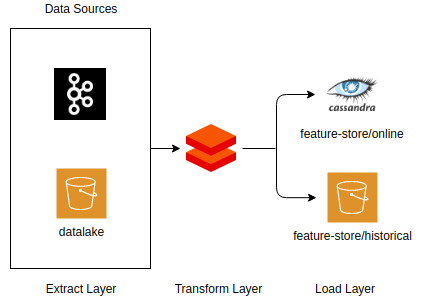
As you can see, you can consume data from different sources, apply desired transformations and, finally, load data into the desired locations:
- Historical feature store: offline features computed as part of a batch job, calculated via scheduled regular jobs, that includes the state of a feature at any giving time. It’s useful for model training;
- Online feature store: online models are not able to read data stored in S3 and, in some cases, it’s difficult to apply the necessary transformations to achieve a certain feature in a proper time window. Therefore, some features are precomputed and stored in Cassandra, where they can be accessed in a low latency for online predictions.
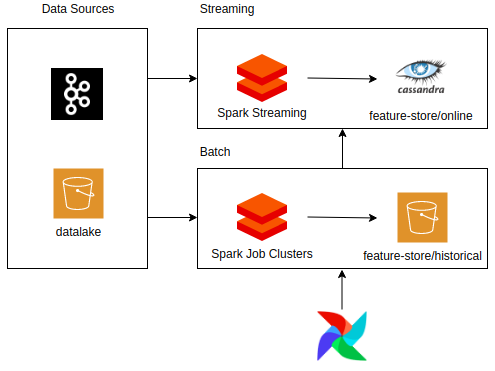
It’s also important to highlight that Butterfree supports both batch and streaming ETL pipelines and you can use an orchestration tool, such as Airflow, for managing jobs. An example is provided in Figure 2:
Applications
Considering the components presented earlier, it’s possible to define a Butterfree pipeline to obtain transformed features from raw data. We’ll use the pipeline exhibited below as an example of how to use Butterfree, its goal will be to compute a list of unique occurrences of an id considering a single event for the current year in a 30 day time window.
from butterfree.constants.data_type import DataType
from butterfree.pipelines.feature_set_pipeline import FeatureSetPipeline
from butterfree.extract import Source
from butterfree.extract.readers import TableReader
from butterfree.transform.aggregated_feature_set import AggregatedFeatureSet
from butterfree.transform.features import Feature, KeyFeature, TimestampFeature
from butterfree.transform.transformations import AggregatedTransform
from butterfree.load import Sink
from butterfree.load.writers import (
    HistoricalFeatureStoreWriter,
    OnlineFeatureStoreWriter,
)
from butterfree.transform.utils.function import Function
from butterfree.extract.pre_processing import filter
from pyspark.sql import functions


class DummyPipeline(FeatureSetPipeline):
    def __init__(self):
        # Data sources definition
        readers = [
            TableReader(
                id="events", database="events_database", table="events_tables"
            ).with_(filter, condition="timestamp >= '2020/01/01' "),
            TableReader(id="house", database="house_database", table="house_table"),
        ]

        # SQL query between defined data sources
        query = """
            select
               id,
               timestamp,
               event_house_id
            from
               events
               inner join
                  house
                  on events.house_id = house.id
            """

        # Extract layer
        source = Source(readers=readers, query=query)

        # Key Feature
        keys = [
            KeyFeature(
                name="id",
                description="Unique identifier.",
                from_column="id",
                dtype=DataType.BIGINT,
            )
        ]

        # Timestamp Feature
        timestamp = TimestampFeature()

        # Transformed Features
        features = [
            Feature(
                name="listing_favorite_set",
                description="List of unique ids for the last 30 days",
                transformation=AggregatedTransform(
                    functions=[Function(functions.collect_set, DataType.ARRAY_BIGINT)]
                ),
                from_column="event_house_id",
            )
        ]

        # Transform layer
        feature_set = AggregatedFeatureSet(
            name="count_events",
            entity="dummy",
            description="Dummy pipeline describing aggregated count events considering "
            "a 30 day time window.",
            keys=keys,
            timestamp=timestamp,
            features=features,
        ).with_windows(definitions=["30 days"])

        # Data destinations definition
        writers = [HistoricalFeatureStoreWriter, OnlineFeatureStoreWriter()]

        # Load layer
        sink = Sink(writers=writers)

        # Pipeline
        super().__init__(source=source, feature_set=feature_set, sink=sink)
Initially, you can explicitly define all desired data sources by using the readers within the Source class and, subsequently, define the relationship between them with a SQL statement. Afterward, both key and timestamp features are determined, as well as the desired transformations that should be applied to the specified column from the source dataframe (it’s a collect set aggregation in this case, for the defined time windows). Finally, data destinations are chosen which in the case of this previous example were both historical and online feature stores.
Conclusion
The Butterfree framework is now open-source. Its goal is to help users obtain transformed features based on a declarative ETL, by abstracting the engineering layers and now the entire community can leverage its benefits and help us go even further.
With its capabilities to store features in both historical and online feature stores, it reduces the engineering efforts required to obtain these features during the development and deployment phases.
We hope that Butterfree can help teams in solving complicated feature engineering issues by making it easier to achieve the desired transformed features. Feel free to follow the Butterfree Github repository in order to learn more about it.