
Building the Ultimate Trading Screener with Python
Part 3: Filtering Screener Data

We’ve completed the initial stage of creating the screener data in the previous articles; now, the next crucial step is to determine how we can identify data that meets specific criteria.
If we remember the structure of the multiindex ScreenerDataframe we have 2 levels of indices:
- The zero level with symbol, and
- The level one with the data of the symbol data
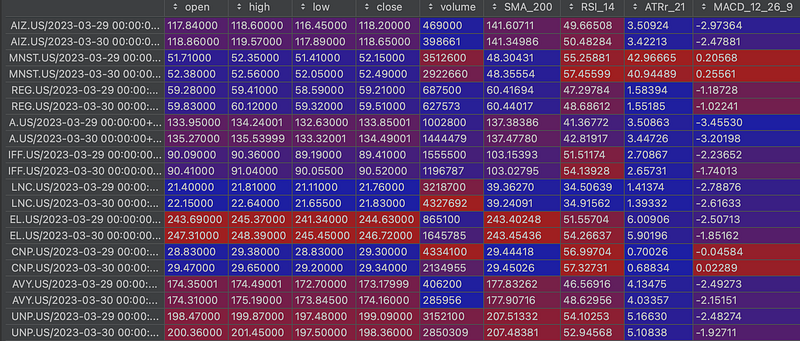
In our quest to identify data that meets specific criteria, it’s essential to have a solid grasp of utilizing the groupby, filter, and iloc functions. However, rest assured, I'll provide you with explicit instructions on how to employ these functions effectively for our screener data.
In the ScreenerDataFrame class, create the search method find_by, which will return the symbols that meet the criteria.
class ScreenerDataFrame(pd.DataFrame):
    def find_by(self, query: str or List[str]) -> List[str]:
       if not isinstance(query, list):
        query = [query]
    ...
The query parameter can take the form of either a single str or a list of criteria. In the case of the latter, the individual strings within the list will be combined using the & (AND) logical condition.
Rather than introducing a new language for defining criteria, we will harness the capabilities of iloc. For instance, let's say we wish to identify signals that satisfy the conditions for a Golden Cross (where the Previous Short SMA is less than the Previous Long SMA AND the Current Short SMA is greater than the Current Long SMA), with the short SMA designated as the 50-day and the long SMA as the 200-day. We can express this condition within the query parameter as follows:
(x['SMA_50'].iloc[-2] < x['SMA_200'].iloc[-2]) & (x['SMA_50'].iloc[-1] > x['SMA_200'].iloc[-2])
*With & we create an AND condition. The index position -1 of iloc will gives us access to the last row of the group (last date row of the symbol), while -2 gives access to the penultimate row.
We can implement the find method easily using groupby, filter and iloc:
def find_by(self, query: str or List[str]) -> List[str]:
    if not isinstance(query, list):
        query = [query]

    criteria = " & ".join([f"({elem})" for elem in query])  # 1
    filtered_df = self.groupby(level=0).filter(lambda x: eval(criteria))  # 2
    filtered_df = filtered_df.groupby(level=0).last()  # 3
    filtered_df = filtered_df.reset_index()
    results = filtered_df["symbol"].to_list() # 4
    if len(results) == 0:
        return []
return results - At line
criteria = " & ".join([f"({elem})" for elem in query])we use a list comprehension to iterate through the elements in thequerylist (we can set several criterion to be joined) and wrap each element within parentheses. Then, these individual criteria are joined together with the&operator to form a single string, which represents the filtering criteria, so it can be used withfilterfunction. - At line
filtered_df = self.groupby(level=0).filter(lambda x: eval(criteria))we group theDataFrameby its index level 0 (the symbol) and uses the filter method to apply the criteria to each group (each symbol). Theeval(criteria)evaluates the criteria string for each group, filtering out rows that meet the conditions. As a result,filtered_dfcontains only the rows that satisfy the criteria. - At line
filtered_df = filtered_df.groupby(level=0).last()we group the filtered DataFrame by its index level 0 to keep only the last row from each group. - Finally, in
results = filtered_df["symbol"].to_list()we get a list of the symbols that meet the specified criteria.
Navigating through this has been remarkably straightforward, wouldn’t you agree?
👏 Did you like the story? Give 50 claps to show your support! Your claps really helps me out and motivates me to keep creating valuable content. Thank you for your support! 👏
In Plain English
Thank you for being a part of our community! Before you go:
- Be sure to clap and follow the writer! 👏
- You can find even more content at PlainEnglish.io 🚀
- Sign up for our free weekly newsletter. 🗞️
- Follow us: Twitter(X), LinkedIn, YouTube, Discord.
- Check out our other platforms: Stackademic, CoFeed, Venture.

