
Retry Your Way to Reliable Applications: A Practical Guide
Imagine uploading a critical business document — the fate of a pivotal deal hanging in the balance — to your cloud storage. You hit “upload,” and…a blank screen stares back, mirroring the sudden emptiness in your stomach. Is your data lost in the cloud’s endless ether, or could a hidden resilience save the day?

In the dynamic ecosystem of cloud computing, where applications interact with diverse components, addressing brief disruptions such as momentary network glitches or temporary service issues is crucial. These issues are often resolved independently. When your application retries an operation after a short pause, it typically succeeds. For example, if a database is handling numerous requests, your initial connection might experience a hiccup, but a retried attempt after a brief delay is likely to be successful.
Solution
Think of retry logic as a built-in “second chance” mechanism. When an operation fails, your system automatically retries a few times before giving up. This significantly increases the chances of success, especially for temporary disruptions like network blips or database hiccups.
Non-members on Medium can still explore the full story — simply click HERE!
How it Works
When the user starts uploading an essential file to Amazon S3, and if a brief network interruption occurs during the process, the retry logic executes as follows:
- Your application tries to perform the desired operation (e.g., uploading a file to Amazon S3).
- If the operation succeeds, it proceeds as normal.
- If the operation fails due to a temporary issue (like a network glitch), retry logic kicks in:
- The system waits for a brief period (e.g., 5 seconds) to allow for potential resolution of the issue.
- It attempts the operation again.
- This process of waiting and retrying continues for a predefined number of attempts (e.g., 3 times).
- If all retry attempts fail, the system logs an error or takes alternative action (e.g., notifying the user).
The purpose of this retry logic is to enhance the likelihood of a successful file upload by enabling the system to recover from transient issues. It ensures that the file has multiple opportunities to be uploaded to S3, even in the face of a brief network glitch.
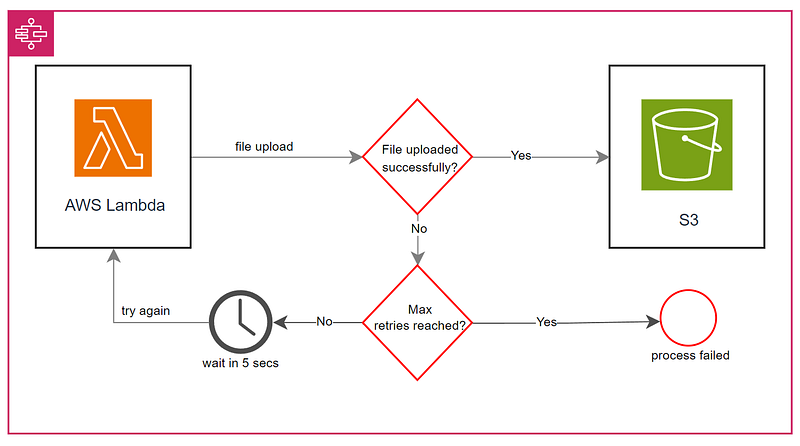
Here’s the provided pseudocode demonstrating the basic implementation of the retry logic:
function performOperationWithRetry():
    maxRetries = 3
    currentRetry = 0

    while currentRetry < maxRetries:
        try:
            # Perform the desired operation
            result = performOperation()

            # Check if the operation was successful
            if result.success:
                return result.data
            else:
                # If the operation failed, retry after a short delay
                wait_for_short_delay()
                currentRetry += 1
        except Exception as e:
            # Handle exceptions, e.g., network errors, database issues

            # Retry after a short delay
            wait_for_short_delay()
            currentRetry += 1

    # If all retry attempts fail, log an error or handle accordingly
    logError("Operation failed after multiple retries")
    return null

function wait_for_short_delay():
    # Implement logic to pause execution for a short delay (e.g., 5 seconds)
    sleep(5)
This pseudocode offers a structured approach to handling retries, incorporating a waiting period and a maximum retry count to balance resilience and resource usage.
Benefits of Retry Logic
Here are the key advantages of implementing retry logic in your system:
- Overcome temporary glitches and ensure reliable data transfers and API interactions.
- Minimize service outages and improve application availability.
- Avoid the need for manual intervention and service escalations when temporary issues occur.
- Ensure a seamless user experience by minimizing service disruptions and data inconsistencies.
By providing these benefits, retry logic becomes an integral component in fortifying the robustness of applications, offering users a more reliable and efficient experience.
When to Integrate Retry Logic
Retry logic isn’t a magic spell for every situation. It’s a precise tool, best used for specific scenarios where temporary hiccups can bring your applications crashing down. Think of it as a built-in safety net, catching those short-lived stumbles before they turn into full-blown failures.
Ideal Scenarios for Retry Logic:
- Cloud Services: Safeguard your application during brief disruptions caused by cloud deployments, updates, or maintenance.
- Database Operations: Ensure recovery from temporary connection issues, lock contention, or brief unavailability in database operations.
- API Calls: Gracefully handle API usage limits, preventing temporary blocks with strategic retries.
- File Operations: Facilitate automatic waiting and retrying for successful file access despite temporary failures.
- Network Operations: Empower your application to overcome transient network glitches, ensuring successful requests despite minor hiccups.
When to Avoid Retry Logic
While retry logic is a valuable tool, it’s not suitable for every situation. Here are scenarios where you might reconsider its integration:
- Critical Transactions: For operations with severe consequences, like financial transactions, retries may introduce unwanted complications or risks.
- Non-Transient Issues: Retry logic is designed for transient issues. If the problem is not temporary, such as a permanent server failure, retries might not be effective.
- High Resource Impact: In scenarios where retries could strain resources significantly, leading to performance degradation or system exhaustion.
- Security-Critical Operations: For sensitive operations, like authentication or authorization, retries might expose vulnerabilities and compromise security.
- Mission-Critical Systems: In systems where failures have severe consequences, relying solely on retry logic might not provide sufficient reliability.
Remember, while retry logic is powerful, its judicious use is key to ensuring effectiveness without introducing unintended complications.
Managing Retry Logic Effectively
Implementing retry logic significantly enhances system resilience, but it requires a thoughtful and balanced approach. Addressing concerns like resource consumption, potential side effects, and the risk of cascading failures is crucial. Factors such as increased system load and the nature of non-idempotent operations emphasize the need for a nuanced strategy. Setting reasonable retry limits and incorporating circuit breakers are pivotal in preventing resource exhaustion and minimizing further disruptions.
Perceiving retry logic as a complementary strategy rather than a substitute for addressing underlying issues is crucial. Attention to security risks, awareness of added complexity, and meticulous testing are integral elements for ensuring effective implementation. In essence, retry logic provides a second chance but demands a deliberate strategy for optimal effectiveness.
Considerations for Effective Implementation:
- To prevent overwhelming services, avoid immediate retries after a failure. Implement exponential backoff, gradually increasing the waiting time between retries. This not only prevents further issues but also optimizes resource usage.
- Ensure that the operation subject to retries is idempotent. In the context of operations like GET requests, where retries involve fetching data, idempotence is crucial to avoid unintended side effects.
- For non-idempotent operations such as POST requests, additional logic is required to handle potential side effects caused by retries. Consider employing optimistic locking or alternative mechanisms to maintain data consistency.
- Acknowledge that retries consume system resources. To prevent exhaustion and performance degradation, set a reasonable limit on the number of retry attempts.
- Continuous monitoring of retry rates is essential. Adjust configurations as needed to optimize performance and resource usage. This proactive approach effectively mitigates transient failures and contributes to the overall reliability of the system.
Now that you’re armed with the knowledge of when to unleash the power of retry logic, let’s dive into practical examples and see how it can transform your applications into resilient heroes!
Example
Building upon the scenario mentioned earlier — where a user is uploading a critical business document to Amazon S3, and a network hiccup disrupts the process midway — let’s delve into how Retry Logic ensures a seamless experience.
With Retry Logic in place, the system promptly initiates a retry after a brief pause, proactively addressing the interruption. By automatically attempting the upload again, the system aims to complete the process without requiring the user to restart. This thoughtful approach not only prevents unnecessary frustration but also guarantees a seamless user experience.
Implementation with AWS SDK and Polly
In addition to this real-world example, the guide further dives into implementing retry logic using the AWS SDK for .NET and Polly library. This showcases a robust approach with exponential backoff, targeted retries, and asynchronous programming.
using System;
using System.IO;
using System.Threading.Tasks;
using Amazon.S3;
using Amazon.S3.Transfer;
using Polly;

class S3Uploader
{
    private static readonly IAmazonS3 S3Client = new AmazonS3Client();

    static async Task Main()
    {
        // Sample file and S3 bucket information
        string filePath = "path/to/your/file.txt";
        string bucketName = "your-s3-bucket-name";
        string objectKey = "your-object-key";

        // Retry configuration
        int maxRetries = 3;
        int baseRetryInterval = 5;

        // Attempt file upload with retry logic
        bool uploadSuccessful = await UploadFileToS3Async(filePath, bucketName, objectKey, maxRetries, baseRetryInterval);

        // Display result
        Console.WriteLine(uploadSuccessful ? "Upload successful!" : "Upload failed after retries.");
    }


    // This method demonstrates the implementation of retry logic using the AWS SDK for .NET, Polly library,
    // and asynchronous programming for handling the retry logic during file uploads to Amazon S3.
    // Parameters:
    //   filePath: Path to the file to be uploaded
    //   bucketName: The name of the S3 bucket
    //   objectKey: The key to assign to the uploaded object
    //   maxRetries: Maximum number of retry attempts
    //   baseRetryInterval: Base interval (in seconds) between retry attempts
    static async Task<bool> UploadFileToS3Async(string filePath, string bucketName, string objectKey, int maxRetries, int baseRetryInterval)
    {
        // Define retry policy using Polly
        var retryPolicy = Policy
            .Handle<AmazonS3Exception>() // Retry only on S3-specific exceptions
            .WaitAndRetryAsync(
                maxRetries,
                attempt => TimeSpan.FromSeconds(baseRetryInterval * Math.Pow(2, attempt - 1)), // Exponential backoff
                (exception, timeSpan, context) =>
                    Console.WriteLine($"Error during upload attempt: {exception.Message}. Retrying in {timeSpan}...")
            );

        try
        {
            // Execute the file upload within the defined retry policy
            await retryPolicy.ExecuteAsync(async () =>
            {
                // Open the file stream using the 'using' statement for automatic disposal
                using var fileStream = new FileStream(filePath, FileMode.Open);

                // Use TransferUtility for file upload to S3
                var transferUtility = new TransferUtility(S3Client);
                await transferUtility.UploadAsync(fileStream, bucketName, objectKey);

                // Log success message
                Console.WriteLine("File uploaded successfully to S3.");
            });

            return true; // Upload succeeded
        }
        catch (Exception ex)
        {
            // Log and return false if upload fails
            Console.WriteLine($"Upload failed: {ex.Message}");
            return false;
        }
    }
}
Key features include exponential backoff to prevent service overload, targeted retries for AmazonS3Exception, asynchronous programming for non-blocking operations, and proper resource disposal. Configurable parameters enhance adaptability, and user feedback is provided through console messages, indicating upload success or failure.
Key Points to Remember
- Retry logic is a powerful tool, but not a silver bullet. Use it strategically for temporary issues.
- Choose idempotent operations (like GET requests) for optimal retries to avoid unintended side effects.
- Set reasonable retry limits and implement circuit breakers to prevent resource exhaustion.
- Leverage built-in retry mechanisms in frameworks and libraries for easier integration.
Conclusion
Investing in retry logic empowers you to build self-healing applications that are resilient to temporary disruptions. This guide provides a comprehensive roadmap for leveraging this powerful tool to enhance your systems’ reliability, user experience, and overall success.
Additional Resources: