
Building Docker Images inside Kubernetes
The Problem
Let’s say that we’re a new team who has been testing and building locally , using docker build, and pushing the images to our Docker registry. We want to put this into a CI/CD system, and so deploy Jenkins on a new Kubernetes cluster (using the Jenkins Kubernetes plugin).
We add a step to run our tests, which works flawlessly. Then we add a step to build a Docker image, but when we run it, and we find that there’s no docker daemon accessible from the Kubernetes container, which means that we can’t build docker images! Let’s investigate some ways that we can fix this problem, and start building Docker images using our CI/CD pipeline.
How image building works
First, it’s important to understand what goes on under the hood when you run docker build using a Dockerfile. Docker will start a container with the base image defined in the FROM directive of the Dockerfile. Docker will then execute everything inside the Dockerfile on that container, and at the end will take a snapshot of that container. That snapshot is the resulting docker image. The only thing that we need from this process is the docker image, so as long as the result is the same a tool can build the docker image in any way it wants, and the implementation doesn’t really matter to us as long as we get the same docker image in the end. Technically we don’t even need a Dockerfile, we can just run commands on a running Docker container and snapshot the results.
The rest of this article is going to explore different ways to generate a Docker image.
Docker out of Docker
With Docker out of Docker we’re essentially connecting the Docker inside of our container to the Docker daemon that the Kubernetes worker uses. The only good reason to use this method is because it’s the easiest to set up. The downsides are that we’re potentially breaking Kubernetes scheduling since we’re running things on Kubernetes but outside of its control. Another downside is that this is a security vulnerability because we need to run our container as privileged and our Jenkins slaves will have access to anything that’s running on the same worker node (which could be a production service if you don’t have a separate cluster for Jenkins)
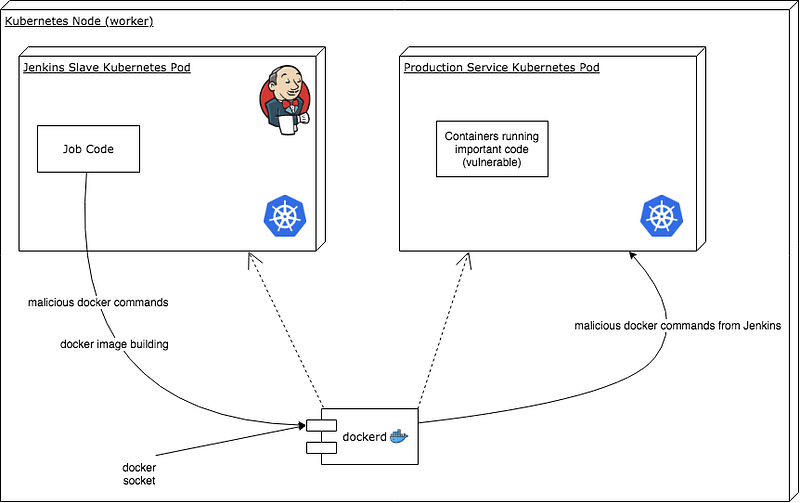
Here’s a basic configuration for Docker out of Docker:
Once you launch the pod, my-container will have access to the host’s docker daemon and images can now be built on it with docker build.
Docker in Docker
Docker in Docker means that we run a Docker container which runs it’s own Docker daemon, thus the name Docker in Docker. This is the approach that we’re currently using at Hootsuite. The advantages of this approach are that it’s still pretty easy to set up and it’s backwards compatible with Jenkins jobs that are already building Docker images using docker build . The security is also better than Docker out of Docker since our Pod doesn’t need to be privileged (although the Docker in Docker container does still need to be privileged) and our Jenkins slaves can’t access the other containers running on the same Kubernetes worker.
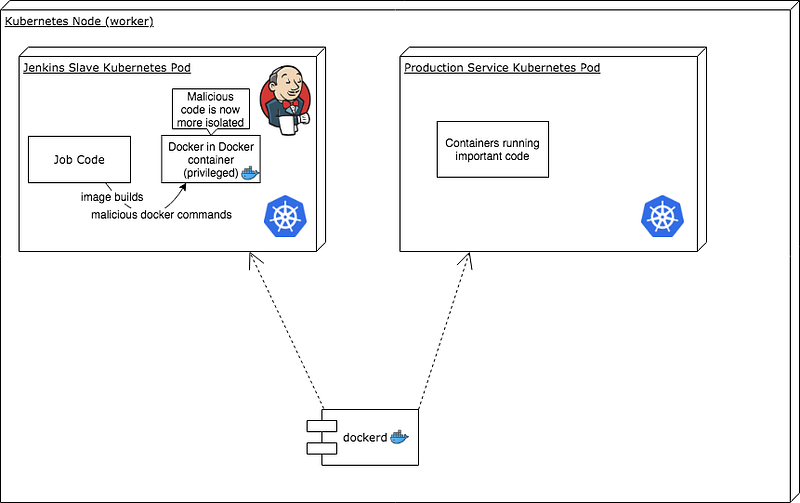
Here’s a YAML snippet with a basic configuration for Docker in Docker:
Once you launch the pod, my-container will have access to the the docker daemon running in the dind container and images can now be built on it with docker build.
Kaniko
This is an open source solution created by Google, who originally created Kubernetes. It allows you to build Docker images without access to a Docker daemon. This means that you can run container builds securely, in isolation, and easily inside your Kubernetes cluster. Kaniko has a few problems at the time of writing. The first problem is that it’s hard to set up. You need to configure a Kubernetes pod and send it a build context, then migrate your CI/CD solution to start using this new set-up to build images. Another problem is that it’s not a very mature solution, and is missing features (such as caching). You can find information about setting up Kaniko in the README found on GitHub: https://github.com/GoogleContainerTools/kaniko
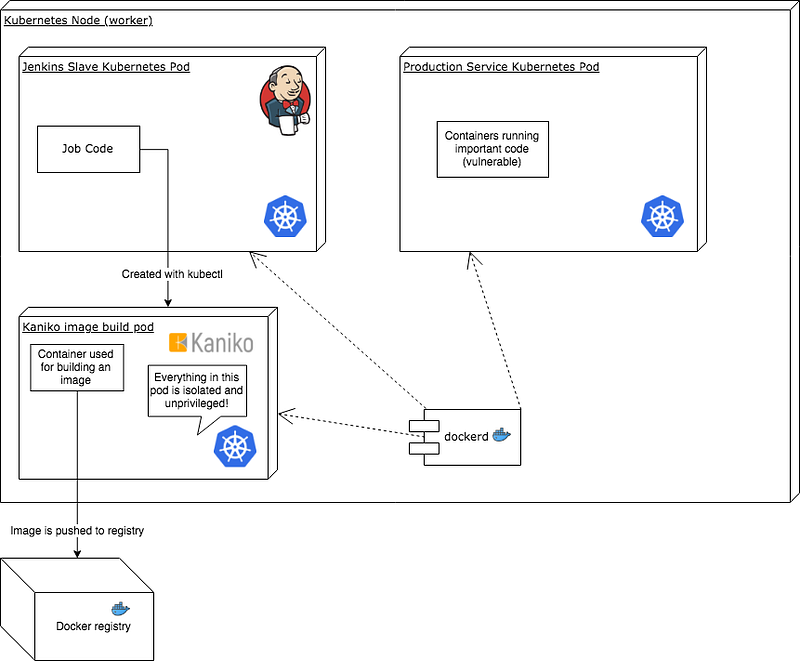
Img
This is an open source tool that essentially mirrors what the docker binary does for building images, but it does it without a Docker daemon. Currently this doesn’t work in a container, but there are upstream patches in progress to container runtimes and Kubernetes to make this possible. This would be the ideal solution if it worked in containers because you don’t need a Docker daemon or extra privileges and there is not a lot of difference between this tool and the docker binary that people are used to. You can find more information about img in the README found on GitHub: https://github.com/genuinetools/img
Implementation of Docker in Docker for Jenkins
Hootsuite is using Jenkins along with the Kubernetes plugin. We’re also currently using the Docker in Docker solution for building images inside Kubernetes pod Jenkins slaves. Here’s a stripped down version of the pod we’re using to run Jenkins slaves that has Docker in Docker configured:
Conclusion
There are many solutions to this problem but many of them are not very usable or are immature. The most simple and backwards compatible solution seems to be using Docker in Docker for images builds despite it’s drawback of having to run in a privileged security context.