
Building Date and Time Zone with JavaScript
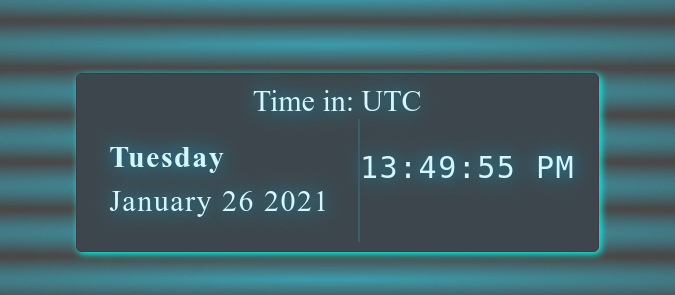
The clock project is a standard project idea for beginner when it comes to JS.
In this article, I will assume you have basic knowledge of HTML, CSS and JavaScript — you know how to link a stylesheet to your HTML or apply the styles in a <style>tag — and you know how to import a JavaScript file into your page.
Getting started
To start it off lets create a nav bar layout for our HTML:
For styling properties check out the styles.css file in my GitHub below because have to keep the blog concise so will mainly cover the .html and .js parts.
And CSS is fairly straightforward, few things to point out are the links and the burger menu as well the styling of the date and time container.
If any questions arise feel free to ping me :)


The burger menu will appear when hitting certain screen width in .css it will be defined as @media screen and (max-width : 768px) as well other properties like the date-time aisle box.
This should cover it with the CSS covered in this post.
FYI the translate() CSS function repositions an element in the horizontal and/or vertical directions. Its result is a data type.
In the JavaScript, we will be adding a class show to the main nav, which will be responsible for sliding in the links, as well as rotating the lines.
The Javascript burger menu:
var ul = document.getElementById("nav_links");
var navElements = document.querySelectorAll('a');
const navSlide = () => { const burger = document.querySelector('.burger');
const nav = document.querySelector('.nav-links'); burger.addEventListener('click', () => {
nav.classList.toggle('nav-active');
nav.classList.toggle('nav-ease-in');
});} navSlide();The JavaScript here is short and concise- at first we get the nav-links class that contains all the elements in the nav bar thenafter get all ‘a’ tags using querySelectorAll.
Inside the defined navSlide arrow function we get the burger and navlinks and make burger have an add event listener that toggles the nav bar.
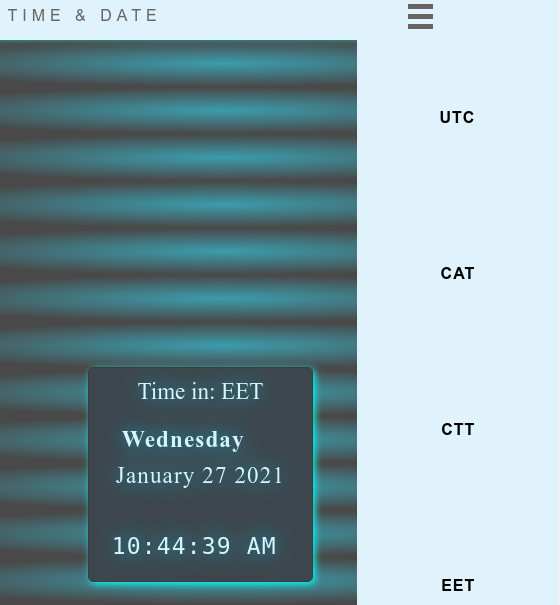
Date and clock Setup
Now lets get started with main part of this project setting up the time and being able to change the time-zones. Settle up your seat-belts because now JS comes in play with full force!
Lets continue on where we left off shall starting with .html and ending with JS.
The HTML is quite straight forward everything will be set up in the section tag and the time and date will be stored in the corresponding id tag.
Get current date and Nav element click events
This JS section will be divided in two sections to start it off receiving the date(because it doesnt change based on time zone) and adding click events to change innerHTML text with value change of the time.
Date and click event listeners
The next step is to get the current date which is achieved using JavaScript function Date() in current year, month and day. Both month and day of the week are set in array value in the Date() function thus we have to make our own array that has all the months and days of the week.
var today = new Date();
var day = weekday[today.getDay()];
var today_date = month[today.getMonth()] + ' ' + today.getDate() +  ' ' + today.getFullYear();
So we set up a new Date() object and use it to retrieve the day and month value by iterating through the corresponding array.
For the click events regarding all the list a tags we use forEach() method it will call a function once for each element in the nav list items.Every item will have its particular event listener and also assigned index which will have a switch statement and have a new function being called to initiate value change as well innerHTML text change for the corresponding time zone.
Note
Switch statement
- The switch expression is evaluated once.
- The value of the expression is compared with the values of each case.
- If there is a match, the associated block of code is executed.
- If there is no match, the default code block is executed.
Setting up Time
For the time setup we create Date() object and setHours depending on the timezone with getHours().The getMinutes() and getSeconds() will not be adjusted just the hours method will be adjusted.
Make two functions one that is run from the start and other that will be changed depending on the chosen time in the nav bar.
utc_time will have a setInterval method so the function will be called every 1 second with var timeInterval = setInterval(utc_time, 1000);
The setInterval expression is called in milliseconds that’s why 1000 is being passed after the function is being passed in the parameters.
The if statement is passed so that if the value is lower then 10 pass 0 in the begining of minutes, seconds because the method provides by single indexes.Regarding hours append PM and AM based if the getHours() method is above or bellow 11 to showcase before noon and after noon(PM,AM).Lastly get the “time” id and use the innerHTML to return the current content of the time.
To make it go real time we make two functions StopLocalClock() and StartLocalClock() so we could switch between times because setInterval will be constantly run IF we dont stop it by clearInterval and the same time to setInterval ones again to switch back to it.
Conclusion
There you go! Hope you learned a lot but that’s not it there’s a CATCH!

Everything works great except the time change function gettime(value_change) when I change it I can not go real time due to setIntervals from both functions are colliding and re-rendering the page with both values simultaneously.So the task is self explanatory I would gladly take any kind of feedback of how to solve it.
Clue
thenorawaitJavaScript’ssetTimeoutseems to be a best approach to the issue in hand includingPromiseObject.
I will definitely return to this Project sooner or later to finish the job as a newbie in JS there are a lot of knowledge that should be absorbed and understood to further develop oneself as a individual.Learning is a constant process that we all should embrace with open arms.
I hope you liked my post I will leave the project repo bellow and feel free to hit me up with questions or solution to the last part of this project.


