
Building CQRS Views with Debezium, Kafka, Materialize, and Apache Pinot — Part 2
How to build an incrementally updated materialized view that serves queries in a faster and scalable manner?
This post is the second and final installment of the article series that explores building a read-optimized view with Debezium, Kafka, Materialize, and Apache Pinot.
Part 1 discussed the problem space of building an online pizza order tracker and a possible solution architecture. Part 2 will walk you through the solution implementation in detail.
Check out part 1 from here if you haven’t already.
Step 1: Event-enabling Microservices data
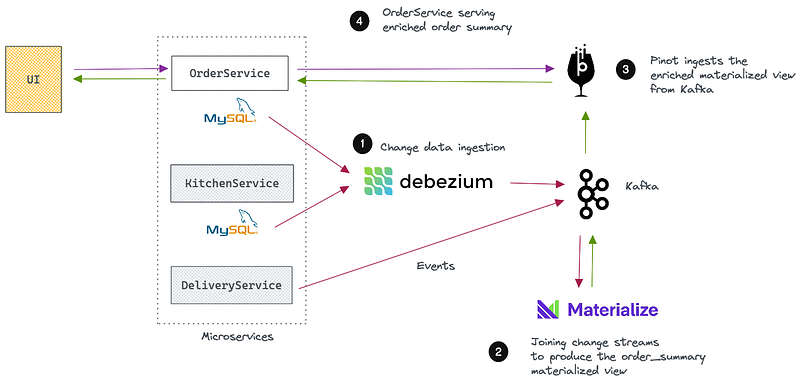
Our first step is to capture data from the above Microservices as they are produced and move them to a place where we can build a materialized view. I’ve omitted the DeliveryService in the project to have lesser moving parts and make it simple to understand.
We have orders and order items in the OrderService and order status updates in the KitchenService. Let’s move these data out first.
Streaming orders from OrderService with Debezium
Assume that the OrderService has a MySQL database called pizzashop with two tables; the orders and order_items. They represent the one-to-many relationship between pizza orders and their order items.
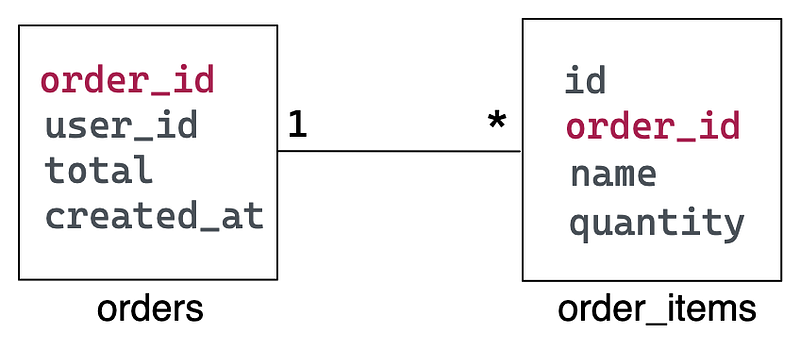
When you start the Docker stack, the MySQL container automatically creates the above database with some mock order records. You can find the seed script in <project_root>/mysql folder.
When the OrderService creates or updates orders in these tables, we can use Debezium to stream them to Kafka as change events. So, let’s register a Debezium MySQL connector to enable that.
Type the following in a terminal.
curl -H 'Content-Type: application/json' localhost:8083/connectors --data '
{
   "name":"orders-connector",
   "config":{
      "connector.class":"io.debezium.connector.mysql.MySqlConnector",
      "tasks.max":"1",
      "database.hostname":"mysql",
      "database.port":"3306",
      "database.user":"debezium",
      "database.password":"dbz",
      "database.server.id":"184054",
      "database.server.name":"mysql",
      "database.include.list":"pizzashop",
      "database.history.kafka.bootstrap.servers":"kafka:9092",
      "database.history.kafka.topic":"mysql-history"
   }
}'
Once the command returns, you should see two Kafka topics created, mysql.pizzashop.orders and mysql.pizzashop.order_items, containing change event streams from orders and order_items tables, respectively. Initially, Debezium will take snapshots from both tables and streams them to those topics.
Capturing order status changes from KitchenService
Let’s assume the KitchenService directly produces an event similar to this into a Kafka topic when the order status transitions across different states.
{
   "id":"1",
   "order_id":1,
   "status":"CREATED",
   "updated_at":1453535342
}
Publish some sample events to the order_updates Kafka topic by running:
kcat -b localhost:29092 -t order_updates -T -P -l data/updates.txtI’ve used the kcat tool here. But feel free to use any other tool. The order_id of these events matches with the orders that came from MySQL, allowing us to join them later.
Step 2: Building the order_summary materialized view.
After completing Step 1, you should see three topics created in Kafka.
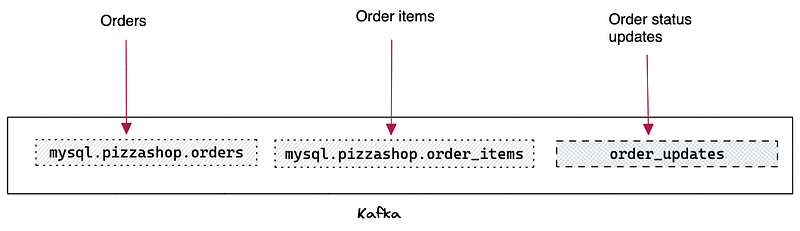
This step aims to build a materialized view by joining the events streaming from these topics together and keeping it updated incrementally as new events arrive. We will use Materialize for that.
Materialize is a streaming database designed to build data-intensive applications and services in SQL — without pipelines or caches. Materialize works based on the Timely Dataflow paper, which is instrumental in maintaining an incrementally updated materialized view.
You can check out my previous article on Materialize for more information.
Define sources and views
We will create three sources to represent the above event streams inside Materialize.
Our Docker stack already contains a running Materialize container. You can connect to it with Materialize CLI or psql (yes, Materialize is wire compatible with Postgres)
psql -U materialize -h localhost -p 6875 materializeNow that you’re in the Materialize CLI, define all of the tables in the pizzashop database as Kafka sources:
CREATE SOURCE orders
FROM KAFKA BROKER 'kafka:9092' TOPIC 'mysql.pizzashop.orders'
FORMAT AVRO USING CONFLUENT SCHEMA REGISTRY 'http://schema-registry:8081' ENVELOPE DEBEZIUM;
CREATE SOURCE items
FROM KAFKA BROKER 'kafka:9092' TOPIC 'mysql.pizzashop.order_items'
FORMAT AVRO USING CONFLUENT SCHEMA REGISTRY 'http://schema-registry:8081' ENVELOPE DEBEZIUM;CREATE SOURCE updates_source
FROM KAFKA BROKER 'kafka:9092' TOPIC 'order_updates'
FORMAT BYTES;The CDC streams written by Debezium are Avro formatted by default, and it uses the Confluent Schema Registry container included in the Docker stack. The above sources pull message schema data from the registry and materialize the column types for each attribute.
We’ll also want to create a JSON-formatted source to represent the order_updates topic.
With JSON-formatted messages, we don’t know the schema, so the JSON is pulled in as raw bytes, and we still need to CAST data into the proper columns and types. For that, we will create the following view.
CREATE MATERIALIZED VIEW updates AS
SELECT
(data->>'id')::int AS id,
(data->>'order_id')::int AS order_id,
data->>'status' AS status,
data->>'updated_at' AS updated_at
FROM (SELECT CONVERT_FROM(data, 'utf8')::jsonb AS data FROM updates_source);
This view is not materialized and doesn’t store the query results but provides an alias for the embedded SELECT statement and allows us to shape the status update data into the format we need.
Type show sources and show views to verify the sources and views created so far.
materialize=> show sources;
      name
----------------
 items
 orders
 updates_source
(3 rows)
materialize=> show views;
name
---------
updates
(1 row)Define the order_summary materialized view
Next, we will join the above streams based on the order_id to create the order_summary materialized view. This view is enriched with all information necessary to populate the UI.
CREATE MATERIALIZED VIEW order_summary AS
SELECT
orders.order_id AS order_id,
orders.total AS total,
orders.created_at as created_at,
array_agg(distinct concat( items.name,'|',items.quantity)) as items,
array_agg(distinct concat( updates.status,'|',updates.updated_at)) as status
FROM orders
JOIN items ON orders.order_id=items.order_id
JOIN updates ON orders.order_id=updates.order_id
GROUP BY orders.order_id, orders.created_at, orders.total;
The orders, order items, and status updates have different cardinalities. For example, a single event can have many order items and status updates. So, we can model the items and updates as arrays with the array_agg() Postgres function. That way, we can fit all related information of an order into a single row in the view.
Running the following query will show you the content of the view. It has already been populated with the existing data.
materialize=> select * from order_summary;Results in:

Define the Kafka sink
The order_summary materialized view keeps on updating as new events come. Changes applied to each row in the view will emit a changelog event containing the latest version of the row. We can capture these events as a CDC stream and move them to Kafka with a sink.
CREATE SINK results
FROM order_summary
INTO KAFKA BROKER 'kafka:9092' TOPIC 'orders_enriched'
 CONSISTENCY TOPIC 'orders_enriched-consistency'
 CONSISTENCY FORMAT AVRO USING CONFLUENT SCHEMA REGISTRY  'http://schema-registry:8081'
WITH (reuse_topic=true)
FORMAT JSON;
When you create a Sink, Materialize streams out all changes to the view from the time of sink creation onwards.
Remember, Materialized views are maintained in memory. If you restart Materialize and use a basic sink, you will stream duplicate change events as Materialize re-ingests the upstream data and re-computes the view. To ensure users don’t unknowingly push duplicate events, Materialize creates new, distinct topics for sinks after each restart.
We can avoid these potential issues with the reuse_topic option.
To enable the reuse of the existing topic, you must use the reuse_topic option. Also, you can specify the name of a consistency topic to store the information that Materialize will use to identify the last completed write. The name of the consistency topic is provided with the CONSISTENCY TOPIC parameter.
Since this is a JSON-formatted sink, you must specify that the consistency topic format is AVRO. That is done through the CONSISTENCY FORMAT parameter and a pointer to the schema registry URL.
Run the following query to see the Kafka topic created by the sink. Note down its name as we will need it in the next step.
SELECT sink_id, name, topic
FROM mz_sinks
JOIN mz_kafka_sinks ON mz_sinks.id = mz_kafka_sinks.sink_id;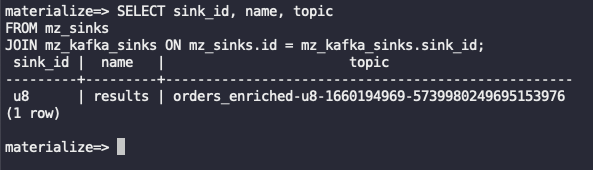
Step 3: Serving the enriched materialized view
Our work is not done yet. But we just finished the tricky part. What remains is to ingest the materialized view’s CDC stream into Apache Pinot, allowing the UI to query it fast at higher throughputs.
Why Apache Pinot?
We could’ve directly served the enriched materialized view to the UI. But this use case is different. A pizza order tracker is Internet-facing, allowing millions of concurrent users to access it, and the results must be shown in the UI within a few milliseconds.
To meet that demand, we will use Apache Pinot, a real-time OLAP database capable of ingesting streaming data and making them available for fast and scalable querying.
You can check out my previous article to learn more about Pinot.
Ingesting nested JSON objects and multi-value fields
The CDC stream coming to Kafka from Materialized consists of JSON-formatted events. The following represents a single event, which includes deeply nested structures and JSON arrays.
{
   "before":null,
   "after":{
      "row":{
         "order_id":1,
         "total":50.0,
         "created_at":"1660194991000",
         "items":[
            "Chicken BBQ|1",
            "Sri Lankan Spicy Chicken Pizza|1"
         ],
         "status":[
            "CREATED|1453535342",
            "PROCESSING|1453535345"
         ]
      }
   },
   "transaction":{
      "id":"1660196614999"
   }
}
We can configure Pinot to unnest the JSON structure during ingestion. Also, we can use multi-value columns to store order items and status updates of a single order.
For more information on ingesting complex JSON objects into Pinot, you can watch the following video by my good friend Mark Needham.
Enabling upserts on order_id
The CDC stream can have multiple events with the same order_id. For example, if the order status changes from PREPARING to READY, it will emit two events with the same order_id.
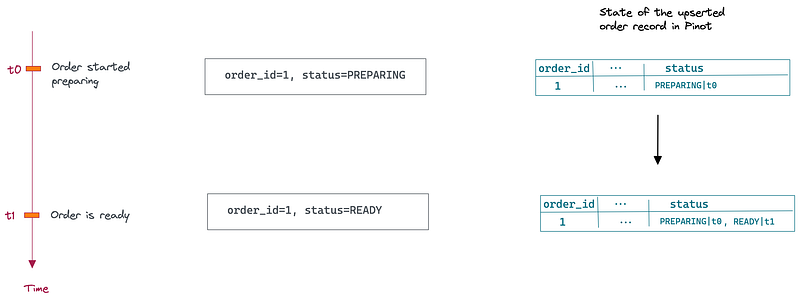
In Pinot, we can capture all change events and merge them into a single row by enabling upserts on the order_id. The upserted row always has the latest state and enables primary key-based fast lookups.
Check out the following for more information on Pinot upserts.
Full Upserts Recipe on StarTree Developer Portal
Define the orders schema and table
Finally, type the following command to define the schema and the table for orders Pinot table. You can find the relevant files inside <project_folder>/config folder.
docker exec -it pinot-controller /opt/pinot/bin/pinot-admin.sh AddTable \
-tableConfigFile /config/orders_table.json \
-schemaFile /config/orders_schema.json -exec
Note that in orders_table.json, you must change the stream.kafka.topic.name to match the topic created by Materialize sink earlier.
Testing the end-to-end solution
If you followed everything until this point, you should see two orders in the orders Pinot table.
Visit the Pinot Query Console and execute the following query to see all the orders in the system and their items and status history as multi-value fields.
SELECT
order_id,
total,
items,
status
FROM orders
Which results in:
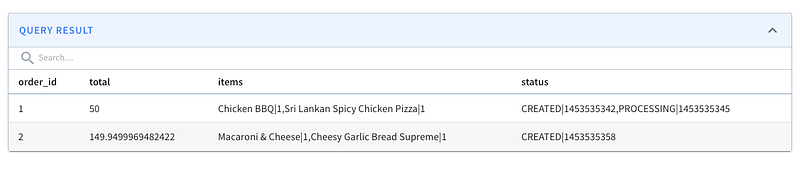
Produce the following event to Kafka to simulate a state change in order_id=1. Let’s make it ready for delivery!!!
{"id":"5","order_id":1,"status":"READY","updated_at":1453535345}Next, run this query in Pinot and see how quickly its status has changed.
SELECT
order_id,
total,
items,
status
FROM orders
WHERE order_id=1
Which results in:

Takeaways — what more can we do?
Now that we have the read-optimized view stored and maintained in Pinot. The OrderService can fulfill the order summary queries coming from the UI by doing a primary key-based lookup on the Pinot table.
Since that table has all the necessary information to populate the UI, it is read-optimized and avoids additional on-demand joins and filtering. That enables rendering the order summary UI faster, enhancing the overall user experience.
Materialize ensures the order_summary view is incrementally updated as new orders come in and their statuses are changed.
How to expand the solution?
What if you want to show more information on the UI in the future? For example, we might as well need to display the delivery ETA and the address. You can facilitate that by adding more data sources (DeliveryService and CustomerService) to the solution, configuring Materialize to join them, and updating Pinot’s serving table to include additional columns.
Please provide your feedback on this solution by commenting or tweeting at me. Also, you can send me PRs with your contributions :)


