Standardized Spring Boot API Responses — Learn how to structure responses

Introduction
When developing Spring Boot APIs, maintaining a consistent and clear response format is essential for both developers and consumers. In this guide, we’ll explore how to achieve this by using a custom Response class. This class will help us handle success and failure scenarios uniformly.
Step 1: Create the Response Class
Let’s start by creating the Response class to encapsulate the structure of API responses.
package com.example.standardapiresponse.responses;

import lombok.Getter;
import lombok.Setter;
import lombok.ToString;
import org.springframework.http.HttpStatus;


@Getter
@Setter
@ToString
public class Response<T> {

    private int statusCode;
    private String message;
    boolean success = false;
    /**
     * Can be a hashmap or list Spring will render a nice Json response :-)
     *
     */
    private T data;

    public Response(int statCode, String statusDesc) {
        statusCode = statCode;
        message = statusDesc;

        if (statusCode == HttpStatus.OK.value()) {
            success = true;
        }

    }

    public Response() {
    }

    public static <T> Response<T> failedResponse(String message) {
        return failedResponse(HttpStatus.BAD_REQUEST.value(), message, null);
    }

    public static <T> Response<T> failedResponse(T data) {
        return failedResponse(HttpStatus.BAD_REQUEST.value(), "Bad request", data);
    }

    public static <T> Response<T> failedResponse(int statusCode, String message) {
        return failedResponse(statusCode, message, null);
    }

    public static <T> Response<T> failedResponse(int statusCode, String message, T data) {
        Response<T> response = new Response<>(statusCode, message);
        response.setSuccess(false);
        response.setData(data);
        return response;
    }

    public static <T> Response<T> successfulResponse(String message, T data) {
        return successfulResponse(HttpStatus.OK.value(), message, data);
    }

    public static <T> Response<T> successfulResponse(String message) {
        return successfulResponse(HttpStatus.OK.value(), message, null);
    }

    public static <T> Response<T> successfulResponse(int statusCode, String message, T data) {
        Response<T> response = new Response<>(statusCode, message);
        response.setSuccess(true);
        response.setData(data);
        return response;
    }

}
Purpose:
- The
Responseclass is designed to encapsulate the structure of API responses, providing a standardized format for success and failure scenarios.
Attributes:
statusCode: Represents the HTTP status code of the response.message: Describes the status or reason for the response.success: Indicates whether the operation was successful.data: Holds the payload data of the response, which can be ant object.
Constructors:
Response(int statCode, String statusDesc): Initializes theResponsewith a status code and description. Setssuccesstotruefor HTTP OK (200) status.Response(): Default constructor.
Static Methods:
failedResponse: Generates a failed response with various combinations of status code, message, and data.successfulResponse: Generates a successful response with different combinations of status code, message, and data.
Step 2 (Optional): Implement Custom Exception handling
To adhere to best practices, it is recommended to implement custom exceptions in your codebase. Below is an example of a custom exception class designed to handle application-specific errors:
package com.example.standardapiresponse.exceptions;

import lombok.Data;
import lombok.Getter;
import org.springframework.http.HttpStatus;

import java.util.Collections;
import java.util.List;


@Data
public class ApplicationException extends RuntimeException  {

    private HttpStatus httpStatus;
    private List<String> errors;
    private Object data;


    public ApplicationException(String message) {
        this(HttpStatus.BAD_REQUEST, message);
    }

    public ApplicationException(HttpStatus httpStatus, String message) {
        this(httpStatus, message, Collections.singletonList(message), null);
    }

    public ApplicationException(HttpStatus httpStatus, String message, Object data) {
        this(httpStatus, message, Collections.singletonList(message),  data);
    }


    public ApplicationException(HttpStatus httpStatus, String message, List<String> errors, Object data) {
        super(message);
        this.httpStatus = httpStatus;
        this.errors = errors;
        this.data = data;
    }

    public void setHttpStatus(HttpStatus httpStatus) {
        this.httpStatus = httpStatus;
    }

    public void setErrors(List<String> errors) {
        this.errors = errors;
    }

    public void setData(Object data) {
        this.data = data;
    }

}
Now, let’s manage exceptions through global exception handling within a Spring Boot application. This GlobalExceptionHandler class handles various exceptions and provides consistent responses for different scenarios
package com.example.standardapiresponse.exceptions;

import com.example.standardapiresponse.responses.Response;
import lombok.extern.slf4j.Slf4j;
import org.springframework.http.HttpStatus;
import org.springframework.http.ResponseEntity;
import org.springframework.web.bind.annotation.ControllerAdvice;
import org.springframework.web.bind.annotation.ExceptionHandler;
import org.springframework.web.servlet.mvc.method.annotation.ResponseEntityExceptionHandler;


import java.net.UnknownHostException;

@ControllerAdvice
@Slf4j
public class GlobalExceptionHandler extends ResponseEntityExceptionHandler {

 @ExceptionHandler(Exception.class)
 public final ResponseEntity<Object> handleAllExceptions(Exception ex) {

  log.error(ex.getMessage(), ex);

  if (ex.getCause() instanceof UnknownHostException) {
   Response<String> error = Response.failedResponse(HttpStatus.NOT_FOUND.value(),
     ex.getLocalizedMessage());
   return new ResponseEntity<>(error, HttpStatus.BAD_REQUEST);
  }
  Response<String> error = Response.failedResponse(HttpStatus.INTERNAL_SERVER_ERROR.value(),
    "We are unable to process your request at this time, please try again later.", ex.getMessage());
  return new ResponseEntity<>(error, HttpStatus.INTERNAL_SERVER_ERROR);
 }

 @ExceptionHandler(ApplicationException.class)
 public ResponseEntity<Object> handleApplicationException(ApplicationException ex) {
  return ResponseEntity.status(ex.getHttpStatus()).body(Response.failedResponse(ex.getHttpStatus().value(), ex.getMessage()));
 }

}
This allows us to also have standard exceptions or error responses
Step 3: Create a Controller Using the Response Class
Now, let’s create a controller that uses the Response class to handle API responses consistently.
The Controller class returns the `ResponseEntity` of Response
package com.example.standardapiresponse.controllers;

import com.example.standardapiresponse.models.User;
import com.example.standardapiresponse.responses.Response;
import com.example.standardapiresponse.services.ExampleService;
import org.springframework.beans.factory.annotation.Autowired;
import org.springframework.http.ResponseEntity;
import org.springframework.web.bind.annotation.GetMapping;
import org.springframework.web.bind.annotation.RequestMapping;
import org.springframework.web.bind.annotation.RestController;

import java.util.List;

@RestController
@RequestMapping("/api/v1")
public class ExampleController {

    @Autowired
    private ExampleService exampleService;

    @GetMapping("/users")
    public ResponseEntity<Response<List<User>>> getUsers(){
        //Validate your request for other end point first

        // call your service
        Response<List<User>> response = exampleService.getUsers();

        //return Response entity.
        return ResponseEntity.status(response.getStatusCode()).body(response);

    }
}
Line of Interest: This line illustrates the method of returning a response object:
return ResponseEntity.status(response.getStatusCode()).body(response);
Step 4: Create a Simple Service
Next, let’s create a simple service that performs some business logic and must return Response or throw exception
package com.example.standardapiresponse.services;

import com.example.standardapiresponse.exceptions.ApplicationException;
import com.example.standardapiresponse.models.User;
import com.example.standardapiresponse.responses.Response;
import org.springframework.http.HttpStatus;
import org.springframework.http.ResponseEntity;
import org.springframework.stereotype.Service;

import java.util.List;

@Service
public class ExampleService {

    public Response<List<User>> getUsers(){

        //Do your business logic or get data from Repository
        User helloWorld = new User("Hello World");
        User sample = new User("Sample of ");
        User standardized = new User("standardized");
        User responses = new User("responses");
        List<User> users = List.of(helloWorld, sample, standardized, responses);

       // =============Sample for Exception throwing response via exception =======================/*
       /**
         // sample of throwing exceptions
         // Please note that this response will be handled by global exceptions
        if(users.isEmpty()){
          throw new ApplicationException(HttpStatus.NOT_FOUND,"No user found", null);
        }
        */

       // =============Sample for failed response =======================
       /**
         Sample of return a failed response
        return  Response.failedResponse(HttpStatus.NOT_FOUND.value(),"No user found", null);
        */

        return  Response.successfulResponse("Successful", users);
    }
}
Samples Response:
- Exception Throwing: This will be handled by the global exceptions and return standard response like the class we created
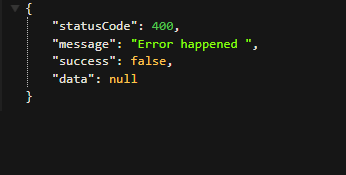
throw new ApplicationException(HttpStatus.NOT_FOUND, "No user found", null);- If the list of users is empty, an
ApplicationExceptionis thrown, which is meant to be handled by global exceptions. Failed Response: Demonstrates returning a failed response explicitly.
return Response.failedResponse(HttpStatus.NOT_FOUND.value(), "No user found", null);- Successful Response: Demonstrates returning a successful response with the list of users
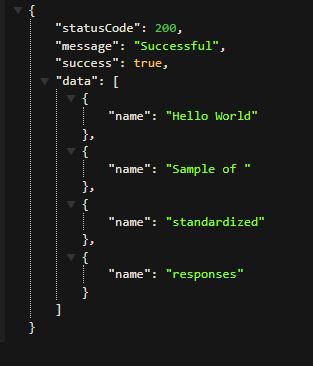
return Response.successfulResponse("Successful", users);This is how the response now look
Throwing exception
Complete sample code : https://github.com/reubenshumba/standardapiresponse.git
Conclusion
Following these steps, you have established a tailored structure for consistent API responses in Spring Boot. This approach improves the clarity and user-friendliness of your API, aiding developers in understanding and effectively utilizing the communicated data. Tailor the code to suit your specific requirements and continue building resilient and developer-friendly APIs with Spring Boot.
Stay tuned!!! I will be back with some more cool Spring boot tutorials in the next article. I hope you liked the article. Don’t forget to follow me 😇 and give some claps 👏. And if you have any questions feel free to comment. Thank you.
Thanks a lot for reading till the end. Follow or contact me via: Email: [email protected] LinkedIn: https://www.linkedin.com/in/reuben-shumba-a72aaa157/ BuyMeCoffee: https://www.buymeacoffee.com/reubenshumba REUBEN SHUMBA


