avatarMykola-Bohdan Vynnytskyi

Free AI web copilot to create summaries, insights and extended knowledge, download it at here

2228

Abstract

e78">After deciding which executor and which database to use, the following architecture was created, that allows individual airflow components to work in tandem using docker containers.</p><figure id="ed21"><img src="https://cdn-images-1.readmedium.com/v2/resize:fit:800/1*t1UNHnYqtbuTV4s6FyqUeQ.png"><figcaption>Airflow Architecture</figcaption></figure><ul><li><i>The scheduler </i>is the main part of Airflow. It monitors, updates, and triggers the task instances once their dependencies are complete.</li><li><i>The worker </i>executes the tasks given by the scheduler.</li><li><i>The web server</i> allows interaction with the system via web UI.</li></ul><h2 id="1b79">Apache Spark</h2><p id="0268">After creating the Airflow cluster, we encountered a second problem with container overload.</p><p id="fdbf">Airflow has a lot on its plate (planning, monitoring, etc.), and we just added one more thing — run the Spark tasks in the same container, which caused an overload problem. To resolve this issue we added to the cluster a separate module that will be responsible to execute Spark jobs</p><p id="baf1">Apache Spark is an open-source, general-purpose distributed data processing engine that is suitable for use in a wide range of circumstances. It can be run in different modes, but we were interested in <a href="https://spark.apache.org/docs/latest/spark-standalone.html">Standalone Mode</a>, which allows us to deploy the Spark cluster on a single machine.</p><figure id="b661"><img src="https://cdn-images-1.readmedium.com/v2/resize:fit:800/1*MK2BO3Zi-PPc36A5NvPecA.png"><figcaption>Project Architecture that includes Spark Standalone Mode</figcaption></figure><ul><li><i>The master</i> is the driver that runs the main program where the spark context is created.</li><li><i>The worker</i> consists of processes that can run in parallel to perform the tasks scheduled by the driver program.</li></ul><h1 id="e98e">How to run the environment</h1><h2 id="b8b0">Default Version</h2><ul><li>Apache Airflow <b>2.3</b></li><li>Apache Spark <b>3.1.2</b></li></ul><h2 id="b454">Prerequisites</h2><ul><li><a href="https://git-scm.com/">Git</a></li><li><a href="https://docs.docker.com/get-docker/">Docker</a></li><li><a

Options

href="https://docs.docker.com/compose/install/">Docker Compose</a></li></ul><h2 id="300d">Download Project</h2><p id="a1cb"><code>git clone <a href="https://github.com/mbvyn/AirflowSpark.git">https://github.com/mbvyn/AirflowSpark.git</a></code></p><h2 id="6f8d">Run containers</h2><p id="2666">Inside the <code>AirflowSpark/docker/</code></p><p id="394b"><code>docker-compose up -d</code></p><h2 id="93f7">Check the access</h2><ul><li><a href="http://localhost:8080/">Airflow</a></li></ul><p id="7966">login: airflow</p><p id="d31e">password: airflow</p><ul><li><a href="http://localhost:8181/">Spark</a></li></ul><h2 id="1fba">Configure Spark Connection</h2><ul><li>Go to <a href="http://localhost:8080/connection/list/">Connection</a></li></ul><p id="8b14">Admin >> Connections</p><ul><li>Add a new record like in the image below</li></ul><figure id="869e"><img src="https://cdn-images-1.readmedium.com/v2/resize:fit:800/1*Grh9aoInU8TOm07Eu2NEVA.jpeg"><figcaption>A connection that will allow Airflow to delegate tasks to Spark</figcaption></figure><h2 id="19d8">Increase the number of Spark Workers</h2><p id="5ead">It is possible to increase the number of workers and specify their memory and cores. Just add the following code to <b>docker-compose.yml</b> and change <i>SPARK_WORKER_MEMORY</i> and/or<b> </b><i>SPARK_WORKER_CORES</i> as you wish.</p> <figure id="ff04"> <div> <div>

            <iframe class="gist-iframe" src="/gist/mbvyn/9a850542ce5fb094f8495620a938facc.js" allowfullscreen="" frameborder="0" height="undefined" width="undefined">
          </div>
        </div>
    </figure></iframe></div></div></figure><h1 id="cffa">Conclusion</h1><p id="c39e">Airflow and Spark are some of the most important tools in Data Engineer’s work. 

Having such an environment configured on a local machine, which was described in this article, allows you to easily develop and test your solutions.</p><p id="155a">You can also check out <a href="https://github.com/mbvyn/AirflowSpark">the GitHub repository</a> for additional information and examples of DAG and spark jobs.</p><p id="2280">Hope this article was helpful. See you!</p></article></body>

Building an Apache Airflow configured with Local Executor and Spark Standalone Cluster with Docker

A guide on how to set up an environment to work with Airflow and Spark

Photo by Emile Perron on Unsplash

Brief context

For a Data Engineer, it is only natural to create ETL processes on a daily basis. And, apparently, there is no better solution for this purpose than Apache Spark. These ETL processes should also be automated with a tool such as Apache Airflow.

Recently, my team and I hit a problem with how to run DAGs in parallel without overloading the system. To solve this problem, a development environment was created with Docker, where Apache Airflow with Local Executor was responsible only for the orchestration of DAGs, and Apache Spark in Standalone Mode for data processing.

In this article, I will share with you how to create the development environment that includes Apache Airflow and Apache Spark in Standalone Mode.

Component overview

Apache Airflow

Apache Airflow is an open-source tool to author, schedule, and monitor workflows programmatically. It is one of the most robust platforms used by Data Engineers for orchestrating workflows or pipelines.

To run instances of tasks, Apache Airflow has a special mechanism called Executor. There are many different executors for different purposes. In our case, we need a lightweight executor that can run tasks in parallel.

The LocalExecutor is a perfect match for our solution. He completes tasks in parallel that run on a single machine.

To store Airflow metadata we also need a database for this purpose we use PostgreSQL.

After deciding which executor and which database to use, the following architecture was created, that allows individual airflow components to work in tandem using docker containers.
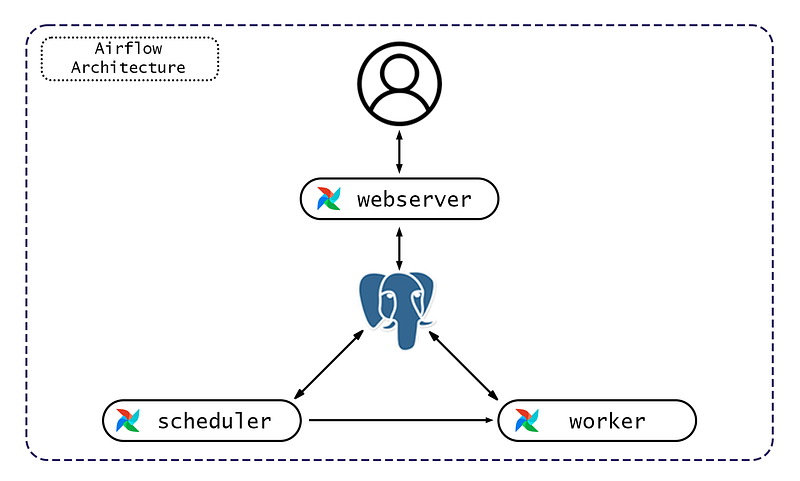
Airflow Architecture
  • The scheduler is the main part of Airflow. It monitors, updates, and triggers the task instances once their dependencies are complete.
  • The worker executes the tasks given by the scheduler.
  • The web server allows interaction with the system via web UI.

Apache Spark

After creating the Airflow cluster, we encountered a second problem with container overload.

Airflow has a lot on its plate (planning, monitoring, etc.), and we just added one more thing — run the Spark tasks in the same container, which caused an overload problem. To resolve this issue we added to the cluster a separate module that will be responsible to execute Spark jobs

Apache Spark is an open-source, general-purpose distributed data processing engine that is suitable for use in a wide range of circumstances. It can be run in different modes, but we were interested in Standalone Mode, which allows us to deploy the Spark cluster on a single machine.
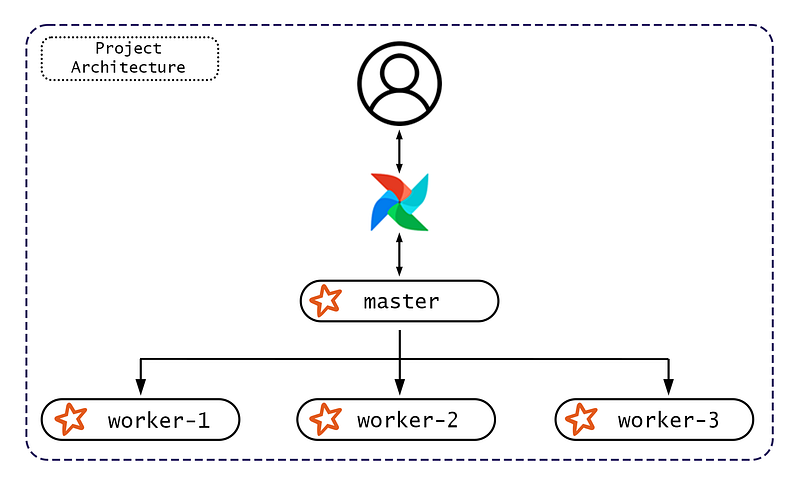
Project Architecture that includes Spark Standalone Mode
  • The master is the driver that runs the main program where the spark context is created.
  • The worker consists of processes that can run in parallel to perform the tasks scheduled by the driver program.

How to run the environment

Default Version

  • Apache Airflow 2.3
  • Apache Spark 3.1.2

Prerequisites

Download Project

git clone https://github.com/mbvyn/AirflowSpark.git

Run containers

Inside the AirflowSpark/docker/

docker-compose up -d

Check the access

login: airflow

password: airflow

Configure Spark Connection

Admin >> Connections

  • Add a new record like in the image below
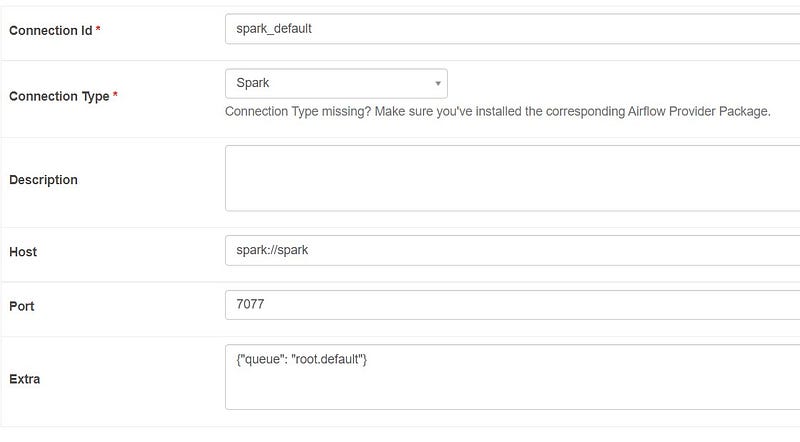
A connection that will allow Airflow to delegate tasks to Spark

Increase the number of Spark Workers

It is possible to increase the number of workers and specify their memory and cores. Just add the following code to docker-compose.yml and change SPARK_WORKER_MEMORY and/or SPARK_WORKER_CORES as you wish.

Conclusion

Airflow and Spark are some of the most important tools in Data Engineer’s work. Having such an environment configured on a local machine, which was described in this article, allows you to easily develop and test your solutions.

You can also check out the GitHub repository for additional information and examples of DAG and spark jobs.

Hope this article was helpful. See you!

Data Engineer
Spark
Airflow
Docker
Big Data
Recommended from ReadMedium