
Building An Academic Knowledge Graph with OpenAI & Graph Database — Part 2
Use GPT-3 for Entity & Relationship Extraction
by Joshua Yu

This is the 2nd part of my trilogy: Building An Academic Knowledge Graph with OpenAI & Graph Database, and I am going to use OpenAI API for entity and relationship extraction.
I. Review What We Have Done
Just to remind the data pipelnie of this project as below:

In the 1st part, I covered data source and ingestion via Neo4j APOC procedure apoc.load.xml to create a knowledge graph for Paper, Author, Title and Summary.
If you followed my steps and used the code shared on Github, you should be able to see the nodes and relationships like this:
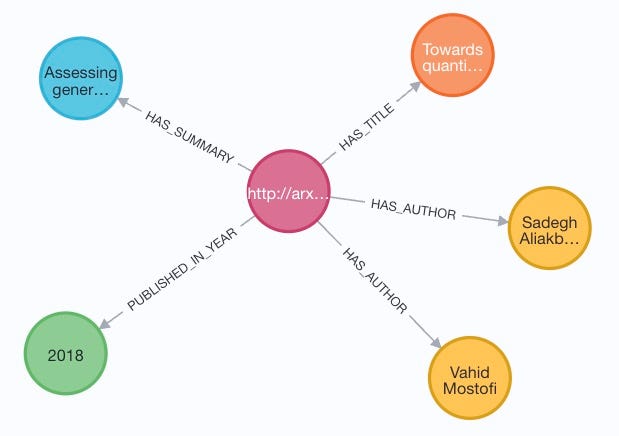
Till now, you may have already had many ideas on how to find more interesting insights from this graph, e.g.:
- find out the papers published by an author and show them along the chain of years
- generate a co-author graph and then a social network of researchers
- predict who may work together on the next paper with the highest probability
- recommend researchers
- use degree centrality and/or PageRank to find out the most imporant reseachers of a specific domain
- … …
Correct! These are popular tasks we can do once we see data as connected things (nodes) through relationships from the real world (rather than just JOINs in a DBMS), and the more nodes and relationships we have, the more insights we can obtain from this!
II. Entity & Relationship Extraction in OpenAI
The metadata of papers contains titile, summary, authors etc. useful information, but more knowledge is in fact embedded in the free style text of title and summary. In the past, there have already been a lot of tools/libraries to perform the so-called NLP (Natural Language Processing). Not surprisingly, this is something GPT-3 is highly capable of too. What’s more exciting is its simplicity and intuitiveness. Let’s have a look at some examples.
Launch the OpenAI Playground and use Parse unstructured data example. You may try other examples e.g. Keywords but I found this one working better towards my goal. With GPT-3, all we need is simply to tell it what we want to do by typing the following words:
Extract entities and relationships from the following text: Cypher is the query language of Neo4j graph database.
and then click Submit button:
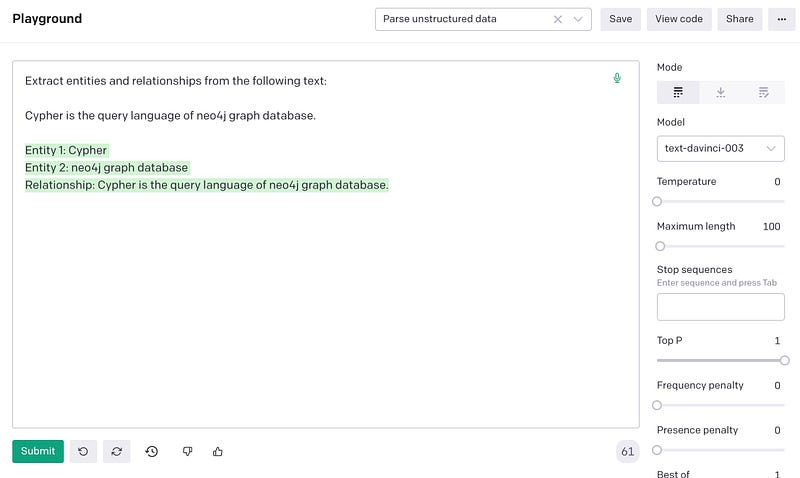
GPT-3 is smart enough to understand our intention / task:
Extract entities and relationships from the following text:
and provided sample:
Cypher is the query language of neo4j graph database.
It completes the text with results:
Entity 1: Cypher Entity 2: neo4j graph database Relationship: Cypher is the query language of neo4j graph database.
We can even instruct it to give results in a certain format:
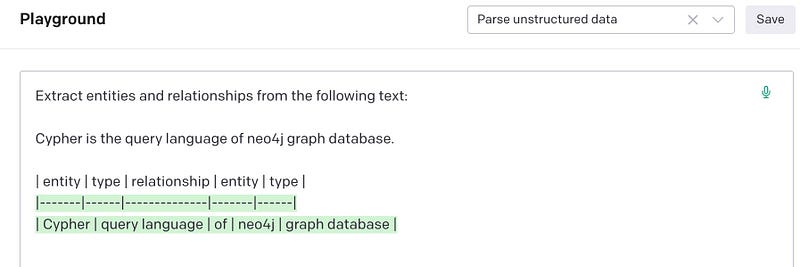
The format can be XML, JSon or anything as long as you provide a sample! According to OpenAI, This is the so-called Prompt Design. It is the process of designing the input text, or the prompt, that a model will use to generate its output with quality and effectiveness. It is important to understand how to craft a good prompt for GPT-3. Truly amazing!
When calling the OpenAI API to perform the task, the prompt text is passed as one parameter of the HTTP Request. As simple as that!
II. Make OpenAI API Calls
Neo4j APOC library provides 2 procedures to call a Restful API:
1) apoc.load.json(), and
2) apoc.load.jsonParams()
The major difference, as per the name suggests, is jsonParams allows the HTTP Header to be changed. Due to this reason, it is not availabe on Neo4j AuraDB for security considerations. However, if you run the pipeline from a client using e.g. Python, it is doable to call OpenAI API within the Python code, and then pass result JSON as a String object to apoc.load.json() which is available on AuraDB.
The scripts below can work well on Neo4j Desktop, or any other Neo4j DBMS versions that enable apoc.load.jsonParams.
// 1) api related parameters
:param openai_api_url=>'https://api.openai.com/v1/completions';
:param openai_api_header_content_type=>"application/json";
:param openai_api_header_auth=>"Bearer " + '***YOUR-OPENAI-APIKEY***';

// 2) model related parameters
:param openai_model=>"text-davinci-003";
:param openai_model_temperature=>0;
:param openai_model_max_tokens=>800;
:param openai_model_top_p=>0.5;
:param openai_model_frequency_penalty=>0;
:param openai_model_presence_penalty=>0.5;

// 3) prompt related parameters

//   Entity-Relationship extract
:param openai_prompt_er_extract_start=>'Extract entities and relationships from the following text:\n\n';
:param openai_prompt_er_extract_result_header=>'| entity | type | relationship | entity | type |';
//   Entity extract
:param openai_prompt_e_extract_start=>'Extract entities  from the following text:\n\n';
:param openai_prompt_e_extract_result_header=>'| entity | type |';
:param openai_prompt_result_skip=>'---';
:param openai_prompt_text=>'Cypher is the query language of neo4j graph database. ';
:param open_prompt_result_delimiter=>'|';
Below is the pseudo code for running entity and relationship extraction for the Summary of each Paper:
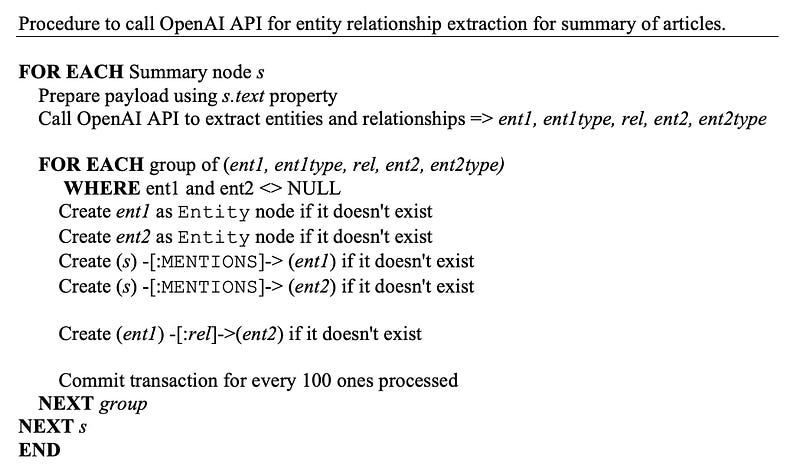
And actual Cypher statement:
// Run Entity-Relationship extraction for all Summary texts by openai API
//
:auto MATCH (s:Summary)
WITH s,
     apoc.convert.toJson(
        {
            model: $openai_model,
            prompt: $openai_prompt_er_extract_start + s.text + '\n\n' + $openai_prompt_er_extract_result_header,
            temperature: $openai_model_temperature,
            max_tokens:  $openai_model_max_tokens,
            top_p:       $openai_model_top_p,
            frequency_penalty: $openai_model_frequency_penalty,
            presence_penalty : $openai_model_presence_penalty
        }) AS payload
CALL {
    WITH s, payload
    CALL apoc.load.jsonParams(
        $openai_api_url,
        {
            `Content-Type`:'application/json',
            Authorization: $openai_api_header_auth
        },
        payload
    ) YIELD value
    WITH s, split(trim(value.choices[0].text), '\n') AS lines
    UNWIND lines AS line
    WITH s, split(line, $open_prompt_result_delimiter) AS tokens
    WITH s, [tk IN tokens WHERE size(trim(tk)) > 0 AND NOT trim(tk) CONTAINS $openai_prompt_result_skip | trim(tk)] AS tok
    WHERE size(tok) > 0
    // -----
    // Create and link entity through relationships extracted
    //   - new Entity nodes
    WITH s, tok[0] AS ent1, tok[1] AS ent1type, tok[2] AS rel, tok[3] AS ent2, tok[4] AS ent2type
    WHERE NOT (ent1 IS NULL OR ent2 IS NULL)
    MERGE (e1:Entity{value:toLower(ent1)})
        ON CREATE SET e1.text = ent1, e1.type = ent1type
    MERGE (e2:Entity{value:toLower(ent2)})
        ON CREATE SET e2.text = ent2, e2.type = ent2type
    MERGE (s) -[:MENTIONS]-> (e1)
    MERGE (s) -[:MENTIONS]-> (e2)
    //   - new Relationship
    WITH e1, e2, rel
    CALL apoc.cypher.doIt("MATCH (e1) WHERE id(e1) = $e1id
                        MATCH (e2) WHERE id(e2) = $e2id
                        MERGE (e1) -[:`" + toLower(rel) + "`]-> (e2)",
                        {e1id:id(e1), e2id:id(e2)}
    ) YIELD value
    RETURN value
} IN TRANSACTIONS OF 100 ROWS
RETURN value IS NULL AS status;
The code above has about 50 lines so let me do a bit explanation on related Neo4j Cypher features here:
1) WITH clause is used several times to pass data stored in variables to the following parts of query statement;
2) UNWIND is equivelant to FOR EACH item IN a collection DO …
3) Because relationship name is decided by the extracted corpus from the summary text, apoc.cypher.doIt() is used to create relationship with dynamic type names.
4) Execution logic is enclosed in a CALL sub-block and there is a commit for every 100 transactions. This is one of the new Cypher syntax features since 4.x to replace (partially) the famous apoc.periodic.iterate() procedure.
We will do the samiliar call for Title of Paper but only for entity extraction. The process should be easy enough to understand so I won’t put pseudo code here.
III. Check Our Enriched KG
Let’s now have a look at a few samples.
For paper id: https://arxiv.org/abs/2202.13608v2
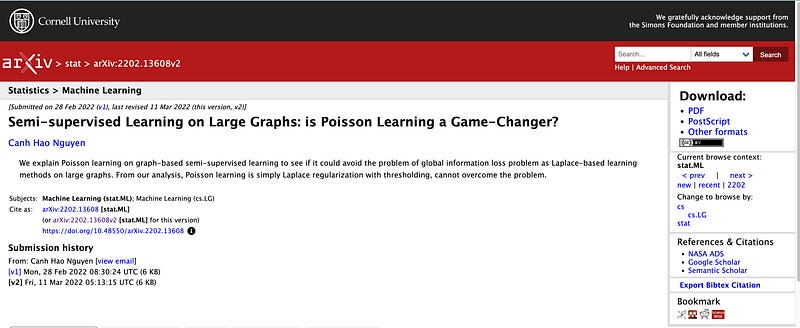
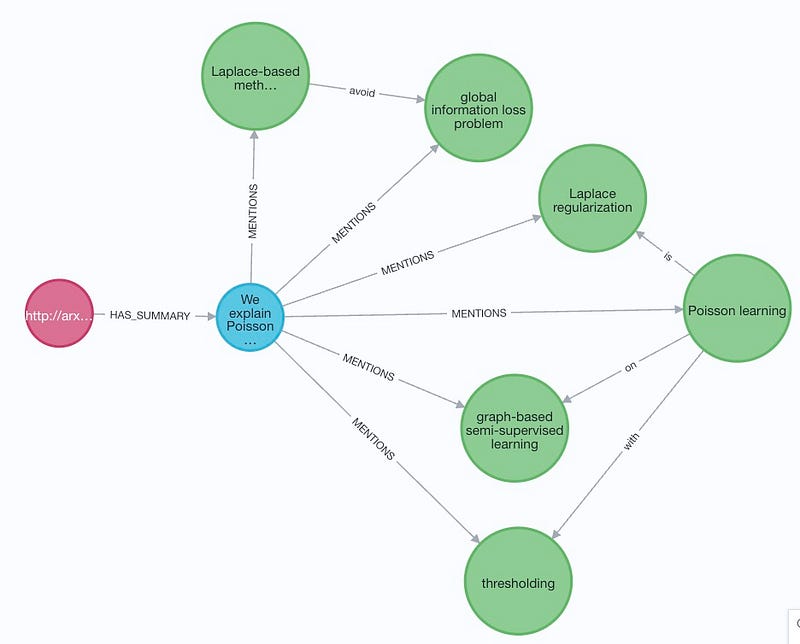
Summary text (highlighted texts are extracted entities and relationships, and underlined texts are missed by the process):

Result graph of entity and relationship extraction:
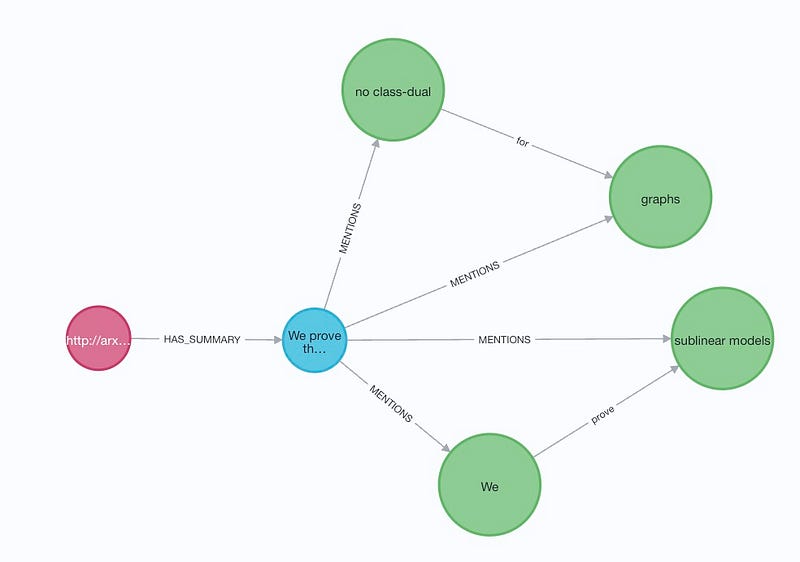
There are cases of inconsistency extraction for example:
For paper http://arxiv.org/abs/1405.7897v1, it has summary text:

The extracted entities include word ‘We’, which is also extracted from the summary text of only one other paper. If We is supposed to be regarded as entity, I’d expected this to be done for all papers.
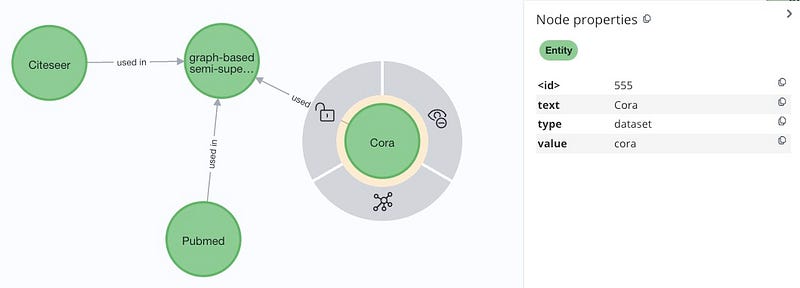
To me, the most interesting part is the correlations between Entities. Below is the graph about datasets used in semi-supervised learning. The ER Extraction process not only recognised correct entity names, it also provided correct type, which is dataset in this case.
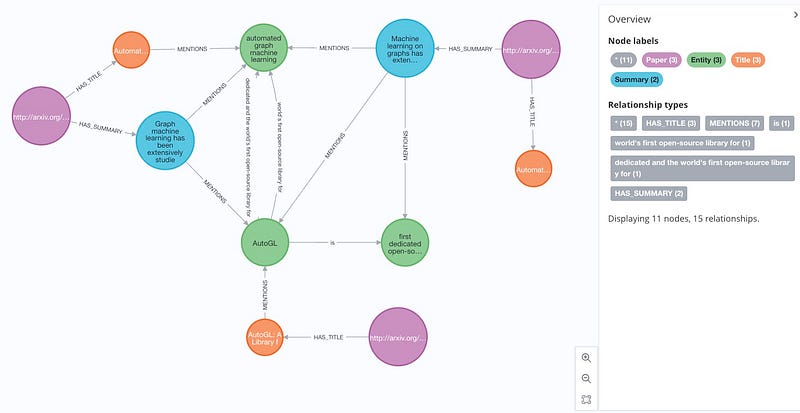
Below is the graph of relevant papers on AutoGL:
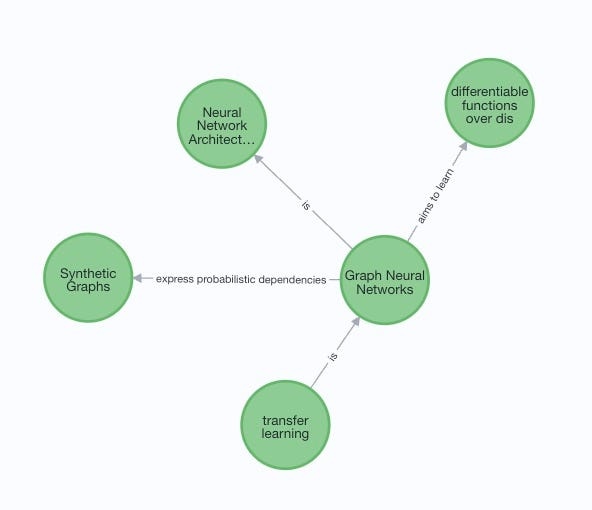
and knowledge about Graph Neural Networks:
IV. Summary
In this episode, we continue the project with entity and relationship extraction using OpenAI API, by creating smart prompts to tell it what we exactly what to achieve. The results are again so impressive, even though there are some places to investigate and improve further. By enriching our academic KG through a NLP pipeline, we can extract concepts and relationships among them at a more granular level, and produce further insights.
Today’s code can be found from my Github repository.


