
Building a Video Game in One Week With Godot
Learning the Godot Engine by building a full-featured video game
When I was in high school (in 2007), I built my first video game. It was a multiplayer persistent online browser game based on the TV show Prison Break 👮 (it is still online for demo purposes, and I left the ugly code open source). Since then I didn’t build anything like a video game, and I was always wondering how hard it could be to build one. That is why I included game development in the Learning Lab challenge, a series of learning challenges that I take myself every 1 to 3 months.
The problem with software engineering, and development, is that for every problem there are hundreds or thousands of solutions. In the more narrowed case of game development, there are a few toolkits, called game engines, to build them. Just type “game engine” on google and you will see 😬.
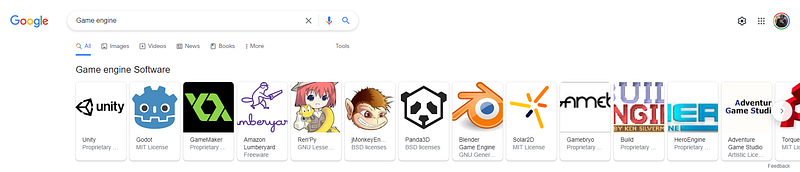
Each of these game engines uses different programming languages and have their own specificities: 2D Games, 3D Games, Games for the web browser, Games for mobile, Game for consoles,…
At the time of writing this post, the most famous engines are Unity, Unreal Engine, Cryengine, and Godot. I will not compare them here, you can find a lot of comparisons online, but I can explain why I decided to go for Godot:
- Godot is open source under MIT License
Godot is completely free and open-source under the very permissive MIT license. No strings attached, no royalties, nothing. Your game is yours, down to the last line of engine code. Source: https://godotengine.org/
- Godot is cross-platform (Windows, Browser, Android, iOS, OSX,…)
- Godot works for both 2D and 3D games
- Godot lets you build the game in C++, C#, Visual Scripting (Low-code) or GDScript (more or less like python), I chose the last one!
- It has quite a big community and a lot of learning resources online
- The engine is continuously updated
Now that you know why I chose Godot, let’s see how to build a video game 🙌!
In this post, I will explain the steps I followed to build a game in one week and I’ll give a quick overview of Godot itself.
Learning preparation
This learning preparation follows the Learning Lab methodology 🎓.
- Finding a mentor I didn’t really look for a mentor. I was just using my main learning course as a mentor! Nevertheless, I decided to work with my girlfriend on the design of the game to detach myself from this so I don’t make design choices.
- Defining the scope of the topic The scope of this learning was to understand the main capabilities of Godot in both 2D and 3D, and how to build a video game from A to Z.
- Choosing a learning resource To learn Godot I used this Udemy course: https://www.udemy.com/course/discovering-godot/ If you are wondering why it was just because I got a coupon for one free course. It was pretty good, and the game shows how to build one simple text-based game, two 2D games, and two 3D games. If you don’t want to pay there are a lot of Godot courses also on youtube.
- Defining a project I had a few different ideas and I ended up choosing one that I got from my nephew: a fighting game to learn the times tables 👨🎓.
How to build a video game
I started building the game after finishing the Udemy course. Here are the steps I followed!
Step 1 — Define the goal of the game 🎯
Before starting anything, define a high-level concept and a goal for your game:
In my case the concept was:
- The game has to make you learn the times tables
- There will be a series of battles to win by giving the right mathematical answers
- The levels should get harder and harder but remain feasible
- From time to time the user should fight a boss
- After winning the final boss, the main character will arrive at his final destination
Step 2— Look for a pack of assets 👾
This step is optional if you are a designer, but if not, I recommend you to look for a pack of assets you could be using so you can design your game around them.
There are many places to get your assets and a few ones with free options are:
- Kenney — https://www.kenney.nl/
- Itch — https://itch.io/game-assets/free
In my case, I first found this pack that my nephew validated: https://0x72.itch.io/dungeontileset-ii
Then I looked for backgrounds that would match it, and I found this amazing pack: https://github.com/sparklinlabs/superpowers-asset-packs
Once the main assets were found we started to think about what would be the gameplay.
Step 3 — Defining the gameplay 🎮
Two elements were required to define the gameplay:
- The screens of the game
- The rules of the game
We found 4 mains screens:
- Landing screen
- Level selection screen
- Battle screen
- Winning / Losing screen
We wanted simple rules:
- If you give the correct answer, the enemy gets damaged
- If you are wrong you get the damage
- To make it more enjoyable: the faster you give the right answer the stronger is the damage you inflict to the enemy.
- When you win a level you unlock the next one
- To make it not too hard: the enemy has a constant attack but the more you go to a higher level the stronger is the enemy
- The constants should be made in a way the user can learn all the times tables
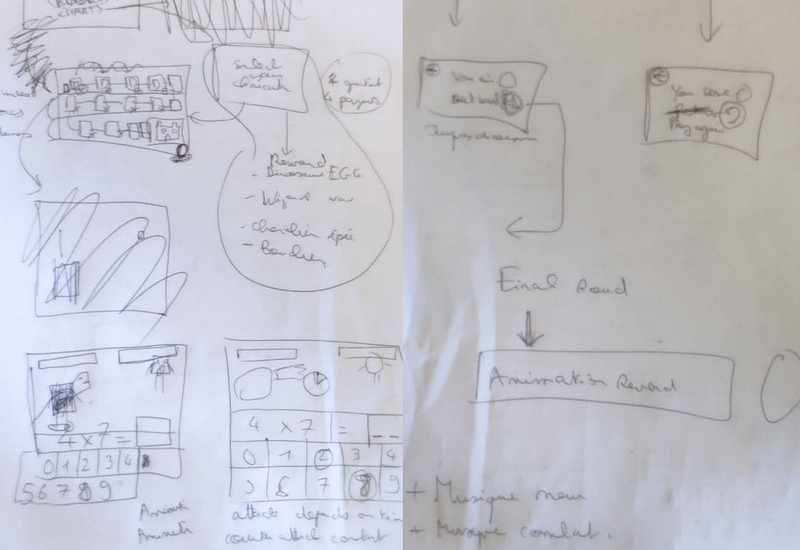
After we had this draft and the rules I started to build the game. But I struggled a lot with the design, it looked ugly (unfortunately I don’t have screenshots to share) and it was frustrating 😓. So I decided to stop and I asked my girlfriend for her help with the designs. To have all the screens designed.
So we first made all the screens in a more detailed way on paper 🙂.
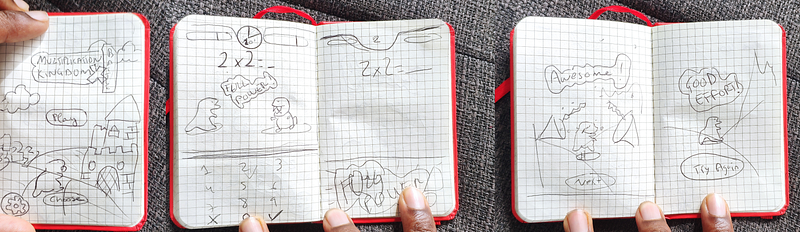
Then we made it on the computer with Adobe Xd.
Step 4 — Making high fidelity designs 🎨
Using the more detailed mockups made on paper, we designed a proper high fidelity design that I could later rebuild without any extra “design thinking” so my brain could focus fully on implementation and logic.
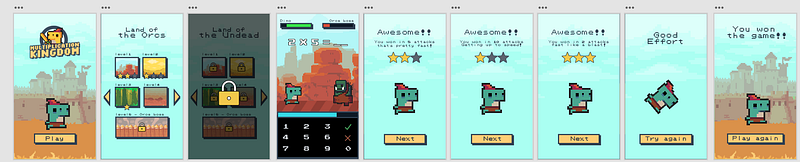
Step 5— Building 🏗️
Once the design was ready, I just had to implement everything with Godot. I will explain below how was my experience with Godot.
Step 6 — Testing 🧪
Once the game was built we needed to do some tests to find bugs and fix them.
Step 7— Publishing 🚀
The last step is to publish the game, in our case we decided to publish on iOS and Android. So we had to do specific tasks such as writing the description for the stores and creating the right screenshots and so on.
Also to make the website I used my free and open-source template: https://mobileapplandingpage.learn.uno/
My experience with Godot
Quick introduction about Godot
In Godot everything is made of Scenes, Nodes, and Scripts, here are a few concepts that you should understand before starting:
- All your views of your game are scenes
- Scenes are composed of Nodes and Scenes
- Nodes are pre-composed elements to make the development faster (you have UI nodes such as buttons, progress bar, or more 2D or 3D related elements such as camera, parallax background, sprite, physics elements, light, shadow, …)
- A Node is a class until you run the code where it becomes instantiated as an object
- All the nodes are well documented
- You can create your own classes by inheritance or composition either by creating Scenes or Scripts
- Each Node or Scene can have a script, it’s basically where you put your own logic
- You can connect Nodes to Scripts with Signals, basically, an event that is run when an action happens such as a click on a button
How Godot looks like
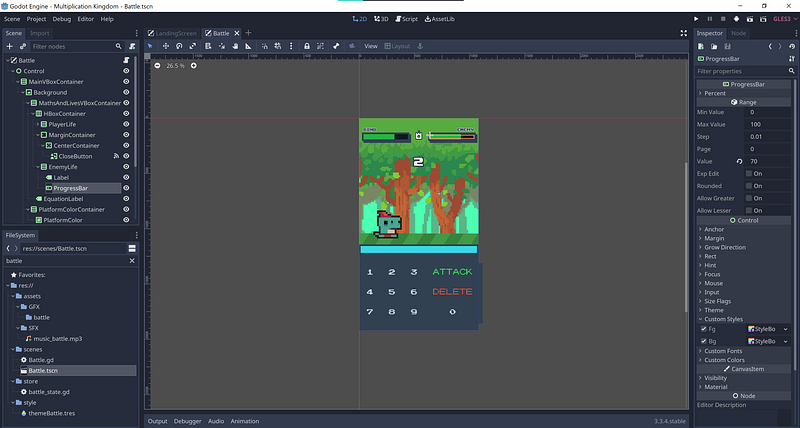
The IDE (Integrated Development Environment) of Godot is apparently made itself with the Godot engine! It has a GUI to build your interfaces and a text editor for the scripts:
- On the left you have your scene tree, it contains all its nodes
- On the left bottom just a basic filesystem useful to drag and drop textures
- In the middle it’s your scene editor, it can be changed to a text editor when you want to edit scripts
- On the bottom the debug console
- On the right all the properties of the selected node
There are also a few additional windows for specific nodes, for example, an animation editor, or a theme editor,…
That’s basically it, to know how to get started building the best is to start with an online course, you can find many free courses on Youtube or paid ones on Udemy (like the one I did).
What I liked about Godot (and what surprised me from this learning)
- Very easy to use, the fast learning curve
- GDScript is as easy as Python, you don’t even need to specify types!
- Testing is very fast, no need to compile, running is instant
- You can solve most of the problems with Google
- You have a node for everything you need for a game (even though for this game I didn’t use many game features, I used many of them for the course, physics, shadow, …)
- It runs exactly the same way on all the platforms (at least for the game I built)
- The animation node is amazing, it works exactly like Adobe After effects
- I was surprised by how fast you can make a full 3D game (from the course I’ve done)
- I was surprised by the number of royalty free assets!
- Godot can even be used to build software and not only games 🤯
What I didn’t like about Godot (and my learning experience)
- Positioning is a bit complicated because some node types cannot be positioned, also, margin and size are sometimes overridden by some options and it can be frustrating 😤
- The course teaches you how to do what they tell you to do, but not how to do something different yourself
- Testing on Android is fine but testing on iOS is not very easy
- The documentation about those two platforms (for specific actions) is not well documented
- The code structure and folder structure are completely up to you. The framework is not very opinionated about that. So it’s easy to have spaghetti code 🍝!
The outcome
I have a few outcomes from learning Godot:
- The games from the courses
- Multiplication Kingdom: the game to learn times tables
Games from the courses
The course thought me to build 5 games:
- A game to build sentences automatically from user’s inputs
- A 2D platform game (with coins, and enemies)
- A 2D stealth game (with shadow, lights, cameras, guards, and door lock codes)
- A 3D 1:1 football game
- A 3D fighting game where you have to throw food at robots
You can find them all here open source, I also added screenshots so you can see how they look like:
Multiplication Kingdom
Here is the game in a few screenshots!
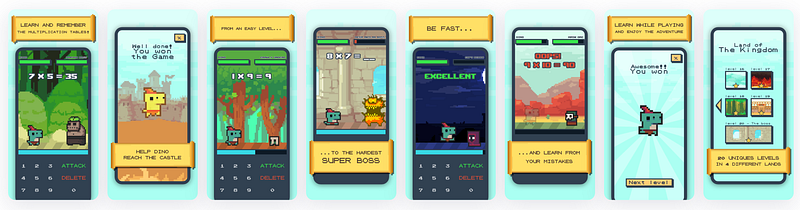
- Google Play: https://play.google.com/store/apps/details?id=com.sandoche.multiplicationkingdom
- Apple AppStore: https://apps.apple.com/us/app/multiplication-kingdom/id1590681279
- Website: https://multiplicationkingdom.learn.uno/
What’s next
I really enjoyed building this game and learning Godot. I will probably use Godot for building applications in the future (if it makes more sense to use it rather than NativeScript of course), or for building software. Also, I am very likely to build other games in the future (maybe linked to some Blockchain), before choosing Multiplication Kingdom I had a few ones in my mind. I’ll keep them for the next projects!
If you liked this post, please click the clap 👏button below a few times to show your support! Also, feel free to comment and give any kind of feedback. Don’t forget to follow me!


