
Angular 17 and NET Core 8: Implementing WebAPI with Clean Architecture
Tutorial 2

Preface
This is another installment in our comprehensive series, Building a Talent Management SPA with Angular 17 and NET Core 8. For a broader view of the series and to access other parts, you can refer back to the series’ table of contents, where each segment is meticulously organized to guide you through every stage of building a robust Talent Management SPA.
Introduction
In this tutorial, we delve into the crucial aspects of database and backend Web API design.
Table of Contents
When designing a Web API for a database with multiple related tables, it’s crucial to adopt architectural patterns that encourage maintainability, scalability, and separation of concerns. The CQRS (Command Query Responsibility Segregation) pattern, along with the Repository pattern, Entity Framework Core for data access, MediatR for in-process messaging, and AutoMapper for object mapping, provides a robust foundation for building such an API.
Part 1: Overview of the Design Approach
- Principles of Clean Architecture
- Key Tools and Patterns: CQRS, Repository Pattern, EF Core, MediatR, AutoMapper
Part 2: Database Tables and Relationships
- Structure of Departments, SalaryRanges, Positions, and Employees Tables
- Table Associations and Relationships
Part 3: Setting Up the Domain Models
- Role of Domain Models in Clean Architecture
- Implementation Details and Code Snippets
- GitHub Link for Domain Models in the TalentManagementApi.Domain Project
Part 4: Defining Repositories
- Repository Pattern in Clean Architecture
- Repository Interface for Domain Models
- GitHub Link for Repository Interfaces in the TalentManagementApi.Application Project
Part 5: Implementing Repositories with EF Core
- Repository Implementations in Infrastructure Layer
- Code Snippets and Implementation Details
- GitHub Link for Concrete Repository Implementations
Part 6: CQRS with MediatR
- Implementing Command and Query Separation
- MediatR Integration and Use Cases
- Code Snippets for CQRS Implementation
- GitHub Link for CQRS Implementations in the Application Project
Part 7: AutoMapper for DTO
- Role of AutoMapper in Object Mapping
- Configuration Details and Examples
- GitHub Link for AutoMapper Mappings
Part 8: Controllers
- Function and Structure of Controllers in Clean Architecture
- Controllers Handling HTTP Requests and MediatR Handlers
- Code Snippets for Controllers
- GitHub Link for Controllers in the WebApi Project
Part 1: Overview of the Design Approach
Clean Architecture promotes the use of various tools and patterns to achieve a clear separation of concerns, enhance maintainability, and improve scalability. Here’s a summary of some key tools and patterns often used in Clean Architecture:
CQRS: This pattern separates read and write operations into distinct models, allowing for the optimization and scalability of each operation independently.
Repository Pattern: Abstracts the data layer, providing a substitution point for the unit tests and a clean separation of concerns.
Entity Framework Core (EF Core): Serves as the ORM (Object-Relational Mapper) for data manipulation.
MediatR: Acts as a mediator for handling requests, commands, and events, thereby decoupling in-process messaging.
AutoMapper: Simplifies the task of transforming objects between the domain and application layers.
Part 2: Database Tables and Relationships
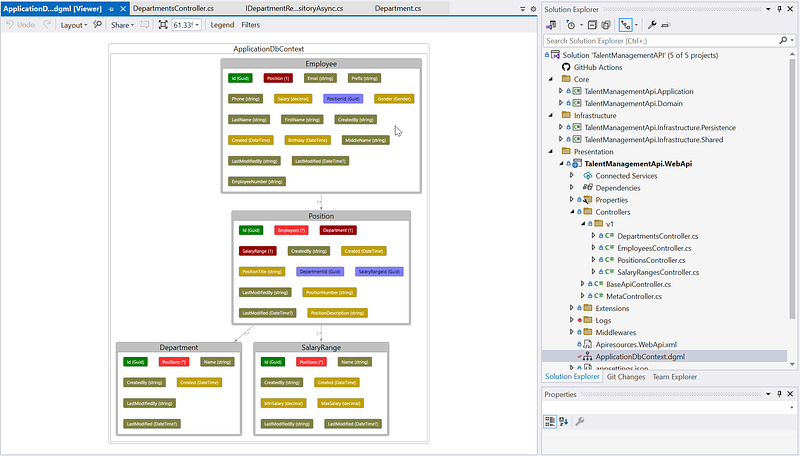
In the sample project source code TalentManagementApi, the database consists of four primary tables:
DepartmentsSalaryRangesPositionsEmployees
Each Position is associated with a Department and a SalaryRange. Each Employee is associated with a Position.
Part 3: Setting Up the Domain Models
In Clean Architecture, Domain Models play a crucial role in encapsulating business logic and rules. They are a part of the Domain layer, which is at the core of the architecture. This layer is the most abstract level of the application and is entirely independent of external concerns like databases, web frameworks, and other external services.
Implementing Domain Models effectively in Clean Architecture requires a good understanding of the business domain and a careful design to ensure that the models truly represent the business requirements and rules. This often involves close collaboration with domain experts to capture the nuances of the business.
Each table will correspond to a domain model in our application. For instance, the Department model will have properties mirroring the Departments table.
using System.Collections.Generic;
using TalentManagementApi.Domain.Common;

namespace TalentManagementApi.Domain.Entities
{
    public class Department : AuditableBaseEntity
    {
        // Department Name
        public string Name { get; set; }

        // Navigation Property for related Positions
        public virtual ICollection<Position> Positions { get; set; }

        public Department()
        {
            Positions = new HashSet<Position>();
        }

        // Additional properties (e.g., Name, ManagerId, etc.) can be added here
    }
}
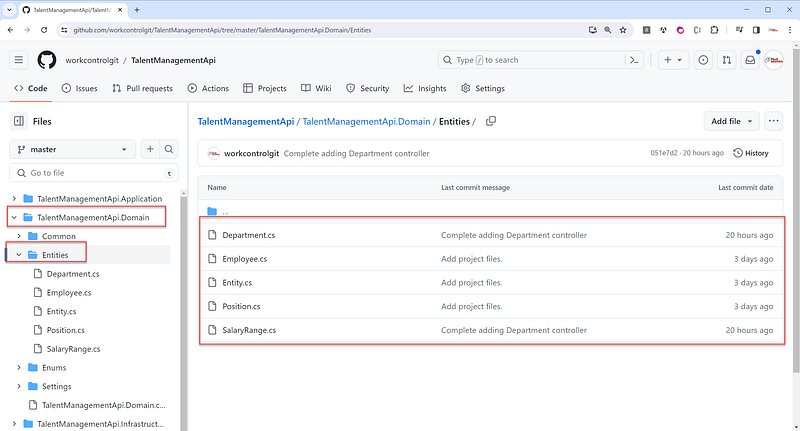
You can locate the domain models within the TalentManagementApi.Domain project hosted on GitHub. For a more detailed view and to explore the structure and implementation of the Department, Employee, Position, SalaryRange, you can access the project via the following GitHub link. This link provides direct access to the source code, allowing you to review and understand how the model integrates within the broader context of the TalentManagementApi project, following Clean Architecture principles.
TalentManagementApi.DomainPart 4: Defining Repositories
In Clean Architecture, the Repository is a crucial design pattern, especially within the Infrastructure layer. The primary role of a Repository is to encapsulate the logic required to access data sources, acting as a mediator between the domain layer of the application and data mapping layers. This pattern aims to separate the business logic and the data access logic, making the system more maintainable, testable, and clean in terms of separation of concerns.
Repositories in Clean Architecture serve to segregate the ways in which data is accessed and manipulated from the core business logic of the application. They support principles of clean, maintainable, and testable code by adhering to the separation of concerns and enabling easier management of data operations.
Implementing Repositories with Entity Framework Core (EF Core) in Clean Architecture involves creating an abstraction layer for data access that interacts with your domain models. This allows your application’s core logic to remain independent of the data persistence mechanism. We’ll define a repository interface for each model to abstract database operations. Below is a code snippet of the repository interface for the Department model:
using TalentManagementApi.Domain.Entities;

namespace TalentManagementApi.Application.Interfaces.Repositories
{
    public interface IDepartmentRepositoryAsync : IGenericRepositoryAsync<Department>
    {
    }
}
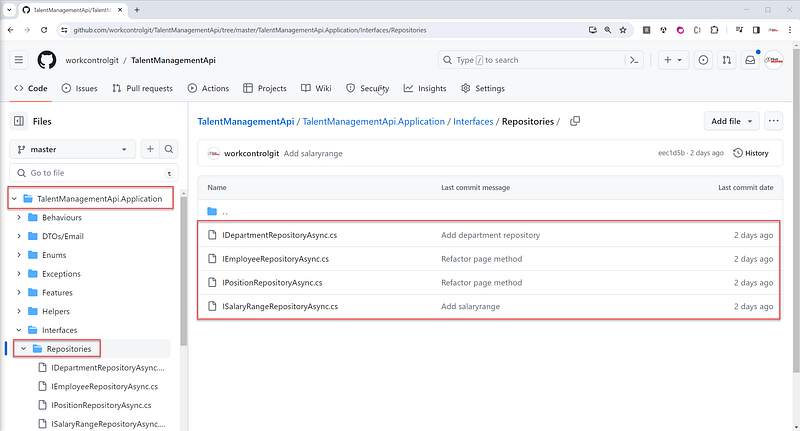
You can locate the repository interfaces within the TalentManagementApi.Application project hosted on GitHub. For a more detailed view and to explore the structure and implementation of the repository interfaces for Department, Employee, Position, SalaryRange, you can access the project via the following GitHub link. This link provides direct access to the source code, allowing you to review and understand how the repository interfaces integrate within the broader context of the TalentManagementApi project, following Clean Architecture principles.
Part 5: Implementing Repositories with EF Core
Implementing Repository Interfaces with Entity Framework Core (EF Core) in the Infrastructure layer is a pivotal step in adhering to the principles of Clean Architecture. This approach allows for a clean separation between the application’s core logic and its data access mechanisms. Below is a code snippet of the repository implementation for the Department model:
using TalentManagementApi.Application.Interfaces.Repositories;
using TalentManagementApi.Domain.Entities;
using TalentManagementApi.Infrastructure.Persistence.Contexts;
using TalentManagementApi.Infrastructure.Persistence.Repository;

namespace TalentManagementApi.Infrastructure.Persistence.Repositories
{
    public class DepartmentRepositoryAsync : GenericRepositoryAsync<Department>, IDepartmentRepositoryAsync
    {
        public DepartmentRepositoryAsync(ApplicationDbContext dbContext) : base(dbContext)
        {
        }
    }
}
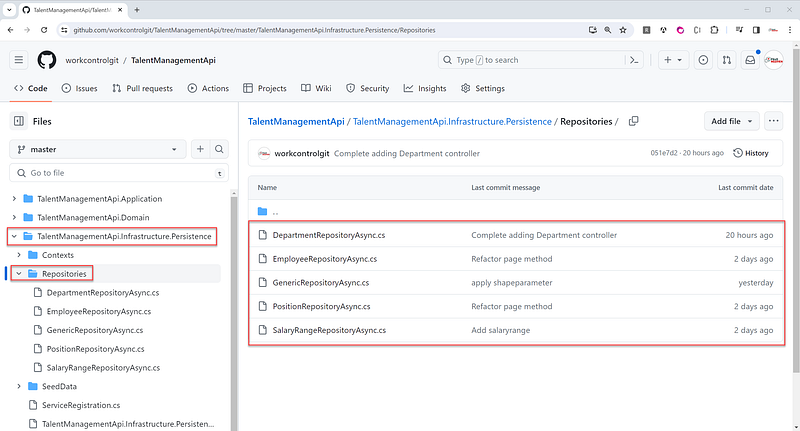
You can find concrete repository implementations within the TalentManagementApi.Infrastructure.Persistence project hosted on GitHub. For a more detailed view and to explore the structure and implementation of the concrete repositories for Department, Employee, Position, SalaryRange, you can access the project via the following GitHub link. This link provides direct access to the source code, allowing you to review and understand how the concrete repository implementations integrate within the broader context of the TalentManagementApi project, following Clean Architecture principles.
Part 6: CQRS with MediatR
CQRS (Command Query Responsibility Segregation) with MediatR in Clean Architecture involves dividing an application’s data operations into two distinct parts: commands for writing data and queries for reading data. MediatR, a mediator pattern implementation, is used to decouple the sending and handling of requests. This setup aligns well with the principles of Clean Architecture, as it promotes separation of concerns, scalability, and maintainability.
We’ll use MediatR to dispatch commands and queries. Each operation (e.g., getting a department list) will have a corresponding command or query class and a handler.
using AutoMapper;
using MediatR;
using System.Collections.Generic;
using System.Threading;
using System.Threading.Tasks;
using TalentManagementApi.Application.Interfaces;
using TalentManagementApi.Application.Interfaces.Repositories;
using TalentManagementApi.Application.Parameters;

namespace TalentManagementApi.Application.Features.Departments.Queries.GetDepartments
{
    /// <summary>
    /// GetAllDepartmentsQuery - handles media IRequest
    /// BaseRequestParameter - contains paging parameters
    /// To add filter/search parameters, add search properties to the body of this class
    /// </summary>
    public class GetDepartmentsQuery : ListParameter, IRequest<IEnumerable<GetDepartmentsViewModel>>
    {
    }

    public class GetAllDepartmentsQueryHandler : IRequestHandler<GetDepartmentsQuery, IEnumerable<GetDepartmentsViewModel>>
    {
        private readonly IDepartmentRepositoryAsync _repository;
        private readonly IModelHelper _modelHelper;
        private readonly IMapper _mapper;

        /// <summary>
        /// Constructor for GetAllDepartmentsQueryHandler class.
        /// </summary>
        /// <param name="repository">IDepartmentRepositoryAsync object.</param>
        /// <param name="modelHelper">IModelHelper object.</param>
        /// <returns>
        /// GetAllDepartmentsQueryHandler object.
        /// </returns>
        public GetAllDepartmentsQueryHandler(IDepartmentRepositoryAsync repository, IModelHelper modelHelper, IMapper mapper)
        {
            _repository = repository;
            _modelHelper = modelHelper;
            _mapper = mapper;
        }

        /// <summary>
        /// Handles the GetDepartmentsQuery request and returns a PagedResponse containing the requested data.
        /// </summary>
        /// <param name="request">The GetDepartmentsQuery request.</param>
        /// <param name="cancellationToken">The cancellation token.</param>
        /// <returns>A PagedResponse containing the requested data.</returns>
        public async Task<IEnumerable<GetDepartmentsViewModel>> Handle(GetDepartmentsQuery request, CancellationToken cancellationToken)
        {
            string fields = _modelHelper.GetModelFields<GetDepartmentsViewModel>();
            string defaultOrderByColumn = "Name";

            string orderBy = string.Empty;

            // if the request orderby is not null
            if (!string.IsNullOrEmpty(request.OrderBy))
            {
                // check to make sure order by field is valid and in the view model
                orderBy = _modelHelper.ValidateModelFields<GetDepartmentsViewModel>(request.OrderBy);
            }

            // if the order by is invalid
            if (string.IsNullOrEmpty(orderBy))
            {
                //default fields from view model
                orderBy = defaultOrderByColumn;
            }

            var data = await _repository.GetAllShapeAsync(orderBy, fields);

            // automap to ViewModel
            var viewModel = _mapper.Map<IEnumerable<GetDepartmentsViewModel>>(data);

            return viewModel;
        }
    }
}
You can find CQRS implementations within the TalentManagementApi.Application project hosted on GitHub. For a more detailed view and to explore the structure and implementation of CQRS for Department, Employee, Position, SalaryRange, you can access the project via the following GitHub link. This link provides direct access to the source code, allowing you to review and understand how CQRS implementations integrate within the broader context of the TalentManagementApi project, following Clean Architecture principles.
Part 7: AutoMapper for DTO
AutoMapper in Clean Architecture is used to simplify the mapping between different object models, particularly between entities in the domain layer and data transfer objects (DTOs) in the application layer. AutoMapper helps reduce the amount of boilerplate code needed for these conversions, making the codebase cleaner and more maintainable.
We’ll configure AutoMapper to handle the conversion between domain models and DTOs (Data Transfer Objects).
using AutoMapper;
using TalentManagementApi.Application.Features.Departments.Queries.GetDepartments;
using TalentManagementApi.Application.Features.Employees.Queries.GetEmployees;
using TalentManagementApi.Application.Features.Positions.Commands.CreatePosition;
using TalentManagementApi.Application.Features.Positions.Queries.GetPositions;
using TalentManagementApi.Application.Features.SalaryRanges.Queries.GetSalaryRanges;
using TalentManagementApi.Domain.Entities;

namespace TalentManagementApi.Application.Mappings
{
    public class GeneralProfile : Profile
    {
        public GeneralProfile()
        {
            CreateMap<Position, GetPositionsViewModel>().ReverseMap();
            CreateMap<Employee, GetEmployeesViewModel>().ReverseMap();
            CreateMap<Department, GetDepartmentsViewModel>().ReverseMap();
            CreateMap<SalaryRange, GetSalaryRangesViewModel>().ReverseMap();
            CreateMap<CreatePositionCommand, Position>();
        }
    }
}
You can find AutoMapper mapping within the TalentManagementApi.Application project hosted on GitHub. For a more detailed view and to explore the structure and implementation of CQRS for Department, Employee, Position, SalaryRange, you can access the project via the following GitHub link.
Part 8: Controllers
In Clean Architecture, controllers typically reside in the outermost layer, often referred to as the Presentation or UI layer. Their primary role is to act as an entry point for incoming requests, handling them by orchestrating interactions between the application layer and the client. Controllers should be lean, with the bulk of business logic residing in the inner layers (Application and Domain).
Controllers will be thin, only handling HTTP requests and delegating work to MediatR handlers. Below is the code snippet for the Departments controller:
using Microsoft.AspNetCore.Mvc;
using System.Threading.Tasks;
using TalentManagementApi.Application.Features.Departments.Queries.GetDepartments;

// For more information on enabling Web API for empty projects, visit https://go.microsoft.com/fwlink/?LinkID=397860

namespace TalentManagementApi.WebApi.Controllers.v1
{
    [ApiVersion("1.0")]
    public class DepartmentsController : BaseApiController
    {
        /// <summary>
        /// Gets a list of employees based on the specified filter.
        /// </summary>
        /// <param name="filter">The filter used to get the list of employees.</param>
        /// <returns>A list of employees.</returns>
        [HttpGet]
        public async Task<IActionResult> Get([FromQuery] GetDepartmentsQuery filter)
        {
            return Ok(await Mediator.Send(filter));
        }
    }
}
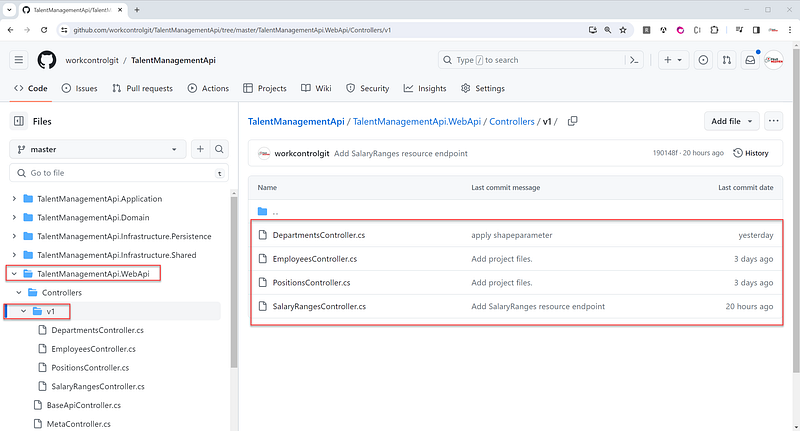
You can find controllers within the TalentManagementApi.WebApi project hosted on GitHub. For a more detailed view and to explore the structure and implementation of the concrete repositories for Department, Employee, Position, SalaryRange, you can access the project via the following GitHub link. This link provides direct access to the source code, allowing you to review and understand how controllers integrate within the broader context of the TalentManagementApi project, following Clean Architecture principles.
Summary

By adopting CQRS, Repository Pattern, and leveraging EF Core, MediatR, and AutoMapper, we can create a Web API that is well-structured and ready for complex business scenarios. This design not only aids in keeping the codebase clean and organized but also allows for easier testing and maintenance.
With this approach, developers can focus on writing business logic in a way that is decoupled from the presentation layer. The separation of commands and queries enables us to optimize read and write operations separately, resulting in a more efficient system.
Moreover, the Repository Pattern encapsulates the logic required to access data sources, making the data access layer more manageable. EF Core’s powerful features, combined with the Repository Pattern, provide a robust data access mechanism.
The use of MediatR promotes a clean architecture by avoiding direct dependencies between the controllers and the business logic. It allows us to dispatch requests to their respective handlers, which execute the actual business operations.
Finally, AutoMapper streamlines the mapping between our entities and DTOs, reducing boilerplate code and potential mapping errors. This makes the code easier to maintain and refactor when needed.
Overall, this design pattern is well-suited for modern web applications where scalability, maintainability, and clean separation of concerns are key. Whether you’re building an SPA or a Mobile app backend, following these patterns can greatly enhance your application’s architecture and its responsiveness to change.
Recommended Contents
Thank you for reading! I hope you found this useful. For more great content, follow me and consider becoming a Medium member. Your support helps me create more awesome articles. Have a fantastic day! — Fuji Nguyen


