
Building a Retrieval-Augmented Generation (RAG) Chatbot with LangChain and Flask in Python
Exploring Techniques for Constructing a Stable AI Chatbot

Introduction
If you are interested in mastering the techniques of building an AI Chatbot application by leveraging the sophisticated features of GPT-4, OpenAI API, Retrieval-Augmented Generation (RAG), LangChain, Python Flask, conversational session management, and beyond, this guide is perfectly tailored for you.
Despite the integration of various technologies in this project, my goal is straightforward: to develop a knowledge base chatbot with an HTML/JavaScript interface designed to respond to user inquiries within a specific domain, such as the credit card business, as demonstrated in this project. Throughout this guide, I will walk you through the essential techniques, offering Python and HTML code snippets that can serve as templates for constructing more sophisticated intelligent agents.
Insights into Retrieval-Augmented Generation (RAG) Chatbots
A knowledge-based Retrieval-Augmented Generation (RAG) Chatbot merges a specialized knowledge base with generative AI to accurately respond to user inquiries. It uses an AI API to extract information in vector form from the knowledge base, ensuring relevance. The RAG framework integrates this retrieval with a generative model like GPT, producing precise and contextually appropriate answers. This innovative approach allows the chatbot to deliver informed responses specific to user queries, making it ideal for sectors requiring detailed knowledge, such as finance or healthcare, in a concise and efficient manner.
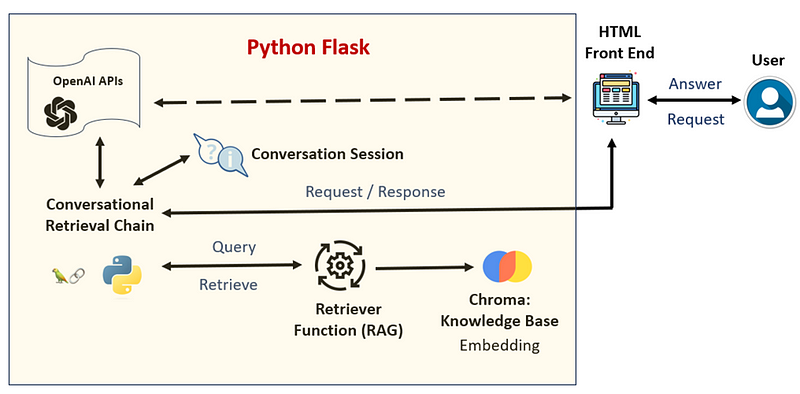
Here are the key steps:
· User input question, a text message from the HTML/JavaScript based frontend
· Python Flask (backend) received the request and send request to the ConversationalRetrievalChain
· The ConversationalRetrievalChain will retrieve the knowledge from the knowledge base Chroma, in which the domain’s knowledge or rules have been ingested by text embedding
· ConversationalRetrievalChain will integrate domain knowledge, conversational history, AI prompt and user’s request to generate response using LLM (OpenAI’s API)
· Python Flask send response: a text message to the HTML/JavaScript based frontend
· Python Flask will handle conversational history based on user’s action
Key Points:
· ConversationalRetrievalChain: A specialized LangChain for building AI chatbots that supports memory and prompt templates. It uses both new inquiries and conversational history to deliver responses. Primarily used for retrieving knowledge in this project, as it fails to store conversational history due to context loss and timeouts with HTML requests
· Conversational Session Management: Exploring methods like Session Storage and database or external file systems for managing conversational history. Both approaches have been experimented with in this project, with their advantages and disadvantages discussed to guide the development of AI Chatbots or Intelligent Agents from scratch.
I have tried both conversational session management approaches in this project and will discuss Pros and Cons in a subsequent section. This will enable you to effectively select and utilize LangChain for your AI chatbot projects. Whether you’re starting from scratch or developing an intelligent agent, this discussion will help you choose optimal conversational session handling.
Let’s go through the Python Flask code to show you how the AI chatbot is working.
Environment Setup for AI Chatbot Development
The initial step in developing this AI chatbot project involves establishing the essential environment, which includes importing Python libraries, initializing the OpenAI environment, and setting up the Python Flask application. Depending on your specific requirements, you might need to adjust these configurations.
import os
from flask import Flask, session, render_template, jsonify, request, redirect, url_for
import openai
from langchain_openai import AzureChatOpenAI
from langchain.chains import ConversationalRetrievalChain
from langchain.prompts import (
    ChatPromptTemplate,
    HumanMessagePromptTemplate,
    SystemMessagePromptTemplate
)
from langchain.prompts.chat import (ChatPromptTemplate, HumanMessagePromptTemplate, SystemMessagePromptTemplate)
from langchain.schema import HumanMessage, SystemMessage, AIMessage
from langchain.prompts import SystemMessagePromptTemplate, ChatPromptTemplate, HumanMessagePromptTemplate
from langchain.document_loaders import TextLoader
from langchain.text_splitter import CharacterTextSplitter
from langchain.vectorstores import Chroma
from langchain_openai import AzureOpenAIEmbeddings
from flask import session

whole_path = r'C:\session_bot'
os.chdir(whole_path)
OPENAI_API_KEY = "############"
OPENAI_EMBEDDING_MODEL_DEP_NAME = "textembedding"
OPENAI_EMBEDDING_MODEL_NAME = 'text-embedding-ada'
OPENAI_GPT_MODEL_DEP_NAME = "gpt4"
OPENAI_GPT_MODEL_NAME = "gpt-4"
OPENAI_API_VERSION = "2023-12-01-preview"
OPENAI_API_BASE = "https://###########"
# Set up the Azure Chat OpenAI model
os.environ["AZURE_OPENAI_API_KEY"] = OPENAI_API_KEY
os.environ["AZURE_OPENAI_ENDPOINT"] = OPENAI_API_BASE

app = Flask(__name__, template_folder='templates', static_url_path='/static')
app.secret_key = "super secret key"
app.config['TEMPLATES_AUTO_RELOAD'] = True
img_folder = os.path.join('static', 'img')
app.config['UPLOAD_FOLDER'] = img_folder
Note, in this project, I used Azure OpenAI API to develop this chatbot system. Therefore I must provide much more information than using general OpenAI API, for instance, I must provide OPENAI_API_BASE and model deployment name in order to use Azure OpenAI API. This is because Azure OpenAI API is the enterprise level application. If you use the general OpenAI API, then you only need to provide OPENAI_API_KEY. For details, please check my another post: https://readmedium.com/navigating-generative-ai-practical-use-cases-and-beyond-for-traditional-data-scientists-1-13df839f18b1 and https://readmedium.com/navigating-generative-ai-practical-use-cases-and-beyond-for-traditional-data-scientists-2-523781388399.
Embedding Knowledge into Chroma for AI Chatbot
The process of embedding knowledge into Chroma involves several crucial steps, beginning with loading the knowledge-based text files. These texts are then segmented into manageable chunks, which are subsequently embedded using the AzureOpenAIEmbeddings model. This results in embedding all the knowledge content into the Chroma database as vector data. To facilitate knowledge retrieval based on user queries, a retriever function is established within the Python Flask framework. This retriever is integral to the ConversationalRetrievalChain’s operation, enabling it to leverage Retrieval-Augmented Generation (RAG) for responding to user requests.
## Data Injection into Chroma
'''
loader = TextLoader('creditcard_QA.txt', encoding='utf-8')
documents = loader.load()
text_splitter = CharacterTextSplitter(chunk_size=500, chunk_overlap=50)
chunks = text_splitter.split_documents(documents)

vectordb = Chroma.from_documents(documents=chunks, embedding = embeddings_model,
           persist_directory=r"C:\session_bot\data_st\chroma_db")

'''
## set up text embeddings model

Embeddings_model = AzureOpenAIEmbeddings(deployment = OPENAI_EMBEDDING_MODEL_DEP_NAME,
                                   model = OPENAI_EMBEDDING_MODEL_NAME,
                                   azure_endpoint = OPENAI_API_BASE,
                                   openai_api_type="azure")

def get_retriever():
    loaded_vectordb = Chroma(persist_directory = r"C:\session_bot\data_st\chroma_db",
                             embedding_function = Embeddings_model)
    retriever = loaded_vectordb.as_retriever(search_type="mmr", k = 5)
    return retriever
Here, the data injection process is typically a one-time setup, potentially updated periodically, hence it’s encapsulated in comments within the Python Flask code to prevent unnecessary repetition. This setup primes the AI chatbot with a rich, searchable knowledge base, enabling sophisticated, context-aware interactions with users.
Flask Endpoints for Chatbot Interface Interaction
The following Flask routes are designed to handle interactions with the chatbot’s front-end interface, catering to user requests effectively.
@app.route('/')
def main_page():
    return render_template('main_page.html')
@app.route('/chatbot_window.html')
def chatbot_window():
    return render_template('chatbot_window.html')

@app.route('/reset_history', methods=['GET'])
def reset_history():
    session.clear()
    return redirect(url_for('chat'))

@app.route('/')
def chat():
    session.clear()
return render_template('chat.html')
· main_page() serves as the entry point, directing users to the chatbot’s main page
· chatbot_window() functions as the interactive dialog window for user-chatbot communication
· chat() acts as the container for the dialog window, ensuring a new session upon page reload or initial visit, suitable for starting or continuing conversations
· reset_history() is triggered by the “new chat” button within the dialog window, initiating a new chat session by clearing the session data
These Flask routes utilize session management to maintain conversational history, ensuring chat is based on context. Clearing the session with chat() and reset_history() allows for the initiation of new conversations, while retaining the session’s data supports ongoing dialogues based on accumulated context. Note, in this program I used Flask sessions to manage conversational history within the chatbot application.
Chatbot Response Generation Function
The send_message() function within our Flask application serves as the core mechanism for generating responses to user queries, acting as the chatbot’s “brain.” This function utilizes the LangChain and OpenAI API to produce contextually relevant answers, guided by the conversation history stored in the Flask session. Below is a detailed breakdown of this pivotal function:
@app.route('/send', methods=['POST'])
def send_message():
    user_request = str(request.json['message'])
    chat_model = AzureChatOpenAI(
        openai_api_version = OPENAI_API_VERSION,
        azure_deployment = OPENAI_GPT_MODEL_DEP_NAME,
        temperature=0.1
    )

    chat_retriever = get_retriever()

    # Load or initialize the chat memory from the session
    qa_history = session.get('conversation_history', [])

# You need to convert  the list qa_history into conversation_history
# since conversation_history should follow the AI Prompt template
    conversation_history = []
    if len(qa_history)>0:
        for it in qa_history:
            q = it[0]
            a = it[1]
            HumanMessage_v = HumanMessage(content = q)
            AI_v = AIMessage( content = a )
            conversation_history.append(HumanMessage_v)
            conversation_history.append(AI_v)
    else:
         conversation_history = [HumanMessage(content = "You are a good helper " ),
                                 AIMessage(content=" Thanks ")]

    bot_response = "This is a placeholder response based on the user's request."

    system_template = """
    You are an expert for credit card business,
    You only answer questions related to to lending business and credit risk.
    Ignore the personal identifiable information and answer generally.
    ---------------
    {context}
    """

    human_template = """Previous conversation: {chat_history}
        Please provide an answer with less than 150 English words for the following new human question: {question}
        """

    messages = [
        SystemMessagePromptTemplate.from_template(system_template),
        HumanMessagePromptTemplate.from_template(human_template)
    ]

    # Initialize the chain
    qa_prompt = ChatPromptTemplate.from_messages(messages)
    qa = ConversationalRetrievalChain.from_llm(
        llm=chat_model,
        chain_type='stuff',
        retriever=chat_retriever,
        return_source_documents=False,
        combine_docs_chain_kwargs={"prompt": qa_prompt}
    )

    bot_response = qa({"question": user_request, "chat_history": conversation_history})['answer']

    # Append the conversation history to session state
    qu_an = [user_request, bot_response]
    if 'conversation_history' not in session:
        session['conversation_history'] = []

    session['conversation_history'].append(qu_an)

    session.modified = True

    return jsonify({'response': bot_response})
Here are the key responsibilities of the function:
· Receive User Queries: It captures the user’s request from the frontend via request.json[‘message’]
· Manage Conversation History: Organizes and updates historical conversation data in the Flask session, ensuring the AI model works with the latest context
· Prepare AI Prompts: Utilizes ChatPromptTemplate to format the AI prompt correctly, allowing the user’s request and historical context to be processed by LangChain and the OpenAI API
· Generate Contextual Responses: The ConversationalRetrievalChain leverages both the knowledge retriever and AI prompts to craft responses based on the user’s query and the conversation history
· Respond to the Frontend: Delivers the AI’s response to the user through the Flask application’s frontend
Managing Conversation History with Databases
After discussing the utilization of Flask sessions for managing chatbot conversation history, this section introduces an alternative approach: using a database. This method is particularly user-friendly for developers familiar with SQL and offers a straightforward way to handle conversation history through external databases. SQLite, a lightweight database, is recommended due to the generally modest size and transient nature of conversation history data.
Updated Python Functions for Database Management:
def get_conversation_history(user_id, session_id):
    conn = sqlite3.connect('conversation_history.db')
    c = conn.cursor()
    c.execute('CREATE TABLE IF NOT EXISTS conversation_history (user_id TEXT, session_id TEXT, message TEXT)')
    conn.commit()

    conversation_history = []
    for row in c.execute('SELECT message FROM conversation_history WHERE user_id = ? AND session_id = ?', (user_id, session_id)):
        conversation_history.append(row[0])

    return conversation_history

def get_conversation_history(user_id, session_id):
    conn = sqlite3.connect('conversation_history.db')
    c = conn.cursor()
    c.execute('CREATE TABLE IF NOT EXISTS conversation_history (user_id TEXT, session_id TEXT, message TEXT)')
    conn.commit()

    conversation_history = []
    for row in c.execute('SELECT message FROM conversation_history WHERE user_id = ? AND session_id = ?', (user_id, session_id)):
        conversation_history.append(row[0])

    return conversation_history

def add_message_to_history(user_id, session_id, message):
    conn = sqlite3.connect('conversation_history.db')
    c = conn.cursor()
    c.execute('CREATE TABLE IF NOT EXISTS conversation_history (user_id TEXT, session_id TEXT, message TEXT)')
    c.execute('INSERT INTO conversation_history VALUES (?, ?, ?)', (user_id, session_id, message))
    conn.commit()

def reset_history_internal():
    try:
        conn = sqlite3.connect('conversation_history.db')
        c = conn.cursor()
        c.execute('DELETE FROM conversation_history')
        c.execute('DROP TABLE IF EXISTS conversation_history')
        conn.commit()
        return True
    except Exception as e:
        print(str(e))
        return False

@app.route('/reset_history', methods=['GET'])
def reset_history():
    reset_history_flag = reset_history_internal()
    print (reset_history_flag)
return render_template('chat.html')

@app.route('/')
def chat():
    reset_history_flag = reset_history_internal()
    print (reset_history_flag)
    return render_template('chat.html')

@app.route('/send', methods=['POST'])
def send_message():

    user_request = str(request.json['message'])

    # Retrieve the conversation history
    user_id = 'unique_user_id'  # You should replace this with the actual user identifier
    session_id = 'unique_session_id'  # You should replace this with the actual session identifier
    conversation_history_lst = get_conversation_history(user_id, session_id)

    # You need to convert the list conversation_history_lst into conversation_history
    # since conversation_history should follow the AI Prompt template
    conversation_history = []
    LLL = len(conversation_history_lst)
    if LLL > 1:
        for n in range(0, LLL, 2):
            q = conversation_history_lst[n]
            a = conversation_history_lst[n+1]
            HumanMessage_v = HumanMessage(content = q)
            AI_v = AIMessage( content = a )
            conversation_history.append(HumanMessage_v)
            conversation_history.append(AI_v)
    else:
         conversation_history = [HumanMessage(content = "You are a good helper " ),
                                 AIMessage(content=" Thanks ")]

    chat_model = AzureChatOpenAI(
        openai_api_version = OPENAI_API_VERSION,
        azure_deployment = OPENAI_GPT_MODEL_DEP_NAME,
        temperature=0.1
    )

    chat_retriever = get_retriever()

    bot_response = "This is a placeholder response based on the user's request."

    system_template = """
    You are an expert for credit card business,
    You only answer questions related to to lending business and credit risk.
    Ignore the personal identifiable information and answer generally.
    ---------------
    {context}
    """

    human_template = """Previous conversation: {chat_history}
        Please provide an answer with less than 150 English words for the following new human question: {question}
        """

    messages = [
        SystemMessagePromptTemplate.from_template(system_template),
        HumanMessagePromptTemplate.from_template(human_template)
    ]

    # Initialize the chain
    qa_prompt = ChatPromptTemplate.from_messages(messages)
    qa = ConversationalRetrievalChain.from_llm(
        llm=chat_model,
        chain_type='stuff',
        retriever=chat_retriever,
        return_source_documents=False,
        combine_docs_chain_kwargs={"prompt": qa_prompt}
    )

    bot_response = qa({"question": user_request, "chat_history": conversation_history})['answer']

    # Save the user's question and bot's answer to the database
    # Add the current user message to the conversation history
    add_message_to_history(user_id, session_id, ' Question from user: ' + user_request)
    add_message_to_history(user_id, session_id, 'Answer from assistant: ' + bot_response)

return jsonify({'response': bot_response})
Function Summary:
· get_conversation_history: Fetches historical Q&A for a user session from SQLite, aiding in response generation
· add_message_to_history: Appends the latest user query and bot response to the database, updating the conversation log
· reset_history_internal and reset_history: Clear the database of conversation history, invoked when starting a new chat or upon user request
· send_message: Main endpoint that retrieves conversation history, generates a response using LangChain and OpenAI API, and updates the database with new conversation entries
Conversation History Management: Database vs. HTML Session Storage
In this project, both database storage and HTML session storage methods were utilized to manage conversation history. Deciding on the superior method involves assessing each approach’s benefit and drawbacks based on specific application requirements. Here’s a comparative analysis:
Database Storage
Pros: Offers long-term, scalable storage ideal for complex interactions, supporting advanced chatbot learning.
Cons: Requires setup and management, adding complexity and potential latency in data handling.
HTML Session Storage
Pros: Easy to implement, suitable for temporary data storage directly in the user’s browser, reducing server load.
Cons: Limited by browser capacity and session duration, unsuitable for long-term history or complex chatbot functionality.
For detailed, persistent conversation tracking, databases excel by providing robust, scalable storage. HTML session storage, while simpler and quicker to implement, suits short-term interactions without the need for server-side storage. The decision should align with your chatbot’s operational demands and desired user experience.
Testing the Chatbot Functionality
To test the chatbot, simply run the Python Flask script and access the application through a web browser:
python C:\session_bot\chat_db.pyNavigate to http://127.0.0.1:5000/ in your web browser. To exit, press CTRL+C.
Interact with the chatbot by clicking on the chat icon at the bottom right of the page. Start by asking a question, for example:
What is the 90 days delinquency in credit card?
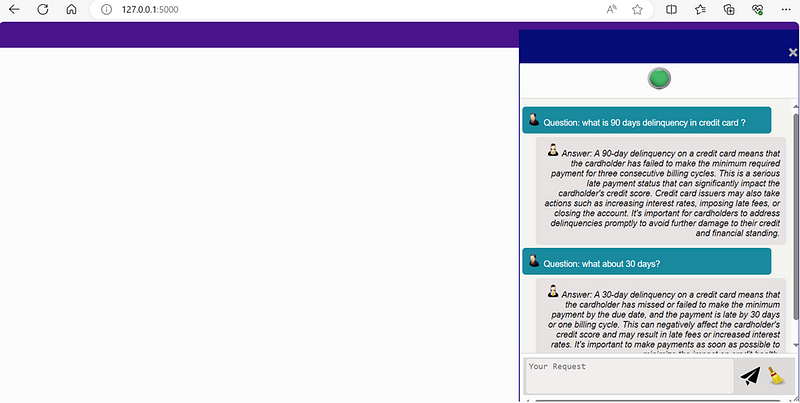
The chatbot will respond with an explanation of “90 days delinquency”. If you follow up with a related question, like:
What about 30 days?
the chatbot, utilizing its conversational history, understands the context and provides a relevant response. This demonstrates the chatbot’s ability to maintain context between questions, enhancing the user experience.
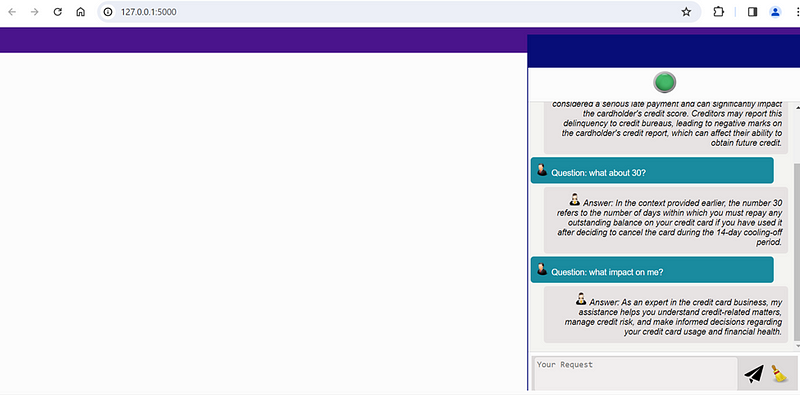
Resetting the Conversation: by clicking the ‘Reset Chat’ button, you can start a new conversation. This action clears the conversational history stored in either the Flask session or the database. If you then ask a question without context, such as:
what impact on me?
the chatbot returns a general response based on its default understanding of its expertise in credit card business. This response is generated because the chatbot’s conversation history is reinitialized, demonstrating its ability to adapt to new conversations while also highlighting the significance of conversational history in providing contextually relevant responses.
Concluding Remarks
This post serves as an update and expansion to my earlier work on creating an intelligent credit card chatbot, which can be found here: Building an Intelligent Credit Card Chatbot with OpenAI API. The necessity for updates arose from advancements in response generation functions, the application of Retrieval-Augmented Generation (RAG) techniques, enhancements to the HTML frontend, and improvements in conversational history management.
For those interested in accessing the complete set of Python code and the frontend HTML scripts that underpin this project, I invite you to explore my GitHub repository: chatbot_update on GitHub


