
Building a Real-time Analytics Dashboard with Flask and Kafka on AWS EC2
Introduction:
Briefly explain the rise in real-time analytics in today’s data-driven world. Introduce Flask as a web framework and Kafka as a real-time event streaming platform, and highlight the intention to deploy it on AWS EC2.
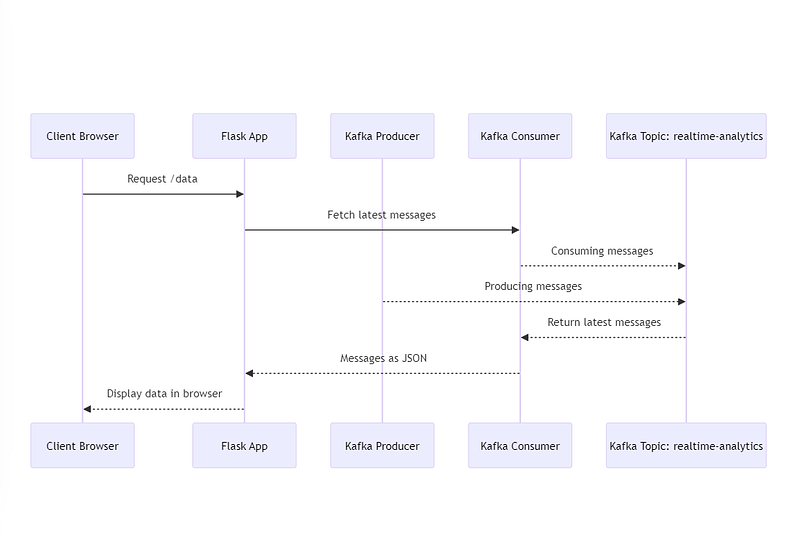
Below is the high level flow which we are trying to achieve in this use case.
Prerequisites:
- An active AWS account
- Basic knowledge of Python, Flask, and Kafka
- A running EC2 instance (you can link to AWS’s official documentation for setting up an EC2 instance)

In this use case, we have used Micro instance type which is sufficient for learning purpose.
Setup Apache Kafka on AWS EC2:
- Install Dependencies:
- Install Java:
sudo apt-get install default-jre
2. Download and Extract Kafka:
wget http://www-us.apache.org/dist/kafka/2.x.x/kafka_2.x-x.x.x.tgztar -xzf kafka_2.x-x.x.x.tgzcd kafka_2.x-x.x.x
3. Start Kafka Services:
- Start ZooKeeper:
./bin/zookeeper-server-start.sh config/zookeeper.properties - Start Kafka broker:
./bin/kafka-server-start.sh config/server.properties
Kafka Producer and Consumer in Python
Setting Up Kafka Producer:
Role of a Kafka Producer: A Kafka producer sends data to Kafka topics. Data can be any type of events, messages, readings, or logs. The purpose of a producer is to collect data from various sources and send them to a topic without worrying about the data being consumed or the consumers that process this data.
Kafka Producer Example:
- Dependencies: First, we need to install the Kafka library for Python:
pip install kafka-python
2. Producer Code:
from kafka import KafkaProducer
import time
import json
import random

producer = KafkaProducer(
    bootstrap_servers='YOUR_EC2_IP_ADDRESS:9092',  # Replace with your EC2 IP address.
    value_serializer=lambda v: json.dumps(v).encode('utf-8')
)

while True:
    data = {
        'timestamp': time.time(),
        'value': random.randint(1, 100)
    }
    print(f"Producing data: {data}")  # To see the produced data in the console.
    producer.send('realtime-analytics', value=data)
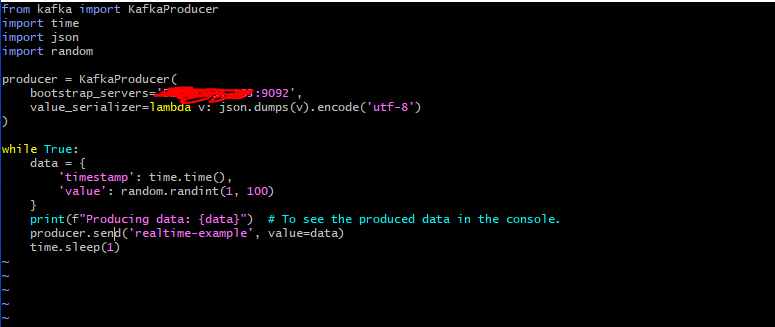
time.sleep(1)- This script initializes a Kafka producer, which connects to the Kafka instance on your EC2.
- It then continuously produces random data (a timestamp and a random value between 1 and 100) to the
realtime-analyticstopic.
Setting Up Kafka Consumer:
Role of a Kafka Consumer: A Kafka consumer fetches data from one or more Kafka topics. A consumer is typically part of a consumer group. When multiple consumers are subscribed to a topic and belong to the same consumer group, each consumer in the group will receive messages from a different subset of the partitions in the topic.
Kafka Consumer :
- Consumer Code:
from kafka import KafkaConsumer
import json

consumer = KafkaConsumer(
    'realtime-analytics',
    bootstrap_servers='YOUR_EC2_IP_ADDRESS:9092',  # Replace with your EC2 IP address.
    value_deserializer=lambda m: json.loads(m.decode('utf-8'))
)

for message in consumer:
    print(f"Consumed data: {message.value}")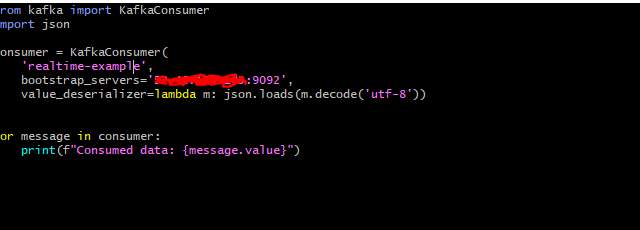
- This script initializes a Kafka consumer, which connects to the Kafka instance on your EC2.
- It then starts listening to the
realtime-analyticstopic and prints each message it consumes.
Integrating Kafka with Flask:
Flask is a lightweight web framework for Python, which is particularly useful for microservices architecture and rapid prototyping. We’re going to leverage Flask to serve the data consumed from Kafka to a frontend dashboard in real-time.
Setting Up Flask:
- Dependencies:
Before we dive into the code, ensure you have Flask installed:
pip install flask
2. Building the Flask Application:
We’ll create a Flask application that starts a Kafka consumer in a separate thread to ensure the main thread (serving the HTTP requests) is not blocked:
from flask import Flask, jsonify
from kafka import KafkaConsumer
import threading
import json

app = Flask(__name__)

# List to hold the data for our dashboard.
dashboard_data = []

consumer = KafkaConsumer(
    'realtime-analytics',
    bootstrap_servers='YOUR_EC2_IP_ADDRESS:9092',  # Replace with your EC2 IP address.
    value_deserializer=lambda m: json.loads(m.decode('utf-8'))
)

def kafka_consumer():
    global dashboard_data
    for message in consumer:
        dashboard_data.append(message.value)
        if len(dashboard_data) > 10:  # Keeping the last 10 data points.
            dashboard_data.pop(0)

threading.Thread(target=kafka_consumer).start()

@app.route('/data', methods=['GET'])
def get_data():
    return jsonify(dashboard_data)

@app.route('/')
def index():
    return "Real-time Analytics Dashboard"

if __name__ == '__main__':
    app.run(host='0.0.0.0', port=5000)  # This will make the Flask app accessible via the EC2's public IP.
This Flask application listens for incoming HTTP requests and serves the last 10 messages consumed from Kafka when you access the /data endpoint.
Running the Flask App on EC2:
With the Flask application ready, start the application on your EC2 instance:
python your_flask_app_filename.pyNote: Ensure the security group of the EC2 instance allows inbound traffic on port 5000.
Access the Flask app via the public IP:
http://YOUR_EC2_IP_ADDRESS:5000/
Awesome !!!. Now we are able to see the real time dasshboard analytics on UI.
Conclusion:
In today’s fast-paced digital world, the demand for real-time analytics has never been greater. With the power of Kafka, we can effortlessly stream vast amounts of data in real-time. Flask, with its simplicity and flexibility, then enables us to present and analyze this data through web interfaces, making it accessible to a wide range of users.
If you found this article insightful and wish to delve deeper into full-stack development or data engineering projects, I’d be thrilled to guide and collaborate further. Feel free to reach out through the mentioned channels below, and let’s make technology work for your unique needs.
Contact Channels:
Thank you for embarking on this journey with me through the realms of real-time data processing. Looking forward to our future collaborations.
In Plain English
Thank you for being a part of our community! Before you go:
- Be sure to clap and follow the writer! 👏
- You can find even more content at PlainEnglish.io 🚀
- Sign up for our free weekly newsletter. 🗞️
- Follow us: Twitter(X), LinkedIn, YouTube, Discord.
- Check out our other platforms: Stackademic, CoFeed, Venture.


