Building a PDF Chatbot with Streamlit and LangChain
In this tutorial, we’ll walk you through the process of creating a simple PDF chatbot using Streamlit and LangChain libraries. The chatbot will allow users to upload a PDF file and ask questions related to its content.
from langchain.vectorstores import FAISS
from langchain.chat_models import ChatOpenAI
from langchain.chains import ConversationalRetrievalChain
from langchain.memory import ConversationBufferMemory
from langchain.text_splitter import RecursiveCharacterTextSplitter
from langchain.embeddings.openai import OpenAIEmbeddings
from PyPDF2 import PdfReader
import streamlit as st
import os
import fitz
from PIL import Image
In this step, We import the necessary libraries for our chatbot, including those from LangChain and Streamlit.
langchain: This library provides tools for natural language processing tasks like text splitting, embeddings, and more.FAISS: A library for efficient similarity search and clustering of dense vectors. It's used to store and retrieve chunks of text.ChatOpenAI: A chat model from LangChain used for generating responses.ConversationalRetrievalChain: A chain that combines a chat model, retriever, and memory to create a conversational retrieval system.ConversationBufferMemory: A memory system that stores and retrieves conversations for the chatbot.RecursiveCharacterTextSplitter: A text splitter for dividing text into smaller chunks.OpenAIEmbeddings: A tool for generating embeddings for text using OpenAI models.PdfReader: A library for reading PDF files and extracting text from them.streamlit: A library for creating interactive web applications.
Step 2: Initialize Streamlit
st.title("PDF Chatbot")Here, we set the title of our Streamlit app to “PDF Chatbot.”
Step 3: Load PDF Text and Create Conversation Chain
def process_pdf(file_path):
    pdf_reader = PdfReader(file_path)
    text = ""
    for page in pdf_reader.pages:
        text += page.extract_text()
    return text
Explanation:
- The
process_pdffunction takes a PDF file path as input, reads the PDF usingPdfReader, and extracts text from each page using theextract_text()method. - This function is used to process the PDF and convert it into text that the chatbot can work with.
Step 4: Generate Response Based on Chat History and Query
def generate_response(chain, history, query):
    result = chain(
        {"question": query, 'chat_history': history}, return_only_outputs=True)
    return result["answer"]
Explanation:
- The
generate_responsefunction takes the conversation chain, chat history, and user query as inputs. - It generates a response by passing the query and chat history to the chain and returning the generated answer.
Step 5: Main Function
def main():
    os.environ['OPENAI_API_KEY'] = "sk-Ha24nR6JqwgAdtx1kIZuEzQKd65b5q3c" # provide your key
    st.write("Upload a PDF file:")
    pdf_file = st.file_uploader("Choose a PDF file", type="pdf")
    query = st.text_input("Enter a question:", "")

    if pdf_file is not None:
        text = process_pdf(pdf_file)
        splitter = RecursiveCharacterTextSplitter(chunk_size=1000, chunk_overlap=200)
        chunks = splitter.split_text(text)
        embeddings = OpenAIEmbeddings()
        vectorstore = FAISS.from_texts(texts=chunks, embedding=embeddings)
        memory = ConversationBufferMemory(memory_key='chat_history', return_messages=True)
        chain = ConversationalRetrievalChain.from_llm(ChatOpenAI(temperature=0.3),
                                                     retriever=vectorstore.as_retriever(),
memory- The
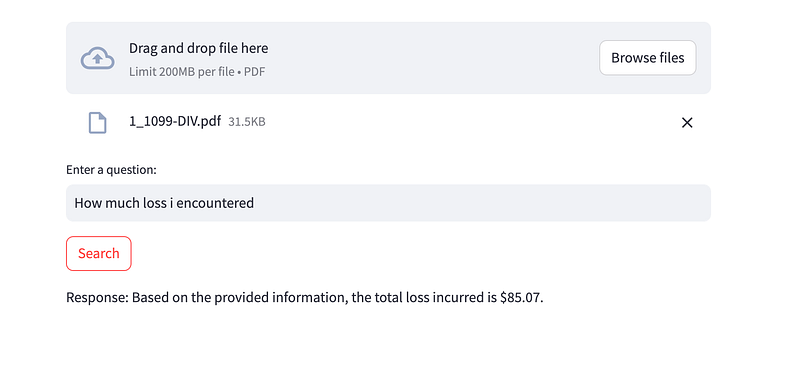
mainfunction is the core of the application. - It uses Streamlit’s interactive components to allow users to upload a PDF file and enter a question.
- When the “Search” button is clicked, the application processes the PDF, creates a conversation chain, and generates a response.
- The response is displayed using Streamlit’s
st.writefunction.
This script creates a simple web-based PDF chatbot using the Streamlit library and the LangChain library for natural language processing. Users can upload a PDF file, ask questions about its content, and receive responses generated by the chatbot.