
Building a Local Knowledge Base with Large Models
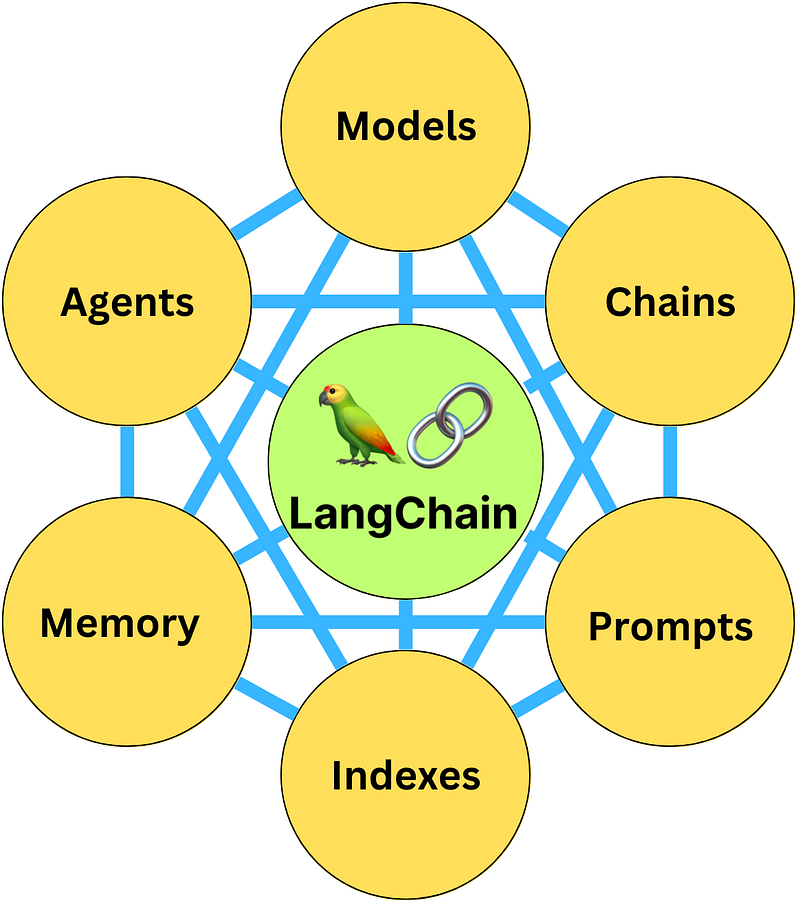
Utilize LangChain to establish a knowledge base, with alternative solutions also recommended at the end of the document.
Using Indexes
Indexing the loaded content, the indexes offer several functionalities:
- Document Loaders for loading documents
- Text Splitters for segmenting documents
- VectorStores for vector storage
- Retrievers for document retrieval
LangChain’s question-answering process can be divided into 4 steps:
Step 1: Create an index. Step 2: Create a Retriever from that index. Step 3: Create a question-answering chain. Step 4: Ask a question!
Implementation with ChatTxt
Within LangChain, the BaseRetriever defined uses the `get_relevant_documents` function to obtain a list of documents relevant to the query. LangChain employs Chroma as the vector storage and retrieval engine, so you’ll need to install the toolkit first.
from abc import ABC, abstractmethod
from typing import List
from langchain.schema import Document
class BaseRetriever(ABC):
@abstractmethod
def get_relevant_documents(self, query: str) ->
List[Document]:
"""Get texts relevant for a query.
Args:
query: string to find relevant texts for
Returns:
List of relevant documents
Chroma is a database for building AI applications with embeddings.
import chromadb

chroma_client = chromadb.Client()

collection =
chroma_client.create_collection(name="my_collection")

collection.add(
documents=["This is an apple", "This is a banana"],
metadatas=[{"source": "my_source"}, {"source":
"my_source"}],
ids=["id1", "id2"]
)

results = collection.query(
query_texts=["This is a query document"],
n_results=2
)
results
{‘ids’: [[‘id1’, ‘id2’]], ‘embeddings’: None, ‘documents’: [[‘This is an apple’, ‘This is a banana’]], ‘metadatas’: [[{‘source’: ‘my_source’}, {‘source’: ‘my_source’}]], ‘distances’: [[1.652575969696045, 1.6869373321533203]]}
from langchain.chains import RetrievalQA
from langchain.llms import OpenAI
from langchain.document_loaders import TextLoader
from langchain.indexes import VectorstoreIndexCreator

loader = TextLoader('./xxx.txt', encoding='utf8')

index = VectorstoreIndexCreator().from_loaders([loader])

query = "xxxx"
index.query(query)
LangChain offers four indexing methods:
1. stuff Directly input the document as a prompt to OpenAI. 2. map_reduce Create a prompt for each chunk (for an answer or summary), then merge them. 3. refine Create a prompt on the first chunk to get a result, then merge the next document and output the result. 4. map_rerank Create a prompt for each chunk, score them, and return the result from the best-scoring document.
Principles Behind ChatPDF Implementation
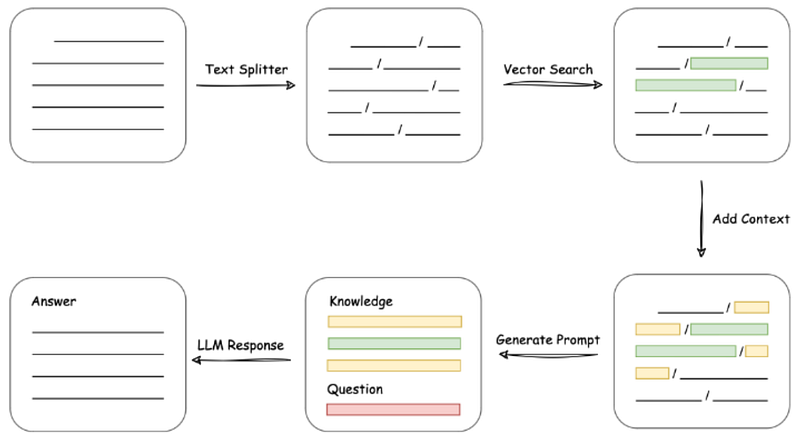
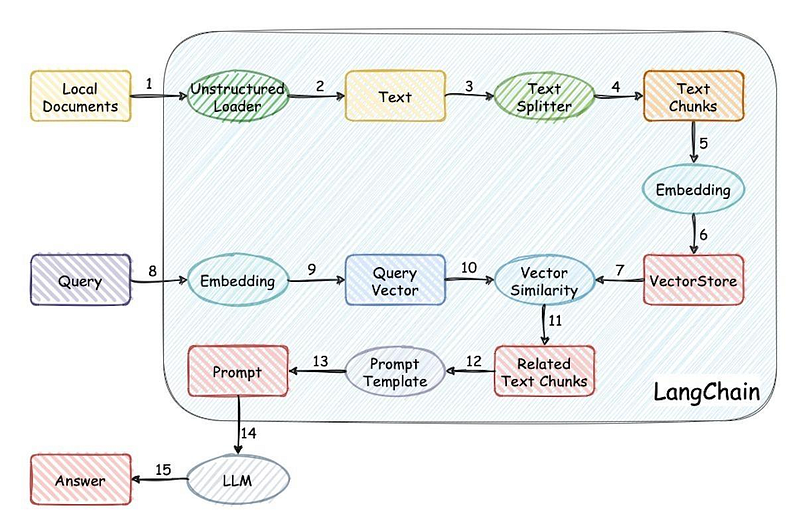
Load file -> Read text -> Split text -> Vectorize text -> Vectorize question -> Match the top k most similar text vectors to the question vector -> Use the matched text as context along with the question in the prompt -> Submit to LLM to generate an answer.
ChatPDF Implementation Scenarios
Typical use cases include:
Project Manager Role: Project management documents + LLM
New Car Sales Guide Role: New car sales articles + LLM
Used Car Expert: Used car appraisal documents + LLM
Traditional Chinese Medicine Practitioner Role: TCM consultation documents + LLM
Customer Service Role: Customer service chat records + LLM
Lawyer Role: Legal consultation records + LLM
HR Role: Attendance and performance manual + LLM
A typical prompt template:
Known information:
{context} Based on the information provided above, answer the user's question concisely and professionally. If an answer cannot be derived from the information, please respond with "Unable to answer the question based on the provided information" or "Insufficient relevant information provided," and do not add fabricated content to the answer. Please answer in Chinese.
The question is: {question}
Vector Databases
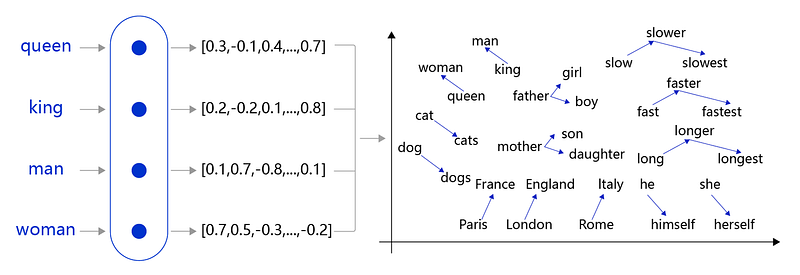
A database that stores embeddings is known as a vector database.
The Transformer architecture in ChatGPT requires knowledge to be embedded.
Alternative Knowledge Base Solutions
Ai PDF is a PDF document processing tool based on GPT, featuring the following characteristics:
This is an open-source project that allows users to interact with their documents using the power of GPT, running entirely locally without leaking user data.
Users can import various documents and ask questions in natural language, to which GPT will provide answers based on those documents.
It offers an open-source GPT chatbot that can run in a local environment without the need to connect to an external API.
It supports implementation in multiple programming languages and can be custom-trained to optimize conversation outcomes.
This is also an open-source project for running the GPT model locally.
Users can import documents locally, and the GPT model will answer questions based on the content of these documents, protecting user privacy.
This is a commercial tool that also allows users to interact with documents and content in various formats through natural language, receiving precise responses.
It supports PDF, Word documents, text, audio, video, and more.
This is an AI workspace service for individuals, where users can custom-train models to optimize different tasks, such as writing, summarizing, and question-answering.
It provides a visual training monitoring interface, mainly targeting enterprise users.
Humata is a tool that uses AI technology to enable users to interact with various data documents through natural language.
askwise.ai is a knowledge assistant service based on GPT.
Conclusion
Knowledge is power, and AI-generated structures reach high.
Want to discover more secrets of AI? Follow us for more exciting discoveries!
I am Meng Li, an independent open-source software developer, and author of the SolidUI AI painting project, very interested in new technologies, and focused on AI and the data field.


