avatarKyle Gallatin

Free AI web copilot to create summaries, insights and extended knowledge, download it at here

6711

Abstract

/span>() manager_dict[<span class="hljs-string">"read_only_model"</span>] = model manager_dict[<span class="hljs-string">"writable_model"</span>] = model manager_dict[<span class="hljs-string">"metric"</span>] = metric data[<span class="hljs-string">"multiprocess_manager"</span>] = manager_dict

<span class="hljs-keyword">class</span> <span class="hljs-title class_">HttpServer</span>(gunicorn.app.base.BaseApplication): <span class="hljs-keyword">def</span> <span class="hljs-title function_">init</span>(<span class="hljs-params">self, app, options=<span class="hljs-literal">None</span></span>): self.options = options <span class="hljs-keyword">or</span> {} self.application = app <span class="hljs-built_in">super</span>().init()

<span class="hljs-keyword">def</span> <span class="hljs-title function_">load_config</span>(<span class="hljs-params">self</span>):
    config = {
        key: value
        <span class="hljs-keyword">for</span> key, value <span class="hljs-keyword">in</span> self.options.items()
        <span class="hljs-keyword">if</span> key <span class="hljs-keyword">in</span> self.cfg.settings <span class="hljs-keyword">and</span> value <span class="hljs-keyword">is</span> <span class="hljs-keyword">not</span> <span class="hljs-literal">None</span>
    }
    <span class="hljs-keyword">for</span> key, value <span class="hljs-keyword">in</span> config.items():
        self.cfg.<span class="hljs-built_in">set</span>(key.lower(), value)

<span class="hljs-keyword">def</span> <span class="hljs-title function_">load</span>(<span class="hljs-params">self</span>):
    <span class="hljs-keyword">return</span> self.application

<span class="hljs-keyword">if</span> name == <span class="hljs-string">"main"</span>: <span class="hljs-keyword">global</span> data parser = argparse.ArgumentParser() parser.add_argument(<span class="hljs-string">"--num-workers"</span>, <span class="hljs-built_in">type</span>=<span class="hljs-built_in">int</span>, default=<span class="hljs-number">5</span>) parser.add_argument(<span class="hljs-string">"--port"</span>, <span class="hljs-built_in">type</span>=<span class="hljs-built_in">str</span>, default=<span class="hljs-string">"8080"</span>) args = parser.parse_args() options = { <span class="hljs-string">"bind"</span>: <span class="hljs-string">"%s:%s"</span> % (<span class="hljs-string">"0.0.0.0"</span>, args.port), <span class="hljs-string">"workers"</span>: args.num_workers, } initialize() HttpServer(app, options).run()</pre></div><p id="c408">The critical thing here is in the <code>initialize()</code> function, where we define a global variable <code>data</code> — in which we store our <code>multiprocessing.Manager</code> object. In that object, we store a model we can update, a hypothetically immutable “read-only” model, and our metric.</p><p id="0baa">After that, we just need to add the required prediction and model update routes! Using the ever-so-familiar flask syntax, we can define endpoints that perform our desired operations.</p><div id="1cdb"><pre><span class="hljs-meta">@app.route(<span class="hljs-params"><span class="hljs-string">"/predict"</span>, methods=[<span class="hljs-string">"POST"</span>]</span>)</span> <span class="hljs-keyword">def</span> <span class="hljs-title function_">predict</span>(): json_request = request.json x = json_request[<span class="hljs-string">"x"</span>] <span class="hljs-keyword">return</span> <span class="hljs-built_in">str</span>(data[<span class="hljs-string">"multiprocess_manager"</span>][<span class="hljs-string">"model"</span>].predict_one(x)), <span class="hljs-number">200</span>

<span class="hljs-meta">@app.route(<span class="hljs-params"><span class="hljs-string">"/update_model"</span>, methods=[<span class="hljs-string">"PUT"</span>]</span>)</span> <span class="hljs-keyword">def</span> <span class="hljs-title function_">update_model</span>(): json_request = request.json x, y = json_request[<span class="hljs-string">"x"</span>], json_request[<span class="hljs-string">"y"</span>] model = data[<span class="hljs-string">"multiprocess_manager"</span>][<span class="hljs-string">"writable_model"</span>] y_pred = model.predict_proba_one(x) model.learn_one(x, y)

metric = data[<span class="hljs-string">"multiprocess_manager"</span>][<span class="hljs-string">"metric"</span>]
metric.update(y, y_pred)

data[<span class="hljs-string">"multiprocess_manager"</span>][<span class="hljs-string">"metric"</span>] = metric
data[<span class="hljs-string">"multiprocess_manager"</span>][<span class="hljs-string">"writable_model"</span>] = model
data[<span class="hljs-string">"multiprocess_manager"</span>][<span class="hljs-string">"read_only_model"</span>] = model
<span class="hljs-keyword">return</span> <span class="hljs-built_in">str</span>(data[<span class="hljs-string">"multiprocess_manager"</span>][<span class="hljs-string">"metric"</span>]), <span class="hljs-number">200</span></pre></div><p id="e9d6">The <code>/predict</code> endpoint is a post request that just gets predictions. The <code>/update_model</code> endpoint, however takes ground truth as the request and in order:</p><ol><li>Gets the predicted probability for the given observation</li><li>Updates the writable model with the new observation</li><li>Updates the metric using the prediction and ground truth</li><li>Replaces the values for the metric, writable model and read only model in our multiprocessing manager</li></ol><p id="8553">For the full code, we can refer to the <a href="https://github.com/kylegallatin/stateful-ml-app">Github repository</a>. If you’d like to run it, use the <code>docker</code> commands in the readme. Application startup will look something like this:</p><div id="eb35"><pre><span class="hljs-selector-attr">[2022-12-21 13:44:07 +0000]</span> <span class="hljs-selector-attr">[8]</span> <span class="hljs-selector-attr">[INFO]</span> <span class="hljs-selector-tag">Starting</span> <span class="hljs-selector-tag">gunicorn</span> <span class="hljs-number">20.1</span><span class="hljs-selector-class">.0</span>

<span class="hljs-selector-attr">[2022-12-21 13:44:07 +0000]</span> <span class="hljs-selector-attr">[8]</span> <span class="hljs-selector-attr">[INFO]</span> <span class="hljs-selector-tag">Listening</span> <span class="hljs-selector-tag">at</span>: <span class="hljs-selector-tag">http</span>:<span class="hljs-comment">//0.0.0.0:8080 (8)</span> <span class="hljs-selector-attr">[2022-12-21 13:44:07 +0000]</span> <span clas

Options

s="hljs-selector-attr">[8]</span> <span class="hljs-selector-attr">[INFO]</span> <span class="hljs-selector-tag">Using</span> <span class="hljs-selector-tag">worker</span>: <span class="hljs-selector-tag">sync</span> <span class="hljs-selector-attr">[2022-12-21 13:44:07 +0000]</span> <span class="hljs-selector-attr">[27]</span> <span class="hljs-selector-attr">[INFO]</span> <span class="hljs-selector-tag">Booting</span> <span class="hljs-selector-tag">worker</span> <span class="hljs-selector-tag">with</span> <span class="hljs-selector-tag">pid</span>: <span class="hljs-number">27</span> <span class="hljs-selector-attr">[2022-12-21 13:44:07 +0000]</span> <span class="hljs-selector-attr">[28]</span> <span class="hljs-selector-attr">[INFO]</span> <span class="hljs-selector-tag">Booting</span> <span class="hljs-selector-tag">worker</span> <span class="hljs-selector-tag">with</span> <span class="hljs-selector-tag">pid</span>: <span class="hljs-number">28</span> <span class="hljs-selector-attr">[2022-12-21 13:44:07 +0000]</span> <span class="hljs-selector-attr">[29]</span> <span class="hljs-selector-attr">[INFO]</span> <span class="hljs-selector-tag">Booting</span> <span class="hljs-selector-tag">worker</span> <span class="hljs-selector-tag">with</span> <span class="hljs-selector-tag">pid</span>: <span class="hljs-number">29</span> <span class="hljs-selector-attr">[2022-12-21 13:44:07 +0000]</span> <span class="hljs-selector-attr">[30]</span> <span class="hljs-selector-attr">[INFO]</span> <span class="hljs-selector-tag">Booting</span> <span class="hljs-selector-tag">worker</span> <span class="hljs-selector-tag">with</span> <span class="hljs-selector-tag">pid</span>: <span class="hljs-number">30</span> <span class="hljs-selector-attr">[2022-12-21 13:44:07 +0000]</span> <span class="hljs-selector-attr">[31]</span> <span class="hljs-selector-attr">[INFO]</span> <span class="hljs-selector-tag">Booting</span> <span class="hljs-selector-tag">worker</span> <span class="hljs-selector-tag">with</span> <span class="hljs-selector-tag">pid</span>: <span class="hljs-number">31</span></pre></div><p id="effb">To confirm it’s working, we need to make sure our model actually learns and that the learning is persistent across all gunicorn workers. To accomplish this, we can run the <code>send_requests.py</code> script present in the repo. This will send single examples to the <code>/update_model</code> endpoint so that the model incrementally learns, and return the updated metric on each pass.</p><p id="d9fa">When you do so, you’ll see my horribly formatted byte string responses printed to the terminal, and watch the model learn in real-time!</p><div id="d9a5"><pre>... b<span class="hljs-string">'ROCAUC: 81.90%'</span> b<span class="hljs-string">'ROCAUC: 82.44%'</span> b<span class="hljs-string">'ROCAUC: 82.92%'</span> b<span class="hljs-string">'ROCAUC: 83.41%'</span> b<span class="hljs-string">'ROCAUC: 83.86%'</span> b<span class="hljs-string">'ROCAUC: 84.29%'</span> b<span class="hljs-string">'ROCAUC: 84.72%'</span> b<span class="hljs-string">'ROCAUC: 85.11%'</span> b<span class="hljs-string">'ROCAUC: 85.52%'</span> b<span class="hljs-string">'ROCAUC: 85.90%'</span> ...</pre></div><p id="1ce8">We can also send single prediction requests now to classify whether or not a given webpage is a phishing page:</p><div id="19f6"><pre>curl -X POST -H <span class="hljs-symbol">'Content</span>-Type: application/json'
localhost:<span class="hljs-number">8080</span>/predict -d
'{<span class="hljs-string">"x"</span>: {<span class="hljs-string">"empty_server_form_handler"</span>: <span class="hljs-number">1.0</span>, <span class="hljs-string">"popup_window"</span>: <span class="hljs-number">0.0</span>, <span class="hljs-string">"https"</span>: <span class="hljs-number">1.0</span>, <span class="hljs-string">"request_from_other_domain"</span>: <span class="hljs-number">0.0</span>, <span class="hljs-string">"anchor_from_other_domain"</span>: <span class="hljs-number">1.0</span>, <span class="hljs-string">"is_popular"</span>: <span class="hljs-number">0.0</span>,<span class="hljs-string">"long_url"</span>: <span class="hljs-number">0.0</span>, <span class="hljs-string">"age_of_domain"</span>: <span class="hljs-number">1</span>, <span class="hljs-string">"ip_in_url"</span>: <span class="hljs-number">0</span>}}'

False</pre></div><p id="d7c3">😱</p><h1 id="85a9">Future Work</h1><p id="3303">Okay, so as I started to wrap this up, I began to have additional thoughts and questions…</p><p id="17ed"><i>Will this scale?</i></p><p id="44ae">Probs not. Instead of storing all our models and metric in a the multiprocessing manager, we would probably want to deploy something like Redis to store our model (or even use as a real-time parameter server) if we’re going to be both serving <i>and </i>updating our model from multiple application runtimes. In the event I were to deploy this to Kubernetes, I’d probably separate the training/serving deployments into separate applications entirely, make frequent model backups to GCS, add checkpoints and tests after updates, etc…but I’m not doing that right now.</p><p id="5c38"><i>Alternative approaches?</i></p><p id="e402">So many. Theoretically, even if we’re performing stateful retraining, we can still have stateless deployments (the deployment would just be updated wayyyy more frequently with a new model artifact). That would less folks reuse paradigms from existing model deployments without the added complexity of stateful serving. Still, it’d be cool to apply distributed offline training techniques (such as federated learning or using parameter servers) to the online space right?</p><p id="b539"><i>Is this even necessary?</i></p><p id="3371">Depends on the use case I imagine. For learning on edge devices and cases where we both (1) have readily available ground truth and (2) the freshest model matters then it’s great. However, in cases where we don’t know or receive ground truth quickly…probably not worth the complexity and overhead. Nothing like yeeting a stale model artifact into production and letting it sit until it dies.</p><p id="163e">Regardless, this was fun and I hope you enjoyed it! Look out for more.</p><figure id="2568"><img src="https://cdn-images-1.readmedium.com/v2/resize:fit:800/1*EJWKnH0U036gAh66xBqlMw.jpeg"><figcaption>Stupidly beautiful pic from the Isle of Skye to use as a cover photo — Image by Author</figcaption></figure><p id="99d0"><i>Thanks to JG for the code, Nick Lowry for the heads up on River, Cole Ingraham for some thoughtful back and forth that helped me shape future work, and Chip Huyen for consistently hitting the nail on the head!</i></p></article></body>

Building a Lil’ Stateful, ML Application for Online Learning

Using River, Flask, Gunicorn and Multiprocessing to Build an Application for Online Learning

Most real-time ML systems that I see today are stateless — they train and serve a fixed model artifact for until being completely replaced by another artifact trained on a window of more recent data. Stateless model retraining can be costly if models are retrained frequently — whereas model drift becomes an issue if models aren’t retrained enough.

On the other hand, stateful retraining and deployment builds on the initial model artifact. Instead of performing large batch training jobs, we conduct incremental training — updating model weights more frequently. This has the advantage of being both cost effective and averse to model drift.
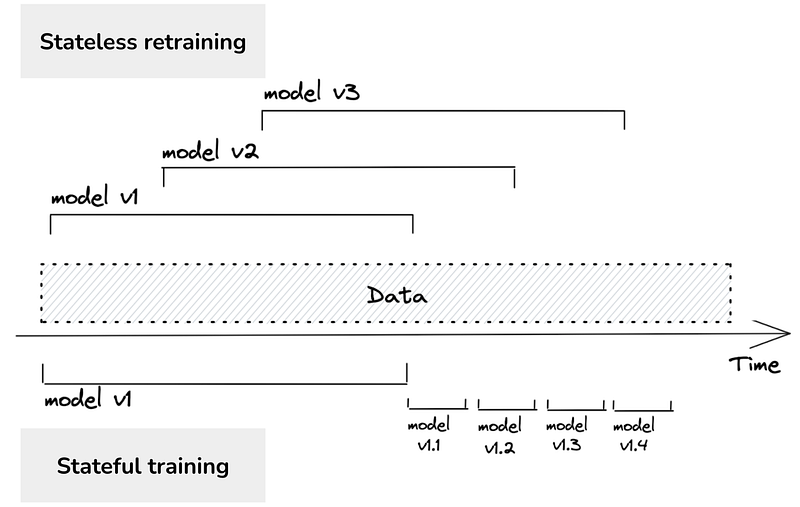
Stateless versus stateful retraining — from Chip Huyen

On the deployment side of things, this also present a set of unique challenges. Most web server + docker image + model artifact approaches to model serving assume that the artifact and model weights are static. Deploying new versions of a model this way would mean lots of reads from a blob store like S3. In the interest of sensible systems design (and because it’s cool) I wanted to build a small deployment that was capable of both making real-time predictions at some level of scale and learning from ground truth on the fly.

The Architecture

I couldn’t find much on generally accepted application designs for this approach, and I imagine the true design would depend a lot on the use case. However, I’ve found it an easy analogy to compare a stateful ML application to a stateful web application backed by a database. Specifically — a case where we want one database instance optimized for writes and the another optimized for reads.
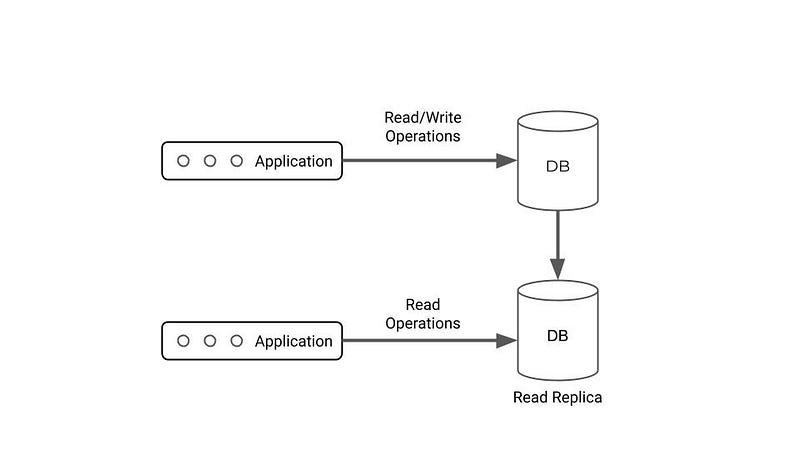
A stateful DB-backed application with a read replica — Image by Author

What if we just treat an ML model more like a stateful, DB-backed application — in that it basically allows both reads (predictions) and writes (incremental training with ground truth)?
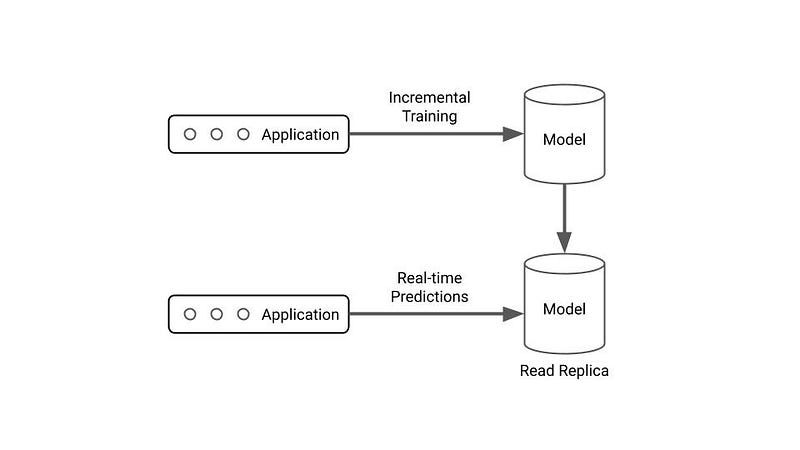
A stateful ML application with a “read replica” — Image by Author

Dramatically oversimplified architectures FTW. Within a model server, we essentially want a high-read object/replica and another that we can perform writes to so our model can learn over time.

The Model

I wanted to demonstrate this architecture using a “classic” model architecture (as opposed to some sort of RL, reward-based agent that might be an easier fit). Thus I needed to use a library wherein I could easily train perform continuous training on a model with single observations.

A peer recently put me onto River — a Python library for online machine learning. Although it’s somewhat similar to more familiar APIs like scikit-learn, it allows us to easily leverage useful methods for our use case.

The above would return something like:

ROCAUC: 95.04%

If you print the metric during each iteration, you can watch the model performance increase in real-time, and the model go from a 50–50 random guessing machine to a trained classifier.

The Application

Check out the code here. For prose, keep reading…

For my first go, I wanted to implement this for a single instance of a flask application run with multiple gunicorn worker processes. This means if I want to update a variable, I need to update it across each process my application is running. Unlike serving stateless model deployments with Flask, we actually care about what happens post-fork (after our initial thread splits into multiple worker processes) since we need to update variables.

Thanks to the magic of the internet, this is already fairly feasible — and JG has a lovely post on the subject along with a Github repo I was able to fork and adapt to my use case. I chose to use the multiprocessing.Manager class to share data across processes in my application. This allows us to store 2 River models (one write one read) and our metric in a Python dictionary accessible from anywhere.

The basic application itself is simple (forked from JG’s code), running a flask+gunicorn application with 5 workers:

import argparse
import os
from multiprocessing import Manager

import gunicorn.app.base
from flask import Flask, request
from river import compose, linear_model, metrics, preprocessing

metric = metrics.ROCAUC()
model = compose.Pipeline(
    preprocessing.StandardScaler(), linear_model.LogisticRegression()
)
app = Flask(__name__)

...

def initialize():
    global data
    data = {}
    data["main_pid"] = os.getpid()
    manager_dict = Manager().dict()
    manager_dict["read_only_model"] = model
    manager_dict["writable_model"] = model
    manager_dict["metric"] = metric
    data["multiprocess_manager"] = manager_dict


class HttpServer(gunicorn.app.base.BaseApplication):
    def __init__(self, app, options=None):
        self.options = options or {}
        self.application = app
        super().__init__()

    def load_config(self):
        config = {
            key: value
            for key, value in self.options.items()
            if key in self.cfg.settings and value is not None
        }
        for key, value in config.items():
            self.cfg.set(key.lower(), value)

    def load(self):
        return self.application


if __name__ == "__main__":
    global data
    parser = argparse.ArgumentParser()
    parser.add_argument("--num-workers", type=int, default=5)
    parser.add_argument("--port", type=str, default="8080")
    args = parser.parse_args()
    options = {
        "bind": "%s:%s" % ("0.0.0.0", args.port),
        "workers": args.num_workers,
    }
    initialize()
    HttpServer(app, options).run()

The critical thing here is in the initialize() function, where we define a global variable data — in which we store our multiprocessing.Manager object. In that object, we store a model we can update, a hypothetically immutable “read-only” model, and our metric.

After that, we just need to add the required prediction and model update routes! Using the ever-so-familiar flask syntax, we can define endpoints that perform our desired operations.

@app.route("/predict", methods=["POST"])
def predict():
    json_request = request.json
    x = json_request["x"]
    return str(data["multiprocess_manager"]["model"].predict_one(x)), 200


@app.route("/update_model", methods=["PUT"])
def update_model():
    json_request = request.json
    x, y = json_request["x"], json_request["y"]
    model = data["multiprocess_manager"]["writable_model"]
    y_pred = model.predict_proba_one(x)
    model.learn_one(x, y)

    metric = data["multiprocess_manager"]["metric"]
    metric.update(y, y_pred)

    data["multiprocess_manager"]["metric"] = metric
    data["multiprocess_manager"]["writable_model"] = model
    data["multiprocess_manager"]["read_only_model"] = model
    return str(data["multiprocess_manager"]["metric"]), 200

The /predict endpoint is a post request that just gets predictions. The /update_model endpoint, however takes ground truth as the request and in order:

  1. Gets the predicted probability for the given observation
  2. Updates the writable model with the new observation
  3. Updates the metric using the prediction and ground truth
  4. Replaces the values for the metric, writable model and read only model in our multiprocessing manager

For the full code, we can refer to the Github repository. If you’d like to run it, use the docker commands in the readme. Application startup will look something like this:

[2022-12-21 13:44:07 +0000] [8] [INFO] Starting gunicorn 20.1.0
[2022-12-21 13:44:07 +0000] [8] [INFO] Listening at: http://0.0.0.0:8080 (8)
[2022-12-21 13:44:07 +0000] [8] [INFO] Using worker: sync
[2022-12-21 13:44:07 +0000] [27] [INFO] Booting worker with pid: 27
[2022-12-21 13:44:07 +0000] [28] [INFO] Booting worker with pid: 28
[2022-12-21 13:44:07 +0000] [29] [INFO] Booting worker with pid: 29
[2022-12-21 13:44:07 +0000] [30] [INFO] Booting worker with pid: 30
[2022-12-21 13:44:07 +0000] [31] [INFO] Booting worker with pid: 31

To confirm it’s working, we need to make sure our model actually learns and that the learning is persistent across all gunicorn workers. To accomplish this, we can run the send_requests.py script present in the repo. This will send single examples to the /update_model endpoint so that the model incrementally learns, and return the updated metric on each pass.

When you do so, you’ll see my horribly formatted byte string responses printed to the terminal, and watch the model learn in real-time!

...
b'ROCAUC: 81.90%'
b'ROCAUC: 82.44%'
b'ROCAUC: 82.92%'
b'ROCAUC: 83.41%'
b'ROCAUC: 83.86%'
b'ROCAUC: 84.29%'
b'ROCAUC: 84.72%'
b'ROCAUC: 85.11%'
b'ROCAUC: 85.52%'
b'ROCAUC: 85.90%'
...

We can also send single prediction requests now to classify whether or not a given webpage is a phishing page:

curl -X POST -H 'Content-Type: application/json' \
  localhost:8080/predict -d \
  '{"x": {"empty_server_form_handler": 1.0, "popup_window": 0.0, "https": 1.0, "request_from_other_domain": 0.0, "anchor_from_other_domain": 1.0, "is_popular": 0.0,"long_url": 0.0, "age_of_domain": 1, "ip_in_url": 0}}'

False

😱

Future Work

Okay, so as I started to wrap this up, I began to have additional thoughts and questions…

Will this scale?

Probs not. Instead of storing all our models and metric in a the multiprocessing manager, we would probably want to deploy something like Redis to store our model (or even use as a real-time parameter server) if we’re going to be both serving and updating our model from multiple application runtimes. In the event I were to deploy this to Kubernetes, I’d probably separate the training/serving deployments into separate applications entirely, make frequent model backups to GCS, add checkpoints and tests after updates, etc…but I’m not doing that right now.

Alternative approaches?

So many. Theoretically, even if we’re performing stateful retraining, we can still have stateless deployments (the deployment would just be updated wayyyy more frequently with a new model artifact). That would less folks reuse paradigms from existing model deployments without the added complexity of stateful serving. Still, it’d be cool to apply distributed offline training techniques (such as federated learning or using parameter servers) to the online space right?

Is this even necessary?

Depends on the use case I imagine. For learning on edge devices and cases where we both (1) have readily available ground truth and (2) the freshest model matters then it’s great. However, in cases where we don’t know or receive ground truth quickly…probably not worth the complexity and overhead. Nothing like yeeting a stale model artifact into production and letting it sit until it dies.

Regardless, this was fun and I hope you enjoyed it! Look out for more.

Stupidly beautiful pic from the Isle of Skye to use as a cover photo — Image by Author

Thanks to JG for the code, Nick Lowry for the heads up on River, Cole Ingraham for some thoughtful back and forth that helped me shape future work, and Chip Huyen for consistently hitting the nail on the head!

Machine Learning
Flask
Docker
Programming
Data Science
Recommended from ReadMedium