

Full-Stack Development
Building a Cloud-Based Text-to-Speech Application with Text Highlighting and AWS Polly
Harness the power of cloud technologies to create an advanced, scalable, and accessible Text-to-Speech solution, with a friendly and easy tool: AWS Polly.
Introduction

Hello there, everybody! Looking for a good way to add text-to-speech (TTS) to your web project? You might be wondering: Should I build it on the client-side or use a cloud-based service?
As shown in my other article published some days ago, while building it on the client-side might seem easier, it has a few downsides, and the main one is that it depends on the user’s device and browser. Some users might have a great experience, but others might not, especially if they’re using an older device or a less common browser. Plus, if you want to add extra features like highlighting text as it’s spoken, it can get tricky with the basic tools available in the browser.
But on the other hand, cloud-based services can make these problems disappear, because they work the same way for every user, no matter what device or browser they’re using. They’re built to handle lots of users at once, so your app can grow without running into performance issues, and they offer powerful features that are hard to build from scratch.
In this article, I’m going to show you how to build a TTS feature with text highlighting using AWS services.
AWS Polly for Text-to-Speech

AWS Polly is a service that turns text into lifelike speech, which uses advanced deep learning technologies to synthesize speech that sounds like a human voice; Polly supports dozens of voices and multiple languages.
First, you’ll need to create an AWS account and configure AWS SDK for your programming language of choice; AWS provides SDKs for JavaScript, Python, .NET, Java, and more, and you can then use the SDK to convert your text to speech with AWS Polly.
Here is a basic example of how to use AWS SDK for JavaScript to synthesize speech:
const AWS = require('aws-sdk');

const polly = new AWS.Polly({
    region: 'us-east-1'
});

let params = {
    'Text': 'Hello, world!',
    'OutputFormat': 'mp3',
    'VoiceId': 'Joanna'
};

polly.synthesizeSpeech(params, function(err, data) {
    if (err) {
        console.log(err.code);
    } else if (data.AudioStream instanceof Buffer) {
        // Your logic to play or store the audio stream
    }
});
AWS Lambda and API Gateway for API Layer

Next, we need to expose the text-to-speech functionality as an API, and we will use AWS Lambda and AWS API Gateway for this purpose, which lets you run your code without provisioning or managing servers.
API Gateway is a fully managed service that makes it easy for developers to create, publish, maintain, monitor, and secure APIs at any scale.
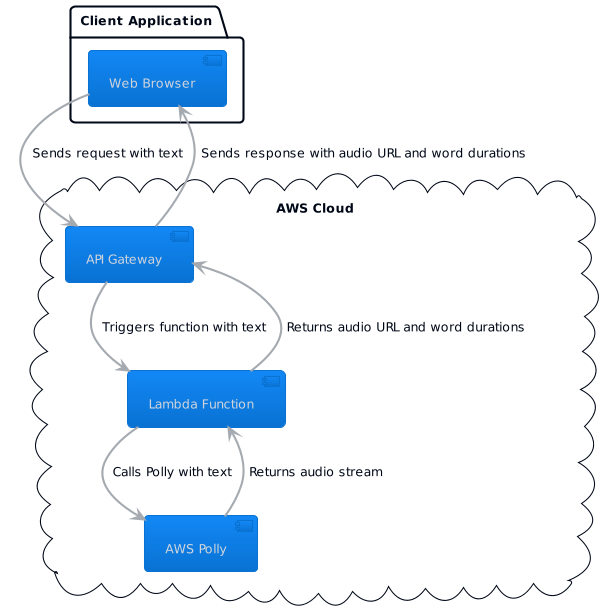
The Architecture
Here’s a simplified architecture:
- A client (web, mobile) sends a request to API Gateway with the text to convert to speech.
- API Gateway triggers a Lambda function, passing the input text.
- The Lambda function uses AWS SDK to call Polly with the input text.
- Polly returns the speech audio, which the Lambda function sends back as the API response.
You can set up the Lambda function and API Gateway manually through the AWS Management Console, or automate the process with an infrastructure as code (IaC) tool like AWS CloudFormation or the Serverless Framework.
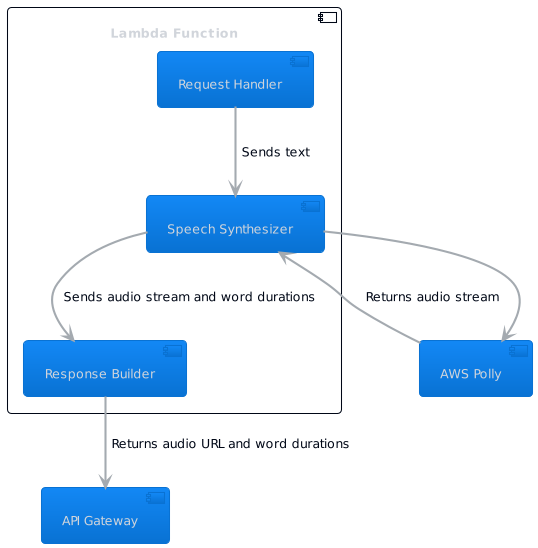
The diagram above breaks down the Lambda Function into three components:
Request Handlerreceives the request from API Gateway and sends the text to theSpeech Synthesizer.Speech Synthesizerinteracts with AWS Polly to convert the text to speech and calculates word durations.Response Builderconstructs the response with the audio URL and word durations, which is then sent back to API Gateway.
I hope that these diagrams should give you a clearer picture of the proposed architecture.
Setting Up the Interface
Here’s an example of a simple Lambda function that receives a string of text from an API Gateway trigger, uses Polly to convert it to speech, and returns the URL of the audio file:
const AWS = require('aws-sdk');
const S3 = require('aws-sdk/clients/s3');

const polly = new AWS.Polly();
const s3 = new S3();

exports.handler = async (event) => {
    const text = event.body;  // text sent via API Gateway

    const params = {
        'Text': text,
        'OutputFormat': 'mp3',
        'VoiceId': 'Joanna'
    };

    try {
        const data = await polly.synthesizeSpeech(params).promise();
        const audioStream = data.AudioStream;

        // Upload the audio file to S3 and get the URL
        const s3Params = {
            Bucket: 'your-bucket-name',
            Key: `${Date.now()}.mp3`,
            Body: audioStream,
            ContentType: 'audio/mpeg',
            ACL: 'public-read'
        };

        const s3Data = await s3.upload(s3Params).promise();
        const audioUrl = s3Data.Location;

        return {
            statusCode: 200,
            body: JSON.stringify({ audioUrl }),
            headers: {
                'Content-Type': 'application/json',
                'Access-Control-Allow-Origin': '*',
                'Access-Control-Allow-Credentials': true,
            },
        };
    } catch (err) {
        console.log(err);
        return {
            statusCode: 500,
            body: JSON.stringify({ error: err.message }),
        };
    }
};
Implementing Text Highlighting

Since we’re creating the audio server-side, text highlighting has to be implemented client-side, and one way to do this is by sending the list of words and their respective estimated speech durations together with the audio from the server.
For instance, you can have the Lambda function split the input text into words, calculate the estimated duration for each word as before, and return this data along with the audio URL. The client can then use this data to implement the highlighting, using a similar setTimeout approach as we've discussed earlier.
Going the Extra Mile: Text Highlighting on the Client-Side
To implement text highlighting, we can modify our Lambda function to return not only the audio URL but also the list of words and their estimated speech durations, then, on the client side, we can use this data to highlight each word as it’s spoken.
// On the server side (Lambda function)

// Calculate estimated duration for each word
const words = text.split(' ');
const durations = words.map(word => 200 + word.length * 50);

// Include word durations in the response
return {
    statusCode: 200,
    body: JSON.stringify({ audioUrl, words, durations }),
    headers: { /* ... */ },
};

// On the client side

// Parse the server response
const { audioUrl, words, durations } = JSON.parse(response.body);

// Create audio element
const audio = new Audio(audioUrl);

// Display the words
const wordElements = words.map((word, i) => {
    const element = document.createElement('span');
    element.textContent = word;
    element.id = `word-${i}`;
    document.body.appendChild(element);
    return element;
});

// Highlight each word as it's spoken
let i = 0;
audio.addEventListener('timeupdate', () => {
    if (audio.currentTime * 1000 >= durations[i]) {
        wordElements[i].style.backgroundColor = 'yellow';  // highlight current word
        if (i > 0) wordElements[i-1].style.backgroundColor = '';  // remove highlight from previous word
        i++;
    }
});

audio.play();
Scalability and Cost Management

Cloud platforms like AWS allow you to easily scale your application to handle more users, and both AWS lambda and API gateway can automatically scale to handle high request volumes, and you pay only for the requests you make.
Oh, remember that AWS Polly charges based on the number of characters in your text, so larger texts could result in higher costs. But don’t worries, to manage it, you can implement logic in your Lambda function to split large texts into smaller chunks and synthesize each chunk separately.
This can also help manage the load on the client side, as smaller audio files are easier to download and play.
Managing Growth and Costs in the Cloud
Remember that code optimization is key to reducing costs, and for instance, synthesizing text in larger chunks can be more cost-effective than synthesizing word by word.
// Instead of:
params = {
    'Text': 'word1',
    'OutputFormat': 'mp3',
    'VoiceId': 'Joanna'
};
polly.synthesizeSpeech(params);

params = {
    'Text': 'word2',
    'OutputFormat': 'mp3',
    'VoiceId': 'Joanna'
};
polly.synthesizeSpeech(params);

// Do:
params = {
    'Text': 'word1 word2',
    'OutputFormat': 'mp3',
    'VoiceId': 'Joanna'
};
polly.synthesizeSpeech(params);
Wrapping Up

In this article, we discussed how to architect a robust, cloud-based Text-to-Speech application with text highlighting, but bear in mind that as the complexity of the application increases, so do the challenges, and with the right design decisions and architectural considerations, these challenges can be effectively tackled.
The principles we discussed can be applied to other cloud platforms, giving you the flexibility to choose the one that best suits your needs and preferences.
Now, having a server-side solution for Text-to-Speech, why not try integrating it with a front-end application to bring your text-to-life in the browser? If you’re interested, check out my earlier article on “Building a Text-To-Speech Application with JavaScript in 3 Easy Steps”, which provides a comprehensive step-by-step guide on how to implement Text-To-Speech using the SpeechSynthesis API, easily integrated with the cloud-based solution we’ve just built.
As you continue to build and learn, you will find more opportunities to enhance the user experience and optimize your application’s performance. Always keep exploring, and happy coding!
📗 Attention: Your choice to buy this book signifies your support to my work, with no additional expense on your part. Enjoy a stimulating read, and I can keep churning out content you appreciate!🏅