avatarGeorge Calin

Free AI web copilot to create summaries, insights and extended knowledge, download it at here

6960

Abstract

eral apps like: a Terminal , a text editor and a file manager</p><p id="cb6f"><b><i>core-image-sato-sdk </i></b>This is a core-image-sato added with complete standalone Software Development Kit (SDK)</p><h1 id="a560">Step 5. Launch BitBake</h1><p id="ce27">BitBake is the task schedule included with Poky, which ultimately is going to build your Linux image.</p><p id="4f3e">By giving BitBake the final target, it will work backwards and build all the dependencies, first beginning with the toolchain.</p><p id="5594">The simple command goes like this:</p><div id="2ff0"><pre> bitbake core-image-minimal</pre></div><p id="f1f8">This is going to bake a <i>core-image-minimal</i> Linux Image for you, as per the settings in the<i> local.conf</i> (detailed at the previous step).</p><p id="77ef">Practically, you will probably associate this <b><i>bitbake</i></b> command with a<b><i> screen</i></b> attach/detach command so that you can do other things while BitBake is building.</p><div id="1246"><pre> <span class="hljs-keyword">screen </span><span class="hljs-keyword">bitbake </span>core-image-minimal</pre></div><p id="60da">And you are free to use CTRL +A CTRL +D to detach.</p><p id="edd0">Plus the following command to attach (reopen this SSH activity) again:</p><div id="d7e9"><pre><span class="hljs-variable"> </span>screen -r </pre></div><figure id="8f27"><img src="https://cdn-images-1.readmedium.com/v2/resize:fit:800/1*grjP--wPnfki7gX30cJJMg.png"><figcaption></figcaption></figure><p id="0b92">I have added <b><i>time</i></b> to the <b><i>bitbake</i></b> command to track the build time.</p><div id="40a4"><pre> <span class="hljs-keyword">screen</span> <span class="hljs-built_in">time</span> bitbake core-image-minimal</pre></div><figure id="5748"><img src="https://cdn-images-1.readmedium.com/v2/resize:fit:800/1*-EwvGpiYwN-3vKfj5nUh4g.png"><figcaption>While BitBake is building the Linux Image, the screen is going to present you these details.</figcaption></figure><p id="3948">First time, be prepared that it is going to take about 3 hours until the image is built. With the next builds, it will take less time, as BitBake will use the source files already downloaded, hence avoid re-executing some amount of work.</p><p id="c887">During build time, BitBake executes a number of defined tasks such as :</p><ul><li>downloads all source files,</li><li>unpacks them,</li><li>patches them</li><li>configures them,</li><li>compiles and</li><li>installs these files.</li></ul><p id="266a">The tasks can be defined and further refined as per particular needs.</p><p id="b1ca">Build time depends upon the <b>number of processor cores</b> (which ensure parallelization in execution of multiple tasks) and the amount RAM of in your machine.</p><h1 id="63ea">Step 6. Verify the structure of the build directory after the image is completed</h1><p id="b330">Once BitBake has completed its work, the content in the build directory is changed. New directories and files have been added.</p><figure id="559b"><img src="https://cdn-images-1.readmedium.com/v2/resize:fit:800/1*qswOrjWkGyOpiJnLlgsdqQ.png"><figcaption>New structure of build directory</figcaption></figure><figure id="5f72"><img src="https://cdn-images-1.readmedium.com/v2/resize:fit:800/1*Soreaj4pkmRG0ye-XFT7Aw.png"><figcaption>content of the ‘tmp’ directory which contains the actual files needed for the deployment of the image</figcaption></figure><figure id="bb5f"><img src="https://cdn-images-1.readmedium.com/v2/resize:fit:800/1*vWsdD3I6-1cRhuntKlgzDQ.png"><figcaption>the image is located inside ‘images’ directory</figcaption></figure><p id="ef8a">BitBake arranges and stores each license file referring to particular source code it used for building the image.</p><p id="2d5d">Sample tree structure of <b><i>/tmp/deploy/ </i></b>directory</p><div id="f54a"><pre>$ tree -L <span class="hljs-number">2</span> <span class="hljs-keyword">build-qemuarm/tmp/deploy/ </span><span class="hljs-keyword">build-qemuarm/tmp/deploy/ </span>├── images │ └── qemuarm ├── licenses │ ├── acl │ ├── acl-native │ ├── alsa-lib-native │ ├── attr │ ├── attr-native │ ├── autoconf │ ├── autoconf-archive │ ├── autoconf-archive-native │ ├── autoconf-native │ ├── automake │ ├── automake-native │ ├── <span class="hljs-keyword">base-files </span>│ ├── <span class="hljs-keyword">base-passwd </span>│ ├── <span class="hljs-keyword">bash </span>│ ├── <span class="hljs-keyword">bash-completion </span>│ ├── <span class="hljs-keyword">bc </span>│ ├── <span class="hljs-keyword">bc-native </span>│ ├── <span class="hljs-keyword">binutils </span>│ ├── <span class="hljs-keyword">binutils-cross-arm </span>│ ├── <span class="hljs-keyword">binutils-native </span>│ ├── <span class="hljs-keyword">bison </span>│ ├── <span class="hljs-keyword">bison-native </span>│ ├── <span class="hljs-keyword">btrfs-tools </span>│ ├── <span class="hljs-keyword">busybox </span>│ ├── <span class="hljs-keyword">bzip2 </span>│ ├── <span class="hljs-keyword">bzip2-native </span>│ ├── ca-certificates │ ├── cmake-native │ ├── core-image-minimal-qemuarm<span class="hljs-number">-20200722144419</span> │ ├── coreutils │ ├── createrepo-c-native │ ├── cross-localedef-native │ ├── curl-native │ ├── cwautomacros-native │ ├── db │ ├── db-native │ ├── dbus │ ├── dbus-native │ ├── dbus-test │ ├── debianutils-native │ ├── depmodwrapper-cross │ ├── <span class="hljs-keyword">diffutils </span>│ ├── dnf-native │ ├── dtc-native │ ├── dwarfsrcfiles-native │ ├── e<span class="hljs-symbol">2f</span>sprogs │ ├── e<span class="hljs-symbol">2f</span>sprogs-native │ ├── elfutils │ ├── elfutils-native │ ├── eudev │ ├── expat │ ├── expat-native │ ├── file-native │ ├── findutils │ ├── flex │ ├── flex-native │ ├── gawk │ ├── gcc │ ├── gcc-cross-arm │ ├── gcc-runtime │ ├── gdbm │ ├── gdbm-native │ ├── gettext │ ├── gettext-minimal-native │ ├── gettext-native │ ├── glib<span class="hljs-number">-2</span>.<span class="hljs-number">0</span> │ ├── glib<span class="hljs-number">-2</span>.<span class="hljs-number">0</span>-native │ ├── glibc │ ├── glibc-locale │ ├── gmp │ ├── gmp-native │ ├── gnome-desktop-testing │ ├── gnu-<span class="hljs-built_in">config</span> │ ├── gnu-<span class="hljs-built_in">config</span>-native │ ├── gobject-introspection-native │ ├── gperf-native │ ├── gpgme-native │ ├── grep │ ├── gtk-doc-native │ ├── init-ifupdown │ ├── initscripts │ ├── iproute2 │ ├── iptables │ ├── itstool-native │ ├── <span class="hljs-keyword">json-c-native </span>│ ├── kern-tools-native │ ├── kmod │ ├── kmod-native │ ├── ldconfig-native │ ├── libarchive-native │ ├── libassuan-native │ ├── libcap │ ├── libcap-ng │ ├── libcap-ng-native │ ├── libcheck-native │ ├── libcomps-native │ ├── libcroco │ ├── libdnf-native │ ├── liberror-

Options

perl │ ├── libffi │ ├── libffi-native │ ├── libgcc │ ├── libgcc-initial │ ├── libgpg-error-native │ ├── libice │ ├── libmnl │ ├── libmodule-<span class="hljs-keyword">build-perl </span>│ ├── libmodulemd-<span class="hljs-built_in">v1</span>-native │ ├── libmpc │ ├── libmpc-native │ ├── libnsl2 │ ├── libnsl2-native │ ├── libpcre │ ├── libpcre2-native │ ├── libpcre-native │ ├── libpthread-stubs │ ├── libpthread-stubs-native │ ├── librepo-native │ ├── libsdl2-native │ ├── libsm │ ├── libsolv-native │ ├── libtirpc │ ├── libtirpc-native │ ├── libtool │ ├── libtool-cross │ ├── libtool-native │ ├── libx11 │ ├── libx11-native │ ├── libxau │ ├── libxau-native │ ├── libxcb │ ├── libxcb-native │ ├── libxcrypt │ ├── libxdmcp │ ├── libxdmcp-native │ ├── libxext-native │ ├── libxml2 │ ├── libxml2-native │ ├── libxrandr-native │ ├── libxrender-native │ ├── libxslt-native │ ├── libyaml-native │ ├── linux-libc-headers │ ├── linux-yocto │ ├── lzo │ ├── lzo-native │ ├── lzop-native │ ├── m4 │ ├── m4-native │ ├── make │ ├── makedevs-native │ ├── make-native │ ├── mdadm │ ├── meson-native │ ├── mklibs-native │ ├── modutils-initscripts │ ├── mpfr │ ├── mpfr-native │ ├── ncurses │ ├── ncurses-native │ ├── netbase │ ├── ninja-native │ ├── openssl │ ├── openssl-native │ ├── opkg-native │ ├── opkg-utils │ ├── opkg-utils-native │ ├── packagegroup-core-<span class="hljs-keyword">boot </span>│ ├── packagegroup-core-<span class="hljs-keyword">buildessential </span>│ ├── patch-native │ ├── pbzip2-native │ ├── perl │ ├── perl-native │ ├── pigz-native │ ├── pixman-native │ ├── pkgconfig │ ├── pkgconfig-native │ ├── popt-native │ ├── prelink-native │ ├── procps │ ├── pseudo-native │ ├── ptest-runner │ ├── python3 │ ├── python3-iniparse-native │ ├── python3-native │ ├── python3-setuptools-native │ ├── python3-six-native │ ├── qemu-helper-native │ ├── qemu-native │ ├── qemu-system-native │ ├── qemuwrapper-cross │ ├── quilt-native │ ├── re2c-native │ ├── readline │ ├── readline-native │ ├── rpm-native │ ├── rsync-native │ ├── run-postinsts │ ├── sed │ ├── <span class="hljs-keyword">shadow </span>│ ├── <span class="hljs-keyword">shadow-native </span>│ ├── <span class="hljs-keyword">shadow-securetty </span>│ ├── <span class="hljs-keyword">shadow-sysroot </span>│ ├── <span class="hljs-keyword">shared-mime-info </span>│ ├── <span class="hljs-keyword">shared-mime-info-native </span>│ ├── socat │ ├── sqlite3 │ ├── sqlite3-native │ ├── <span class="hljs-keyword">swig-native </span>│ ├── sysvinit │ ├── sysvinit-inittab │ ├── tcp-wrappers │ ├── texinfo-dummy-native │ ├── tzcode-native │ ├── tzdata │ ├── unifdef-native │ ├── unzip │ ├── unzip-native │ ├── update-rc.d │ ├── update-rc.d-native │ ├── util-linux │ ├── util-linux-native │ ├── util-macros │ ├── util-macros-native │ ├── which │ ├── xcb-proto │ ├── xcb-proto-native │ ├── <span class="hljs-keyword">xorgproto </span>│ ├── <span class="hljs-keyword">xorgproto-native </span>│ ├── xtrans │ ├── xtrans-native │ ├── xz │ ├── xz-native │ ├── zip │ ├── zlib │ └── zlib-native └── rpm ├── armv7vet2hf_neon ├── noarch └── qemuarm

<span class="hljs-number">243</span> <span class="hljs-keyword">directories, </span><span class="hljs-number">0</span> files</pre></div><h1 id="318f">Run/verify first Linux image</h1><ol><li>Source the <i>poky’s oe-init-build-env</i> script to the directory where the build is saved.</li><li>Run the following command:</li></ol><div id="b476"><pre><span class="hljs-variable">$ </span>runqemu qemuarm nographic slirp</pre></div><p id="d43f">Your system is about the load the Linux Operating System you have prepared with Yocto.</p><h2 id="b79b">Sample commands</h2><p id="48b0"><b>Print basic system information</b></p><div id="1311"><pre><span class="hljs-attribute">root</span>@qemuarm:# uname -a <span class="hljs-attribute">Linux</span> qemuarm <span class="hljs-number">5</span>.<span class="hljs-number">4</span>.<span class="hljs-number">49</span>-yocto-standard #<span class="hljs-number">1</span> SMP PREEMPT Fri Jun <span class="hljs-number">30</span> <span class="hljs-number">17</span>:<span class="hljs-number">19</span>:<span class="hljs-number">27</span> UTC <span class="hljs-number">2020</span> armv7l GNU/Linux1</pre></div><p id="b272">The output includes the following information:</p><ul><li><i>Linux</i> — Kernel name.</li><li><i>qemuarm </i>— Hostname.</li><li><i>5.4.49-yocto</i>-standard Kernel release.</li><li><i>#1 SMP PREEMPT Fri Jun 30 17:19:27 UTC 2020 </i>— Kernel version.</li><li><i>armv7l </i>— Machine hardware name.</li><li><i>GNU/Linux</i> — Operating system name.</li></ul><p id="3914"><b>Switch off Linux system QEMU</b></p><div id="88e8"><pre>root<span class="hljs-variable">@qemuarm</span><span class="hljs-symbol">:</span><span class="hljs-comment"># poweroff</span></pre></div><p id="11da">Sample console output:</p><div id="3e99"><pre>Broadcast message from root@qemuarm (ttyAMA0) (Wed Jul <span class="hljs-number">8</span> <span class="hljs-number">17</span>:<span class="hljs-number">38</span>:<span class="hljs-number">13</span> <span class="hljs-number">2020</span>): The <span class="hljs-keyword">system</span> is going down <span class="hljs-keyword">for</span> <span class="hljs-keyword">system</span> halt NOW! INIT: Switching to runlevel: <span class="hljs-number">0</span> INIT: Sending processes configured via /etc/inittab the TERM signal Stopping syslogd/klogd: stopped syslogd (pid <span class="hljs-number">317</span>) stopped klogd (pid <span class="hljs-number">320</span>) done <span class="hljs-function"><span class="hljs-title">Deconfiguring</span></span> network interfaces... ifdown: interface lo <span class="hljs-keyword">not</span> configured done. <span class="hljs-function"><span class="hljs-title">Sending</span></span> <span class="hljs-keyword">all</span> processes the TERM signal... <span class="hljs-function"><span class="hljs-title">Sending</span></span> <span class="hljs-keyword">all</span> processes the KILL signal... <span class="hljs-function"><span class="hljs-title">Unmounting</span></span> remote filesystems... <span class="hljs-function"><span class="hljs-title">Deactivating</span></span> swap... <span class="hljs-function"><span class="hljs-title">Unmounting</span></span> local filesystems... [ <span class="hljs-number">1622.959762</span>] EXT4-fs (vda): re-mounted. Opts: (null) [ <span class="hljs-number">1624.292649</span>] reboot: <span class="hljs-built_in">Power</span> down runqemu - INFO - Cleaning up</pre></div><figure id="76af"><img src="https://cdn-images-1.readmedium.com/v2/resize:fit:800/1*9vg3-OY14aZN1UpKwIxxZg.png"><figcaption></figcaption></figure></article></body>

Build your first custom Linux image with BitBake
Step 1. Install Poky on your machine

Poky, what?

Poky is Yocto Project’s distribution system.

Yocto Project is a solution and set of tools that allow you to prepare your own custom Linux Images. It works closely with the concepts of “recipe” and “layers”.

Yocto Project deals with the recipes with a mix of Python and shell scripting and a task scheduler called “BitBake”. Pretty neat language, huh..

To tell it bluntly, you arrange the recipe as per your inner wishes, and Yocto bakes the Linux Operating System image. It is careful about all details like destination machine hardware, even end user licenses.

If you want to read more, check my previous post for the reasoning behind Yocto .

The steps behind the installation are enumerated in detail in this post:

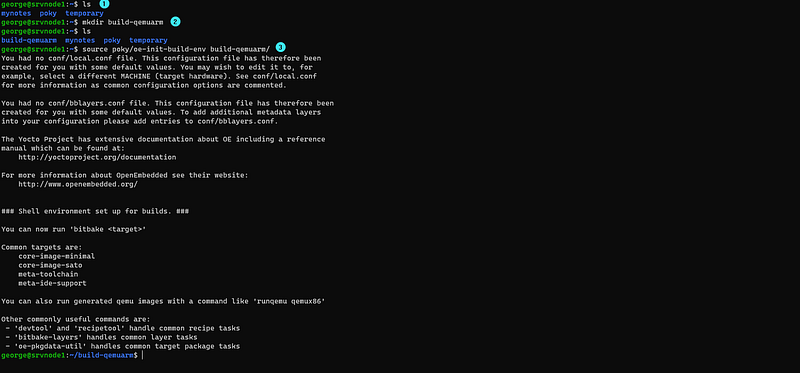
Step 2. Source the poky building environment

$ source poky/oe-init-build-env build-qemuarm/

notes:

  1. ‘build-qemuarm’ is the name of the directory where the build process will take place
  2. in my example from the screenshot below, I had already constructed this directory prior to sourcing the poky environment, but it is not necessarily needed. The command will generate the directory if it does not exist.
  3. All of the configuration, intermediate, and target image files will be placed in the ‘build-qemuarm’ directory.
  4. You must source this script each time you want to work again on the same project.
What is Quick EMULator (QEMU)?

Quick EMUlator (QEMU) is a free and open source software package that performs hardware virtualization. The QEMU-based machines allow you to test and development without real hardware. Currently, QEMU supports the following hardware:

  1. ARM
  2. ARM64
  3. MIPS
  4. MIPS64
  5. PowerPC
  6. x86
  7. x86–64

Initially, the build directory contains only one subdirectory named conf/, which has the configuration files for this project:

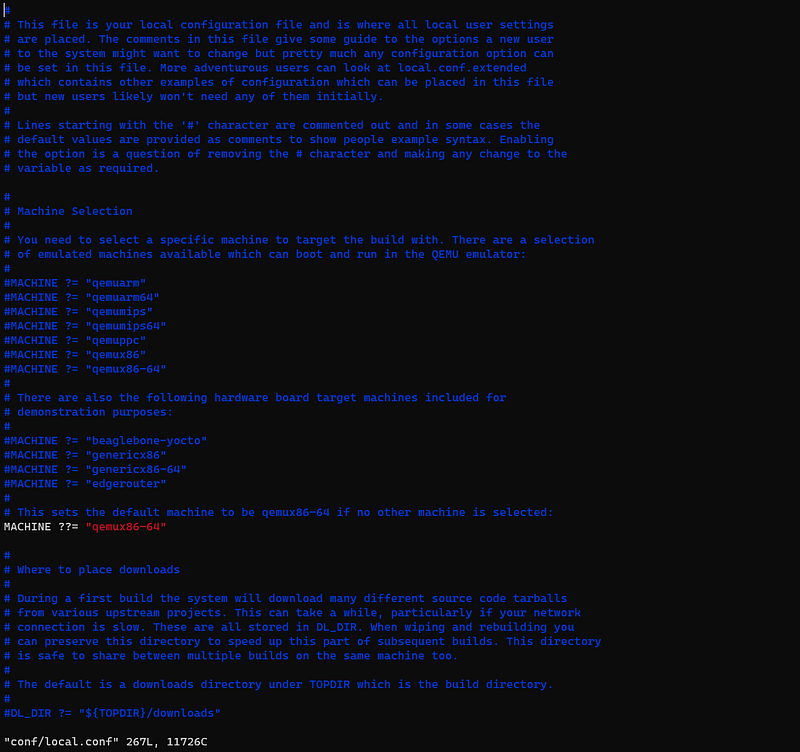
local.conf

This contains a specification of what you are going to build and variables about the build environment.
bblayers.conf

This contains paths of the (meta-)layers.

By the way, in Yocto Project, all names of layers start conventionally with “meta-”.
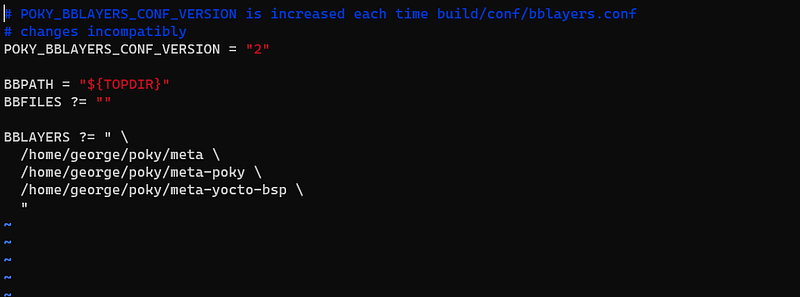
You use this bblayers.conf if you need to add extra functionality in your custom Linux Image (example support for a new language compiler, etc)

templateconf.cfg

This contains the name of a directory which has different .conf files. By default it points to meta-poky/conf/.

Step 3. Adjust the content of the file ‘conf/local.conf’ for your needs

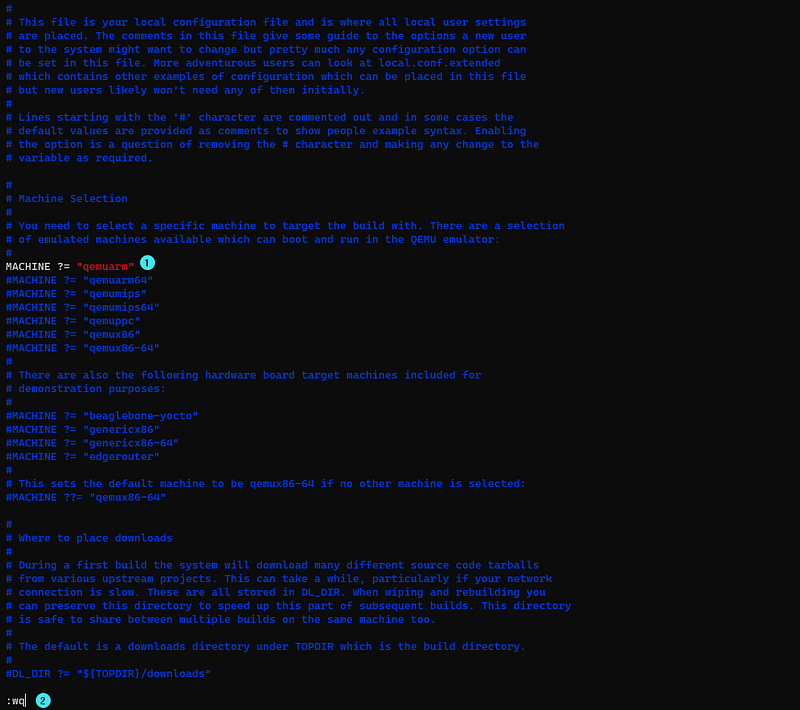
For simplicity, MACHINE variable is to be set by removing the comment (#) character.

Step 4. Understand and choose the type of Linux image you want to build

To actully perform a build, you need to actually run BitBake and tell it which root filesystem image to create.

For example here are some common examples of images, as Yocto offers more than like these:

core-image-minimal This is a small console-based system which is useful for tests and as a basis for other custom images. Minimal images allow devices to boot, useful for BSP development . BSP stands for Board Support Package

core-image-full-cmdline Console only image with full support of target device hardware

core-image-x11 This is a basic image with support for graphics through a X11 server and the xTerminal terminal app.

core-image-sato This is a complete graphical system based on Sato which is a mobile graphical environment built on X11 and GNOME. This image includes several apps like: a Terminal , a text editor and a file manager

core-image-sato-sdk This is a core-image-sato added with complete standalone Software Development Kit (SDK)

Step 5. Launch BitBake

BitBake is the task schedule included with Poky, which ultimately is going to build your Linux image.

By giving BitBake the final target, it will work backwards and build all the dependencies, first beginning with the toolchain.

The simple command goes like this:

$ bitbake core-image-minimal

This is going to bake a core-image-minimal Linux Image for you, as per the settings in the local.conf (detailed at the previous step).

Practically, you will probably associate this bitbake command with a screen attach/detach command so that you can do other things while BitBake is building.

$ screen bitbake core-image-minimal

And you are free to use CTRL +A CTRL +D to detach.

Plus the following command to attach (reopen this SSH activity) again:

$ screen -r 

I have added time to the bitbake command to track the build time.

$ screen time bitbake core-image-minimal
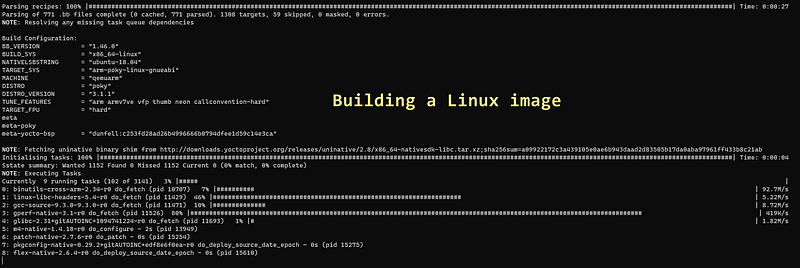
While BitBake is building the Linux Image, the screen is going to present you these details.

First time, be prepared that it is going to take about 3 hours until the image is built. With the next builds, it will take less time, as BitBake will use the source files already downloaded, hence avoid re-executing some amount of work.

During build time, BitBake executes a number of defined tasks such as :

  • downloads all source files,
  • unpacks them,
  • patches them
  • configures them,
  • compiles and
  • installs these files.

The tasks can be defined and further refined as per particular needs.

Build time depends upon the number of processor cores (which ensure parallelization in execution of multiple tasks) and the amount RAM of in your machine.

Step 6. Verify the structure of the build directory after the image is completed

Once BitBake has completed its work, the content in the build directory is changed. New directories and files have been added.
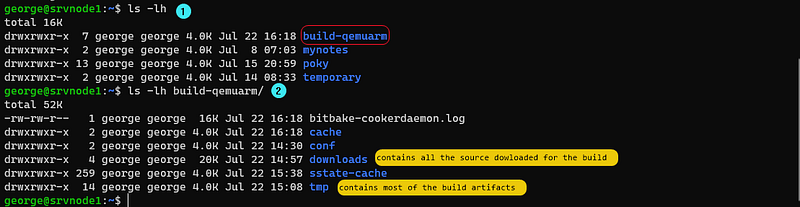
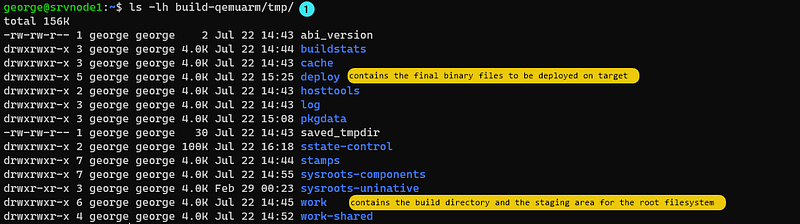
New structure of build directory
content of the ‘tmp’ directory which contains the actual files needed for the deployment of the image
the image is located inside ‘images’ directory

BitBake arranges and stores each license file referring to particular source code it used for building the image.

Sample tree structure of /tmp/deploy/ directory

$ tree -L 2 build-qemuarm/tmp/deploy/
build-qemuarm/tmp/deploy/
├── images
│   └── qemuarm
├── licenses
│   ├── acl
│   ├── acl-native
│   ├── alsa-lib-native
│   ├── attr
│   ├── attr-native
│   ├── autoconf
│   ├── autoconf-archive
│   ├── autoconf-archive-native
│   ├── autoconf-native
│   ├── automake
│   ├── automake-native
│   ├── base-files
│   ├── base-passwd
│   ├── bash
│   ├── bash-completion
│   ├── bc
│   ├── bc-native
│   ├── binutils
│   ├── binutils-cross-arm
│   ├── binutils-native
│   ├── bison
│   ├── bison-native
│   ├── btrfs-tools
│   ├── busybox
│   ├── bzip2
│   ├── bzip2-native
│   ├── ca-certificates
│   ├── cmake-native
│   ├── core-image-minimal-qemuarm-20200722144419
│   ├── coreutils
│   ├── createrepo-c-native
│   ├── cross-localedef-native
│   ├── curl-native
│   ├── cwautomacros-native
│   ├── db
│   ├── db-native
│   ├── dbus
│   ├── dbus-native
│   ├── dbus-test
│   ├── debianutils-native
│   ├── depmodwrapper-cross
│   ├── diffutils
│   ├── dnf-native
│   ├── dtc-native
│   ├── dwarfsrcfiles-native
│   ├── e2fsprogs
│   ├── e2fsprogs-native
│   ├── elfutils
│   ├── elfutils-native
│   ├── eudev
│   ├── expat
│   ├── expat-native
│   ├── file-native
│   ├── findutils
│   ├── flex
│   ├── flex-native
│   ├── gawk
│   ├── gcc
│   ├── gcc-cross-arm
│   ├── gcc-runtime
│   ├── gdbm
│   ├── gdbm-native
│   ├── gettext
│   ├── gettext-minimal-native
│   ├── gettext-native
│   ├── glib-2.0
│   ├── glib-2.0-native
│   ├── glibc
│   ├── glibc-locale
│   ├── gmp
│   ├── gmp-native
│   ├── gnome-desktop-testing
│   ├── gnu-config
│   ├── gnu-config-native
│   ├── gobject-introspection-native
│   ├── gperf-native
│   ├── gpgme-native
│   ├── grep
│   ├── gtk-doc-native
│   ├── init-ifupdown
│   ├── initscripts
│   ├── iproute2
│   ├── iptables
│   ├── itstool-native
│   ├── json-c-native
│   ├── kern-tools-native
│   ├── kmod
│   ├── kmod-native
│   ├── ldconfig-native
│   ├── libarchive-native
│   ├── libassuan-native
│   ├── libcap
│   ├── libcap-ng
│   ├── libcap-ng-native
│   ├── libcheck-native
│   ├── libcomps-native
│   ├── libcroco
│   ├── libdnf-native
│   ├── liberror-perl
│   ├── libffi
│   ├── libffi-native
│   ├── libgcc
│   ├── libgcc-initial
│   ├── libgpg-error-native
│   ├── libice
│   ├── libmnl
│   ├── libmodule-build-perl
│   ├── libmodulemd-v1-native
│   ├── libmpc
│   ├── libmpc-native
│   ├── libnsl2
│   ├── libnsl2-native
│   ├── libpcre
│   ├── libpcre2-native
│   ├── libpcre-native
│   ├── libpthread-stubs
│   ├── libpthread-stubs-native
│   ├── librepo-native
│   ├── libsdl2-native
│   ├── libsm
│   ├── libsolv-native
│   ├── libtirpc
│   ├── libtirpc-native
│   ├── libtool
│   ├── libtool-cross
│   ├── libtool-native
│   ├── libx11
│   ├── libx11-native
│   ├── libxau
│   ├── libxau-native
│   ├── libxcb
│   ├── libxcb-native
│   ├── libxcrypt
│   ├── libxdmcp
│   ├── libxdmcp-native
│   ├── libxext-native
│   ├── libxml2
│   ├── libxml2-native
│   ├── libxrandr-native
│   ├── libxrender-native
│   ├── libxslt-native
│   ├── libyaml-native
│   ├── linux-libc-headers
│   ├── linux-yocto
│   ├── lzo
│   ├── lzo-native
│   ├── lzop-native
│   ├── m4
│   ├── m4-native
│   ├── make
│   ├── makedevs-native
│   ├── make-native
│   ├── mdadm
│   ├── meson-native
│   ├── mklibs-native
│   ├── modutils-initscripts
│   ├── mpfr
│   ├── mpfr-native
│   ├── ncurses
│   ├── ncurses-native
│   ├── netbase
│   ├── ninja-native
│   ├── openssl
│   ├── openssl-native
│   ├── opkg-native
│   ├── opkg-utils
│   ├── opkg-utils-native
│   ├── packagegroup-core-boot
│   ├── packagegroup-core-buildessential
│   ├── patch-native
│   ├── pbzip2-native
│   ├── perl
│   ├── perl-native
│   ├── pigz-native
│   ├── pixman-native
│   ├── pkgconfig
│   ├── pkgconfig-native
│   ├── popt-native
│   ├── prelink-native
│   ├── procps
│   ├── pseudo-native
│   ├── ptest-runner
│   ├── python3
│   ├── python3-iniparse-native
│   ├── python3-native
│   ├── python3-setuptools-native
│   ├── python3-six-native
│   ├── qemu-helper-native
│   ├── qemu-native
│   ├── qemu-system-native
│   ├── qemuwrapper-cross
│   ├── quilt-native
│   ├── re2c-native
│   ├── readline
│   ├── readline-native
│   ├── rpm-native
│   ├── rsync-native
│   ├── run-postinsts
│   ├── sed
│   ├── shadow
│   ├── shadow-native
│   ├── shadow-securetty
│   ├── shadow-sysroot
│   ├── shared-mime-info
│   ├── shared-mime-info-native
│   ├── socat
│   ├── sqlite3
│   ├── sqlite3-native
│   ├── swig-native
│   ├── sysvinit
│   ├── sysvinit-inittab
│   ├── tcp-wrappers
│   ├── texinfo-dummy-native
│   ├── tzcode-native
│   ├── tzdata
│   ├── unifdef-native
│   ├── unzip
│   ├── unzip-native
│   ├── update-rc.d
│   ├── update-rc.d-native
│   ├── util-linux
│   ├── util-linux-native
│   ├── util-macros
│   ├── util-macros-native
│   ├── which
│   ├── xcb-proto
│   ├── xcb-proto-native
│   ├── xorgproto
│   ├── xorgproto-native
│   ├── xtrans
│   ├── xtrans-native
│   ├── xz
│   ├── xz-native
│   ├── zip
│   ├── zlib
│   └── zlib-native
└── rpm
    ├── armv7vet2hf_neon
    ├── noarch
    └── qemuarm

243 directories, 0 files

Run/verify first Linux image

  1. Source the poky’s oe-init-build-env script to the directory where the build is saved.
  2. Run the following command:
$ runqemu qemuarm nographic slirp

Your system is about the load the Linux Operating System you have prepared with Yocto.

Sample commands

Print basic system information

root@qemuarm:~# uname -a
Linux qemuarm 5.4.49-yocto-standard #1 SMP PREEMPT Fri Jun 30 17:19:27 UTC 2020 armv7l GNU/Linux1

The output includes the following information:

  • Linux — Kernel name.
  • qemuarm — Hostname.
  • 5.4.49-yocto-standard Kernel release.
  • #1 SMP PREEMPT Fri Jun 30 17:19:27 UTC 2020 — Kernel version.
  • armv7l — Machine hardware name.
  • GNU/Linux — Operating system name.

Switch off Linux system QEMU

root@qemuarm:~# poweroff

Sample console output:

Broadcast message from root@qemuarm (ttyAMA0) (Wed Jul  8 17:38:13 2020):
The system is going down for system halt NOW!
INIT: Switching to runlevel: 0
INIT: Sending processes configured via /etc/inittab the TERM signal
Stopping syslogd/klogd: stopped syslogd (pid 317)
stopped klogd (pid 320)
done
Deconfiguring network interfaces... ifdown: interface lo not configured
done.
Sending all processes the TERM signal...
Sending all processes the KILL signal...
Unmounting remote filesystems...
Deactivating swap...
Unmounting local filesystems...
[ 1622.959762] EXT4-fs (vda): re-mounted. Opts: (null)
[ 1624.292649] reboot: Power down
runqemu - INFO - Cleaning up
Yoctoproject
Bitbake
Embedded Linux
Embedded Training
Linux
Recommended from ReadMedium