
Build gRPC API using PostgreSQL with Go Practices
Introduction to gRPC API Framework
gRPC is an open source Remote Procedure Call(RPC) framework that can run in any environment. gRPC can be used together to build scalable and robust applications.
In this article, we are going to learn how to build a CRUD application together with gRPC and PostgreSQL as the database. Below are the critical advantages that gRPC APIs have over RESTFul APIs.
- Performance: gRPC APIs are faster and more efficient compared to RESTful APIs. gRPC uses Protocol Buffers for data serialization, which is more compact and faster than JSON used by RESTful APIs. Moreover, gRPC uses HTTP/2 for transport, which allows for efficient multiplexing and reduced latency.
- Strong typing: gRPC APIs use Protocol Buffers for message definition, which allows for strong typing of message fields. This makes it easier to catch errors during development and helps to prevent bugs from creeping into production code.
- Code generation: gRPC APIs generate client and server stubs automatically from the API definition file. This makes it easier for developers to consume APIs without worrying about the low-level details of the transport layer.
- Streaming: gRPC APIs support both unary and streaming calls. Streaming allows for real-time communication between the client and server, which is useful for applications like chat, gaming, and real-time analytics.
- Interoperability: gRPC APIs can be used across multiple languages, platforms, and frameworks. This makes it easier to build microservices and distributed systems using a variety of tools and technologies.
The application will be made up of three major parts namely server, client and proto. These parts will be discussed in length later in the articles.
Prerequisite
Go programming language installed. One of the three latest releases should be fine
Protocol buffer compiler version 3
Go plugins for protocol compiler. Use the below commands to install compiler plugins.
go install google.golang.org/protobuf/cmd/protoc-gen-go@v1.28
go install google.golang.org/grpc/cmd/protoc-gen-go-grpc@v1.2
Update your PATH so that protoc compiler can find the plugins
export PATH="$PATH:$(go env GOPATH)/bin"gRPC architecture
gRPC uses the client and server architecture, where the client application can directly make request/call functions on a server. Unlike RESTful architecture where a client makes a request and waits for a response, in gRPC , that client calls a function on the server application hosted in a different machine as if it were in a local object.
gRPC is based around the idea of defining a service on the server side that has methods that can be called remotely with their parameters and return types. On the other hand the client side has a stub that provides the same methods as the one in the server side.
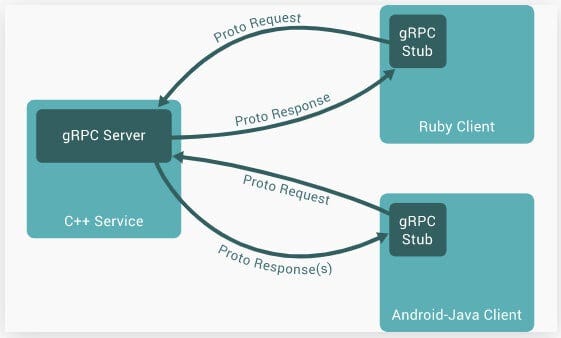
gRPC uses protocol buffers by default, which are basically open source mechanisms for serializing structured data. When working with protocol buffers you first of all define the structure of the data you want to serialize in a file with a .proto extension as we will see later in this tutorial.
When you are done defining the structured data, you use a protocol buffer compiler called protoc to generate client and server code.
The order of application development will be ,
- Write protocol buffer data and compile using protoc compiler
- Write server side code
- Write Client side code
Application structure
As mentioned before, this application will be made up of three major parts(modules):
- proto: All our gRPC generated code will be hosted here. When working with gRPC , the gRPC compiler generates the client and server code based on the content of a .proto file.
- Server side: This module will host code for implementing server side code from the proto module. We also add postgres database connection and operations here.We will also have code that responds to client requests.
- Client side: In this module we host code for making requests to the server side.
Please note that the server and client modules will both have a main.go file and will be run in separate terminals.Follow the below steps for building our application structure.
Create working directory and navigate into it using the terminal
mkdir go-grpc-crud-api && cd go-grpc-crud-apiCreate module folders
mkdir proto server clientInitialize go module
go mod init example.com/go-grpc-crud-apiInstall dependencies
go get -u google.golang.org/grpc
go get -u gorm.io/gorm
go get –u gorm.io/driver/postgres
go get -u github.com/google/uuid
go get -u github.com/gin-gonic/gin
Protocol buffers
gRPC uses protocol buffers by default and the first step when working with protocol buffers is to define the structure of the data you want to serialize in a proto file. The proto file lives in a proto directory.
In this section , we are going to create a proto file with the structured data that we want to work with. In this article, we are going to use movies as our data. Each movie will have an id, title and genre.
Move into the the proto directory and create a new file calledmovie.proto.Add the below content into the proto file.
proto/movie.proto
proto/movie.proto
syntax="proto3";

package proto;

option go_package="example.com/go-grpc-crud";


message Movie {
   string id = 1;
   string title = 2;
   string genre = 3;
}

message CreateMovieRequest {
   Movie movie = 1;
}
message CreateMovieResponse {
   Movie movie = 1;
}
message ReadMovieRequest{
   string id = 1;
}
message ReadMovieResponse{
   Movie movie = 1;
}
message ReadMoviesRequest{

}
message ReadMoviesResponse{
   repeated Movie movies = 1;
}
message UpdateMovieRequest{
   Movie movie = 1;
}
message UpdateMovieResponse{
   Movie movie = 1;
}
message DeleteMovieRequest{
   string id = 1;
}
message DeleteMovieResponse{
   bool success = 1;
}


service MovieService {
   rpc CreateMovie(CreateMovieRequest) returns (CreateMovieResponse) {}
   rpc GetMovie(ReadMovieRequest) returns (ReadMovieResponse) {}
   rpc GetMovies(ReadMoviesRequest) returns (ReadMoviesResponse) {}
   rpc UpdateMovie(UpdateMovieRequest) returns (UpdateMovieResponse) {}
   rpc DeleteMovie(DeleteMovieRequest) returns (DeleteMovieResponse) {}
}
In a proto file, you define messages using the message keyword. A message is simply a structured data type that can have one or more fields. Each field has a name, a type, and a unique number that identifies it within the message.
The ReadMoviesRequest message does not have any fields defined. This means that it is simply a message type that can be used as an argument in a gRPC service method. When a client invokes a service method that takes a ReadMoviesRequest message as an argument, the message will be passed to the server so that it can be processed.
The ReadMoviesResponse message has one field defined called movies. The repeated keyword is used to indicate that this field is a repeated field, which means that it can contain zero or more values of the type Movie. The number 1 that appears after the field name is a unique identifier for this field within the message.
When a service method returns a ReadMoviesResponse message to a client, the client will receive a message containing an array of Movie objects. The client can then iterate over this array and process the movie data as needed.
Apart from a message, protocol buffer files have a service object as well. To define a service start with a keyword servicefollowed by the name of the service then follow the name with {}.A service refines the methods that will be implemented by the server. These methods will also be called directly by the client. To define a method, use the keyword rpcfollowed by the name of the method name ,argument list (the round brackets) a returns keyword and lastly curly {} brackets.
Overall, proto files allow developers to define messages and services in a language-agnostic way, which can be used to generate code in a variety of programming languages. This makes it easier to create distributed systems that can communicate with each other using a common language-agnostic interface.
Generate Client and Server code using proto file
Now that the protocol buffer code is ready, we can use it to generate server and client code. This is the stage where we will use the protoc compiler .Navigate to the root directory at the same level as the proto, server and client folder in the terminal. Use the below instruction in the terminal to generate server and client code.
protoc --go_out=. --go_opt=paths=source_relative --go-grpc_out=. --go-grpc_opt=paths=source_relative proto/movie.protoThe above command basically means to generate server and client code using the proto file located in the proto/movie.proto path. The generated server and client code will be added in the proto folder as proto.pb.go and proto_grpc.pb.go
Configure gRPC Server
Now that we have the server code ready, we need to write code that implements rcp methods defined in our MovieService in the movie.proto file. We also write code that ,
- Creates database model and database connection
- Create gRPC server
- Implement RPC methods
In the server folder, create a main.go file that will host the server side code.
Create database model and database connection
server/main.go
package main

import (
   "context"
   "errors"
   "flag"
   "fmt"
   "log"
   "net"
   "time"

   pb "example.com/grpc-demo/proto"
   "github.com/google/uuid"

   "google.golang.org/grpc"
   "gorm.io/driver/postgres"
   "gorm.io/gorm"
)

func init() {
   DatabaseConnection()
}
var DB *gorm.DB
var err error

type Movie struct {
   ID        string `gorm:"primarykey"`
   Title     string
   Genre     string
   CreatedAt time.Time `gorm:"autoCreateTime:false"`
   UpdatedAt time.Time `gorm:"autoUpdateTime:false"`
}

func DatabaseConnection() {
   host := "localhost"
   port := "5432"
   dbName := "postgres"
   dbUser := "postgres"
   password := "pass1234"
   dsn := fmt.Sprintf("host=%s port=%s user=%s dbname=%s password=%s sslmode=disable",
       host,
       port,
       dbUser,
       dbName,
       password,
   )
   DB, err = gorm.Open(postgres.Open(dsn), &gorm.Config{})
   DB.AutoMigrate(Movie{})
   if err != nil {
       log.Fatal("Error connecting to the database...", err)
   }
   fmt.Println("Database connection successful...")
}
Create gRPC server
var (
   port = flag.Int("port", 50051, "gRPC server port")
)

type server struct {
   pb.UnimplementedMovieServiceServer
}
Implement RPC methods
func (*server) CreateMovie(ctx context.Context, req *pb.CreateMovieRequest) (*pb.CreateMovieResponse, error) {
   fmt.Println("Create Movie")
   movie := req.GetMovie()
   movie.Id = uuid.New().String()

   data := Movie{
       ID:    movie.GetId(),
       Title: movie.GetTitle(),
       Genre: movie.GetGenre(),
   }

   res := DB.Create(&data)
   if res.RowsAffected == 0 {
       return nil, errors.New("movie creation unsuccessful")
   }
   return &pb.CreateMovieResponse{
       Movie: &pb.Movie{
           Id:    movie.GetId(),
           Title: movie.GetTitle(),
           Genre: movie.GetGenre(),
       },
   }, nil
}

func (*server) GetMovie(ctx context.Context, req *pb.ReadMovieRequest) (*pb.ReadMovieResponse, error) {
   fmt.Println("Read Movie", req.GetId())
   var movie Movie
   res := DB.Find(&movie, "id = ?", req.GetId())
   if res.RowsAffected == 0 {
       return nil, errors.New("movie not found")
   }
   return &pb.ReadMovieResponse{
       Movie: &pb.Movie{
           Id:    movie.ID,
           Title: movie.Title,
           Genre: movie.Genre,
       },
   }, nil
}

func (*server) GetMovies(ctx context.Context, req *pb.ReadMoviesRequest) (*pb.ReadMoviesResponse, error) {
   fmt.Println("Read Movies")
   movies := []*pb.Movie{}
   res := DB.Find(&movies)
   if res.RowsAffected == 0 {
       return nil, errors.New("movie not found")
   }
   return &pb.ReadMoviesResponse{
       Movies: movies,
   }, nil
}

func (*server) UpdateMovie(ctx context.Context, req *pb.UpdateMovieRequest) (*pb.UpdateMovieResponse, error) {
   fmt.Println("Update Movie")
   var movie Movie
   reqMovie := req.GetMovie()

   res := DB.Model(&movie).Where("id=?", reqMovie.Id).Updates(Movie{Title: reqMovie.Title, Genre: reqMovie.Genre})

   if res.RowsAffected == 0 {
       return nil, errors.New("movies not found")
   }

   return &pb.UpdateMovieResponse{
       Movie: &pb.Movie{
           Id:    movie.ID,
           Title: movie.Title,
           Genre: movie.Genre,
       },
   }, nil
}

func (*server) DeleteMovie(ctx context.Context, req *pb.DeleteMovieRequest) (*pb.DeleteMovieResponse, error) {
   fmt.Println("Delete Movie")
   var movie Movie
   res := DB.Where("id = ?", req.GetId()).Delete(&movie)
   if res.RowsAffected == 0 {
       return nil, errors.New("movie not found")
   }

   return &pb.DeleteMovieResponse{
       Success: true,
   }, nil
}
All these functions are implementation of the movie service. We are implementing methods defined in movie_grpc.pb.go file. Please take some time to see what this file holds. Each method takes a Go context as a first argument and requests as the seconds arguments.These methods also return a response and error.
Starting the gRPC server
The server code is hosted in the main function. In the main function we will set up the gRPC server and run it as a separate entity from the client.
server/main.go
func main() {
   fmt.Println("gRPC server running ...")

   lis, err := net.Listen("tcp", fmt.Sprintf(":%d", *port))

   if err != nil {
       log.Fatalf("Failed to listen: %v", err)
   }

   s := grpc.NewServer()

   pb.RegisterMovieServiceServer(s, &server{})

   log.Printf("Server listening at %v", lis.Addr())

   if err := s.Serve(lis); err != nil {
       log.Fatalf("failed to serve : %v", err)
   }
}
A gRPC server requires a TCP connection that listens on port 50051. The statement lis, err := net.Listen("tcp", fmt.Sprintf(":%d", *port)) create the connection that the gRPC server needs.
After a successful connection, we create a new gRPC server using the s := grpc.NewServer()statement. Next we register our server with the newly created gRPC server using the statement pb.RegisterMovieServiceServer(s, &server{}) statement.
After a successful registration, we run the server using the s.Serve(lis) statement.
The moment that we have been waiting for is here. The next thing is to run the server from the terminal. Navigate to the root folder and run the below code.
$ go run server/main.go

Database connection successful...
gRPC server running ...
2022/12/14 11:56:33 Server listening at [::]:50051
Configure gRPC Client
On the client side of things, we are going to use gRPC to communicate with the server. The request will start from Gin REST API to gRPC client and then finally to the gRPC server. The response will travel back the same way, from the gRPC server, to the gRPC client and finally to the Gin framework. Please note that we are using Gin only for testing via Postman. gRPC does not have bindings for Postman or browser based support.
package main

import (
   "flag"
   "log"
   "net/http"

   pb "example.com/go-grpc-crud-api/proto"
   "github.com/gin-gonic/gin"
   "google.golang.org/grpc"
   "google.golang.org/grpc/credentials/insecure"
)

var (
   addr = flag.String("addr", "localhost:50051", "the address to connect to")
)

type Movie struct {
   ID    string `json:"id"`
   Title string `json:"Title"`
   Genre string `json:"genre"`
}

func main() {
   flag.Parse()
   conn, err := grpc.Dial(*addr, grpc.WithTransportCredentials(insecure.NewCredentials()))

   if err != nil {
       log.Fatalf("did not connect: %v", err)
   }

   defer conn.Close()
   client := pb.NewMovieServiceClient(conn)

   r := gin.Default()
   r.GET("/movies", func(ctx *gin.Context) {
       res, err := client.GetMovies(ctx, &pb.ReadMoviesRequest{})
       if err != nil {
           ctx.JSON(http.StatusBadRequest, gin.H{
               "error": err,
           })
           return
       }
       ctx.JSON(http.StatusOK, gin.H{
           "movies": res.Movies,
       })
   })
   r.GET("/movies/:id", func(ctx *gin.Context) {
       id := ctx.Param("id")
       res, err := client.GetMovie(ctx, &pb.ReadMovieRequest{Id: id})
       if err != nil {
           ctx.JSON(http.StatusNotFound, gin.H{
               "message": err.Error(),
           })
           return
       }
       ctx.JSON(http.StatusOK, gin.H{
           "movie": res.Movie,
       })
   })
   r.POST("/movies", func(ctx *gin.Context) {
       var movie Movie

       err := ctx.ShouldBind(&movie)
       if err != nil {
           ctx.JSON(http.StatusBadRequest, gin.H{
               "error": err,
           })
           return
       }
       data := &pb.Movie{
           Title: movie.Title,
           Genre: movie.Genre,
       }
       res, err := client.CreateMovie(ctx, &pb.CreateMovieRequest{
           Movie: data,
       })
       if err != nil {
           ctx.JSON(http.StatusBadRequest, gin.H{
               "error": err,
           })
           return
       }
       ctx.JSON(http.StatusCreated, gin.H{
           "movie": res.Movie,
       })
   })
   r.PUT("/movies/:id", func(ctx *gin.Context) {
       var movie Movie
       err := ctx.ShouldBind(&movie)
       if err != nil {
           ctx.JSON(http.StatusBadRequest, gin.H{
               "error": err.Error(),
           })
           return
       }
       res, err := client.UpdateMovie(ctx, &pb.UpdateMovieRequest{
           Movie: &pb.Movie{
               Id:    movie.ID,
               Title: movie.Title,
               Genre: movie.Genre,
           },
       })
       if err != nil {
           ctx.JSON(http.StatusBadRequest, gin.H{
               "error": err.Error(),
           })
           return
       }
       ctx.JSON(http.StatusOK, gin.H{
           "movie": res.Movie,
       })
       return

   })
   r.DELETE("/movies/:id", func(ctx *gin.Context) {
       id := ctx.Param("id")
       res, err := client.DeleteMovie(ctx, &pb.DeleteMovieRequest{Id: id})
       if err != nil {
           ctx.JSON(http.StatusBadRequest, gin.H{
               "error": err.Error(),
           })
           return
       }
       if res.Success == true {
           ctx.JSON(http.StatusOK, gin.H{
               "message": "Movie deleted successfully",
           })
           return
       } else {
           ctx.JSON(http.StatusInternalServerError, gin.H{
               "error": "error deleting movie",
           })
           return
       }

   })

   r.Run(":5000")

}
We start by importing protocol buffer code from the proto module, together with Gin and gRPC. Next we define the port number for the gRPC client to use in order to communicate with our gRPC server using the statement addr = flag.String("addr", "localhost:50051", "the address to connect to").
We then define a movie struct with the same properties as the movie struct in the server slide. In the main function, we create a connection to the server using the statement conn, err := grpc.Dial(*addr,rpc.WithTransportCredentials(insecure.NewCredentials())). After a successful connection, we create an instance of our gRCP client using the statement client := pb.NewMovieServiceClient(conn).The client will give us access to all the CRUD methods implemented by the server . For example,
- GetMovies()
- GetMovie()
- CreateMovie()
- UpdateMovie()
- DeleteMovie().
Each method will take a Gin context as the first argument and a pointer to protocol buffer request that matches the method being called. For example, GetMovies() method will take &pb.ReadMoviesRequest as its second argument.
The next thing to do is to create a Gin router using the statement r := gin.Default(). The router will be used to router HTTP CRUD requests to the gRPC client.
Executing gRPC Client
After adding the above code in the client/main.go file, run the client by issuing the below project.
$ go run client/main.goExample:
$ go run client/main.go
[GIN-debug] [WARNING] Creating an Engine instance with the Logger and Recovery middleware already attached.

[GIN-debug] [WARNING] Running in "debug" mode. Switch to "release" mode in production.
 - using env:   export GIN_MODE=release
 - using code:  gin.SetMode(gin.ReleaseMode)

[GIN-debug] GET    /movies                   --> main.main.func1 (3 handlers)
[GIN-debug] GET    /movies/:id               --> main.main.func2 (3 handlers)
[GIN-debug] POST   /movies                   --> main.main.func3 (3 handlers)
[GIN-debug] PUT    /movies/:id               --> main.main.func4 (3 handlers)
[GIN-debug] DELETE /movies/:id               --> main.main.func5 (3 handlers)
[GIN-debug] [WARNING] You trusted all proxies, this is NOT safe. We recommend you to set a value.
Please check https://pkg.go.dev/github.com/gin-gonic/gin#readme-don-t-trust-all-proxies for details.
[GIN-debug] Listening and serving HTTP on :5000
Tests gRPC CRUD API using Postman
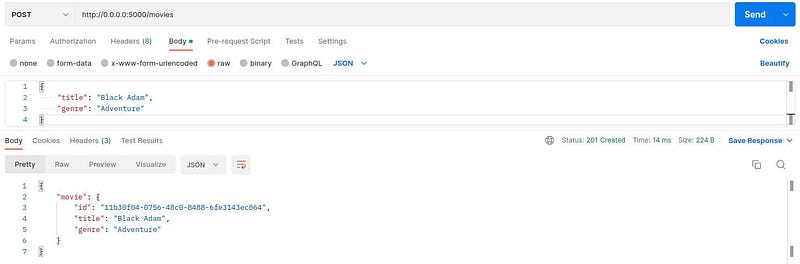
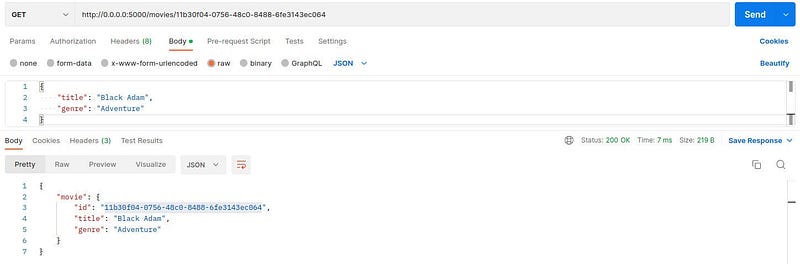
This is the time to test if both the client and server are working as expected. Remember the client and server will be running on different terminals. Ensure that the client and server are running in their own terminal environment before starting these tests.
Create a movie
Read a movie
Read movies
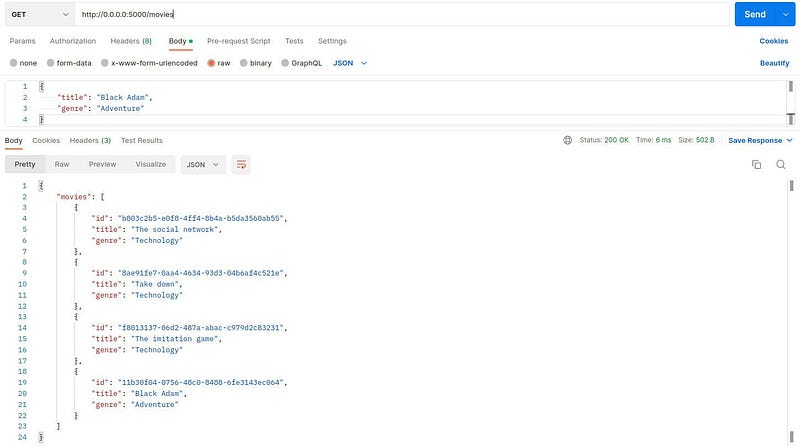
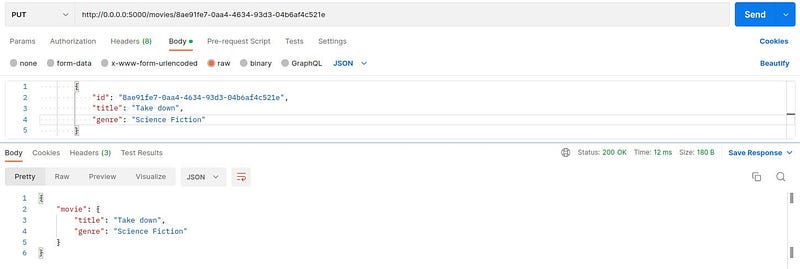
Update movie
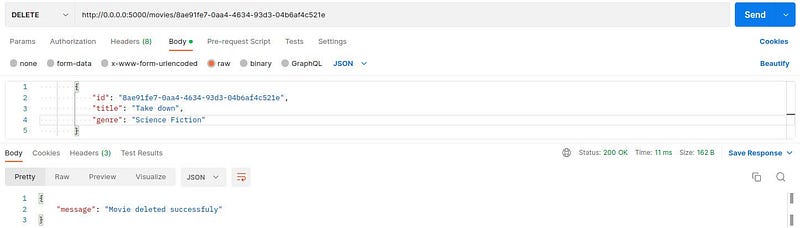
Delete movie
Summary
In this article, we learn about gRPC CRUD application, using postgres as the data store and Gin for routing HTTP requests to gRPC clients. We also get to learn about a brief introduction to gRPC architecture that is made up of the client and server. The server connects to the database and responds to the client after every request.


