avatarConnor Leech

Summary

The article provides a tutorial on implementing a Google Maps API typeahead address search functionality using Vue.js and Laravel 5.3.

Abstract

This tutorial guides developers through the process of enhancing a Laravel 5.3 application with an address autocomplete feature, similar to Google Maps, by utilizing the vue-google-maps component. It details the steps to install the necessary package, create a custom Vue component for location input, and integrate the Google Maps Places API. The article also covers obtaining a Google Maps API key, registering the component, and initializing the map service in the application. Additionally, it instructs on how to incorporate the location input component into the application's view and run the development server to see the changes in real-time. The author provides code snippets and concludes with a link to the source code and a call to action for readers to share the tutorial if they find it useful.

Opinions

  • The author emphasizes the usefulness of the typeahead functionality for enhancing user experience in address selection.
  • The tutorial is structured as a follow-up to a previous post on generating authentication for a Laravel web application, suggesting a progressive learning path for readers.
  • The author, by providing specific code examples and installation commands, demonstrates a preference for detailed, hands-on instruction.
  • The recommendation to share the tutorial on Twitter indicates the author values community engagement and feedback.
  • By linking to the vue-google-maps GitHub repository, the author shows trust in third-party libraries to extend the functionality of Laravel applications.
  • The inclusion of an embedded video suggests the author believes in multimedia resources to complement written tutorials.

Build Google Maps Typeahead Functionality with Vue.js and Laravel 5.3
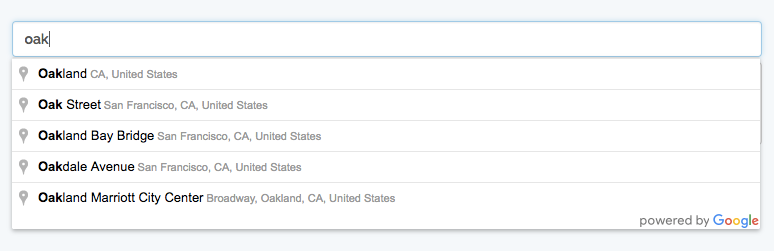
What we’ll be building!

In my last post we created a Laravel 5.3 application and added authentication. In this tutorial we are going to add Google Maps API typeahead functionality for selecting addresses.

In this app, we want users to be able to see places as they type. For this we’ll GuillaumeLeclerc/vue-google-maps component, specifically the placesInput component.

$ npm i vue-google-maps --save

Rename resources/assets/js/components/Example.vue to resources/assets/js/components/LocationInput.vue. In that file we will create our custom Vue component.

<template>
<place-input
            :place.sync="placeInput.place"
            :types.sync="placeInput.types"
            :component-restrictions.sync="placeInput.restrictions"
            class='form-control'
    ></place-input>
<pre>{{ placeInput.place | json }}</pre>
</template>
<script>
    import { PlaceInput, Map } from 'vue-google-maps'
    export default {
       data() {
            return {
                placeInput: {
                    place: {
                        name: ''
                    },
                    types: [],
                    restrictions: {'country': 'usa'}
                }
            }
        },
        components: {
            PlaceInput
        }
    }
</script>
<style>
    label { display: block; }
</style>

We also have to create a Google Maps API key at console.developers.google.com. Then register the component and initialize Google Maps in resources/assets/js/app.js.

import { load } from 'vue-google-maps'
load({
  key: 'YOUR_API_KEY',
  v: '3.24',                // Google Maps API version
  libraries: 'places',   // If you want to use places input
});
Vue.component('locationInput', require('./components/LocationInput.vue'));
const app = new Vue({
    el: 'body'
});

To use our component drop it into resources/views/home.blade.php:

@extends('layouts.app')
@section('content')
<div class="container">
    <div class="row">
        <div class="col-md-8 col-md-offset-2">
            <location-input></location-input>
        </div>
    </div>
</div>
@endsection

To make the app run and have webpack watch for file changes open up two terminal windows and run:

$ php artisan serve
$ gulp watch

Source code: https://github.com/connor11528/laravel-5.3-app

If you enjoyed this tutorial give it a recommend or share on twitter. Thanks for reading!

JavaScript
Laravel
Vuejs
Maps
Tutorial
Recommended from ReadMedium