avatarMartin Bernaola

Summary

The website provides a guide on building and deploying a Docker image using Jenkins with the Docker Pipeline plugin and Kubernetes for application deployment.

Abstract

The article titled "Build and Deploy a Docker Image to Jenkins + Kubernetes Cluster" outlines a process for streamlining the build and deployment pipeline using Docker, Jenkins, and Kubernetes. It emphasizes the use of the Docker Pipeline plugin in Jenkins to create and push Docker images from a Dockerfile. The guide advises on how to integrate a custom Docker registry and then proceeds to explain the deployment of the image to a Kubernetes cluster. It recommends using the kubectl command with the patch method to update resources efficiently, ensuring that new pods replace the old ones without downtime. The article also suggests employing a Job Multibranch in Jenkins for managing deployments across different environments.

Opinions

  • The author advocates for the Docker Pipeline plugin as an efficient mechanism for building and testing applications consistently across environments.
  • The preference for using patch over other methods like apply, edit, or replace for updating Kubernetes resources indicates the author's inclination towards incremental updates for minimal disruption.
  • The recommendation to use a Job Multibranch in Jenkins shows the author's support for a structured approach to handling multiple deployment environments, which can help in maintaining a clear separation between different stages of the deployment pipeline (e.g., development, staging, production).

Build and Deploy a Docker Image to Jenkins + Kubernetes Cluster

Many organizations use Docker as the primary tool to unify their build and test environments across all machines, providing efficient mechanisms for deploying applications.
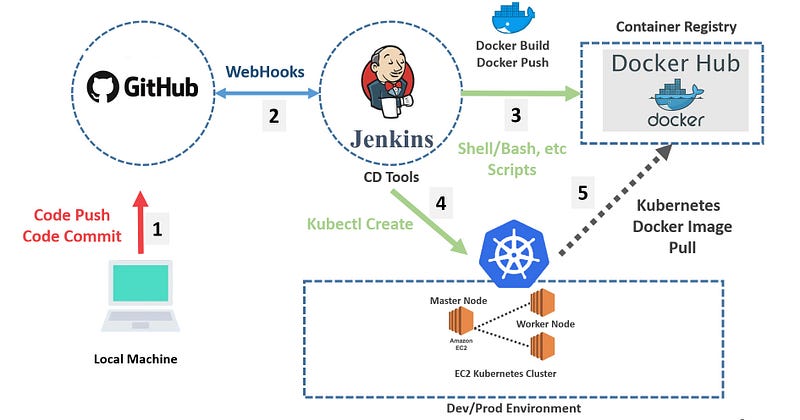
Source:https://ikarimov.com/img/pipeline.jpg

Let’s start with Jenkins. In order to build and deploy a Docker image through a Jenkins Pipeline, we need to install the Plugin Docker Pipeline plugin.

The Docker Pipeline plugin provides a build() method for creating a new image, from a Dockerfile in the repository, during a Pipeline run.

Once installed. Let’s get started

In your Stages section, in the Jenkinsfile, after testing the application, We can proceed to Build and Push the Docker Image:

Using a custom registry:

By default the Docker Pipeline integrates assumes the default Docker Registry of Docker Hub.

The next step is to proceed to deploy it in our Kubernetes cluster. Kubernetes offers several ways to update resources: apply, edit, patch, and replace.

When you want to update a resource, it is best to default to patching it.

Additionally, you can also log into the Cluster before deploying and avoid the line: -s $ CLUSTER_URL — token $ TOKEN_CLUSTER — insecure-skip-tls-verify

Under the hood, the kubectl apply, edit, and patch commands all use the PATCH HTTP request method to update an existing resource. What happens in this instance is the deployment will terminate the old pods and create the new ones.

To complete it, it is recommended to use a Job Multibranch to manage a cluster with different environments and to be able to deploy the corresponding containers in each one.
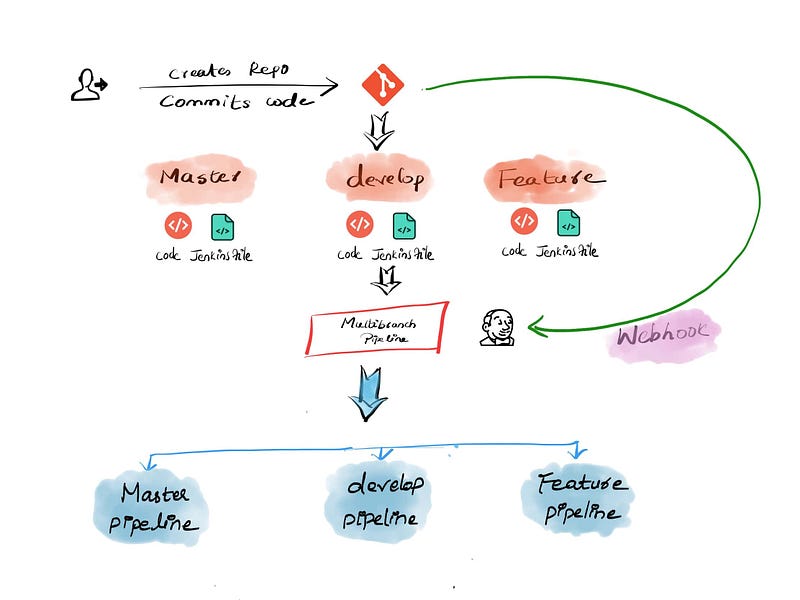
Source: https://devopscube.com/jenkins-multibranch-pipeline-tutorial/

Bernaola Martin

Kubernetes
Docker
DevOps
Deployment
Continuous Integration
Recommended from ReadMedium