avatarOet Nnyw

Free AI web copilot to create summaries, insights and extended knowledge, download it at here

3137

Abstract

create_book</span>(<span class="hljs-params">event, context</span>): request_body = json.loads(event[<span class="hljs-string">'body'</span>]) <span class="hljs-comment"># Validate required fields (e.g., title, author, etc.)</span> <span class="hljs-keyword">if</span> <span class="hljs-keyword">not</span> request_body.get(<span class="hljs-string">'title'</span>) <span class="hljs-keyword">or</span> <span class="hljs-keyword">not</span> request_body.get(<span class="hljs-string">'author'</span>): <span class="hljs-keyword">return</span> { <span class="hljs-string">'statusCode'</span>: <span class="hljs-number">400</span>, <span class="hljs-string">'body'</span>: json.dumps({<span class="hljs-string">'message'</span>: <span class="hljs-string">'Title and Author are required.'</span>}), } new_book = { <span class="hljs-string">'id'</span>: <span class="hljs-number">123</span>, <span class="hljs-comment"># Replace with a proper ID generation method</span> <span class="hljs-string">'title'</span>: request_body[<span class="hljs-string">'title'</span>], <span class="hljs-string">'author'</span>: request_body[<span class="hljs-string">'author'</span>], <span class="hljs-comment"># Other book details...</span> } <span class="hljs-keyword">return</span> { <span class="hljs-string">'statusCode'</span>: <span class="hljs-number">201</span>, <span class="hljs-string">'body'</span>: json.dumps(new_book), }</pre></div><h2 id="129e">Read Function (Create a book by ID):</h2><div id="41f2"><pre><span class="hljs-keyword">import</span> json

<span class="hljs-keyword">def</span> <span class="hljs-title function_">get_book</span>(<span class="hljs-params">event, context</span>): book_id = event[<span class="hljs-string">'bookId'</span>] book = { <span class="hljs-string">"bookId"</span>: <span class="hljs-number">123</span>, <span class="hljs-string">"bookTitle"</span>: <span class="hljs-string">"Harry Potter"</span>, <span class="hljs-string">"authorName"</span>: <span class="hljs-string">"J. K. Rowling"</span> } <span class="hljs-keyword">if</span> <span class="hljs-keyword">not</span> book_id == <span class="hljs-string">"123"</span>: <span class="hljs-keyword">return</span> { <span class="hljs-string">'statusCode'</span>: <span class="hljs-number">404</span>, <span class="hljs-string">'body'</span>: json.dumps({<span class="hljs-string">'message'</span>: <span class="hljs-string">'Book not found.'</span>}), } <span class="hljs-keyword">return</span> { <span class="hljs-string">'statusCode'</span>: <span class="hljs-number">200</span>, <span class="hljs-string">'body'</span>: json.dumps(book), }</pre></div><h2 id="7af6">Step 3: Create Resources and Methods</h2><p id="605e">Next, create resources for the API endpoints, e.g., <code>/books</code> for listing and creating books, and <code>/books/{id}</code> for getting, updating, and deleting individual books. Define appropriate HT

Options

TP methods (GET, POST, PUT, DELETE) for each resource.</p><figure id="7115"><img src="https://cdn-images-1.readmedium.com/v2/resize:fit:800/0*WiGnuDxd_FKbRKnx.png"><figcaption></figcaption></figure><h2 id="bc7a">Step 4: Test the API</h2><p id="0814">API Gateway provides a testing feature called <code>Test</code> for API methods, allowing us to test them before deploying to a stage.</p><p id="f700">In the API Gateway console, navigate to our API and select the resource/method we want to test. Click on the <code>Test</code> tab. On the test page, we can configure a test event. This is a JSON payload that simulates the input to your API method.</p><p id="cf24">Let’s test the <code>POST</code> request by inputting the request body as below:</p><figure id="ee5c"><img src="https://cdn-images-1.readmedium.com/v2/resize:fit:800/0*AKdUYmLgOlXCkMq5.png"><figcaption></figcaption></figure><p id="9ee9">Click the <code>Test</code> button to simulate the API request using the configured test event. Review the results, including the request sent and the response received.</p><figure id="e8c9"><img src="https://cdn-images-1.readmedium.com/v2/resize:fit:800/0*rbtqavTD5aIVCUbc.png"><figcaption></figcaption></figure><p id="959a">The log displays empty values for the method request path, query string, and headers, revealing that no specific details have been extracted from the request yet.</p><p id="d7dd">The log indicates that the <code>HTTP POST</code> request is received with a JSON payload. The original request body contains information about the book, including the title and author.</p><p id="e2ee">It then transforms this information, prepares an endpoint request to a specified Lambda function, and forwards the request.</p><p id="592b">Upon receiving the Lambda response, API Gateway performs transformations before sending the final response to the client. This involves mapping the Lambda response to a structured API response.</p><p id="6291">In the next article, we’ll learn how to configure the method and integration to define the structure of API requests and responses.</p><p id="4a03">Happy coding! 🎉</p><ul><li><i>Leave a comment if you have any question.</i></li><li><i>Clap if you find this tutorial useful.</i></li><li><i>Follow me to get notified when I publish new tutorials.</i></li><li><i>Buy me a <a href="https://ko-fi.com/wynnteo">coffee</a> to support me.</i></li></ul><div id="5c05" class="link-block"> <a href="https://readmedium.com/build-an-api-gateway-rest-api-with-lambda-integration-part-ii-3e7ee32938e2"> <div> <div> <h2>Build an API Gateway REST API with Lambda Integration Part II</h2> <div><h3>In Amazon API Gateway, both Integration Response and Method Response are components for controlling and defining the…</h3></div> <div><p>medium.com</p></div> </div> <div> <div style="background-image: url(https://miro.readmedium.com/v2/resize:fit:320/0*tIqWcDX3hqoNV6Cz.png)"></div> </div> </div> </a> </div></article></body>

Build an API Gateway REST API with Lambda Integration Part I
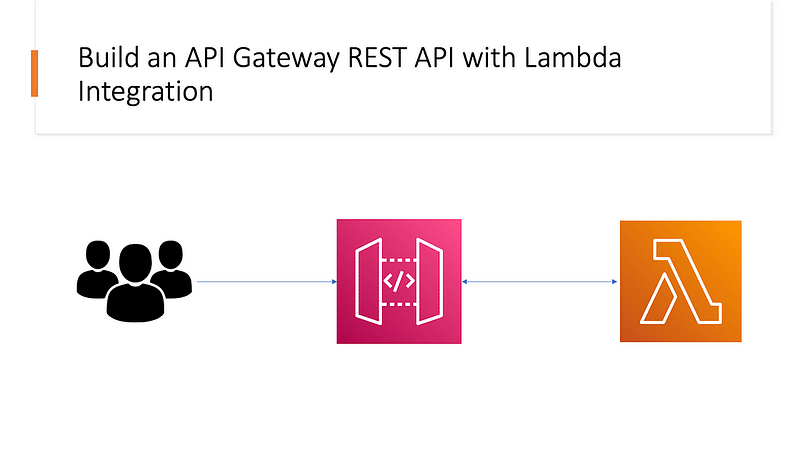
In this tutorial, we’ll walk through setting up an REST API in AWS API Gateway with Lambda Integration, configuring various integration methods and handling method requests and responses.

Introduction

API Gateway Lambda integration allows us to connect our API Gateway resources to Lambda functions and use them as backend logic for our API. There are two types of Lambda integrations:

Lambda Proxy Integration

This approach simplifies development by offloading request parsing and response formatting to API Gateway. This object is then passed to the Lambda function as an event object. The Lambda function processes the event object and returns a JSON response object, which API Gateway further parses and sends back to the client as the API response. This is suitable for most API implementations with JSON input and output formats.

Lambda Non-Proxy Integration

This approach provides greater flexibility and control over the request and response format. The Lambda function parses the request, processes it, and generates the response. This approach provides greater flexibility and control over the request and response format but requires more development effort as the Lambda function needs to handle parsing and formatting.

Implementation

Let’s extend the tutorial by creating a simple CRUD API for managing a list of books.

Step 1: Create an API in API Gateway

In AWS API Gateway, when we create a new API, we can choose between REST API and HTTP API. REST APIs offer more advanced features and capabilities, making them suitable for complex API scenarios. HTTP APIs prioritize simplicity and clarity, making them perfect for streamlined use cases.

Set Up API Gateway

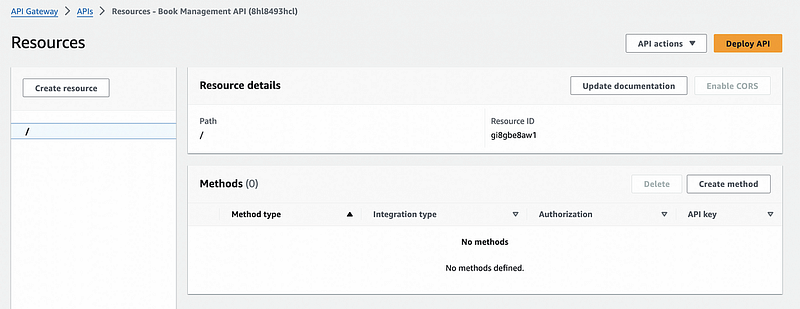
In the API Gateway console, choose Create API and select REST API. Give it a descriptive name like Book Management API. Select Regional as the desired API endpoint type then click on Create API.
Step 2: Deploy a Lambda function

Next, we need to create Lambda functions to handle the logic for each method. Having a separate Lambda function for each resource method (e.g., Create, Read, Update, Delete) is a common and recommended best practice. This approach follows the Single Responsibility Principle and helps maintain a clean and modular codebase.

Create Function (Create a new book):

import json

def create_book(event, context):
    request_body = json.loads(event['body'])
    # Validate required fields (e.g., title, author, etc.)
    if not request_body.get('title') or not request_body.get('author'):
        return {
            'statusCode': 400,
            'body': json.dumps({'message': 'Title and Author are required.'}),
        }
    new_book = {
        'id': 123,  # Replace with a proper ID generation method
        'title': request_body['title'],
        'author': request_body['author'],
        # Other book details...
    }
    return {
        'statusCode': 201,
        'body': json.dumps(new_book),
    }

Read Function (Create a book by ID):

import json

def get_book(event, context):
    book_id = event['bookId']
    book = {
        "bookId": 123, 
        "bookTitle": "Harry Potter",
        "authorName": "J. K. Rowling"
    }
    if not book_id == "123":
        return {
            'statusCode': 404,
            'body': json.dumps({'message': 'Book not found.'}),
        }
    return {
        'statusCode': 200,
        'body': json.dumps(book),
    }

Step 3: Create Resources and Methods

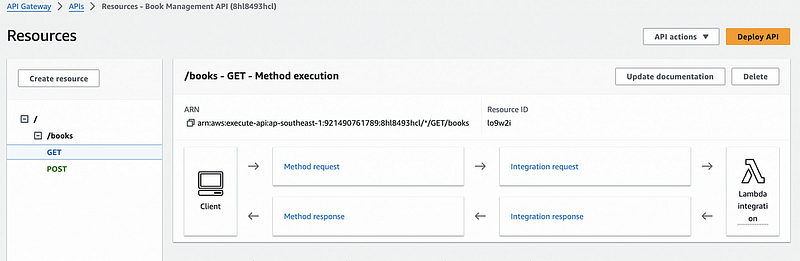
Next, create resources for the API endpoints, e.g., /books for listing and creating books, and /books/{id} for getting, updating, and deleting individual books. Define appropriate HTTP methods (GET, POST, PUT, DELETE) for each resource.
Step 4: Test the API

API Gateway provides a testing feature called Test for API methods, allowing us to test them before deploying to a stage.

In the API Gateway console, navigate to our API and select the resource/method we want to test. Click on the Test tab. On the test page, we can configure a test event. This is a JSON payload that simulates the input to your API method.

Let’s test the POST request by inputting the request body as below:
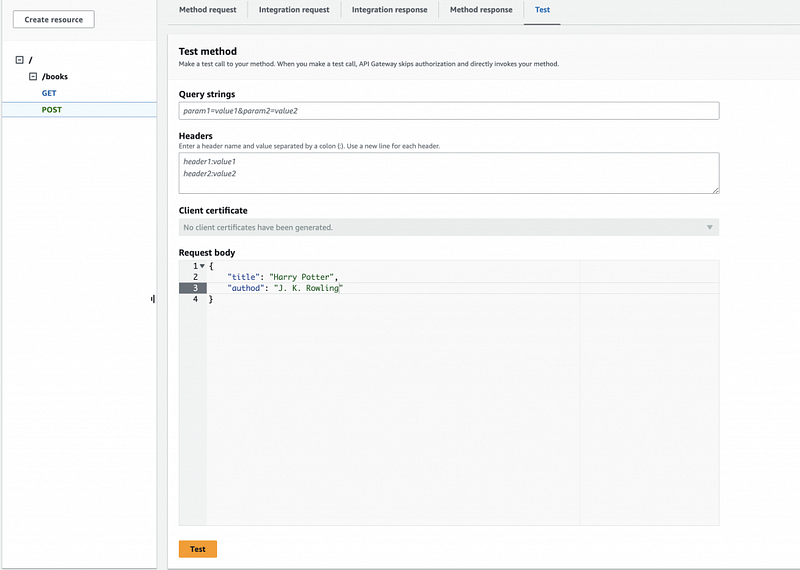
Click the Test button to simulate the API request using the configured test event. Review the results, including the request sent and the response received.
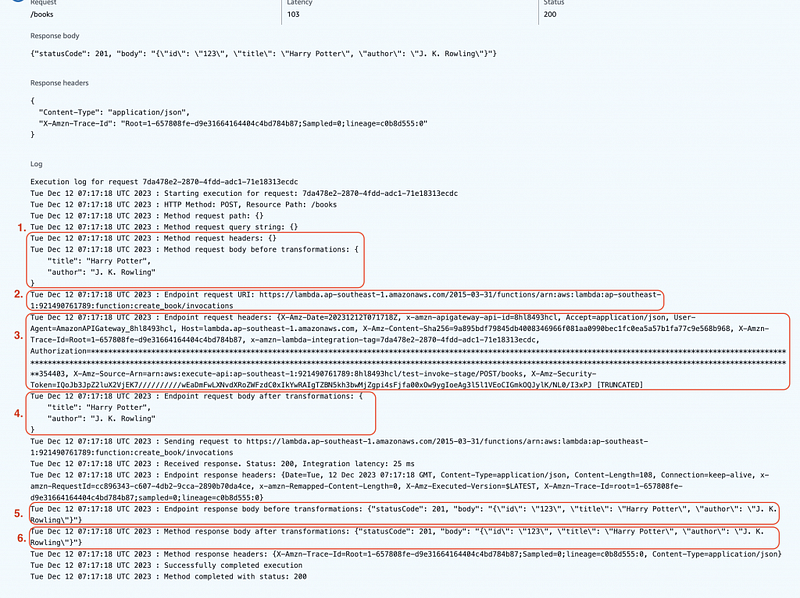
The log displays empty values for the method request path, query string, and headers, revealing that no specific details have been extracted from the request yet.

The log indicates that the HTTP POST request is received with a JSON payload. The original request body contains information about the book, including the title and author.

It then transforms this information, prepares an endpoint request to a specified Lambda function, and forwards the request.

Upon receiving the Lambda response, API Gateway performs transformations before sending the final response to the client. This involves mapping the Lambda response to a structured API response.

In the next article, we’ll learn how to configure the method and integration to define the structure of API requests and responses.

Happy coding! 🎉

  • Leave a comment if you have any question.
  • Clap if you find this tutorial useful.
  • Follow me to get notified when I publish new tutorials.
  • Buy me a coffee to support me.
Api Gateway
Lambda
Integration
Serverless
Rest Api
Recommended from ReadMedium