
Build an Amazon Scraper With Selenium
Do star ratings really matter?
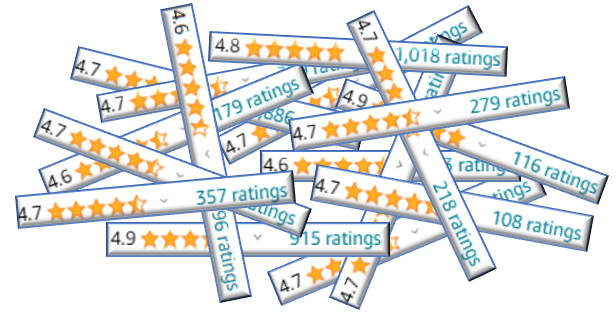
Do Amazon star ratings matter? As someone who writes Python books, I hope so, but now I’m unsure. Based on a recent search for “Python programming books,” I had to scroll a long way to find a book with a rating lower than 4.5, and most were rated 4.7 or higher.
Are Python books just that good, or are Amazon ratings pretty useless? Is 4.5 a participation trophy for just showing up?
Part of the issue is that the Amazon search engine incorporates ratings, so you would expect the results to be top-heavy with highly rated books. But if the engine returns more highly rated books than you care to browse through, then ratings are no longer a discriminating factor in book selection.
To investigate this, let’s run some statistics on star ratings for Python programming books. Since scrolling through webpages is for chumps, we’ll build a dedicated web scraper using Selenium, a Python package that will automate clicking and scrolling through Amazon.
Knowing how to scrape websites is a useful skill. Massive retailers like Amazon control more than half of the US e-commerce market, and their websites are brimming with valuable data for sellers, vendors, social scientists, and more.
Selenium
Selenium references an open-source umbrella project using several tools and libraries to automate web browsers. It works with multiple programming languages, including Python, and its API uses the WebDriver protocol to control browsers like Firefox, Safari, and Chrome. Originally designed as a testing tool, it has become a popular browser automation platform that permits web crawling and scraping.
Selenium lets you automate “manual” tasks like scrolling through pages, filling out forms, and clicking buttons. It can work behind the scenes or “show its work” in an open browser.
In this project, we’re going to watch it work. Although this causes slightly longer run times, watching the “ghost in the machine” effect is fun as the browser seems to run itself, automatically clicking buttons, filling out search boxes, and scrolling through pages.
Installing Firefox
You can install Mozilla Firefox through this link. You don’t need to set it as your default browser.
Installing Libraries
In addition to Selenium, we’ll need webdriver-manager (for working with the Firefox browser) and seaborn (to make charts).
For a conda installation, use:
conda install -c conda-forge selenium
conda install webdriver-manager
conda install seaborn
To install with pip, use:
pip install -U selenium
pip install webdriver-manager
pip install seaborn (Note that seaborn dependencies include NumPy, pandas, and Matplotlib)
The Code
The following code was entered into JupyterLab and is described by cell. It performs the following general steps:
- Creates a driver for the Firefox browser (don’t worry, it won’t become your default)
- Launches Amazon.com
- Searches for “Python programming books”
- Retrieves the book names and ratings for a specified number of pages
- Loads the names and ratings into lists
- Calculates statistics and plots the results
If you haven’t run Selenium before, sit back and watch. Don’t interact with the webpage at all. When the search is complete, the browser will close. Then you can run the plots (assuming you didn’t choose to Run All Cells in the notebook, in which case the plots will appear automatically).
Occasionally the program will fail and raise exceptions, such as NoSuchWindowExceptionor TimeoutException. This is generally due to external things like a Firefox crash or slow connection. In this case, just run the program again. If you still have problems, scroll down to the “Alternative Scraper” section near the end of this article.
Also, note that the list of books returned in an Amazon search isn’t “fixed,” so you may get slightly different results with each search. In other words, don’t expect the results to be exactly reproducible.
Importing libraries
We’ll need a lot of imports here. The time module is for pausing the program to avoid rate limiting by Amazon's API; the re (regular expressions) module is for massaging the output; statistics is for calculating the median rating value; matplotlib and seaborn are used for plotting. From Selenium, we'll need the webdriver and other specific imports for working with the Firefox browser.
import time
import re
import statistics

import matplotlib.pyplot as plt
import seaborn as sns

from selenium import webdriver
from selenium.webdriver.firefox.service import Service
from selenium.webdriver.common.by import By
from selenium.webdriver.support.ui import WebDriverWait
from selenium.webdriver.support import expected_conditions as EC
from webdriver_manager.firefox import GeckoDriverManager
Defining a function to scrape Amazon
The following code defines a function to extract book data from Amazon. The search_term parameter represents what you would type into the Amazon search box if you were conducting a manual search. The num_pages parameter represents the number of Amazon pages to search through.
The scraping process is performed using a with block that automatically closes the Firefox browser. The code is mostly a boilerplate script you can find online or generate with ChatGPT. It's not easy to read because we're dealing with HTML, the language of the web.
def scrape_amazon(search_term, num_pages):
    """Search Amazon pages and return list of book names and ratings."""
    # Set up Selenium webdriver using a context manager:
    with webdriver.Firefox(service=Service(
        executable_path=GeckoDriverManager().install())) as driver:
        # Create empty lists to hold book information:
        book_names = []
        book_ratings = []

        # Begin scraping:
        for page in range(1, num_pages + 1):
            # Visit Amazon search page
            url = f'https://www.amazon.com/s?k={search_term}&page={page}'
            driver.get(url)

            # Wait for the book elements to update:
            WebDriverWait(driver, 10).until(EC.presence_of_all_elements_located(
                (By.CSS_SELECTOR, 'span.a-size-medium.a-color-base.a-text-normal')))

            # Find the elements:
            book_elements = driver.find_elements(By.CSS_SELECTOR,
                                                 'span.a-size-medium.a-color-base.a-text-normal')
            rating_elements = driver.find_elements(By.CSS_SELECTOR, 'span.a-icon-alt')

            # Extract the names and ratings:
            for book_element, rating_element in zip(book_elements, rating_elements):
                book_names.append(book_element.text)
                if rating_element.get_attribute('innerHTML'):
                    book_ratings.append(rating_element.get_attribute('innerHTML'))
                else:
                    book_ratings.append('No rating')

            # Pause program to avoid overloading site:
            time.sleep(3)

    return book_names, book_ratings
Calling the scraping function
In the cell below, the keyword variable represents what you would manually type into the Amazon search box. The pages variable is the number of Amazon pages you want to scrape. Five pages will yield slightly over 100 books.
This will take a minute or so to run. Remember not to interact with the browser while it’s running.
If Amazon displays a “Something went wrong on our end” page, either wait for Firefox to close or manually close it. Then try again. This error usually results from a poor connection, which could also mean that Amazon is blocking you. If the problem persists, use the alternative scraper referenced near the end of this article.
# Call the webscraper:
keyword = 'Python programming books'
pages = 5
books, ratings = scrape_amazon(keyword, pages)
Wrangling the results
The output from the scrape_Amazon() function requires some post-processing prior to plotting and running statistics. The book names, for example, are currently web elements. To provide the option to print them, we first need to convert them into strings.
Next, we need to wrangle the ratings. They are currently in string format, such as "4.5 out of 5 stars." To plot them and calculate statistics, they must be converted into the float datatype. This calls for regular expressions, and as I described in one of my previous articles. That's a job for ChatGPT!
# Convert book name web elements to strings:
books = [str(name) for name in books]
# print(books)

# Extract the rating number from the string "x out of x stars":
decimal_ratings = []

for rating in ratings:
    match = re.search(r'\d+\.\d+', rating)
    if match:
        decimal_ratings.append(float(match.group()))

# print(decimal_ratings)
Plotting the results
We’ll use Seaborn to plot the results as a horizontal bar chart. First, we need to remove any books with a rating of 0.0. These books haven’t been reviewed yet, and we don’t want them to impact our results.
Since the average value can be skewed by a few very low or high values, we’ll use the statistics module to calculate the median value. The median is simply the "middle number" in a dataset. It gives us an idea of where the “center” is located and the “typical” value. We’ll print these values out to supplement the bar chart.
# Calculate and display statistics and rating counts.
data = [x for x in decimal_ratings if x > 0.0]  # Remove ratings of 0.
print(f"The number of books reviewed = {len(data)}")
print("The average rating is", round(sum(data)/len(data), 2))
print(f"The median rating is {statistics.median(data)}")

fig, ax = plt.subplots(figsize=(4, 3))
ax = sns.histplot(y=data, bins=10, edgecolor='white', kde=True)
ax.set_yticks([0.0, 1.0, 2.0, 3.0, 3.5, 4.0, 4.5, 5])
ax.set_ylabel('Amazon Star Rating')
ax.grid(True);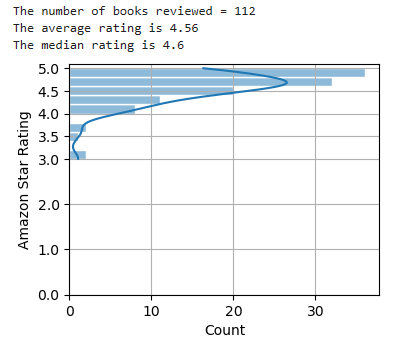
Note: Amazon will sometimes return a few off-topic books. I chose to ignore these for this exercise.
Outcome
We inspected over 100 books — more than I would care to peruse when shopping — and the average and median ratings were 4.56 and 4.6, respectively. These ratings are equivalent to a 92 out of 100 on a test. That’s an “A” where I come from.
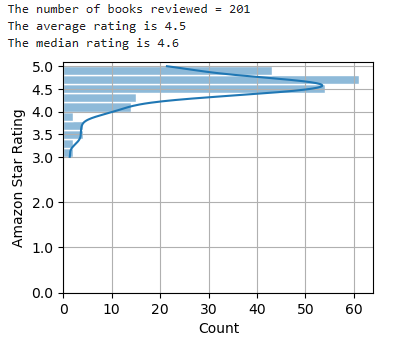
Even if you look at twice as many Python books, the result is the same:
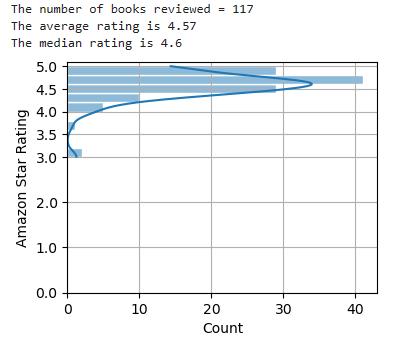
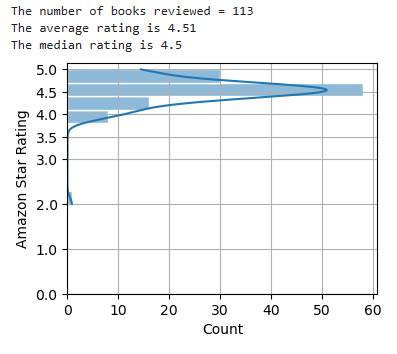
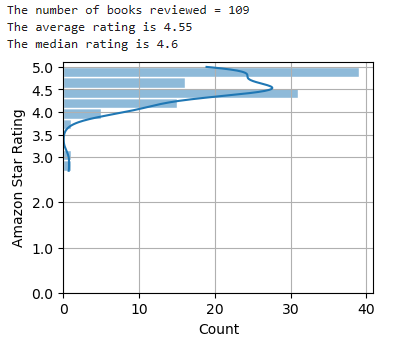
What about non-Python programming books and other “how-to” books? You get the same result.
Here’s the chart for C++ books:
Here’s the chart for JavaScript books:
Here’s the chart for Microsoft Excel:
For something completely different, here’s the chart for knitting books:
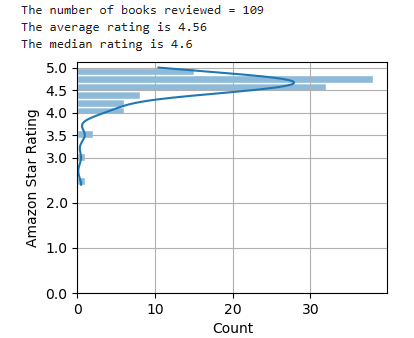
One of the issues here may be that technical books are purchased by people with limited knowledge of the subject — hence the need to buy the book in the first place. Even a mediocre book will enhance their skills, and they don’t have the deep domain knowledge to recognize when a book isn’t up to snuff. If a book helps you, you’ll be inclined to give it a high rating.
Contrast this with novels, where it’s easier for people to judge quality. A search for “science fiction books,” for example, yields an average and median ranking of only 4.4 for the first 115 books returned.
Including the number of reviews per book
For discriminating among books, another consideration could be the number of reviews per book. It seems reasonable that poor-quality books would get fewer reviews.
If you scrape the number of reviews per book, you see this to some degree. Books with over 100 reviews tend to have average ratings of 4.0 or higher.
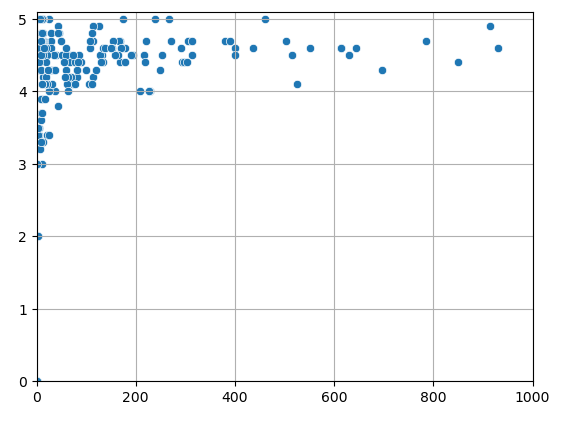
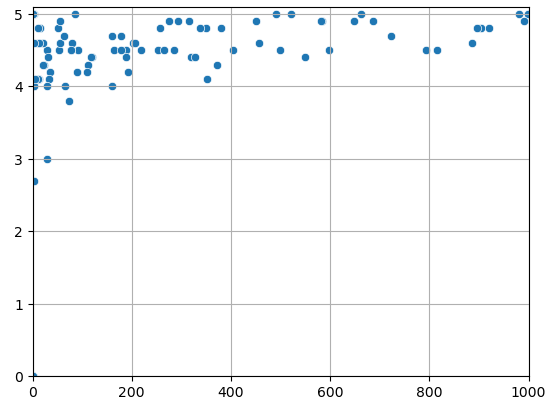
The problem with this approach is that getting hundreds to thousands of reviews takes a while. This handicaps newer books. A book may also serve a niche topic that, by its nature, has fewer buyers and, thus, fewer reviewers.
So, what does it mean? To me, ratings only matter if they’re worse than about 4.4 and better than 4.8. I also like to see 50+ reviews to weed out friends, family, and enemies. And, as everyone knows, you have to read actual reviews and “Look inside” to make a final decision. If you have any thoughts on this, please share them in the comments.

An Alternative Scraper
Scraping Amazon is notoriously difficult, especially for beginners. You can easily encounter problems related to the following:
- IP (Internet Protocol) blocking
- Changes to page structures
- Different page structures for different products
- Complicated page structures
- CAPTCHA screens
The web scraper we built above is unsophisticated and may be blocked if you scrape too often. It represents a “fit-for-purpose” solution designed to gather a targeted bit of information a few times.
If you encounter problems, then try the alternative scraper stored in this Gist. This scraper is tailored to the current (as of this writing) page structure for programming books. It can also handle CAPTCHA windows, though you will have to manually enter the sequence of characters that prove you’re not a robot.
Thanks
Thanks for reading, and please follow me for more Quick Success Data Science projects in the future.