avatarTim Urista | Senior Cloud Engineer

Free AI web copilot to create summaries, insights and extended knowledge, download it at here

6494

Abstract

argateClient *client.StargateClient

<span class="hljs-function"><span class="hljs-keyword">func</span> <span class="hljs-title">initializeDB</span><span class="hljs-params">()</span></span> { grpcEndpoint := <span class="hljs-string">"localhost:8090"</span> authEndpoint := <span class="hljs-string">"localhost:8081"</span>

<span class="hljs-comment">// Retrieve Cassandra username and password from environment variables</span>
username := os.Getenv(<span class="hljs-string">"CASSANDRA_USERNAME"</span>)
passwd := os.Getenv(<span class="hljs-string">"CASSANDRA_PASSWORD"</span>)

<span class="hljs-keyword">if</span> username == <span class="hljs-string">""</span> || passwd == <span class="hljs-string">""</span> {
    fmt.Println(<span class="hljs-string">"Cassandra authentication values are not set in environment variables"</span>)
    os.Exit(<span class="hljs-number">1</span>)
}

conn, err := grpc.Dial(grpcEndpoint, grpc.WithInsecure(), grpc.WithBlock(),
    grpc.WithPerRPCCredentials(
        auth.NewTableBasedTokenProviderUnsafe(
            fmt.Sprintf(<span class="hljs-string">"http://%s/v1/auth"</span>, authEndpoint), username, passwd,
        ),
    ),
)

<span class="hljs-keyword">if</span> err != <span class="hljs-literal">nil</span> {
    fmt.Printf(<span class="hljs-string">"error creating connection %v"</span>, err)
    os.Exit(<span class="hljs-number">1</span>)
}

stargateClient, err = client.NewStargateClientWithConn(conn)
<span class="hljs-keyword">if</span> err != <span class="hljs-literal">nil</span> {
    fmt.Printf(<span class="hljs-string">"error creating client %v"</span>, err)
    os.Exit(<span class="hljs-number">1</span>)
}

}

<span class="hljs-function"><span class="hljs-keyword">func</span> <span class="hljs-title">executeQuery</span><span class="hljs-params">(query <span class="hljs-type">string</span>)</span></span> (*pb.ResultSet, <span class="hljs-type">error</span>) { cqlQuery := &pb.Query{ Cql: query, }

response, err := stargateClient.ExecuteQuery(cqlQuery) <span class="hljs-keyword">if</span> err != <span class="hljs-literal">nil</span> { <span class="hljs-keyword">return</span> <span class="hljs-literal">nil</span>, fmt.Errorf(<span class="hljs-string">"error executing query: %w"</span>, err) }

<span class="hljs-keyword">return</span> response.GetResultSet(), <span class="hljs-literal">nil</span> }

<span class="hljs-function"><span class="hljs-keyword">func</span> <span class="hljs-title">executeBatch</span><span class="hljs-params">(queries []<span class="hljs-type">string</span>)</span></span> <span class="hljs-type">error</span> { batchQueries := <span class="hljs-built_in">make</span>([]*pb.BatchQuery, <span class="hljs-built_in">len</span>(queries)) <span class="hljs-keyword">for</span> i, query := <span class="hljs-keyword">range</span> queries { batchQueries[i] = &pb.BatchQuery{ Cql: query, } }

batch := &pb.Batch{ Type: pb.Batch_LOGGED, Queries: batchQueries, }

_, err := stargateClient.ExecuteBatch(batch) <span class="hljs-keyword">if</span> err != <span class="hljs-literal">nil</span> { <span class="hljs-keyword">return</span> fmt.Errorf(<span class="hljs-string">"error executing batch: %w"</span>, err) }

<span class="hljs-keyword">return</span> <span class="hljs-literal">nil</span> }</pre></div><p id="4ae1">In the main.go file we will initialize the client to interact with astroDB.</p><h1 id="6356">5. Create Signup and Login Handlers:</h1><p id="953d">Now a file named handlers.go: <b>touch handlers.go</b></p><p id="9e68">Inside handlers.go, implement signup and login handlers:</p><div id="ba89"><pre><span class="hljs-comment">// File: handlers.go</span>

<span class="hljs-keyword">package</span> main

<span class="hljs-keyword">import</span> ( <span class="hljs-string">"encoding/json"</span> <span class="hljs-string">"fmt"</span> <span class="hljs-string">"net/http"</span>

<span class="hljs-string">"github.com/stargate/stargate-grpc-go-client/stargate/pkg/proto"</span> <span class="hljs-string">"golang.org/x/crypto/bcrypt"</span> )

<span class="hljs-function"><span class="hljs-keyword">func</span> <span class="hljs-title">SignupHandler</span><span class="hljs-params">(w http.ResponseWriter, r *http.Request)</span></span> { <span class="hljs-keyword">if</span> r.Method != http.MethodPost { http.Error(w, <span class="hljs-string">"Invalid request method"</span>, http.StatusMethodNotAllowed) <span class="hljs-keyword">return</span> }

<span class="hljs-keyword">var</span> user User err := json.NewDecoder(r.Body).Decode(&user) <span class="hljs-keyword">if</span> err != <span class="hljs-literal">nil</span> { http.Error(w, <span class="hljs-string">"Invalid request body"</span>, http.StatusBadRequest) <span class="hljs-keyword">return</span> }

hashedPassword, err := hashAndSalt(user.Password) <span class="hljs-keyword">if</span> err != <span class="hljs-literal">nil</span> { http.Error(w, <span class="hljs-string">"Error hashing password"</span>, http.StatusInternalServerError) <span class="hljs-keyword">return</span> } user.Password = hashedPassword

insertQuery := fmt.Sprintf( <span class="hljs-string">"INSERT INTO test.users (id, username, password) VALUES (uuid(), '%s', '%s');"</span>, user.Username, user.Password, )

resultSet, err := executeQuery(insertQuery) <span class="hljs-keyword">if</span> err != <span class="hljs-literal">nil</span> { http.Error(w, <span class="hljs-string">"Error creating user"</span>, http.StatusInternalServerError) <span class="hljs-keyword">return</span> }

w.WriteHeader(http.StatusCreated) }

</pre></div><p id="6bc6">Now Add the Login Handler also:</p><div id="3c50"><pre>... <span class="hljs-function"><span class="hljs-keyword">func</span> <span class="hljs-title">LoginHandler</span><span class="hljs-params">(w http.ResponseWriter, r *http.Request)</span></span> { <span class="hljs-keyword">if</span> r.Method != http.MethodPost { http.Error(w, <span class="hljs-string">"Invalid request method"</span>, http.StatusMethodNotAllowed) <span class="hljs-keyword">return</span> }

<span class="hljs-keyword">var</span> user User err := json.NewDecoder(r.Body).Decode(&user) <span class="hljs-keyword">if</span> err != <span class="hljs-literal">nil</span> { http.Error(w, <span class="hljs-string">"

Options

Invalid request body"</span>, http.StatusBadRequest) <span class="hljs-keyword">return</span> }

selectQuery := fmt.Sprintf( <span class="hljs-string">"SELECT password FROM test.users WHERE username='%s';"</span>, user.Username, )

resultSet, err := executeQuery(selectQuery) <span class="hljs-keyword">if</span> err != <span class="hljs-literal">nil</span> { http.Error(w, <span class="hljs-string">"Error fetching user"</span>, http.StatusInternalServerError) <span class="hljs-keyword">return</span> }

<span class="hljs-keyword">if</span> <span class="hljs-built_in">len</span>(resultSet.Rows) == <span class="hljs-number">0</span> { http.Error(w, <span class="hljs-string">"User not found"</span>, http.StatusNotFound) <span class="hljs-keyword">return</span> }

storedPassword, err := proto.ToString(resultSet.Rows[<span class="hljs-number">0</span>].Values[<span class="hljs-number">0</span>]) <span class="hljs-keyword">if</span> err != <span class="hljs-literal">nil</span> { http.Error(w, <span class="hljs-string">"Error getting password"</span>, http.StatusInternalServerError) <span class="hljs-keyword">return</span> }

err = bcrypt.CompareHashAndPassword([]<span class="hljs-type">byte</span>(storedPassword), []<span class="hljs-type">byte</span>(user.Password)) <span class="hljs-keyword">if</span> err != <span class="hljs-literal">nil</span> { http.Error(w, <span class="hljs-string">"Invalid password"</span>, http.StatusUnauthorized) <span class="hljs-keyword">return</span> }

w.WriteHeader(http.StatusOK) }</pre></div><p id="43fd">The <code>LoginHandler</code> function in <code>handlers.go</code> processes login requests by first ensuring the request method is POST, then decoding the request body to extract user credentials, and querying the database to retrieve the stored hashed password for the specified username. It compares the stored hashed password with the hashed version of the password provided in the request using bcrypt's <code>CompareHashAndPassword</code> function. Upon successful password verification, it responds with a status code of <code>200 OK</code>; if the password verification fails or any other error occurs during the process, it responds with an appropriate error message and HTTP status code, such as <code>401 Unauthorized</code> for incorrect passwords, or <code>404 Not Found</code> if the username doesn't exist in the database.</p><p id="371e"><b>Example Expected Return:</b></p><ul><li>Successful Login: HTTP status code <code>200 OK</code>.</li><li>Failed Login due to incorrect password: HTTP status code <code>401 Unauthorized</code> with error message "Invalid password".</li><li>Failed Login due to non-existent username: HTTP status code <code>404 Not Found</code> with error message "User not found".</li></ul><h1 id="f457">6. Create Main File:</h1><p id="5f08">Create a file named main.go: <b>touch main.go</b></p><p id="8937">Inside main.go, set up your HTTP server and route handlers:</p><div id="faa4"><pre><span class="hljs-keyword">package</span> main <span class="hljs-keyword">import</span> ( <span class="hljs-string">"fmt"</span> <span class="hljs-string">"net/http"</span> ) <span class="hljs-function"><span class="hljs-keyword">func</span> <span class="hljs-title">main</span><span class="hljs-params">()</span></span> { initializeDB() http.HandleFunc(<span class="hljs-string">"/signup"</span>, SignupHandler) http.HandleFunc(<span class="hljs-string">"/login"</span>, LoginHandler) fmt.Println(<span class="hljs-string">"running on port 8080..."</span>) http.ListenAndServe(<span class="hljs-string">":8080"</span>, <span class="hljs-literal">nil</span>) }</pre></div><h1 id="e3d5">7. Create Dockerfile:</h1><p id="77e7">Create a file named Dockerfile: touch Dockerfile</p><p id="399e">Inside Dockerfile, set up your Go application:</p><div id="25a9"><pre>FROM golang:1.21 WORKDIR /app

COPY . .

RUN go mod init go-login RUN go build -o go-login

CMD [“./go-login”]</pre></div><h1 id="35a6">8. Build and Run Your Docker Container:</h1><p id="06ed">Build your Docker image: <b>docker build -t go-login .</b></p><p id="172d">Run your Docker container: <b>docker run -d -p 8080:8080 go-login</b></p><p id="3d39">Now, your Go application should be running in a Docker container, and you should be able to access the signup and login endpoints at <a href="http://localhost:8080/signup">http://localhost:8080/signup</a> and <a href="http://localhost:8080/login">http://localhost:8080/login</a> respectively.</p><p id="0cd0">9. Run & Test your application</p><div id="709c"><pre> go run main.go db.go handlers.go running on port 8080...</pre></div><p id="74d6">Now try the handlers:</p><div id="1e08"><pre> curl -i -X POST -H <span class="hljs-string">"Content-Type: application/json"</span>
-d '{<span class="hljs-string">"username"</span>: <span class="hljs-string">"testuser"</span>, <span class="hljs-string">"password"</span>: <span class="hljs-string">"testpassword"</span>}'
http://localhost:8080/signup

HTTP/1.1 201 Created <span class="hljs-section">Date: Mon, 18 Oct 2021 14:23:41 GMT</span> <span class="hljs-section">Content-Length: 0</span>

... $ curl -i -X POST -H <span class="hljs-string">"Content-Type: application/json"</span>
-d '{<span class="hljs-string">"username"</span>: <span class="hljs-string">"testuser"</span>, <span class="hljs-string">"password"</span>: <span class="hljs-string">"testpassword"</span>}'
http://localhost:8080/login

HTTP/1.1 200 OK <span class="hljs-section">Date: Mon, 18 Oct 2021 14:40:21 GMT</span> <span class="hljs-section">Content-Length: 0</span></pre></div><p id="c9bb">Thanks for reading!</p><p id="9ff2">This guide has walked you through a basic example of setting up a user authentication system using Go and Stargate AstroDB. While this setup serves as a good starting point, there’s much more to explore in the realm of user authentication.</p><p id="eb26">In a potential Part 2, we could delve into integrating Single Sign-On (SSO) providers such as Google and Facebook to further enhance the user authentication system. If you’re interested in learning about how to integrate with SSO providers for your user authentication setup, feel free to leave a comment below expressing your interest.</p><p id="0cab"><b>Please Comment “I want Part 2” </b>if you would find this useful.</p><p id="c4c0">Your feedback will help us craft content that best meets your needs!</p></article></body>

Build a Super Simple but Scalable User Login System in Go, Cassandra & Docker

A simple how-to to build a Docker file using go, cassandra with astrodb and docker

Creating a user login system is a multi-step process that involves both backend and potentially some frontend development.

In this guide, I’ll outline how you could create a simple user login flow using Go (Golang) and Cassandra as the database, with the database hosted on AstroDB. We’ll also create a Dockerfile for easy deployment. Here’s a step-by-step guide:

1. Setup Your Environment:

  1. Install Go: Download and install Go from the official website.
  2. Install Docker: Download and install Docker from the official website.
  3. Setup Cassandra on AstroDB: Create an account on AstroDB and set up a Cassandra database. Take note of your database credentials and connection details.

2. Project Initialization:

Create a new directory for your project and navigate into it:

mkdir go-login && cd go-login

3. Create the User Model:

Create a file named user.go: touch user.go

Now create the user.go file:

package main

import (
    "golang.org/x/crypto/bcrypt"
)

type User struct {
    ID       string `json:"id"`
    Username string `json:"username"`
    Password string `json:"password"` // This will store the hashed password
}

func hashAndSalt(password string) (string, error) {
    hash, err := bcrypt.GenerateFromPassword([]byte(password), bcrypt.MinCost)
    if err != nil {
        return "", err
    }
    return string(hash), nil
}

In this example, we use bycrpt’s built-in MinCost function for salting which has internal value of 4, you can increase this value for added security at the expense of time (it will take longer to generate the new value as a result of a greater value).

The User model is very simple, you can annotate this example or create additional tables with ID for secondary searches and attributes. Cassandra scales horizontally so having additional tables are often preferred for additional data since it’s easier to add more data than to perform migrations later.

It’s counter-intuitive if you have been doing lots of SQL, but you can often (but not always) have better performance and scalability with lots of tables and using application logic to combine data than trying to plan for the exact complex schema you need from the start.

I’ve found it’s better to have a smaller schema and add things later even if you take some amount of latency. But every use case is different.

Side Note: why is it important to store a hashed password?
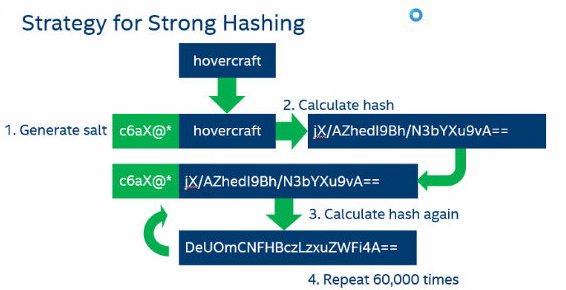
Hashed passwords are more secure in case of data breaches compared to plaintext passwords.

They make it harder for attackers to exploit and mitigate the impact of the breach. This is especially important as individuals commonly reuse passwords across multiple sites.

By using cryptographic hash functions like bcrypt or Argon2, along with unique salts for each password, brute force or dictionary attacks are obstructed and identical passwords generate different hash values. This ensures secure password verification without exposing the actual password, even to system administrators, thus enhancing user privacy and trust.

Additionally, hashing passwords is often mandated or recommended by regulatory frameworks and industry standards, aiding in legal compliance and reflecting a commitment to responsible data handling. This can improve a company’s professional reputation and foster a culture of security and non-repudiation within the organization.

See more: https://www.tokenex.com/blog/ab-hashing-vs-salting-how-do-these-functions-work/#:~:text=Hashing%20takes%20plaintext%20data%20elements,in%20order%20to%20decode%20it.

4. Setup Logic

Create a file named db.go: `touch db.go`

Inside db.go, write code to connect to your Cassandra database on AstroDB using Astro client:

// File: db.go

package main

import (
    "fmt"
    "os"

    "github.com/stargate/stargate-grpc-go-client/stargate/pkg/auth"
    "github.com/stargate/stargate-grpc-go-client/stargate/pkg/client"
    pb "github.com/stargate/stargate-grpc-go-client/stargate/pkg/proto"
    "google.golang.org/grpc"
)

var stargateClient *client.StargateClient

func initializeDB() {
    grpcEndpoint := "localhost:8090"
    authEndpoint := "localhost:8081"

    // Retrieve Cassandra username and password from environment variables
    username := os.Getenv("CASSANDRA_USERNAME")
    passwd := os.Getenv("CASSANDRA_PASSWORD")

    if username == "" || passwd == "" {
        fmt.Println("Cassandra authentication values are not set in environment variables")
        os.Exit(1)
    }

    conn, err := grpc.Dial(grpcEndpoint, grpc.WithInsecure(), grpc.WithBlock(),
        grpc.WithPerRPCCredentials(
            auth.NewTableBasedTokenProviderUnsafe(
                fmt.Sprintf("http://%s/v1/auth", authEndpoint), username, passwd,
            ),
        ),
    )

    if err != nil {
        fmt.Printf("error creating connection %v", err)
        os.Exit(1)
    }

    stargateClient, err = client.NewStargateClientWithConn(conn)
    if err != nil {
        fmt.Printf("error creating client %v", err)
        os.Exit(1)
    }
}

func executeQuery(query string) (*pb.ResultSet, error) {
 cqlQuery := &pb.Query{
  Cql: query,
 }

 response, err := stargateClient.ExecuteQuery(cqlQuery)
 if err != nil {
  return nil, fmt.Errorf("error executing query: %w", err)
 }

 return response.GetResultSet(), nil
}

func executeBatch(queries []string) error {
 batchQueries := make([]*pb.BatchQuery, len(queries))
 for i, query := range queries {
  batchQueries[i] = &pb.BatchQuery{
   Cql: query,
  }
 }

 batch := &pb.Batch{
  Type:    pb.Batch_LOGGED,
  Queries: batchQueries,
 }

 _, err := stargateClient.ExecuteBatch(batch)
 if err != nil {
  return fmt.Errorf("error executing batch: %w", err)
 }

 return nil
}

In the main.go file we will initialize the client to interact with astroDB.

5. Create Signup and Login Handlers:

Now a file named handlers.go: touch handlers.go

Inside handlers.go, implement signup and login handlers:

// File: handlers.go

package main

import (
 "encoding/json"
 "fmt"
 "net/http"

 "github.com/stargate/stargate-grpc-go-client/stargate/pkg/proto"
 "golang.org/x/crypto/bcrypt"
)

func SignupHandler(w http.ResponseWriter, r *http.Request) {
 if r.Method != http.MethodPost {
  http.Error(w, "Invalid request method", http.StatusMethodNotAllowed)
  return
 }

 var user User
 err := json.NewDecoder(r.Body).Decode(&user)
 if err != nil {
  http.Error(w, "Invalid request body", http.StatusBadRequest)
  return
 }

 hashedPassword, err := hashAndSalt(user.Password)
 if err != nil {
  http.Error(w, "Error hashing password", http.StatusInternalServerError)
  return
 }
 user.Password = hashedPassword

 insertQuery := fmt.Sprintf(
  "INSERT INTO test.users (id, username, password) VALUES (uuid(), '%s', '%s');",
  user.Username, user.Password,
 )

 resultSet, err := executeQuery(insertQuery)
 if err != nil {
  http.Error(w, "Error creating user", http.StatusInternalServerError)
  return
 }

 w.WriteHeader(http.StatusCreated)
}

Now Add the Login Handler also:

...
func LoginHandler(w http.ResponseWriter, r *http.Request) {
 if r.Method != http.MethodPost {
  http.Error(w, "Invalid request method", http.StatusMethodNotAllowed)
  return
 }

 var user User
 err := json.NewDecoder(r.Body).Decode(&user)
 if err != nil {
  http.Error(w, "Invalid request body", http.StatusBadRequest)
  return
 }

 selectQuery := fmt.Sprintf(
  "SELECT password FROM test.users WHERE username='%s';",
  user.Username,
 )

 resultSet, err := executeQuery(selectQuery)
 if err != nil {
  http.Error(w, "Error fetching user", http.StatusInternalServerError)
  return
 }

 if len(resultSet.Rows) == 0 {
  http.Error(w, "User not found", http.StatusNotFound)
  return
 }

 storedPassword, err := proto.ToString(resultSet.Rows[0].Values[0])
 if err != nil {
  http.Error(w, "Error getting password", http.StatusInternalServerError)
  return
 }

 err = bcrypt.CompareHashAndPassword([]byte(storedPassword), []byte(user.Password))
 if err != nil {
  http.Error(w, "Invalid password", http.StatusUnauthorized)
  return
 }

 w.WriteHeader(http.StatusOK)
}

The LoginHandler function in handlers.go processes login requests by first ensuring the request method is POST, then decoding the request body to extract user credentials, and querying the database to retrieve the stored hashed password for the specified username. It compares the stored hashed password with the hashed version of the password provided in the request using bcrypt's CompareHashAndPassword function. Upon successful password verification, it responds with a status code of 200 OK; if the password verification fails or any other error occurs during the process, it responds with an appropriate error message and HTTP status code, such as 401 Unauthorized for incorrect passwords, or 404 Not Found if the username doesn't exist in the database.

Example Expected Return:

  • Successful Login: HTTP status code 200 OK.
  • Failed Login due to incorrect password: HTTP status code 401 Unauthorized with error message "Invalid password".
  • Failed Login due to non-existent username: HTTP status code 404 Not Found with error message "User not found".

6. Create Main File:

Create a file named main.go: touch main.go

Inside main.go, set up your HTTP server and route handlers:

package main
import (
 "fmt"
 "net/http"
)
func main() {
 initializeDB()
 http.HandleFunc("/signup", SignupHandler)
 http.HandleFunc("/login", LoginHandler)
 fmt.Println("running on port 8080...")
 http.ListenAndServe(":8080", nil)
}

7. Create Dockerfile:

Create a file named Dockerfile: touch Dockerfile

Inside Dockerfile, set up your Go application:

FROM golang:1.21
WORKDIR /app

COPY . .

RUN go mod init go-login
RUN go build -o go-login

CMD [“./go-login”]

8. Build and Run Your Docker Container:

Build your Docker image: docker build -t go-login .

Run your Docker container: docker run -d -p 8080:8080 go-login

Now, your Go application should be running in a Docker container, and you should be able to access the signup and login endpoints at http://localhost:8080/signup and http://localhost:8080/login respectively.

9. Run & Test your application

$ go run main.go db.go handlers.go
running on port 8080...

Now try the handlers:

$ curl -i -X POST -H "Content-Type: application/json" \
  -d '{"username": "testuser", "password": "testpassword"}' \
  http://localhost:8080/signup

HTTP/1.1 201 Created
Date: Mon, 18 Oct 2021 14:23:41 GMT
Content-Length: 0

...
$ curl -i -X POST -H "Content-Type: application/json" \
  -d '{"username": "testuser", "password": "testpassword"}' \
  http://localhost:8080/login

HTTP/1.1 200 OK
Date: Mon, 18 Oct 2021 14:40:21 GMT
Content-Length: 0

Thanks for reading!

This guide has walked you through a basic example of setting up a user authentication system using Go and Stargate AstroDB. While this setup serves as a good starting point, there’s much more to explore in the realm of user authentication.

In a potential Part 2, we could delve into integrating Single Sign-On (SSO) providers such as Google and Facebook to further enhance the user authentication system. If you’re interested in learning about how to integrate with SSO providers for your user authentication setup, feel free to leave a comment below expressing your interest.

Please Comment “I want Part 2” if you would find this useful.

Your feedback will help us craft content that best meets your needs!

Golang
Cassandra
Authentication
Login
Backend
Recommended from ReadMedium