
Build a Real-Time Chat App With React Hooks and Socket.io
With source code and live demo

If you’d like to jump straight to the point or just want to get an overview of what we’re going to build, you can check out the app in action.
Live demo: https://pixochi.github.io/socket.io-react-hooks-chat-client-v2/
Source code: https://github.com/pixochi/socket.io-react-hooks-chat
1. Overview
We’re going to create a web app for sending messages between multiple users in real time. Client(browser) uses React for user interface and Server runs on NodeJS. To achieve real-time communication, we’ll establish a WebSocket connection between Client and Server with Socket.io.
WebSocket 101
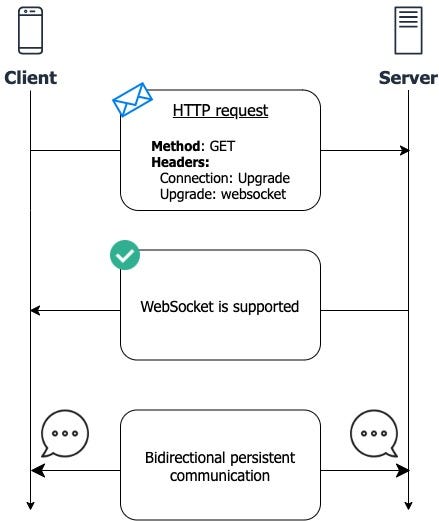
The app uses WebSocket for an instant exchange of messages sent by users. Let’s look at some steps how a WebSocket connection is created.
- If Client wants to use WebSocket instead of traditional HTTP, an HTTP GET request must be sent with special headers asking Server for connection upgrade.
- If Server supports WebSocket, the response confirms possibility of connection upgrade.
- Once the handshake is finished, the connection provides a way for bidirectional communication. Both Client and Server can emit and listen for events until one of them closes the connection.
2. Client
We’ll set up the app with Create React App by running just one command:
npx create-react-app socket.io-react-hooks-chatThen we need to install socket.io-client for creating a WebSocket connection and its management. We also need react-router-dom for support of more than 1 route.
npm install socket.io-client react-router-domThe app can be started with:
npm startRouting
App.js handles 2 main routes — Home for creating a chat room and ChatRoom for actually sending and receiving messages. The Home and ChatRoom components will be created in the next step.
New chat room

Home.jsx contains a text input for a room name. Only users in the same room will be able to chat together.
The green “Join Room” button links to a chat room with the provided room name.
Chat room
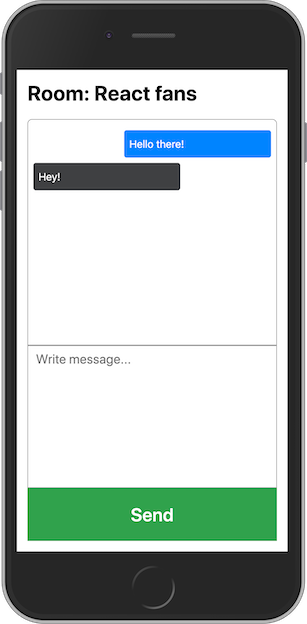
ChatRoom.jsx is where we create a WebSocket connection and exchange messages with other users in the chat room.
Management of the connection and messages is handled by the useChat React hook that is described in the next step.
useChat hook
When the chat room is opened, we use socket.io-client to create a connection to a local server(yet to be created) running on http://localhost:4000. When creating the connection, roomId is sent as a query parameter in order to group users by room name.
The hook exposes an object containing:
- messages: an array of received and sent messages
- sendMessage: a function that emits an event with a new message to the server
The socket also listens for incoming messages. When a new message is received, it is added to the array of all messages.
3. Server
We need only a very simple server setup to forward messages to all users in the same room. The server has to support WebSocket so we’ll install the socket.io package.
npm install socket.ioWe start by creating a basic HTTP server that is used for an upgrade to WebSocket. The server listens on port 4000 — that’s what we defined also in useChat.js.
Once the socket is open, it listens for the event we emit in the React app. The message, that is carried by that event, is then forwarded to all users in the same room by emitting another event. The client picks up the event and adds the message to the array of all messages.
Run the server with:
node server.jsIf everything is correct, you should see “Listening on port 4000” in your terminal.
Q&A
If something doesn’t work as expected or needs more details, just drop a comment below :)
Source code
Best React Books and Courses in 2023
React — The Complete Guide 2023 (incl. React Router & Redux)

Modern React with Redux [2023 Update]
The Road to React: Your journey to master plain yet pragmatic React.js
If you like this article, follow me for more future tips on development with React, JavaScript, TypeScript and more :)
Become a member
If you enjoy reading stories like these and want to support me as a writer, consider signing up to become a Medium member. It’s $5 a month, giving you unlimited access to stories on Medium. If you sign up using my link, I’ll earn a small commission 🙌
Job Opportunity — Come Join Me
My amazing team at Tjekvik is looking for more developers! Do you have experience with React and Ruby on Rails? Then don’t hesitate and apply right here: https://www.tjekvik.com/careers. You can work from anywhere in Europe! 🌍
You may like
Disclosure: Some links on this site are affiliate links. This means I may earn a commission if you make a purchase through those links, at no extra cost to you.


