avatarAntoineGGG

Free AI web copilot to create summaries, insights and extended knowledge, download it at here

8960

Abstract

a357"><img src="https://cdn-images-1.readmedium.com/v2/resize:fit:800/1*Eksobb9NbQjkfcs7Hg_ZbQ.png"><figcaption></figcaption></figure><p id="18e5">The thing is that quasar will wrap the classic input into the q-input component, so after reading some threads from the community, trying to retrieve the ref inside the quasar component but without any success, some people from the community tell me that using the ref for this purpose is not the right way to solve this problem.</p><p id="7fac">“you have to assign your api result inside a variable and use a Q-select to display the results”…</p><p id="3c75">And going back to the google places api doc to grab some informations, we can see this on the top of the page:</p><figure id="6c90"><img src="https://cdn-images-1.readmedium.com/v2/resize:fit:800/1*7_HnbNyr62ghvkn9NpdEXw.png"><figcaption></figcaption></figure><p id="f769">That’s interesting to know that we can do all the stuff into our back-end (Server side) and send the result from our back-end to our front-end and give and give it to our Q-select component</p><h1 id="6746">The Server Side Workflow</h1><p id="031f">So let’s create a google ressource with the nest command:</p><div id="dd94"><pre><span class="hljs-attribute">nest g resource google</span></pre></div><p id="a4c3">Create needed interfaces for your responses:</p><div id="d05e"><pre><span class="hljs-comment">//GoogleInterfaces.ts\</span></pre></div><div id="eb69"><pre><span class="hljs-keyword">import</span> { Request } <span class="hljs-keyword">from</span> <span class="hljs-string">"express"</span>;</pre></div><div id="f5d1"><pre>export <span class="hljs-keyword">interface</span> <span class="hljs-symbol">IPlaceDetailsRequest</span> <span class="hljs-symbol">extends</span> <span class="hljs-symbol">Request</span> { query: { place_id: <span class="hljs-built_in">string</span>; }; }</pre></div><div id="de13"><pre>interface IPredictionSubstring { <span class="hljs-built_in">length</span>: <span class="hljs-built_in">number</span>; <span class="hljs-built_in">offset</span>: <span class="hljs-built_in">number</span>; }</pre></div><div id="1f92"><pre><span class="hljs-keyword">interface</span> <span class="hljs-symbol">IStructuredFormatting</span> { main_text: <span class="hljs-built_in">string</span>; main_text_matched_substrings: Array<IPredictionSubstring>; secondary_text: <span class="hljs-built_in">string</span>; }</pre></div><div id="5692"><pre><span class="hljs-keyword">interface</span> <span class="hljs-symbol">IPredictionTerm</span> { offset: number; value: <span class="hljs-built_in">string</span>; }</pre></div><div id="ad94"><pre>interface IAutocompletePrediction { <span class="hljs-attribute">description</span>: string; <span class="hljs-attribute">matched_substrings</span>: Array<IPredictionSubstring>; <span class="hljs-attribute">place_id</span>: string; <span class="hljs-attribute">structured_formatting</span>: IStructuredFormatting; <span class="hljs-attribute">terms</span>: Array<IPredictionTerm>; <span class="hljs-attribute">types</span>: Array<string>; <span class="hljs-attribute">distance_meters?</span>: number; }</pre></div><div id="9a00"><pre><span class="hljs-built_in">export</span><span class="hljs-built_in"> interface </span>IAutocompletePredictionContainer { predictions: Array<IAutocompletePrediction>; }</pre></div><div id="8321"><pre><span class="hljs-keyword">interface</span> <span class="hljs-symbol">AddressComponents</span> { long_name: <span class="hljs-built_in">string</span>; short_name: <span class="hljs-built_in">string</span>; types: Array<<span class="hljs-built_in">string</span>>; }</pre></div><div id="82aa"><pre><span class="hljs-keyword">interface</span> Place { address_components: <span class="hljs-keyword">Array</span><AddressComponents>; }</pre></div><div id="b169"><pre><span class="hljs-keyword">export</span> <span class="hljs-keyword">interface</span> <span class="hljs-title class_">IPlacesDetailsResponse</span> { <span class="hljs-attr">html_attributions</span>: <span class="hljs-title class_">Array</span><<span class="hljs-built_in">string</span>>; <span class="hljs-attr">result</span>: <span class="hljs-title class_">Place</span>; <span class="hljs-attr">status</span>: <span class="hljs-built_in">string</span>; info_messages?: <span class="hljs-title class_">Array</span><<span class="hljs-built_in">string</span>>; }</pre></div><p id="c217"><a href="https://developers.google.com/maps/documentation/places/web-service/autocomplete#place_autocomplete_responses">If you want to see those interfaces more in details…</a></p><p id="b976">Now let’s create our controller:</p><div id="bfe8"><pre><span class="hljs-keyword">import</span> { Controller, <span class="hljs-keyword">Get</span> } <span class="hljs-keyword">from</span> "@nestjs/common"; <span class="hljs-keyword">import</span> { GoogleService } <span class="hljs-keyword">from</span> "./google.service"; <span class="hljs-keyword">import</span> { Observable } <span class="hljs-keyword">from</span> "rxjs"; <span class="hljs-keyword">import</span> { Req, Query } <span class="hljs-keyword">from</span> "@nestjs/common";</pre></div><div id="25d9"><pre><span class="hljs-keyword">import</span> {IAutocompletePredictionContainer,IPlaceDetailsRequest,} <span class="hljs-keyword">from</span> <span class="hljs-string">"../interfaces/GoogleInterfaces"</span>;</pre></div><div id="edce"><pre><span class="hljs-meta">@Controller(<span class="hljs-string">"google"</span>)</span></pre></div><div id="509d"><pre><span class="hljs-keyword">export</span> <span class="hljs-keyword">class</span> <span class="hljs-title class_">GoogleController</span> { <span class="hljs-title function_">constructor</span>(<span class="hljs-params"><span class="hljs-keyword">private</span> <span class="hljs-keyword">readonly</span> googleService: GoogleService</span>) {}</pre></div><div id="df4a"><pre> <span class="hljs-meta">@Get(<span class="hljs-string">"places"</span>)</span> async getAdress( <span class="hljs-meta">@Query(<span class="hljs-string">'input'</span>)</span> searchString: string, ): Promise<Observable<IAutocompletePredictionContainer>> { <span class="hljs-keyword">const</span> result = <span class="hljs-keyword">this</span>.googleService.getAdress(searchString); <span class="hljs-keyword">return</span> result; }</pre></div><div id="5959"><pre> <span class="hljs-meta">@Get(<span class="hljs-string">"place/details"</span>)</span> async getAdressDetails( <span class="hljs-meta">@Req()</span> req: IPlaceDetailsRequest, ): Promise<Observable<IPlaceDetailsRequest>> { <span class="hljs-keyword">const</span> result = <span class="hljs-keyword">this</span>.googleService.getAdressDetails(req.query); <span class="hljs-keyword">return</span> result; } }</pre></div><p id="3fcb">And our service:</p><div id="7947"><pre><span class="hljs-keyword">import</span> { Injectable } <span class="hljs-keyword">from</span> <span class="hljs-string">"@nestjs/common"</span>; <span class="hljs-keyword">import</span> { <span class="hljs-keyword">map</span> } <span class="hljs-keyword">from</span> <span class="hljs-string">"rxjs/operators"</span>; <span class="hljs-keyword">import</span> { HttpService } <span class="hljs-keyword">from</span> <span class="hljs-string">"@nestjs/axios"</span>; <span class="hljs-keyword">import</span> { IAutocompletePredictionContainer, IPlaceDetailsRequest }<span class="hljs-keyword">from</span> <span class="hljs-string">"../interfaces/GoogleInterfaces"</span>; <span class="hljs-keyword">import</span> { Observable } <span class="hljs-keyword">from</span> <span class="hljs-string">"rxjs"</span>;</pre></div><div id="ed2a"><pre><span class="hljs-meta">@Injectable()</span> export <span class="hljs-keyword">class</span> <span class="hljs-title class_">GoogleService</span> { <span class="hljs-keyword">constructor</span>(<span class="hljs-keyword">private</span> httpService: HttpService) {} getAdress(input: string): Observable<IAutocompletePredictionContainer> { <span class="hljs-keyword">return</span> <span class="hljs-keyword">this</span>.httpService.<span class="hljs-keyword">get</span>(<span class="hljs-string">"https://maps.googleapis.com/maps/api/place/autocomplete/json"</span>, { params: { input, key: process.env.GOOGLE_API, sessionToken: Date.now(), types: <span class="hljs-string">"geocode"</span>, components: <span class="hljs-string">"country:fr"</span>, }, }).pipe(map((res) => res.<span class="hljs-keyword">data</span>.predictions)); }</pre></div><div id="4890"><pre> <span class="hljs-title function_">getAdressDetails</span>(<span class="hljs-attr">input</span>: { <span class="hljs-attr">place_id</span>: <span class="hljs-built_in">string</s

Options

pan>; }): <span class="hljs-title class_">Observable</span><<span class="hljs-title class_">IPlaceDetailsRequest</span>> { <span class="hljs-keyword">const</span> { place_id } = input; <span class="hljs-keyword">const</span> sessionToken = <span class="hljs-title class_">Date</span>.<span class="hljs-title function_">now</span>(); <span class="hljs-keyword">return</span> <span class="hljs-variable language_">this</span>.<span class="hljs-property">httpService</span>.<span class="hljs-title function_">get</span>( <span class="hljs-string">https://maps.googleapis.com/maps/api/place/details/json?place_id=<span class="hljs-subst">${place_id}</span>&amp;key=<span class="hljs-subst">${process.env.GOOGLE_API}</span>&amp;sessionToken=<span class="hljs-subst">${sessionToken}</span></span>, ).<span class="hljs-title function_">pipe</span>(<span class="hljs-title function_">map</span>(<span class="hljs-function">(<span class="hljs-params">res</span>) =></span> res.<span class="hljs-property">data</span>)); } }</pre></div><p id="7cf2">Here we have two endpoint, the first one get our searchstring and will return us some suggestions and in our case the locations place_id with which we’ll give, with the second request all our places details… (lat,lng and many more…)</p><p id="188c">Let’s see how to manage our responses in our front-end:</p><p id="7e06">Like the community said to me, we’ll use a q-select component to load the result of our first request and when we select an address, send an other request to our ‘details’ endpoint:</p><p id="eff0">The q-select component:</p><div id="b4e1"><pre><div <span class="hljs-keyword">class</span>="col-6" v-<span class="hljs-keyword">if</span>="editable"> <q-<span class="hljs-keyword">select</span> <span class="hljs-keyword">class</span>="q-ma-md" @<span class="hljs-keyword">input</span>-<span class="hljs-keyword">value</span>="fetchPlaces($event)" v-model="user.adresse" autocomplete="places" label="Adresse" use-<span class="hljs-keyword">input</span> :<span class="hljs-keyword">options</span>="placesDescription" map-<span class="hljs-keyword">options</span> emit-<span class="hljs-keyword">value</span> ></q-<span class="hljs-keyword">select</span>> </div></pre></div><p id="814e">The @input-value here will send our request with what we’ll type into our component with this methods, where we use a setTimeout to avoid send a call for each letter:</p><div id="bd36"><pre><span class="hljs-keyword">async</span> <span class="hljs-title function_">fetchPlaces</span>(<span class="hljs-params">searchString</span>) { <span class="hljs-built_in">clearTimeout</span>(<span class="hljs-variable language_">this</span>.<span class="hljs-property">addressSearchTimeout</span>); <span class="hljs-variable language_">this</span>.<span class="hljs-property">addressSearchTimeout</span> = <span class="hljs-built_in">setTimeout</span>(<span class="hljs-keyword">async</span> () => { <span class="hljs-variable language_">this</span>.<span class="hljs-property">places</span> = (<span class="hljs-keyword">await</span> googleServices.<span class="hljs-title function_">getPlaces</span>(searchString)).<span class="hljs-property">data</span>; }, <span class="hljs-number">500</span>); },</pre></div><p id="d057">We’ll use two watcher, the first one is to “watch” if this.places get some changes, if yes we gonna change “this.placesDescription” thats is our options for our q-select component (you’ll see the result of our first endpoint into your component):</p><div id="344b"><pre>watch: { <span class="hljs-attribute">places</span>: { deep: true, handler(place) { if (place?<span class="hljs-variable">.length</span>) { this<span class="hljs-variable">.placesDescription</span> = place<span class="hljs-variable">.map</span>((location) => { return { label: location<span class="hljs-variable">.description</span>, value: location<span class="hljs-variable">.description</span>, place_id: location<span class="hljs-variable">.place_id</span>, }; }); } }, },</pre></div><div id="4fa4"><pre><span class="hljs-attr">user</span>: { <span class="hljs-attr">deep</span>: <span class="hljs-literal">true</span>, <span class="hljs-keyword">async</span> <span class="hljs-title function_">handler</span>(<span class="hljs-params">location</span>) { <span class="hljs-keyword">const</span> placeToCall = <span class="hljs-variable language_">this</span>.<span class="hljs-property">placesDescription</span>.<span class="hljs-title function_">filter</span>( <span class="hljs-function">(<span class="hljs-params">place</span>) =></span> place.<span class="hljs-property">label</span> === location.<span class="hljs-property">adresse</span> ); googleServices.<span class="hljs-title function_">checkIfPropertyExist</span>(<span class="hljs-variable language_">this</span>.<span class="hljs-property">user</span>, placeToCall); }, }, }</pre></div><p id="4f81">And the second one will watch this.user to call our second endpoint with the place_id from the first endpoint, call the second to get more details about the place and update our user address property with it:</p><div id="0951"><pre><span class="hljs-regexp">//</span> <span class="hljs-regexp">/services/g</span>oogle.js \</pre></div><div id="c4f1"><pre><span class="hljs-keyword">import</span> { axiosInstance } <span class="hljs-keyword">from</span> <span class="hljs-string">"src/boot/axios"</span>;</pre></div><div id="8ced"><pre><span class="hljs-keyword">export</span> <span class="hljs-keyword">default</span> { <span class="hljs-title function_">getPlaces</span>(<span class="hljs-params">input</span>) { <span class="hljs-keyword">return</span> axiosInstance.<span class="hljs-title function_">get</span>(<span class="hljs-string">"/google/places"</span>, { <span class="hljs-attr">params</span>: { input } }); },</pre></div><div id="3f7a"><pre>getPlacesDetails(<span class="hljs-keyword">data</span>) { <span class="hljs-keyword">return</span> axiosInstance.<span class="hljs-keyword">get</span>(<span class="hljs-string">"/google/place/details"</span>, { params: <span class="hljs-keyword">data</span> }); },</pre></div><div id="b68a"><pre>async checkIfPropertyExist<span class="hljs-params">(entity, data)</span> { <span class="hljs-keyword">if</span> <span class="hljs-params">(data.length)</span> { const result = await this.getPlacesDetails<span class="hljs-params">({ place_id: data[0].place_id, })</span>; <span class="hljs-keyword">if</span> <span class="hljs-params">(result.<span class="hljs-attr">status</span> === 200)</span> { result?<span class="hljs-string">.data</span>?<span class="hljs-string">.result</span>?<span class="hljs-string">.address_components.forEach</span><span class="hljs-params">((detail)</span> => { <span class="hljs-keyword">if</span> <span class="hljs-params">(detail?.types.includes("postal_code")</span>) { entity.codepostal = detail.long_name; } <span class="hljs-keyword">if</span> <span class="hljs-params">(detail?.types.includes("locality")</span>) { entity.ville = detail.long_name; } }); <span class="hljs-keyword">if</span> <span class="hljs-params">(result?.data?.result?.geometry?.location)</span> { entity.lat = result?<span class="hljs-string">.data</span>?<span class="hljs-string">.result</span>?<span class="hljs-string">.geometry</span>?<span class="hljs-string">.location.lat</span>; entity.lng = result?<span class="hljs-string">.data</span>?<span class="hljs-string">.result</span>?<span class="hljs-string">.geometry</span>?<span class="hljs-string">.location.lng</span>; } } } }, };</pre></div><p id="2f9d">And here you are!</p><p id="9be1">Instead of make a call from your front end, you create to endpoint to manage places api call and use the data to display it in your front-end app, and we can’t see the “powered by google” anymore !!</p><figure id="ed15"><img src="https://cdn-images-1.readmedium.com/v2/resize:fit:800/1*wjA48gkpI9BBHcmFicLl3w.png"><figcaption>Quasar Q-select with Google Places api results</figcaption></figure><p id="ed56">You can now make your back-end online, and for all of your project you can call those endpoint when you want to fill some address property into user’s profil, or anything you want to build with places api!</p><p id="bc30">Hope it helps, and if you have any suggestions feel free to contact me !!</p><p id="d0dd">I didn’t explain why I used rxjs with pipe, map, and observable cause I don’t know (yet) those tools but the first call of google places api will return an observable, and after a few time reading the doc it’s the only way that I found to use the data from api….</p><p id="f47a">Thanks for reading :)</p></article></body>

Build a light Google places API micro service for your projects.

…or how to switch your api calls into your back-end instead of your front-end…

Photo by Jackson So on Unsplash

Recently I had to manage an autocomplete input which will call Google places API to suggest adresses for user profil pages.

Stack:

  • Back-end: NestJS / MySql
  • Front-end: VueJS / Quasar

The Client Side Workflow

I’ll present my first approach (without quasar component, I’ll explain why later):

First a basic input with a ref (important):

<div class="custom__field__control">
    <input
      v-model="user.adresse"
      type="text"
      ref="locations"
      class="custom__input"
      placeholder="Adresse"
    />
</div>

Create a function which accept a callback to inject places api call into the DOM.

window.checkAndAttachMapScript = function (callback) {
    let scriptId = 'map-api-script'
    let mapAlreadyAttached = !!document.getElementById(scriptId)
    if (mapAlreadyAttached) {
        if (window.google)
            callback()
    } else {
        window.mapApiInitialized = callback
        let script = document.createElement('script')
        script.id = scriptId
        script.src = `https://maps.googleapis.com/maps/api/js?    key=${process.env.GOOGLE_API}&sessiontoken=${this.sessionToken}&libraries=places,geometry&callback=mapApiInitialized`
        document.body.appendChild(script)
    }
    return mapAlreadyAttached
}

Call Explanation:

process.env.GOOGLE_API: your google api key

geometry: To add latitude and longitude to our response

sessionToken: To avoid multiple request on google api, and don’t spend a lot of money while test your features, we created a token variable with a random number:

data() {
    return {
        sessionToken: Date.now()
    }
}

Then we create a function that’ll attach our api call to our input, and manage results:

initLocationSearch() {
  let autocomplete = new     window.google.maps.places.Autocomplete(this.$refs.locations)
  autocomplete.addListener('place_changed', () => {
      let place = autocomplete.getPlace()
        if (place && place.address_components) {
          place.address_components.forEach((property) => {
            if (property.types.includes('street_number')) {
              this.adresse = property.long_name
              this.street_number = property.long_name
            }
            if (property.types.includes('route')) {
              this.adresse += ` ${property.long_name}`
              this.route = property.long_name
            }
            if (property.types.includes('locality')) {
              this.ville = property.long_name
            }
            if (property.types.includes('postal_code')) {
              this.codePostal = property.long_name
            }
          })
        }
        if (place && place.geometry) {
          this.geometry = place.geometry.location
        }
     })
  },

The first part here is to attach the script to our “locations” ref.

The second part is to treat result and assign our variables with the corresponding google places autocomplete element.

For the last part, we’ll have to start this script at the beginning of the component lifecycle:

mounted() {
    window.checkAndAttachMapScript(this.initLocationSearch)
}

Result:
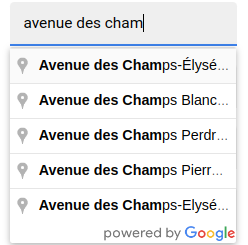
Ok that’s not bad, I manage the call with a classic input, now I’ll try to explain my attempt with quasar component…
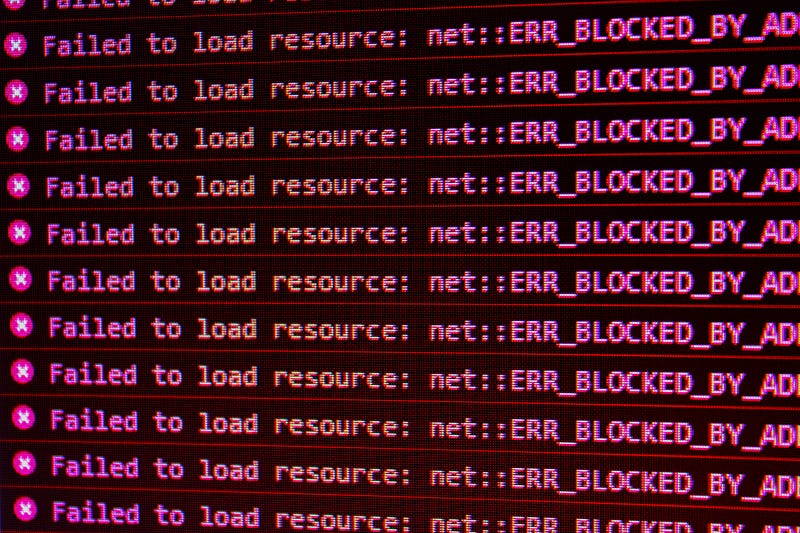
Photo by David Pupaza on Unsplash

I will not explain what’s quasar, and how their components works, but my idea was to create a ref from a quasar input to inject google results on it.

Here is my quasar component:

<q-input 
    ref="locations" 
    v-model="user.adresse"
    type="text"
    label="Adresse"
    filled 
    dense
/>

And if you try with the same config as above, for classic html input..it doesn’t work !

And your console look like this:

The thing is that quasar will wrap the classic input into the q-input component, so after reading some threads from the community, trying to retrieve the ref inside the quasar component but without any success, some people from the community tell me that using the ref for this purpose is not the right way to solve this problem.

“you have to assign your api result inside a variable and use a Q-select to display the results”…

And going back to the google places api doc to grab some informations, we can see this on the top of the page:

That’s interesting to know that we can do all the stuff into our back-end (Server side) and send the result from our back-end to our front-end and give and give it to our Q-select component

The Server Side Workflow

So let’s create a google ressource with the nest command:

nest g resource google

Create needed interfaces for your responses:

//GoogleInterfaces.ts\\
import { Request } from "express";
export interface IPlaceDetailsRequest extends Request {
  query: {
    place_id: string;
  };
}
interface IPredictionSubstring {
  length: number;
  offset: number;
}
interface IStructuredFormatting {
  main_text: string;
  main_text_matched_substrings: Array<IPredictionSubstring>;
  secondary_text: string;
}
interface IPredictionTerm {
  offset: number;
  value: string;
}
interface IAutocompletePrediction {
  description: string;
  matched_substrings: Array<IPredictionSubstring>;
  place_id: string;
  structured_formatting: IStructuredFormatting;
  terms: Array<IPredictionTerm>;
  types: Array<string>;
  distance_meters?: number;
}
export interface IAutocompletePredictionContainer {
  predictions: Array<IAutocompletePrediction>;
}
interface AddressComponents {
  long_name: string;
  short_name: string;
  types: Array<string>;
}
interface Place {
  address_components: Array<AddressComponents>;
}
export interface IPlacesDetailsResponse {
  html_attributions: Array<string>;
  result: Place;
  status: string;
  info_messages?: Array<string>;
}

If you want to see those interfaces more in details…

Now let’s create our controller:

import { Controller, Get } from "@nestjs/common";
import { GoogleService } from "./google.service";
import { Observable } from "rxjs";
import { Req, Query } from "@nestjs/common";
import {IAutocompletePredictionContainer,IPlaceDetailsRequest,} from "../interfaces/GoogleInterfaces";
@Controller("google")
export class GoogleController {
  constructor(private readonly googleService: GoogleService) {}
  @Get("places")
  async getAdress(
  @Query('input') searchString: string,
  ): Promise<Observable<IAutocompletePredictionContainer>> {
    const result = this.googleService.getAdress(searchString);
    return result;
  }
  @Get("place/details")
  async getAdressDetails(
  @Req() req: IPlaceDetailsRequest,
  ): Promise<Observable<IPlaceDetailsRequest>> {
    const result = this.googleService.getAdressDetails(req.query);
    return result;
  }
}

And our service:

import { Injectable } from "@nestjs/common";
import { map } from "rxjs/operators";
import { HttpService } from "@nestjs/axios";
import { IAutocompletePredictionContainer, IPlaceDetailsRequest }from "../interfaces/GoogleInterfaces";
import { Observable } from "rxjs";
@Injectable()
export class GoogleService {
  constructor(private httpService: HttpService) {}
  getAdress(input: string): Observable<IAutocompletePredictionContainer> {
  return this.httpService.get("https://maps.googleapis.com/maps/api/place/autocomplete/json", {
    params: {
      input,
      key: process.env.GOOGLE_API,
      sessionToken: Date.now(),
      types: "geocode",
      components: "country:fr",
    },
  }).pipe(map((res) => res.data.predictions));
}
  getAdressDetails(input: {
    place_id: string;
  }): Observable<IPlaceDetailsRequest> {
    const { place_id } = input;
    const sessionToken = Date.now();
    return this.httpService.get(
`https://maps.googleapis.com/maps/api/place/details/json?place_id=${place_id}&key=${process.env.GOOGLE_API}&sessionToken=${sessionToken}`,
    ).pipe(map((res) => res.data));
  }
}

Here we have two endpoint, the first one get our searchstring and will return us some suggestions and in our case the locations place_id with which we’ll give, with the second request all our places details… (lat,lng and many more…)

Let’s see how to manage our responses in our front-end:

Like the community said to me, we’ll use a q-select component to load the result of our first request and when we select an address, send an other request to our ‘details’ endpoint:

The q-select component:

<div class="col-6" v-if="editable">
  <q-select
  class="q-ma-md"
  @input-value="fetchPlaces($event)"
  v-model="user.adresse"
  autocomplete="places"
  label="Adresse"
  use-input
  :options="placesDescription"
  map-options
  emit-value
  ></q-select>
</div>

The @input-value here will send our request with what we’ll type into our component with this methods, where we use a setTimeout to avoid send a call for each letter:

async fetchPlaces(searchString) {
  clearTimeout(this.addressSearchTimeout);
  this.addressSearchTimeout = setTimeout(async () => {
    this.places = (await googleServices.getPlaces(searchString)).data;
    }, 500);
},

We’ll use two watcher, the first one is to “watch” if this.places get some changes, if yes we gonna change “this.placesDescription” thats is our options for our q-select component (you’ll see the result of our first endpoint into your component):

watch: {
places: {
  deep: true,
  handler(place) {
    if (place?.length) {
      this.placesDescription = place.map((location) => {
        return {
          label: location.description,
          value: location.description,
          place_id: location.place_id,
        };
      });
    }
  },
},
user: {
  deep: true,
  async handler(location) {
    const placeToCall = this.placesDescription.filter(
    (place) => place.label === location.adresse
     );
    googleServices.checkIfPropertyExist(this.user, placeToCall);
    },
  },
}

And the second one will watch this.user to call our second endpoint with the place_id from the first endpoint, call the second to get more details about the place and update our user address property with it:

// /services/google.js \\
import { axiosInstance } from "src/boot/axios";
export default {
  getPlaces(input) {
    return axiosInstance.get("/google/places", { params: { input }   });
},
getPlacesDetails(data) {
  return axiosInstance.get("/google/place/details", { params: data });
},
async checkIfPropertyExist(entity, data) {
  if (data.length) {
    const result = await this.getPlacesDetails({
      place_id: data[0].place_id,
    });
  if (result.status === 200) {
    result?.data?.result?.address_components.forEach((detail) => {
      if (detail?.types.includes("postal_code")) {
        entity.codepostal = detail.long_name;
      }
      if (detail?.types.includes("locality")) {
        entity.ville = detail.long_name;
      }
    });
      if (result?.data?.result?.geometry?.location) {
        entity.lat = result?.data?.result?.geometry?.location.lat;
        entity.lng = result?.data?.result?.geometry?.location.lng;
       }
    }
  }
},
};

And here you are!

Instead of make a call from your front end, you create to endpoint to manage places api call and use the data to display it in your front-end app, and we can’t see the “powered by google” anymore !!
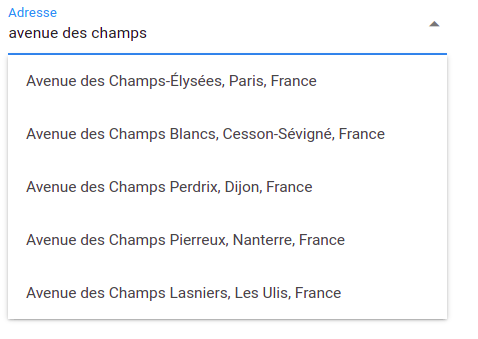
Quasar Q-select with Google Places api results

You can now make your back-end online, and for all of your project you can call those endpoint when you want to fill some address property into user’s profil, or anything you want to build with places api!

Hope it helps, and if you have any suggestions feel free to contact me !!

I didn’t explain why I used rxjs with pipe, map, and observable cause I don’t know (yet) those tools but the first call of google places api will return an observable, and after a few time reading the doc it’s the only way that I found to use the data from api….

Thanks for reading :)

Google
Google Places Api
Nestjs
Quasarframework
JavaScript
Recommended from ReadMedium