Build a clean Flutter Module

Flutter is the cross-platform tool used to build natively compiled mobile apps for iOS and Android. The platform is highly focused on UI and can be tailored for various screen sizes. Before we dive in, let’s take a look at the evolution of cross-platform tools.
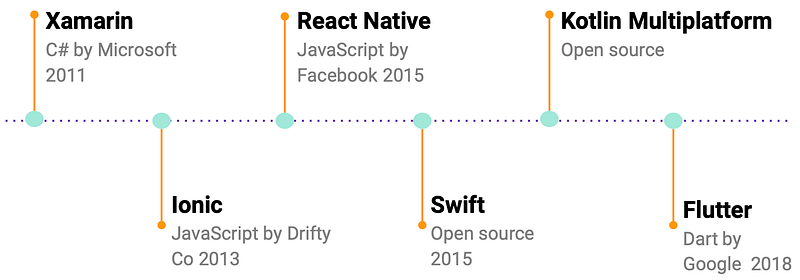
I am sure you have probably heard this famous phrase before: “I don’t like Flutter because I have tried tool X and Y in the past, and none of them matched the expectations as native” (and my face is like this 🤔 🤨 😐 😑 😶). It is true that in the past, developers have tried various approaches to arrive to a stage where we have multiple options to select from, and Flutter is probably the closest tool for a native look & feel. So, if you haven’t given it a try, don’t dismiss it too quickly.
Let’s view some basic components of Flutter, followed by examples of building them with clean code, which helps us to scale, extend and to adapt to changes.
To use Flutter, you must know Widget, it is like View for Android but more. If a view is like a piece of lego then Widget is a more complete model. There are two types:
- Stateless Widgets have an immutable state and doesn’t change through its lifetime
- Stateful Widgets have a mutable state and keep track of changes. UI will be redrawn from scratch to adapt to them, and because Flutter renders UI fast, you won’t see any difference with the naked eye.
Saying so, Flutter isn’t just an UI tool, Dart is a language to use for complex logic, especially if you are following the clean architecture path. One of the most famous and widely used pattern is probably the Presentation-Domain-Data layering. It enforces separation of concerns and concentration on current piece of work only.
- Presentation layer is where magic occurs, it is the most important part of the app because it interacts with users.
- Domain layer contains business logic and it is the brain of the app. When you are working at this layer, you can completely ignore UI and treat data as something you’d be given like a charm, assuming you have it when you need.
- Data layer obviously interacts with data. Whether it came from a remote server or a database, this layer is responsible to receive data, to parse, to store and to send it forward.
Okay, enough jibber jabber jibber jabbering, let’s dive in…
Module Overview
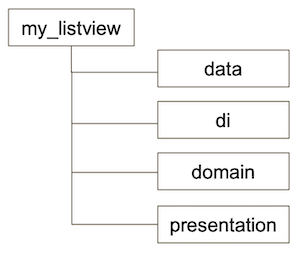
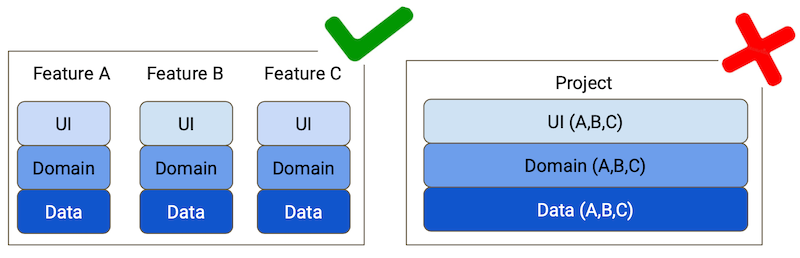
Module structure is debatable, some might prefer to divide code into Data-Domain-Presentation modules, and each module contains 100+ features, it is better to form a feature module with it is own eco system, so if an API service changes, it affects only within the module, rather than re-compiling the entire code base.
Data Layer
In this example, I used Chopper lib for HTTP request, it is very close to Retrofit in Android. Dart has its own async task system called Future, which has three states: incomplete, complete with value and complete with error.
@Get(path: “/account.json”)
Future<Response<AccountDTO>> getAccountDTO();
How the flow works is like this: first someone clicks a button and within the same thread, the handler sends out a HTTP request, in this moment, an empty Future object is created, after a while waiting in patient, some data arrives in the callback, the Future is now complete with values. It can either be passed forward or be consumed within the same function using keyword then().
DTO model is unique in Data layer, which maps JSON structure, and because of that, the DTO model isn’t designed for one screen or one UI/UX flow, hence we need to create a mapper to transfer DTO to domain model.
class AccountMapper implements Mapper<AccountDTO, Account> {
   Account map(AccountDTO input) {
      return Account(
             accountNumber: input.accountNumber,
             name: input.name,
             balance: input.balance,
             sortCode: input.sortCode);
   }
}
Repository is the class that glues everything together in Data layer. It hides data logic of how it is formed but provides clean API so others can retrieve data easily.
AccountRepositoryImpl(this._accountApi, this._accountMapper);
Future<Result<AccountModel>> getAccount() async {
   Response<AccountDTO> accountDTO = await _accountApi.getAccountDTO();
   if (accountDTO.isSuccessful) {
    return _accountMapper.map(Result.success(accountDTO.body));
   } else {
    return Result.failure(ResultException(accountDTO.base.toString()));
   }
 }
}
Domain Layer
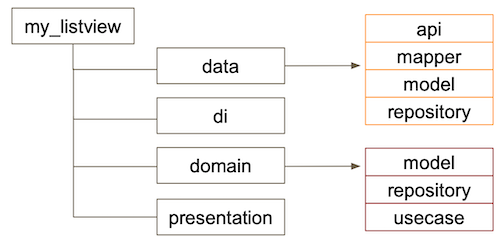
This is an overview of a module’s content, if case you might wonder repository has appeared twice in data and domain, the abstract repository in domain will be used in presentation, which hides the solid implementation inside data, in order to prevent directing accessing data from outer layer.
abstract class AccountRepository {
   Future<Result<AccountModel>> getAccount();
}
Unlike DTO, domain model isn’t just a plain data holder but contains actions and behaviour, i.e. null checks.
class AccountModel {
   final Iterable<Account> account;
   AccountModel({this.account});
}
UseCase is debatable especially when it contains just one repository, it becomes the duplicated middleman, nevertheless it tidies up your ViewModel or Presenter if there are more than one repositories involved. It works like an organiser inside a drawer. But then depending on your choice of design pattern in the presentation layer, you might replace UseCase with other things like BLoC
class GetAccountUseCaseImpl implements GetAccountUseCase {
  final AccountRepository _accountRepository;
  GetAccountUseCaseImpl(this._accountRepository);
  @override
  Future<Result<AccountModel>> execute() {
    return _accountRepository.getAccount();
  }
}
Presentation Layer
There are plenty patterns to choose from in this layer: MVP, MVVM or BLoC. The reason I said before that BLoC can be the new UseCase, is because they perform similar tasks, although BLoC sometimes lean towards more on the ViewModel side, because it has both business and platform logic. For the example above, you can replace it with BLoC:
class AccountBloc implements Bloc {
  final AccountRepository _accountRepository;
  final StreamController<Result<AccountModel>> _accountController = StreamController();
  Stream<Result<AccountModel>> get accounts => _accountController.stream;
void _loadAccount() async {
final Result<AccountModel> model = await _accountRepository.getAccount();
_timelineController.sink.add(model);
}
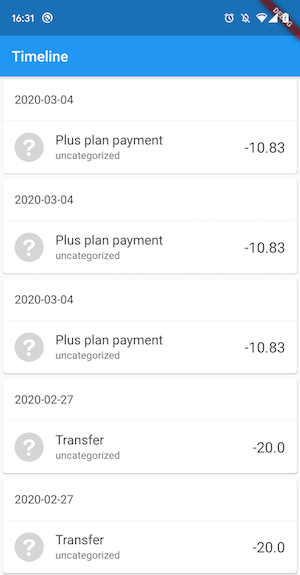
}It doesn’t matter which pattern you choose to use, when it comes to build Widget, you only need to describe how the Widget should be build, assuming you’d have the data when needed. A sample ListView Widget for looks like below:
class _AccountState extends State<AccountListView> {
  final _accountUseCase = AccountProvider().getAccountUseCase;

  void initState() {
     super.initState();
     _accountUseCase.execute().then((result) {
     setState(() {
        AccountModel account = (result as Success).value;
     }

  @override Widget build(BuildContext context) {...}
}
At the end…
- Used Dependency Inversion Principle to isolate Domain Layer
- Outer layers can depend on inner layers, but not vice versa
- Depends on the size of your project, you can split layers between classes, packages or modules, and it is advisable to keep presentation-domain-data layer inside each module, not a god module that contains only one layer of 100 features to share within one project.