avatarBoredGeekSociety

Free AI web copilot to create summaries, insights and extended knowledge, download it at here

2408

Abstract

ge base to feed GPT-3 with the right context.</p><p id="bd32">Your knowledge base should consist of a set of documents that represent the topics your chatbot will be able to discuss. These documents can be in plain text format and contain relevant information related to your business.</p><p id="7afc"><b>For example</b>, if you are building a chatbot for a restaurant, your knowledge base should contain documents about the menu, the restaurant location, hours of operation, and other relevant information.</p><p id="bd1a"><b>In our case</b>,</p><ul><li><b>Knowledge</b>: We’ll use this wikipedia post as a toy example: <a href="https://en.wikipedia.org/wiki/Tunisian_cuisine">https://en.wikipedia.org/wiki/Tunisian_cuisine</a></li><li><b>Context</b>: Tunisian cuisine & wine are among the best in the world but its is still very discret. So let’s load that data and ask a few questions about it!</li><li><b>Format</b>: We’ll copy past all of the content in this page and save it into a text file “tunisian_cuisine.txt”</li></ul><h1 id="b270">Step 3: Python Library — Llama Index (former GPT index)</h1><ul><li><b>Summary: Llama index is a “</b>project consisting of a set of data structures designed to make it easier to use large external knowledge bases with LLMs.”</li><li><b>Doc: <a href="https://gpt-index.readthedocs.io/en/latest/"></a></b><a href="https://gpt-index.readthedocs.io/en/latest/">Welcome to GPT Index (LlamaIndex 🦙)! — GPT Index documentation (gpt-index.readthedocs.io)</a></li></ul><p id="1998"><b>Install it on your notebook,</b> to get you started!</p><div id="3d37"><pre>!pip install llama-index --quiet</pre></div><h1 id="0a6d">Step 4: Write some (more) code!</h1><h2 id="0f71">Setup</h2><ul><li>Create a folder named “data_folder”.</li><li>Add you files in that folder.</li></ul><p id="7751">See image with the full structure of the colab notebook and the code for reference.</p><h2 id="4ff9">Import Libraries & Index files</h2><div id="c638"><pre><span class="hljs-keyword">import</span> os <span class="hljs-keyword">from</span> llama_index <span class="hljs-keyword">import</span> GPTSimpleVectorIndex, SimpleDirectoryReader

os.environ[<span class="hljs-string">"OPENAI_API_KEY"</span>] = <span class="hljs-string">'ADD YOUR API KEY HERE'</span>

documents = SimpleDirectoryReader(<span class="hljs-string">'data_folder'</span>).load_data() index = GPTSimpleVectorInd

Options

ex(documents)</pre></div><p id="3bc6">We are ready now to ask questions!</p><h2 id="de8a">Ask questions!</h2><ul><li><b>index.query</b>: to ask your question.</li><li><b>answer.response:</b> to get the response of the query.</li><li><b>display & markdown</b>: to better display the response (just some styling ; optional).</li></ul><div id="a769"><pre><span class="hljs-keyword">from</span> IPython.display <span class="hljs-keyword">import</span> Markdown answer = index.query(<span class="hljs-string">"tell me two fun facts about Tunisian cuisine"</span>) display(Markdown(<span class="hljs-string">f"<b><span class="hljs-subst">{answer.response}</span></b>"</span>))</pre></div><h2 id="e73d">A few thoughts</h2><ul><li><b>Relevant answers:</b> It takes into account the context to provide you with a relevant answer. e.g., <b><i>Question</i></b><i>:</i> “what is harissa?” <b><i>Answer</i></b>: “<i>Harissa is a spicy chili pepper paste made from a blend of hot chili peppers, garlic, olive oil, and spices. It is commonly used as a condiment in Tunisian cuisine and is often served with dishes such as felfel mahchi, fricasse, and kamounia.”</i></li><li><b>Off-topic questions: </b>If it can’t find a relevant answer in the context, it will say so! This is very important to limit off-topic answers. e.g., <b><i>Question</i></b><i>:</i> “Tell me everything you know about sushi?” <b><i>Answer</i></b>: “<i>I do not know anything about sushi given the context information provided.”</i></li></ul><figure id="9d08"><img src="https://cdn-images-1.readmedium.com/v2/resize:fit:800/1*TzmyAHMSyr5M0LlX5c-Wqw.png"><figcaption>Colab Structure & Code. Create a folder named “data_folder” and add your files in it.</figcaption></figure><h1 id="09b7">Conclusion</h1><p id="bbd3">This is a basic introduction to a library that should help you test your Q&A Chatbot projects quickly!</p><p id="5644">Keep in mind that you’ll have to:</p><ul><li>Fine tune the models parameters depending on your needs</li><li>Improve your prompts in order to better fit your conversational answering preferences</li><li>Test its scalability for a large knowledge base.</li></ul><p id="b5c4">These are things that we’ll explore in a later post. Meanwhile, enjoy!</p><p id="349a">If you like this topic, please consider supporting us: 🔔 <b><i>clap </i></b>& <b><i>follow </i>🔔</b></p></article></body>

Build a ChatGPT like App for Your Business in 7 lines of Code

Simplest way to get you started!

Human like AI assistant — by author via Midjourney

Building a conversational AI to manage customer support will become common in the next couple of years. It is already possible to build such as system based on GPT3 APIs, leading to a Q&A bot similar to ChatGPT.

In this blog post, we will discuss how to leverage GPT3 APIs to create a conversational AI system for your niche business. For that you’ll need,

  • Step 1: An OpenAI API Key.
  • Step 2: A knowledge base. it could be a simple text file with relevant information.
  • Step 3: A Python Library that abstracts all the complexity behind a couple of functions. We will use Llama Index.
  • Step 4: A few lines of code! 7 lines to be precise!

This is how it will look like in Colab! More on its structure in code below!
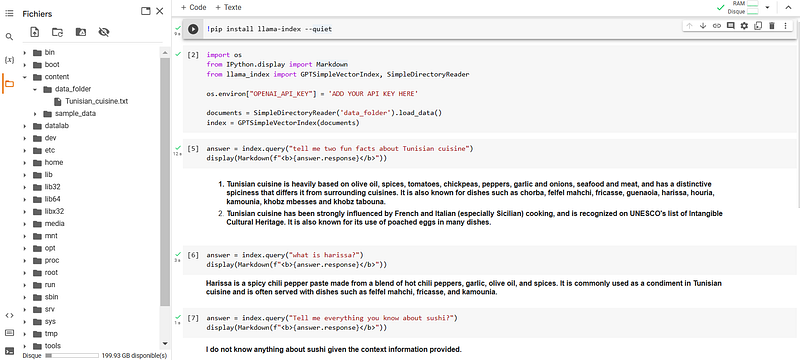
Colab Structure & Code. Create a folder named “data_folder” and add your files in it.

But first, If you like this topic, please consider supporting us: 🔔 clap & follow 🔔

Step 1: Get an OpenAI API key

To access GPT-3, you need to create an account with OpenAI and obtain an API key. You can sign-up for an account at https://openai.com/api/.

Once you have an account, you can create an API key by navigating to the “API Keys” in the menu (top right), or by following this link: https://platform.openai.com/account/api-keys

Click on “Create new secret key”, and that’s it!
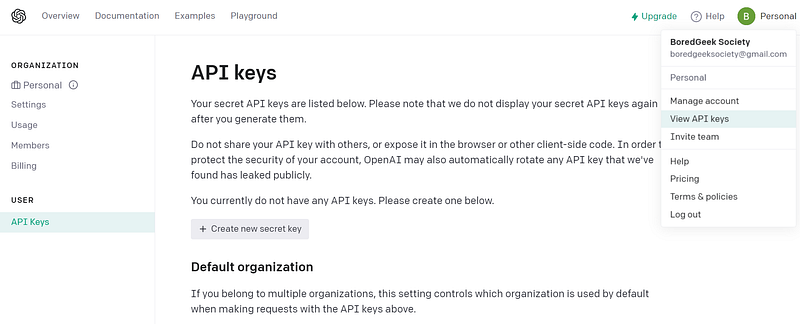
Create a new OpenAI key

Step 2: Prepare your knowledge base

Before you start building your chatbot, you need to prepare a knowledge base to feed GPT-3 with the right context.

Your knowledge base should consist of a set of documents that represent the topics your chatbot will be able to discuss. These documents can be in plain text format and contain relevant information related to your business.

For example, if you are building a chatbot for a restaurant, your knowledge base should contain documents about the menu, the restaurant location, hours of operation, and other relevant information.

In our case,

  • Knowledge: We’ll use this wikipedia post as a toy example: https://en.wikipedia.org/wiki/Tunisian_cuisine
  • Context: Tunisian cuisine & wine are among the best in the world but its is still very discret. So let’s load that data and ask a few questions about it!
  • Format: We’ll copy past all of the content in this page and save it into a text file “tunisian_cuisine.txt”

Step 3: Python Library — Llama Index (former GPT index)

Install it on your notebook, to get you started!

!pip install llama-index --quiet

Step 4: Write some (more) code!

Setup

  • Create a folder named “data_folder”.
  • Add you files in that folder.

See image with the full structure of the colab notebook and the code for reference.

Import Libraries & Index files

import os
from llama_index import GPTSimpleVectorIndex, SimpleDirectoryReader

os.environ["OPENAI_API_KEY"] = 'ADD YOUR API KEY HERE'

documents = SimpleDirectoryReader('data_folder').load_data()
index = GPTSimpleVectorIndex(documents)

We are ready now to ask questions!

Ask questions!

  • index.query: to ask your question.
  • answer.response: to get the response of the query.
  • display & markdown: to better display the response (just some styling ; optional).
from IPython.display import Markdown
answer = index.query("tell me two fun facts about Tunisian cuisine")
display(Markdown(f"<b>{answer.response}</b>"))

A few thoughts

  • Relevant answers: It takes into account the context to provide you with a relevant answer. e.g., Question: “what is harissa?” Answer: “Harissa is a spicy chili pepper paste made from a blend of hot chili peppers, garlic, olive oil, and spices. It is commonly used as a condiment in Tunisian cuisine and is often served with dishes such as felfel mahchi, fricasse, and kamounia.”
  • Off-topic questions: If it can’t find a relevant answer in the context, it will say so! This is very important to limit off-topic answers. e.g., Question: “Tell me everything you know about sushi?” Answer: “I do not know anything about sushi given the context information provided.”
Colab Structure & Code. Create a folder named “data_folder” and add your files in it.

Conclusion

This is a basic introduction to a library that should help you test your Q&A Chatbot projects quickly!

Keep in mind that you’ll have to:

  • Fine tune the models parameters depending on your needs
  • Improve your prompts in order to better fit your conversational answering preferences
  • Test its scalability for a large knowledge base.

These are things that we’ll explore in a later post. Meanwhile, enjoy!

If you like this topic, please consider supporting us: 🔔 clap & follow 🔔

Chatbots
Gpt 3
Python
Artificial Intelligence
NLP
Recommended from ReadMedium