
Bug Hunting 101: Directory Enumeration & Authentication Bypass
TL;DR- A quick write-up on the best methods I’ve used for bug bounties that included directory issues and authentication vulnerabilities that were bypassed using Ffuf, a popular hacking tool for cybersecurity pen-testers.
Introduction
Malicious threat actors are constantly on the lookout for easy vulnerabilities that they can exploit with a couple minutes of automated bug hunting or a few seconds of manual pen-testing.
The best way to ensure you’ve mitigated any vulnerabilities as a website or business owner is to actually look at the steps these hackers would take, and work backwards. Or, if you’re a pen-tester yourself, companies will pay some serious cash if you can find the vulnerabilities for them!
Today, we’ll take a look at Ffuf, a widely known web fuzzer. Then, we’ll use it to bypass authentication mechanisms in just a couple of minutes. Finally, I’ll demonstrate how you can uncover sensitive files through directory traversal.
What is FFuf?
Ffuf is an incredibly capable fuzzer written in Go, a popular programming language. Fuzzing is a method of sending malformed or abnormal data to a system and forcing it to execute arbitrary code, and do something it’s not normally supposed to do.
Make sure you have written permission and documented authority (if required) when utilizing any tool or concept provided in this article. If you maliciously or even unintentionally harm a website or service, I am not responsible for any damage caused.
Installation
Ffuf comes pre-packaged with the Kali Linux OS. If you want to install Ffuf on a different system, the instructions are listed here. Since Ffuf is written in the go programming language, make sure you have the Go compiler installed in your system before trying to install Ffuf.
If you are new to wordlists, a wordlist is a list of commonly used terms. You can find a lot of useful wordlists here.
Seclists is a collection of multiple types of lists used during security assessments. This includes usernames, passwords, URLs, and plenty of other kinds. If you’re running Kali Linux, you can find seclists under /usr/share/wordlists.
Fuzzing with Ffuf
We can use Ffuf to fuzz the web application to discover directories, find usernames, enumerate virtual hosts, and even brute-force authentication.
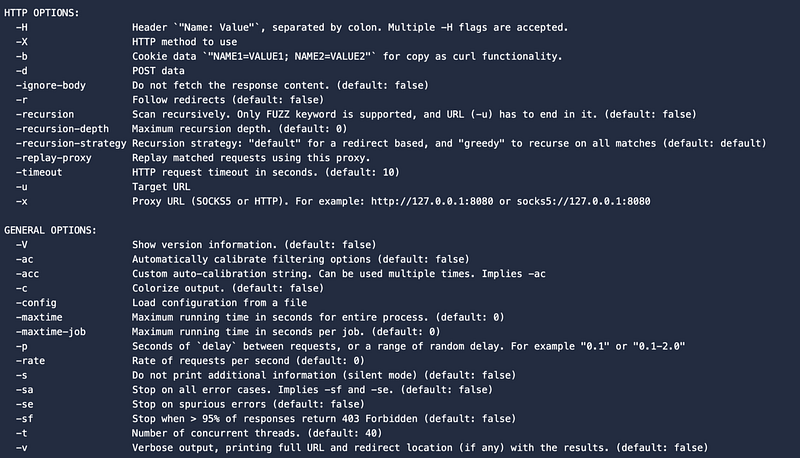
The ffuf -h (‘help’) command is used to view important options that Ffuf uses during each scan. In the subsequent sections, we’ll be building on this command and using localhost:3000 for our example URL to enumerate.
You may need to change this if you’re actually in the process of bug hunting.
ffuf -h
Enumerating URLs with Ffuf
URL enumeration is quite useful, especially if some are hidden from being publicly indexed. During this section, we’ll utilize a web content wordlist to fuzz the web app for hidden URLs.
ffuf -u http://localhost:3000/FUZZ -w /usr/share/wordlists/SecLists/Discovery/Web-Content/big.txt
Here, the “FUZZ” keyword is used as a placeholder. Ffuf will attempt to access all sorts of directories by replacing “FUZZ” with every word in the wordlist.
After running this command, you might expect to find directories such as (on a vulnerable web app) /config, /admin, or /server-status.
Enumerating Files
If you’re looking for specific types of files, Ffuf allows us to use a -e flag to specify an extension. We can instruct Ffuf to only look for files with specific extensions, such as .html, .php, or .txt.
I’ve also supplied a wordlist for this particular command which I found works fairly well with my own pen-testing endeavors →
ffuf -u http://localhost:3000/FUZZ -w /usr/share/wordlists/SecLists/Discovery/Web-Content/raft-medium-words-lowercase.txt -e .php,.html,.txtThis command looks for all the files at the root of the domain with any specified extension. While some of the files may not be served on the web application (you can’t access them through a search bar), they are still valid and worth noting.
The same command can be run, but with the -mc flag to specify a "match code" of 200. This will return only the files that we can navigate to and view content on.
ffuf -u http://localhost:3000/FUZZ -w /usr/share/wordlists/SecLists/Discovery/Web-Content/raft-medium-words-lowercase.txt -e .php,.html,.txt -mc 200
Brute Forcing Techniques
We can have Ffuf perform a brute-force attack by trying a variety of common username and password combinations. If the web application being tested doesn’t use this type of authentication (substituting an email or something similar), the username wordlist can be replaced with an email wordlist.
For this attack, we will need two parameters: a username and a password.
Including both wordlists as W1 for a username wordlist and W2 for a password wordlist, here’s an example of what a sample brute-force command might look like:
ffuf -w usernames.txt:W1,/usr/share/wordlists/SecLists/Passwords/Common-Credentials/10-million-password-list-top-100.txt:W2 -X POST -d “username=W1&password=W2” -H “Content-Type: application/x-www-form-urlencoded” -u http://localhost:3000/login -fc 200Vulnerability Mitigation
The best way to protect your digital well-being or your business’s well-being from directory traversal is to keep uploaded files to a minimum, and to have secure implementations for user data requests. If you’re a beginner, remember that certain files in websites can’t be served ever because the server won’t touch content outside of the public folder.
To avoid authentication bypass, read up on best practices for multi-factor authentication, or at the very least gain an understanding of the various methods that authentication can be hacked through. Just reviewing simple username and password vulnerability mitigations isn’t going to do much good if they’re nearly obsolete already.
Thanks for reading about hunting for bug bounties with Ffuf! If you enjoyed this post, feel free to give it a few claps and check out similar content on The Gray Area.
Support my content by subscribing to a Medium membership through my referral link, and obtain access to all of my posts →
Thanks!


