avatarC. L. Beard

Free AI web copilot to create summaries, insights and extended knowledge, download it at here

1913

Abstract

ses. To get to those practices you scroll down and click [add] on the Meditation button. This will bring up a list of possible meditations.</p><figure id="6a0a"><img src="https://cdn-images-1.readmedium.com/v2/resize:fit:800/1*0LW-1iwtZdtncxxNUralcg.png"><figcaption>Screenshot by the uthor</figcaption></figure><p id="7017">This is just a sample list of possible meditations you can choose from in the Brite App.</p><h2 id="4927">Projects</h2><p id="964e">The section I use most is the Projects section. This is where I spend most of my time. Brite App is an excellent replacement for <a href="https://asana.com">Asana</a> or <a href="https://trello.com/home">Trello</a> in this case.</p><p id="be5b">My project is to learn the harmonica.</p><figure id="daf9"><img src="https://cdn-images-1.readmedium.com/v2/resize:fit:800/1*P8ESQKO7s2TjijCQcvVPRw.png"><figcaption>Screenshot by the author</figcaption></figure><p id="1e48">Looks kinda like a Trello board, or an Asana project board. Or even a project you could create in <a href="https://affiliate.notion.so/iaj55r477ijt">Notion</a> if you wanted to take the time.</p><p id="15db">What I think is the secret sauce here is the way you can visually prioritize tasks under management. Click the matrix tab for the screen that allows you to drag and drop project tasks into their respective priority spot.</p><figure id="ce0a"><img src="https://cdn-images-1.readmedium.com/v2/resize:fit:800/1*E35kGW-D4CnI9pzKpUNBfw.png"><figcaption>Screenshot by the author</figcaption></figure><p id="f037">This is a much more efficient method I think than in Asana where you have to navigate to the individual task and then set the priority for that single task. Brite App gives you a visual listing of all the tasks per project and so you get a good overview. I think it is better this way since you can see everything at once.</p><h2 id="5892">Tasks</h2><p id="4ab7">This is t

Options

he view you will get in Brite App once you have defined some tasks in your projects and further assigned additional work for yourself.</p><figure id="49e7"><img src="https://cdn-images-1.readmedium.com/v2/resize:fit:800/1*gZwtEwGevtswikTas3svNQ.png"><figcaption>Screenshot by the author</figcaption></figure><p id="3d89">You can see all the information you need is right there in front of you. You can see your current work and upcoming tasks for each project. You do not see your habits here, that is on the first page when you open the app.</p><h2 id="d135">Notes</h2><p id="0578">This is where I write down any thoughts I might have during the day. These are thoughts that do not necessarily fit into another category like project or habit. This might be notes from a YouTube video or might make a list of URLs I need to remember but do not want to keep a tab open for. This is somewhat how I use <a href="https://www.craft.do">Craft</a>.</p><p id="1d77">I find using the <a href="https://britetodo.com">B</a>rite App a better option though because it is more handy to have all my notes near my projects, and task board. It is more convenient for me to keep it all in one place</p><p id="071f"><a href="https://britetodo.com">Brite</a> App offers a lot of great features that make planning your day, your projects, and parts of your life so much easier. It is a great idea to have all of that in one place so you are not opening so many different apps. I always thought it was odd that so many peers would have a project app and a habit app too. Why not just have them all in one place? Makes sense to me.</p><p id="e072">Using the Brite App will be something I hold onto. I like the very visual way they have things organized, and the ease of use in building new projects, keeping notes, and tracking my habits. It is a very useful tool for solopreneurs.</p><p id="fb2b">thanks for reading</p></article></body>

Brite App, the One-Stop Solution for Soloprenuers

Track habits, projects, and goals all in one place
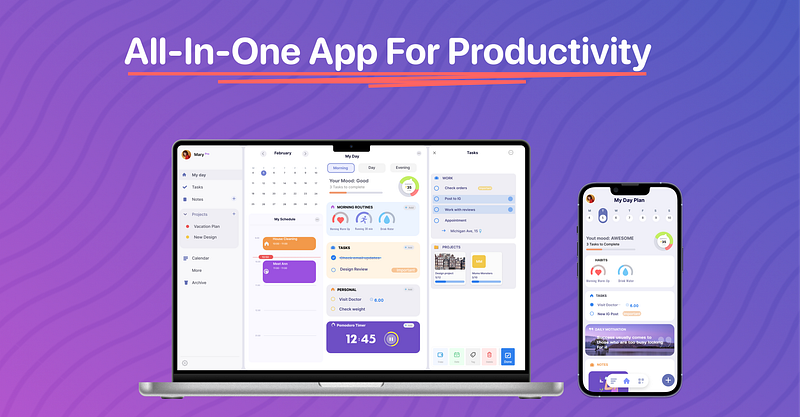
Image courtesy Brite App

There are so many task management, project management, and habit-tracking apps out there it is hard to know the good from the bad. That is until you use one of them and then you’ll see if it works or not. Picking the right one that will help you more than it blocks you is important when we don’t necessarily have time to evaluate for ourselves. That is why I write these articles. I write them to help. This is not an affiliate gig I am doing, but it is an honest review.

This time I’m covering Brite App is a software program that runs in your web browser and on all your devices with a paid subscription. In this article, I will also compare it to Asana, Notion, and Craft which are the main players in this space. I think you will find that Brite App does all that they individually do while being more complete as well.

My Day

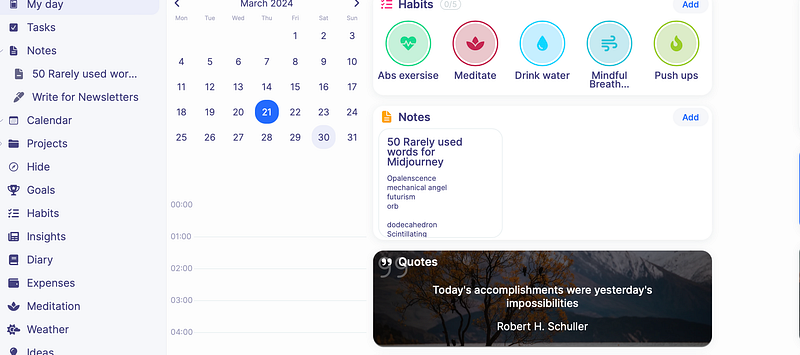
This is where I start:
Screenshot by the author

This is where it all begins for my day using the Brite App. You can see it is a habit tracker, and calendar, and (not pictured) there is a Pomodoro timer on the first page. On the left, you see a navigation list where you can easily move to other parts of the app.

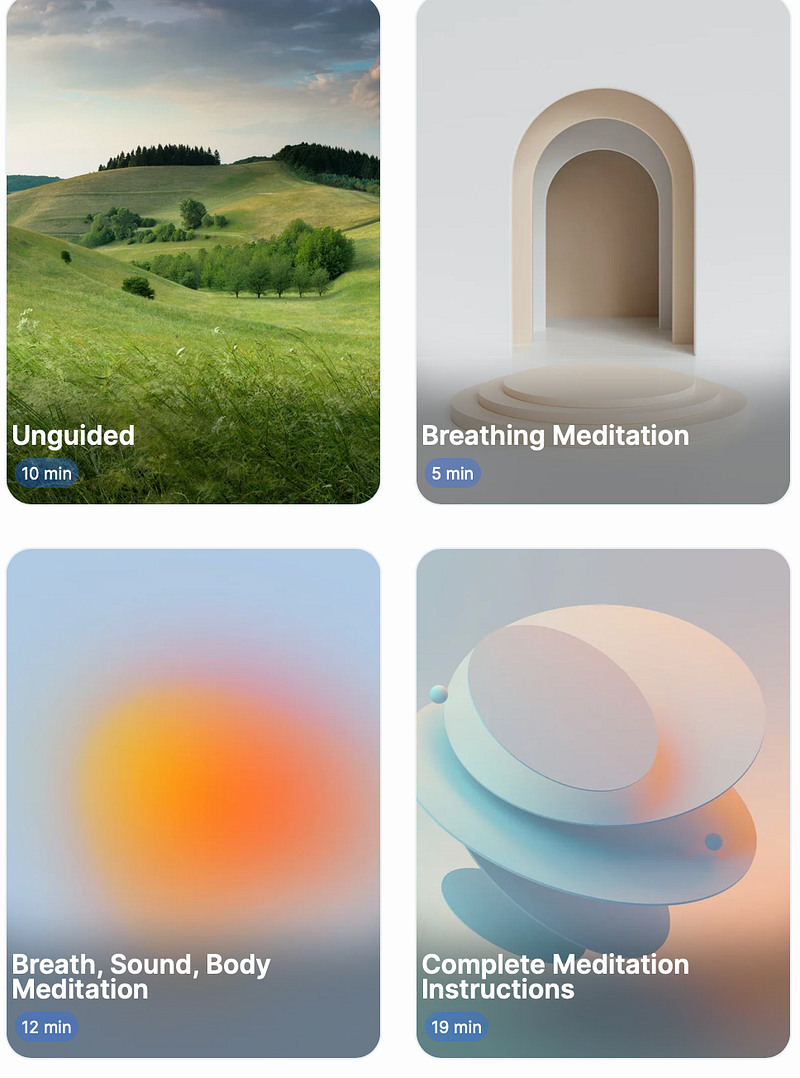
At this point, I like to check off my habits to start my day. Not shown here the Brite Appmalso has included several meditation exercises. To get to those practices you scroll down and click [add] on the Meditation button. This will bring up a list of possible meditations.
Screenshot by the uthor

This is just a sample list of possible meditations you can choose from in the Brite App.

Projects

The section I use most is the Projects section. This is where I spend most of my time. Brite App is an excellent replacement for Asana or Trello in this case.

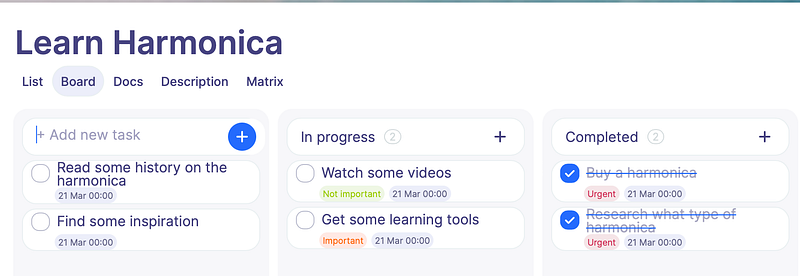
My project is to learn the harmonica.
Screenshot by the author

Looks kinda like a Trello board, or an Asana project board. Or even a project you could create in Notion if you wanted to take the time.

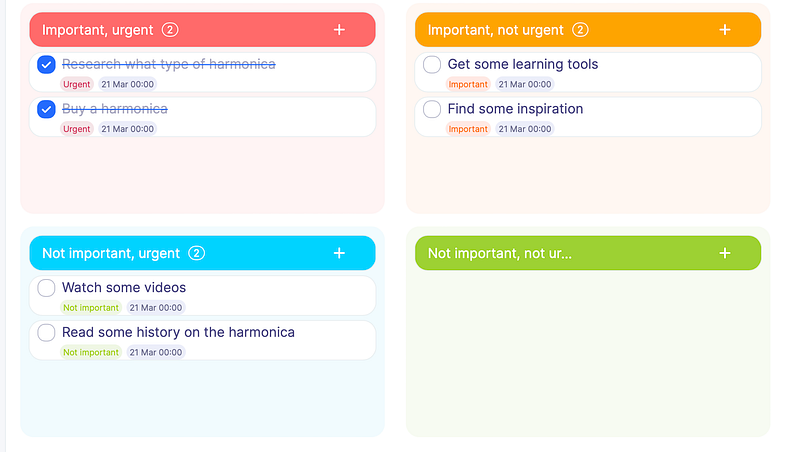
What I think is the secret sauce here is the way you can visually prioritize tasks under management. Click the matrix tab for the screen that allows you to drag and drop project tasks into their respective priority spot.
Screenshot by the author

This is a much more efficient method I think than in Asana where you have to navigate to the individual task and then set the priority for that single task. Brite App gives you a visual listing of all the tasks per project and so you get a good overview. I think it is better this way since you can see everything at once.

Tasks

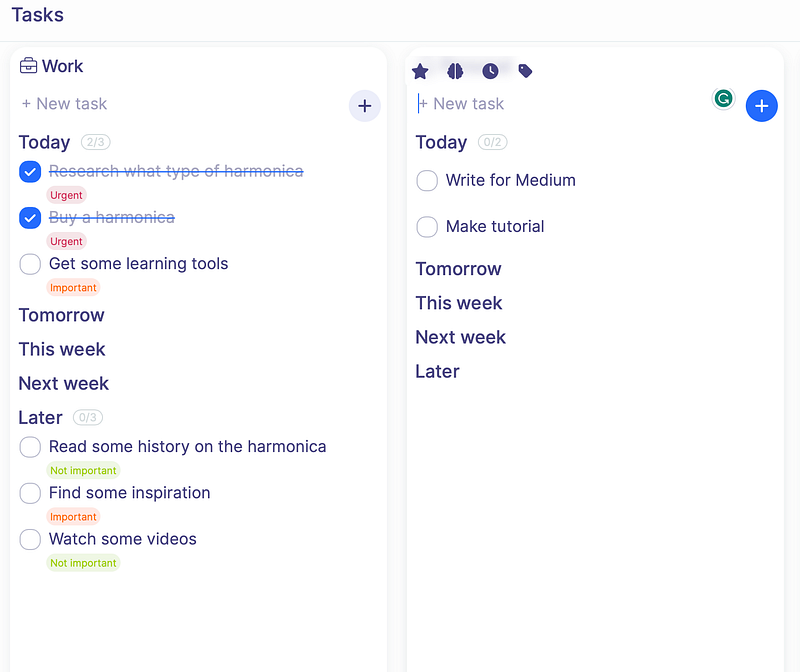
This is the view you will get in Brite App once you have defined some tasks in your projects and further assigned additional work for yourself.
Screenshot by the author

You can see all the information you need is right there in front of you. You can see your current work and upcoming tasks for each project. You do not see your habits here, that is on the first page when you open the app.

Notes

This is where I write down any thoughts I might have during the day. These are thoughts that do not necessarily fit into another category like project or habit. This might be notes from a YouTube video or might make a list of URLs I need to remember but do not want to keep a tab open for. This is somewhat how I use Craft.

I find using the Brite App a better option though because it is more handy to have all my notes near my projects, and task board. It is more convenient for me to keep it all in one place

Brite App offers a lot of great features that make planning your day, your projects, and parts of your life so much easier. It is a great idea to have all of that in one place so you are not opening so many different apps. I always thought it was odd that so many peers would have a project app and a habit app too. Why not just have them all in one place? Makes sense to me.

Using the Brite App will be something I hold onto. I like the very visual way they have things organized, and the ease of use in building new projects, keeping notes, and tracking my habits. It is a very useful tool for solopreneurs.

thanks for reading

Solopreneur
Business
Habit Building
Project Management
Goal Setting
Recommended from ReadMedium