
Bringing The Power Of ChatGPT To Obsidian Canvas
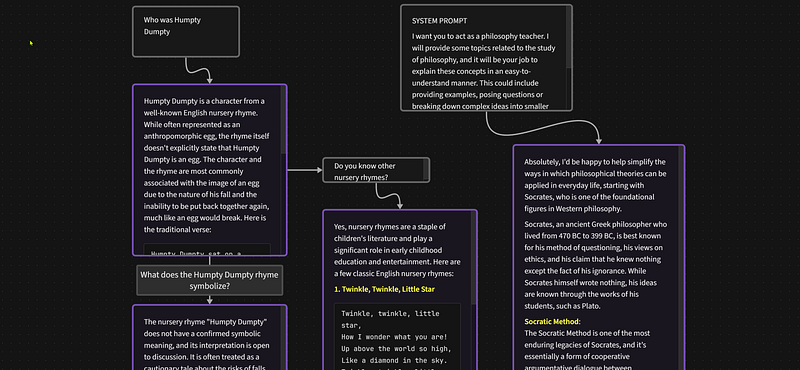
In the ever-evolving world of digital note-taking and knowledge management, the introduction of powerful AI tools has been a game-changer. Among these innovations, the Augmented Canvas plugin for Obsidian stands out, blending the intuitive visual mapping of Obsidian Canvas with the cutting-edge capabilities of GPT-4. This is the first Obsidian community plugin for AI that works within the Canvas that I have seen.
This article, an explainer for the accompanying detailed video demonstration, takes you through the journey of installing, exploring, and maximizing the potential of Augmented Canvas for your research and creative projects.
Installation: A Gateway to Innovation
Augmented Canvas, though a beta release, marks a significant leap forward by integrating ChatGPT into the Obsidian ecosystem. Due to the plugin being a Beta version, the installation process diverges from the standard community plugin route. For this we need to use the “BRAT” community plugin that facilitates the installation of beta plugins for testing. This initial step, requiring a bit of navigation, is well-supported by a comprehensive video tutorial that guide users through the installation of the BRAT plugin and, subsequently, the Augmented Canvas. You will find the article on the plugin and an accompanying video is available. For those venturing into the beta landscape of Obsidian plugins, these resources are invaluable.
The Canvas Unveiled
Upon installation, Augmented Canvas reveals its true potential through the additon of some new icons and features within the Obsidian canvas.
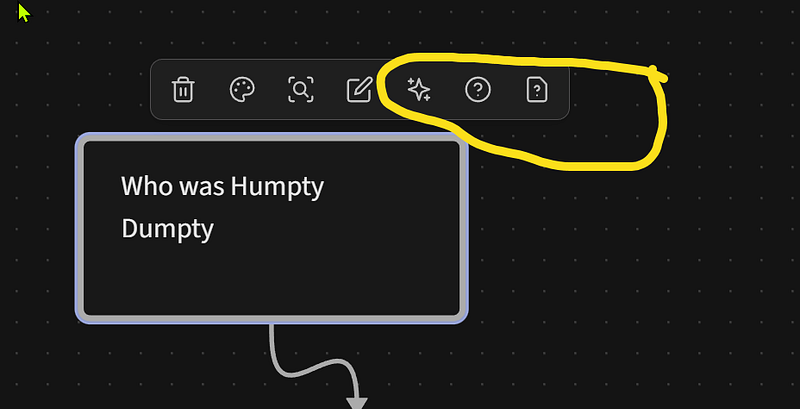
The “Ask AI” function stands out, enabling users to pose questions directly related to their canvas content. This feature, alongside the ability to generate AI-driven queries, opens new avenues for exploration and discovery. Whether you’re delving into historical origins, researching academic papers, seeking symbolic meanings, or simply curious about nursery rhymes, Augmented Canvas offers a seamless, interactive experience.
Beyond Visual Mapping: A Research Powerhouse
Augmented Canvas transcends the boundaries of visual mapping. Its ability to assist in generating video scripts, performing information checks, and even facilitating the writing of research papers highlights its versatility. The plugin’s current development trajectory promises even more functionality, including image generation within the canvas and the capability to fetch captions from YouTube videos, pending the provision of a YouTube API key.
Seamless Integration and Customization
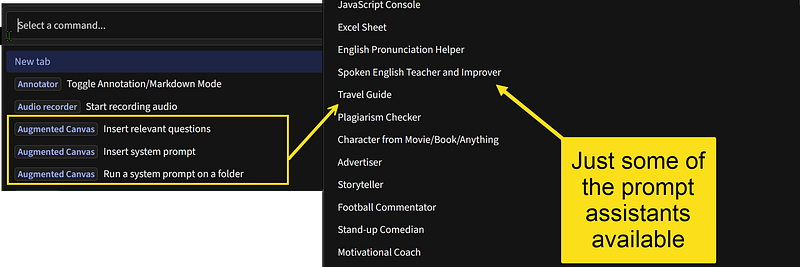
One of the plugin’s features is its integration with Obsidian’s command palette. This allows users to access and execute specific system prompts tailored to the Augmented Canvas, further enhancing the flexibility and customization of the visual mapping experience. Whether you’re a student, researcher, or creative professional, these features empower you to take your projects to new heights.
A Call to Action: Engage and Evolve
The journey with Augmented Canvas doesn’t end with installation and exploration. Users are encouraged to share their experiences, provide feedback, and engage with the developer and also in comments on this article and video. This collaborative spirit not only enriches the user experience but also drives the continuous improvement and evolution of the plugin.
Conclusion: The Future of Knowledge Management
Augmented Canvas represents a significant milestone in the integration of AI and knowledge management tools. By marrying the visual and interactive strengths of Obsidian with the analytical power of GPT-4, it offers a unique platform for enhancing productivity and fostering creativity. As we look to the future, the potential of Augmented Canvas and similar innovations to revolutionize the way we organize, analyze, and generate knowledge is truly exciting.
Whether you’re a seasoned Obsidian user or new to the platform, Augmented Canvas invites you to unlock new possibilities. Dive into this innovative tool, explore its features, and witness its impact on your research and creative endeavors. The journey is just beginning, and the potential is limitless.
Remember, your feedback and insights are invaluable as we all continue to explore the frontiers of AI in knowledge management. Share your experiences with Augmented Canvas in the comments below or join the conversation on GitHub. Together, let’s shape the future of digital creativity and research for the betterment of us all.
Thanks! I really appreciate you reading my work. If you enjoyed this article and found it useful, you can clap (up to 50 times) and follow me for more articles. You can also subscribe on YouTube for more videos or visit my site Ric Raftis Consulting where you can join my email list.


