
Bring Shortcuts support to your iOS App with SwiftUI
With iOS 16, App Intents has been announced by Apple for developers to provide their custom shortcuts more easily with their apps. In this article, I aim to show you a direct and easy way to implement it without causing any headaches. Demo is at the end of the article!

Creating the project
Let’s open the Xcode and create a new project. You can select the interface as SwiftUI and uncheck the tests as we do not need them for this demo app. Detailed information on how to create a new project on Xcode can be found here for developers who recently met with iOS programming.
Instead of starting directly with the Shortcuts implementation, I want you to take glimpse to the View and its ViewModel, so that you might have a better understanding what will be going on in AppIntents structs.
A Quick Content View
Now it is time to re-create the given ContentView for our purpose. We can implement a simple “Notes” app interface with approx. 50 lines of code.
ViewModel Structure
Below is the ViewModel to handle the logic of these notes, such as adding or deleting and so on.
Implementing App Intents
The moment you have been waiting for has arrived. Let’s implement the AppIntents! From now on, I will try to explain the codes line by line to explain better.
AppIntent
First, we need to create an AppIntent struct. The purpose of this struct is to have a structure for our shortcut when we want to run it from Siri or Shortcuts app. Therefore, this structure wants us to add its title, parameter type and what to perform when we run it. Code is below.
Line 5: This “title” will be the title of our shortcut.
Line 7–8: Helper title with its note parameter, where we take the input from the user.
Line 10: This provides us the functionality to save the note.
perform()
We always need to overwrite this function to tell what we want to do. In our case, it returns two types: IntentResult and ProvidesDialog.
- IntentResult: This one is almost a must to put to perform functions since we will have a result once we initiate our intents.
- ProvidesDialog: After we add our note, we want to provide an output to the user, like “Note is added”. This output is a dialog, so it is pretty straight-forward.
AppShortcutsProvider
Now, we need to create a bridge between the device and this AppIntent. AppShortcutsProvider will do this job.
Line 6: We call our AppIntent here.
Line 7: Aim of these phrases is to run the shortcut. For instance, you can tell “Siri, add a note.” to run this shortcut.
Line 11–12: Self-explanatory two variables, to show our shortcut.
Test and run it!
We can now build and run our app in the Simulator to test. If you have not activated Siri on the simulator before, go to Settings → Siri & Search → Press Side Button for Siri and enable it.
Now you can call Siri by holding the power button. Once it pop ups, tell “Siri, add a note”. If Siri does not understand, or opens the default Notes app, tell “Siri, add a {your_app_name} note”. This time, it will be more specific for Siri and it will catch this phrase from our “phrases” in AppShortcutsProvider struct. Give the permission to run from now on.
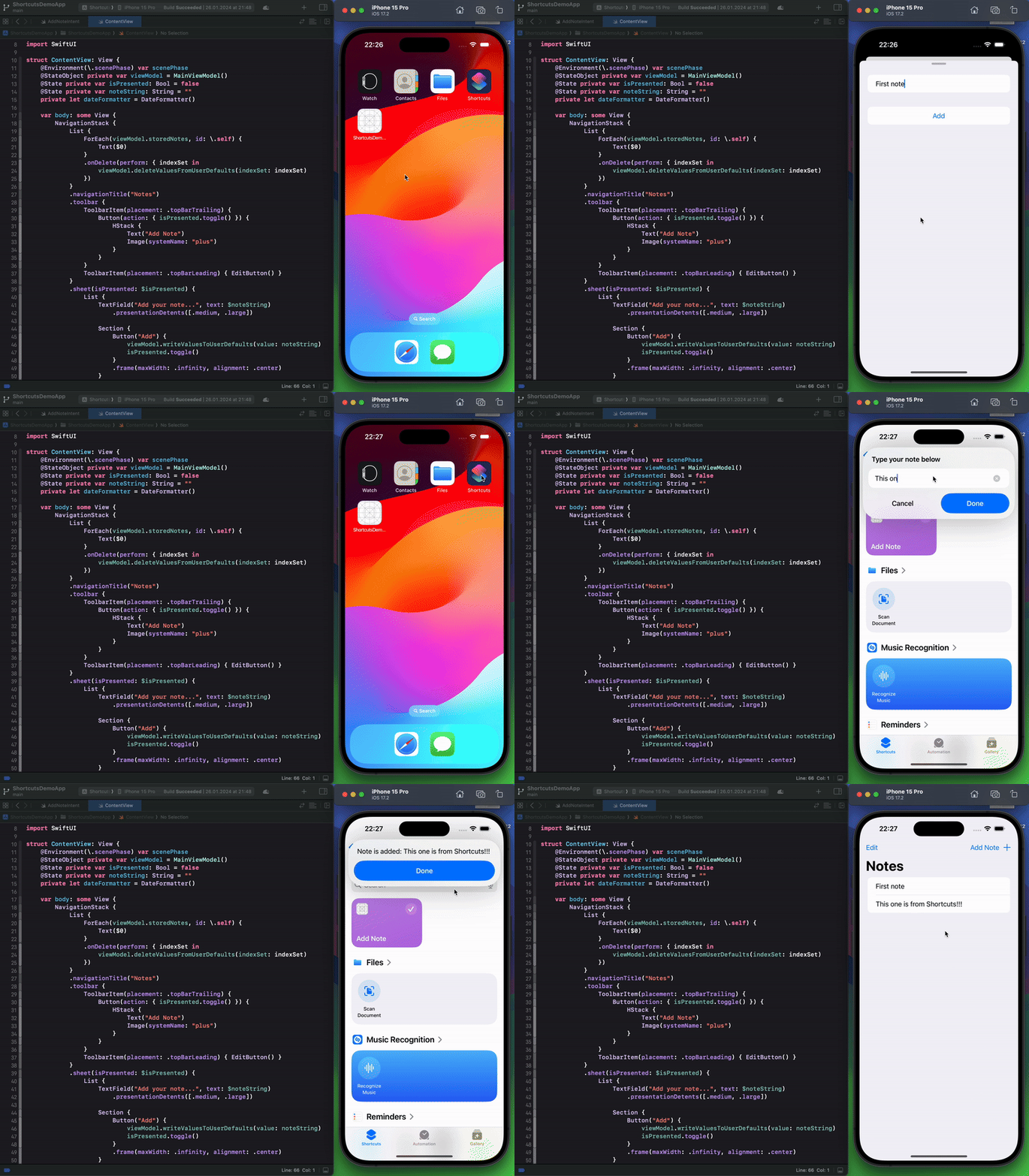
There you go! You can call this shortcut now anytime, even from the Search at home screen, or from Shortcuts app 🎉
You can check the source code, and more helpful Swift / SwiftUI projects in my GitHub profile below.
Hope it is clear. Happy coding 👨🏼💻


