
Brilliant Outlined Strategy to Kill Your Product Picture Excuses
This year is the one where no obstacle will stop you.

Simple strategies lend themselves to easy excuses. Why?
Because they seem too good to be true. You assume it would have never worked out, anyway. Then pat yourself on the back for not wasting time on a side hustle that didn’t take off.
The first nuclear bomb destroying your dreams? Numbers.
Let me tell you a secret. The articles that make me the most money have very few claps and fans. Lurkers read them. (From one lurker to another, thank you!)
It’s the same on social media. The accounts with huge follower counts get less engagement. They might also make less money. But they will never tell you.
Now that you’re warming up to the idea of starting from zero on social media. Let’s attack the hurdle of consistency.
Social Media Content Reality
Here is a lesser-known brand story.
This photo is of a woman at her brand photoshoot for 5 hours. Five hours! Yup. Social apps are free. But cost you — your time.

Her photographer shot a lot of photos at this shoot. She stepped on set for 30 minutes. The rest of the 5 hours got spent organizing outfits for three models and folding clothes.
This business is one of three. Jance owns a boutique. Records YouTube training videos and hosts a course membership for clothing store owners.
So, of course, she stocks up clothing image content to post every day for months. This approach frees up time to grow her other businesses.
You might not have Jance’s freedom, inventory, or funds.
That’s all good.
It’s okay because I’ll present a simple alternative.
Here is the strategy.
Let’s be honest with each other. I’m not saving you time.
This strategy will also cost you hours. But it is affordable and works if you don’t have a warehouse full of inventory or models.
Step #1! Create Product Vectors
- Buy your products.
- Take one picture of each item on your couch or clean floor.
- Upload the images to your computer.
- Head to remove.bg or removal.ai and get the offending background removed.
- Great. You own 3-D, life-like vectors of your products.
Step #2! Make positive associations
(Remember, houses with furniture sell faster. Complements are not your competition.)
- Think of what complements your goods.
- Visit Unsplash, brand websites, or Pexels to get images of the associative products.
- Head back to remove.bg or removal.ai to get rid of offending backgrounds.
- Outstanding. You now also have vectors of goods often used with your products.
Step #3! Photo and Video Editing
- Upload all your vectors to Canva.
- Change the background color from white to soft brand colors (optional).
- Mix and match your vectors to create your social media image.
- Or go a little further. Choose an animation element to create a video.
- You have done it! Repeat the content editing step to create more post material.
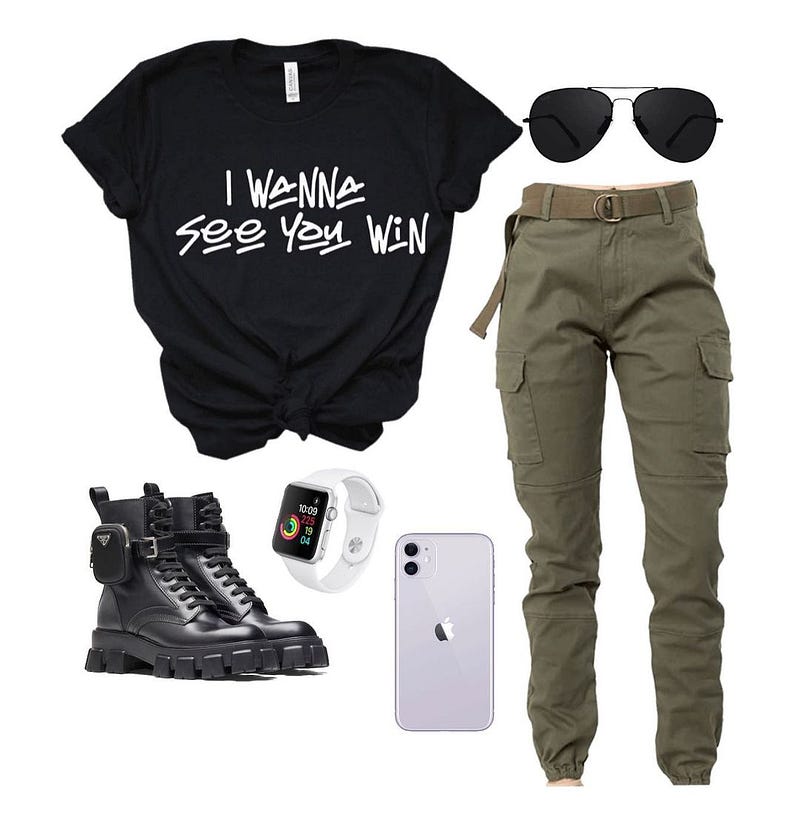
You can also look at templates for inspiration. Here is one way your creations might turn out.
Notice the clothes are paired with items ideal customers often use as accessories. This approach sells the t-shirt. But feels valuable to users because they get an outfit guide.
Key reminders!
- Optimize your time usage and results by planning first.
- Prevent stress by doing the steps in hour-batches.
Thank you for reading!
P.S.: If you like to experience Medium, consider supporting me and thousands of other writers by signing up for a membership.
It only costs $5 per month, it supports us, writers, greatly, and you have the chance to make money with your writing as well. When I started, I made my first $100 in 2 months. By signing up with this link, you’ll support me directly with a portion of your fee, it won’t cost you more. If you do so, thank you plenty!
If you liked this story, you might also like: