
Break Up a Big Airflow DAG into Multiple Files
Modularize Chunks of Your Large Airflow DAG for Easy Reüse and Maintainability

I was working on a Airflow DAG file that was growing into the hundreds of lines. Making changes required bouncing back-and-forth around the file, taking notes on a scratchpad to get everything right. Once I got to the point of opening multiple views of the DAG file in an IDE, I knew it was a good time to stop and find a way to break up the DAG into smaller pieces.
With the advent of TaskGroups in Airflow 2, it’s both conceptually and practically easier to break a big DAG into pieces. The pieces can be reüsed and, of course, they’re easier to update and maintain.
TaskGroups are just UI groupings for related tasks, but the groupings tend to be logical. The tasks in a TaskGroup can be bundled up and abstracted away to make it easier to build a DAG from units that are larger than individual tasks. That being said, TaskGroups aren’t the only way to group tasks and move them out of your DAG file. You could also have a logical chunk of tasks that don’t sit within a TaskGroup. The downside to this latter approach is that you lose the benefits of collapsing the tasks into a single node in the web UI graph view of a DAG run.
The trick to breaking up DAGs is to have the DAG in one file, for example modularized_dag.py, and the logical chunks of tasks or TaskGroups in separate files, with one logical task chunk or TaskGroup per file. Each file contains functions, each of which returns an operator instance or a TaskGroup instance.
To illustrate with a quick overview, modularized_dag.py below imports operator-returning functions from foo_bar_tasks.py, and it imports a TaskGroup-returning function from xyzzy_taskgroup.py. Within the DAG context, those functions are called with the DAG object dag passed as an argument, and their return values are assigned to task or TaskGroup variables, which can be assigned up-/downstream dependencies.
Simple Example with Real Operators
Now for a real example. Let’s use the dummy operator and the Python operator to create tasks.
The DAG file first: dags/modularized_dag.py. It simply imports the chunked task functions from plugins/includes/foo_bar_tasks.py and the TaskGroup function from plugins/includes/xyzzy_taskgroup.py. It passes in the DAG that’s created with the DAG context to each of those functions.
dags/modularized_dag.py:
from datetime import datetime, timedeltafrom airflow import DAG
from includes.foo_bar_tasks import build_foo_task, build_bar_task
from includes.xyzzy_taskgroup import build_xyzzy_taskgroupdefault_args = {
'owner': 'airflow',
'depends_on_past': False,
'email_on_retry': False,
'retries': 1,
'retry_delay': timedelta(minutes=5),
}with DAG(
dag_id="modularized_dag",
schedule_interval="@once",
start_date=datetime(2021, 1, 1),
default_args=default_args,
) as dag: # logical chunk of tasks
foo_task = build_foo_task(dag=dag)
bar_task = build_bar_task(dag=dag) # taskgroup
xyzzy_taskgroup = build_xyzzy_taskgroup(dag=dag) foo_task >> bar_task >> xyzzy_taskgroupNext are the logically chunked task functions in plugins/includes/foo_bar_tasks.py. We’ll have a couple of functions in our logical chunk, build_foo_task and build_bar_task. The first returns a dummy operator, and the second returns a Python operator. The Python operator uses an simple imported logging function, log_info, which is defined below in plugins/includes/log_info.py.
plugins/includes/foo_bar_tasks.py:
from airflow import DAG
from airflow.operators.dummy import DummyOperator
from airflow.operators.python import PythonOperator
from includes.log_info import log_info
def build_foo_task(dag: DAG) -> DummyOperator:
    foo_task = DummyOperator(task_id="foo_task", dag=dag)
return foo_taskdef build_bar_task(dag: DAG) -> PythonOperator:
bar_task = PythonOperator(
task_id="bar_task",
python_callable=log_info,
dag=dag,
) return bar_taskAfter the logical chunk task functions, we have a TaskGroup function in plugins/includes/xyzzy_taskgroup.py. This task group includes a pair of tasks, baz_task, which is implemented with dummy operator, and qux_task, with a Python operator. Like the chunked tasks file above, this file also imports the logging function log_info.
plugins/includes/xyzzy_taskgroup.py:
from airflow import DAG
from airflow.operators.dummy import DummyOperator
from airflow.operators.python import PythonOperator
from airflow.utils.task_group import TaskGroup
from includes.log_info import log_infodef build_xyzzy_taskgroup(dag: DAG) -> TaskGroup:
xyzzy_taskgroup = TaskGroup(group_id="xyzzy_taskgroup") baz_task = DummyOperator(
task_id="baz_task",
task_group=xyzzy_taskgroup,
dag=dag,
) qux_task = PythonOperator(
task_id="qux_task",
task_group=xyzzy_taskgroup,
python_callable=log_info,
dag=dag,
) baz_task >> qux_task return xyzzy_taskgroupFinally, here’s the simple logging function that is imported by foo_bar_tasks.py and xyzzy_taskgroup.py.
plugins/includes/log_info.py:
import loggingdef log_info(**kwargs):
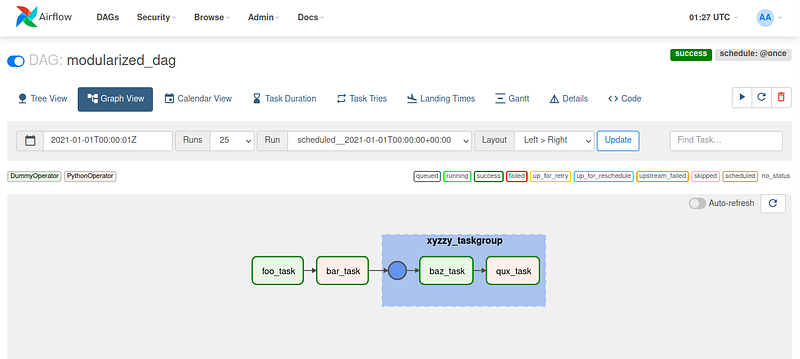
logging.info(kwargs)Once all those files in place, you can use your Airflow web UI to unpause the DAG and make sure it worked. Here’s the Graph View of modularized_dag.py:
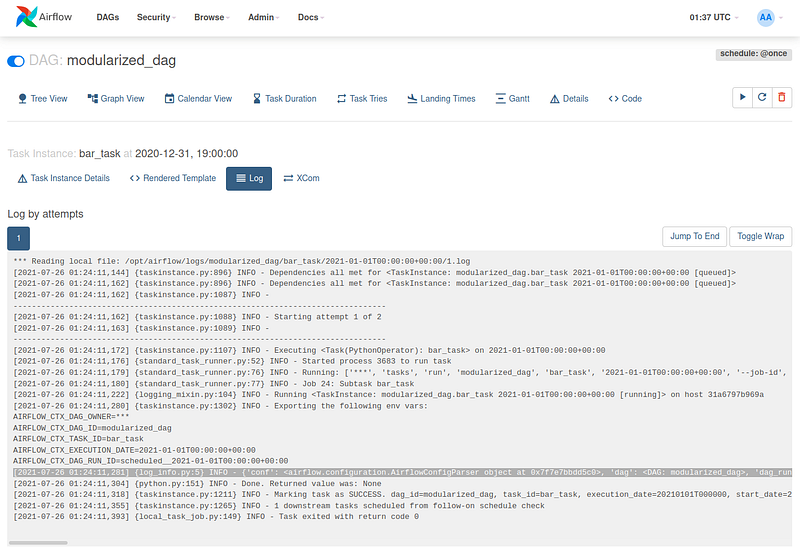
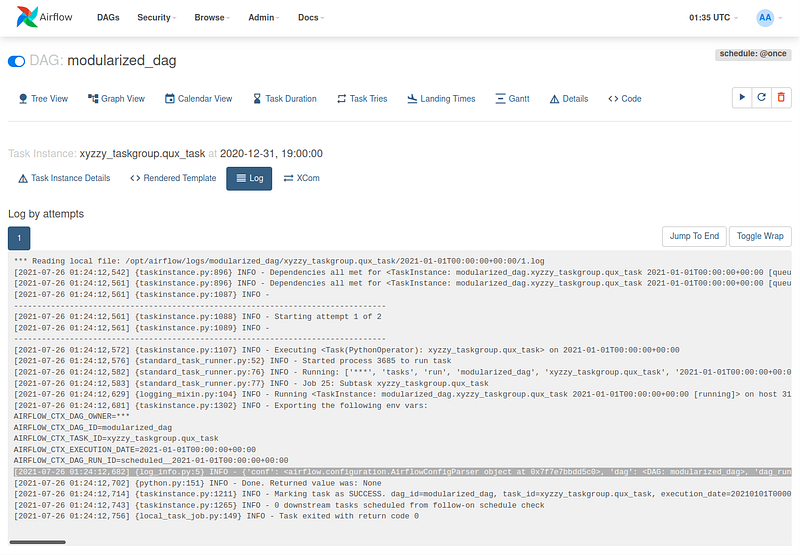
We can check the logs of our Python operator tasks (the first from the logically chunked tasks, and the second from inside the xyzzy_taskgroup):
bar_task with log_info function output highlighted gray:
xyzzy_taskgroup.qux_task with log_info function output highlighted gray:
Overview
We’ve covered how to break up a large DAG file into modular chunks by placing TaskGroup- or operator-returning functions in separate files that the now-modularized DAG will import from the plugins/includes directory. The advantages of using TaskGroup-returning functions are that (1) you can abstract away a logical group of tasks into one component in the DAG, and (2) the tasks included in the TaskGroup will be collapsed into a single node in the web UI graph view of a DAG run.


