
9 Quick Games on macOS Terminal That Will Assassinate Your Boredom
Terminal has a fun side too
Ahh, in my childhood, I used to play a lot of GTA games — Vice City, San Andreas, Bully etc.
I still remember some VC cheat codes — FannyMagnet, FightFightFight, BigBang. Haha!
Good old days, right? Bad. They never come back.
Now that I’m a programmer and I can’t install such games on my Mac anymore. If my boss finds me playing them, he’s sure to fire me. Heck, I don’t even have time to play GTA, forget about playing and getting fired.
But,
“Where there’s a will, there’s a way.”
— George Herbert
So I’ve discovered 9 quick games on Homebrew formulae that I can quickly start, play, & end without my boss even knowing I played.
Tho these aren’t as graphic-y as GTA games, these will surely beat your burnout/boredom.
#1. netToe (Tic Tac Toe)
This is the Tic Tac Toe game for Terminal.
It offers 3 modes of play →
- Player vs. CPU,
- Player vs. Player,
- Two players over network (Wow!).
And 3 levels of difficulty.
The CPU gives you (or the other player) the first chance on a random basis. And you’d fill in X or O by typing the square’s coordinates at each turn.
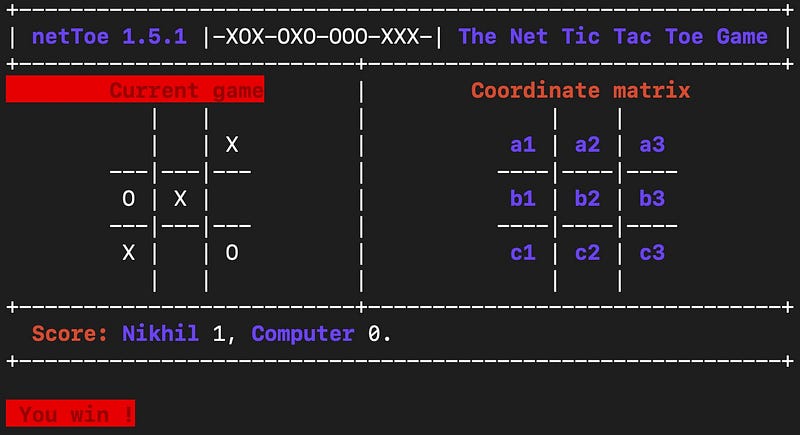
For example, to put your mark at the centre, you type b2.
Overall, it’s a nice quick pastime game to play when you’re bored. What do you say?
Install netToe: brew install nettoe
Launch netToe: nettoe
#2. nsuds (Sudoku)
Know Sudoku? Same thing here.
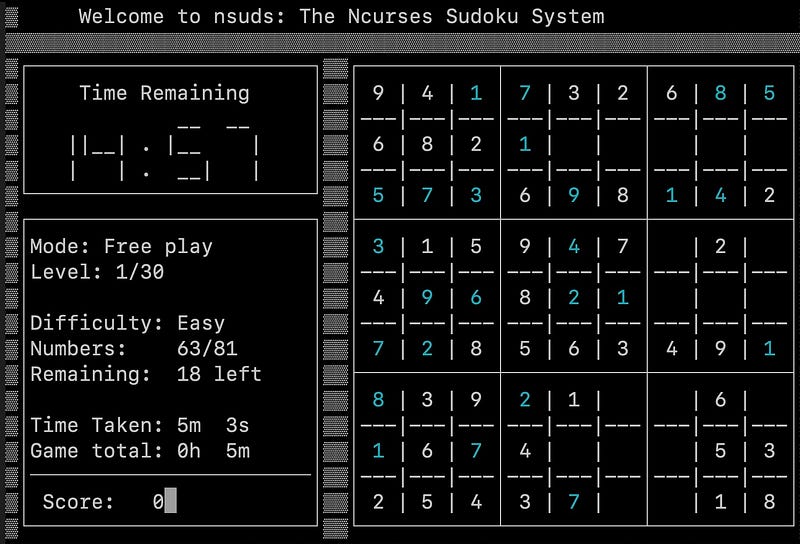
nsuds offers 5 levels of difficulty. Each subsequent difficulty level starts with lesser pre-filled squares, and lesser time to complete.
After each game, nsuds displays a summary page showing how well you played. Plus it remembers your previous scores and adds it up to the cumulative score — which you can show off to your pals.
My roomie takes Sudoku challenges very seriously once he held his pee for 10 min straight while on nsuds. He didn’t know he could pause the game by pressing P.
(Lesson learnt: Don’t hold pee, hold P)
No cheating allowed — when you pause the game, the puzzle will be hidden. So you won’t gain any extra time to win a paper crown.
Install nsuds: brew install nsuds
Launch nsuds: nsuds
If you’re a Sudoku newbie, install Nudoku
It offers features like
- Correct so far?
- Give a hint
- Highlight all matching numbers
- Solve puzzle
which help beginners a lot. Not to mention, it’s got a much cleaner UI.
Install Nudoku: brew install nudoku
Launch Nudoku: nudoku
#3. nSnake (Snake game)
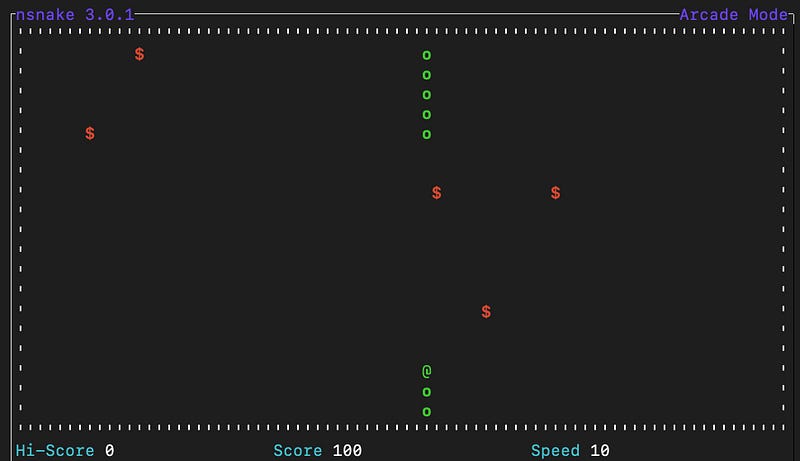
nSnake is just like the classic snake game you played back in early 2000’s PLUS some customisations like
- Snake speed
- Number of fruits on the screen,
- Teleport walls,
- Random walls,
- Maze size.
So if you’re a fan of the timeless classic or are feeling nostalgic,
Install nSnake: brew install nsnake
Launch nSnake: nsnake
For a lighter version, play naga
Fun fact:Naga is originally referred to member of a semi-divine race, part-human, part-cobra in form, who resides in the netherworld.Hence the name Naga for the game.Nothing to customise, nothing very attractive. It’s just the classic-est snake game.
Install naga: brew install naga
Launch naga: naga
#4. yetris (Tetris)
Classic Tetris feels confining. Why?
- You’ve got to wait until the block falls down — even after you’ve decided its final place.
- You won’t know the next block until the current one is placed down.
- You don’t have any live stats to measure game progress.
If you feel the same too, say hello to yetris — the Tetris game designed for the frustrated.
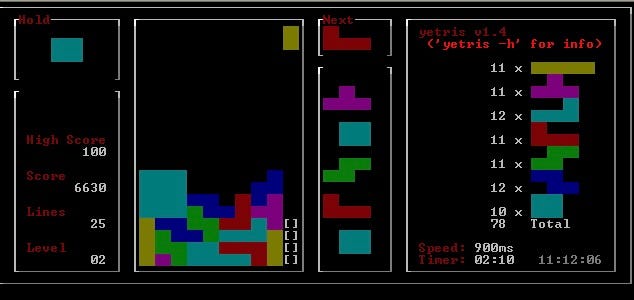
yetris’s a customisable version of Tetris.
It lets you
- hard-drop or soft-drop a falling block by hitting space or ↓
- rotate a block anti/pro-clockwise by hitting Z or X.
- see the next 7 blocks even before the current one’s placed.
- hold a block by pressing C
- know the game stats (at the right of the screen).
How cool, Tetris’s just got a lot easier.
Install yetris: brew install yetris
Launch yetris: yetris
(For a more challenging tetris, play bastet)
If you’re a challenge-taker, you need to play bastet — The Bastard Tetris.
This uses a special algorithm to deliberately give you the worst possible block at any given time — such as a straight ‘I’ block when you only need to clear a horizontal line to win 😑
Don’t hate bastet yet, it’s a bit considerate too.
- Hit ↓ to soft-drop a block.
- Hit space to rotate a block anti-clockwise.
Best of luck. I pray you’ll win bastet.
Install bastet: brew install bastet
Launch bastet: bastet
#5. typespeed
Roll up your sleeves! typespeed’s a gamified typing tutor.
How it works:
When you start the game, you’ll see some difficult-to-type words (like philosophize, guillotine, masquerade) flying across on the screen, left to right.
Think of them as your enemies. And you’re supposed to zap them by typing their spellings (quickly & correctly!) before they reach the right edge.
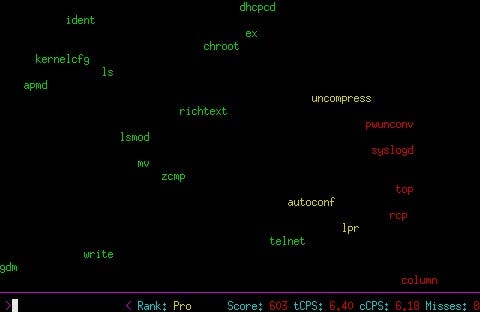
The game gets progressively harder with
- Longer words.
- More first-letter-capitalised words.
- More words flying at a given moment.
- Words flying faster.
Don’t worry, as you can customise the game difficulty to your skill level, whether you’re a novice typist or an seasoned veteran.
Overall, typespeed’s a thriller game that not only cures your boredom, but also helps increase your typing speed :)
Install typespeed: brew install typespeed
Launch typespeed: typespeed
Need a formal typing tutor? Install Klavaro
It supports various keyboard layouts incl. QWERTY, Dvorak, and Colemak. And offers a wide range of exercises to help improve your typing speed and accuracy
Install Klavaro: brew install klavaro
Launch Klavaro: klavaro
For an exclusive Dvorak typing tutor, install dvorak7min
Install dvorak7min: brew install dvorak7min
Launch dvorak7min: dvorak7min
#6. MyMan (Pac-Man) ⍩⃝
Unless you’ve been living under a pac-man shaped rock, you’d be knowing about the popular classic arcade game — Pacman.
MyMan’s the same game rewritten for Terminal.
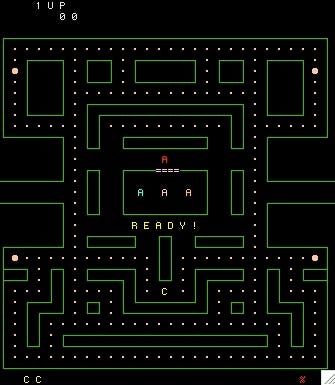
The game’s entirely displayed in text — with simple ASCII characters representing the maze, pac-man ⍩⃝, and the ghosts.
But despite the minimalist presentation, myman perfectly manages to give you the same thrill you got while playing the original Namco’s Pacman.
You should give it a try!
Install MyMan: brew install myman
Launch MyMan: myman
#7. nInvaders (Space Invaders)
nInvaders’s a very old game that clones the retro-popular Space Invaders game.
Do you know when it’s last updated? 2003. 😳
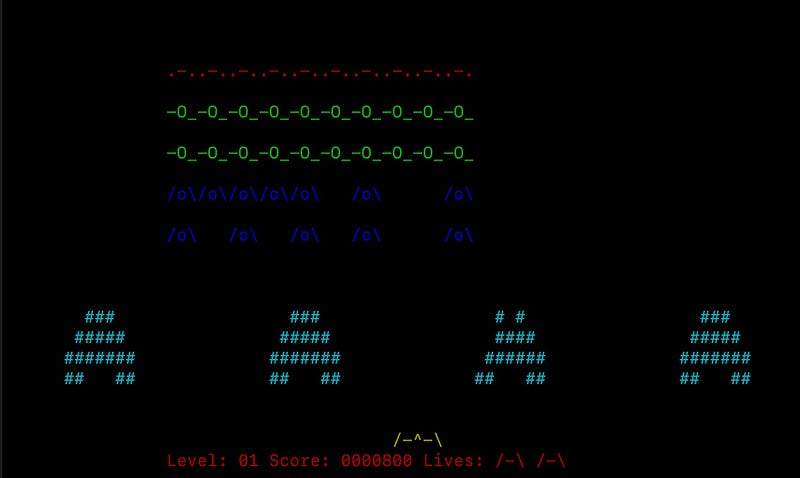
As you start the game, you’ll see a fleet of aliens flying left-to-right and right-to-left above you — descending one step closer with each round.
And you — as the hero of the planet — must shoot them out before they invade it, while dodging their bullets. The game gets progressively harder as they speed up with each step they descend.
Install nInvaders: brew install ninvaders
Launch nInvaders: ninvaders
#8. rogue
This game is easier played than explained. So I’ll tell you how to install it first. Then I’ll explain how to play.
Install rogue: brew install rogue
Launch rogue: rogue
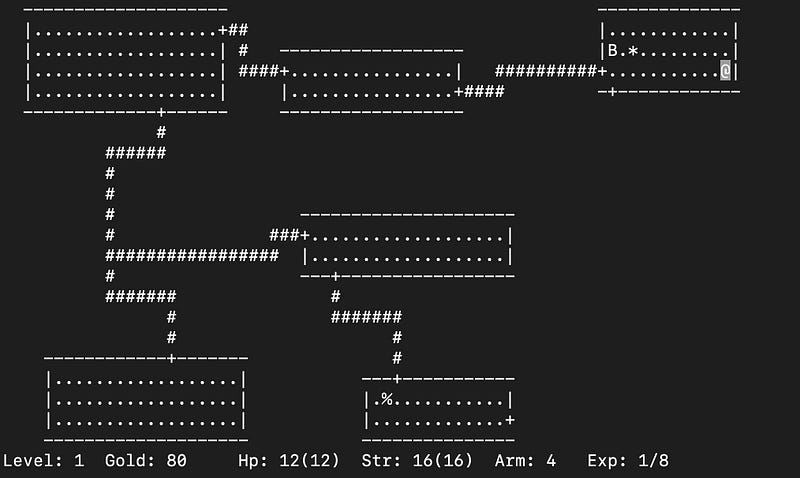
rogue’s a dungeon crawling game — where you’re tasked with exploring a dangerous dungeon in search of rare ingredients to create a magical potion.
While you progress, you’ll also encounter various monsters and obstacles that must be overcome using your strategies and wits.
The game uses the so-called “procedural generation system” to make sure no two playthroughs are same. With each new game, the dungeon’s layout, monsters, and artifacts keep varying.
So the gameplay’d never feel predictable. It’s always exciting.
Install rogue: brew install rogue
Launch rogue: rogue
#9. wordle
Wordle — a popular word-guessing game — has once taken over the internet by storm. You’re now gonna play it on Terminal :)
As you start wordle, it thinks of a valid 5-letter word and give you 6 tries to guess it. Each time you do, it indicates
- letters that don’t exist with red.
- letters that exist but aren’t in correct position with yellow.
- letters that are in the correct position with green.
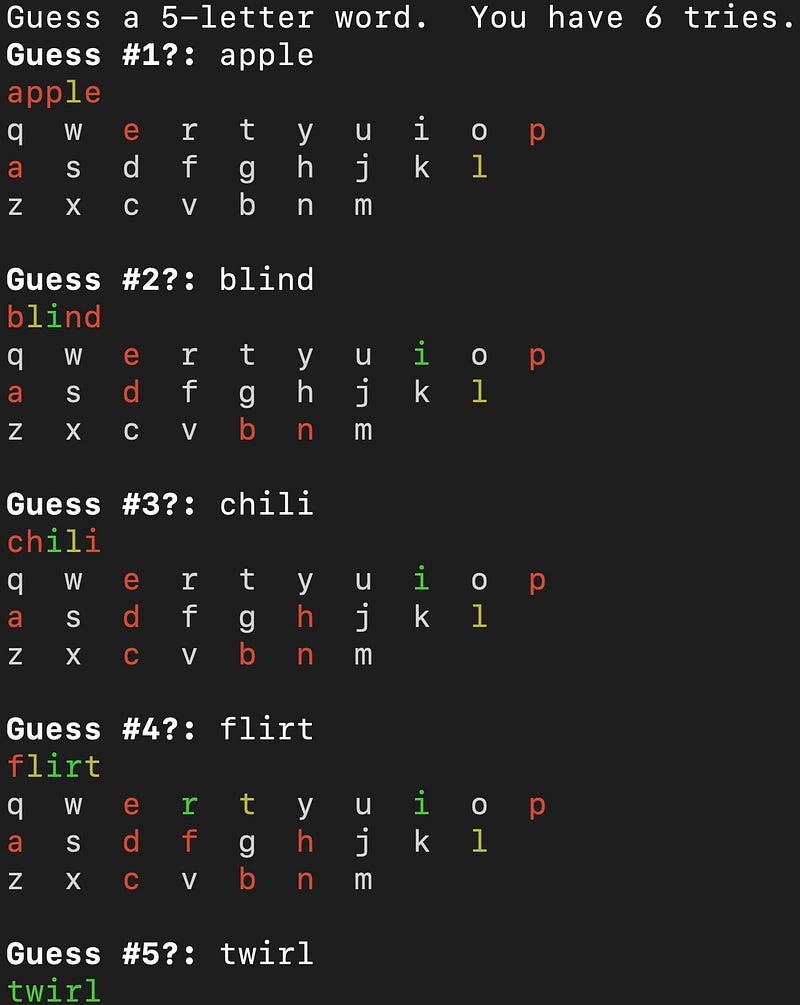
With such colour indications, each subsequent guess gets easier as the possible word choices keep narrowing down.
If you’re clever (and knowledgable) enough, you’ll be able to get the word by the sixth try. Else, no suspenses, wordle will reveal its word.
Install wordle: brew install wordle
Launch wordle: wordle
For more a‘macOS’zing Terminal commands, read these.
For only Homebrew tools, read these.
Join 360+ others to get notified whenever I publish a new story.


