
Boost Your Productivity With These 6 Awesome webpack Plugins
Plugins are the backbone of webpack

webpack plugins are used for performing a wider range of tasks like bundle optimization, asset management, and injection of environment variables.
webpack itself is built on the same plugin system that you use in your webpack configuration. Depending on how you’re using webpack, there are multiple ways to use plugins.
Without further ado, here are six awesome webpack plugins.
Webpack Bundle Analyzer
Visualize the size of webpack output files with an interactive, zoomable tree map.
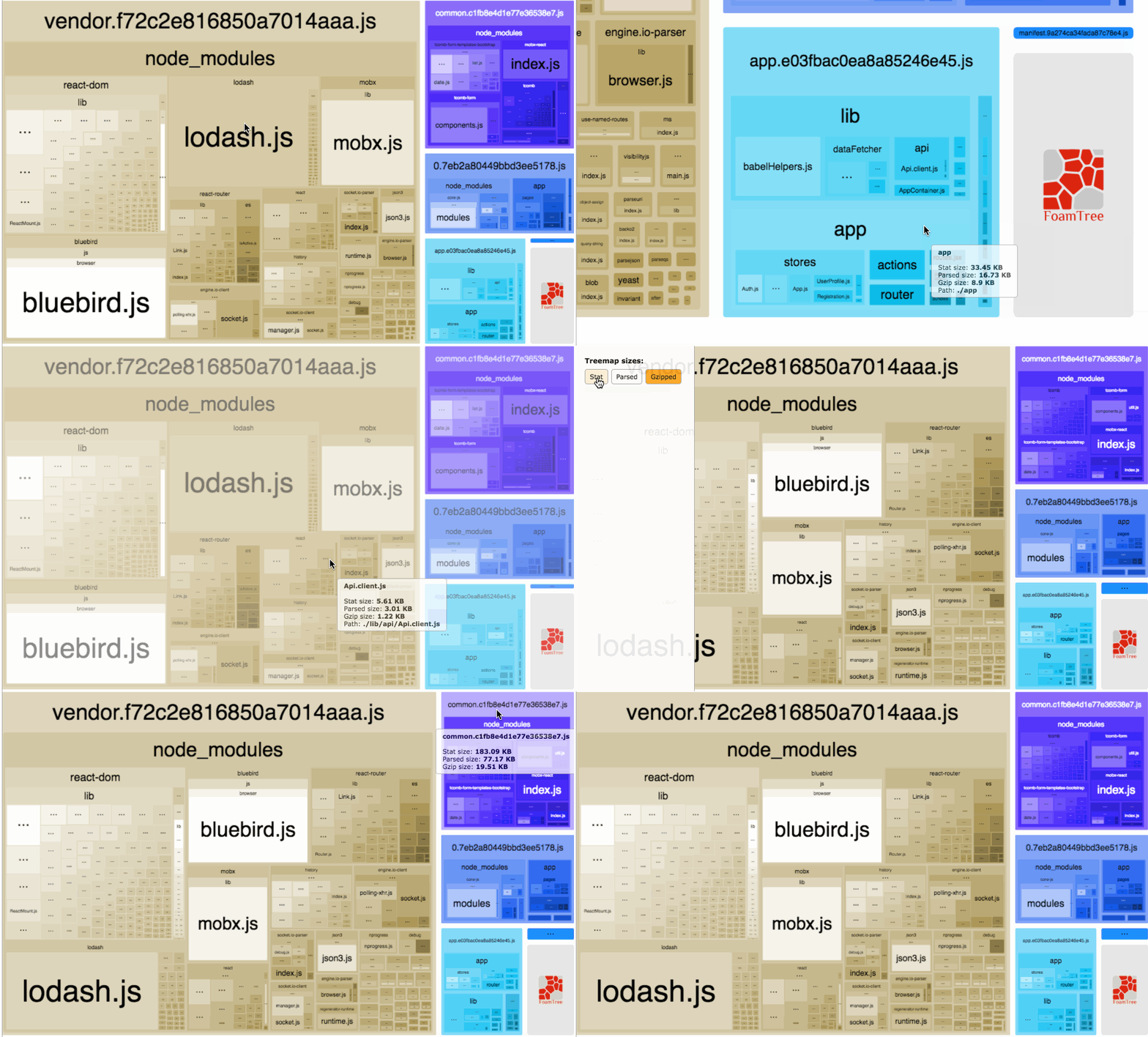
This plugin will help you do the following:
- Realize what’s really inside your bundle
- Find out what modules make up the most of the bundle’s size
- Find modules that got there by mistake
- Optimize your webpack bundle
Getting started
# NPM
npm install --save-dev webpack-bundle-analyzer
# Yarn
yarn add -D webpack-bundle-analyzerUsage
const BundleAnalyzerPlugin = require('webpack-bundle analyzer');module.exports = {
plugins: [
new BundleAnalyzerPlugin()
]
}offline-plugin
The offline-plugin is intended to provide an offline experience for webpack projects.
The plugin uses ServiceWorker and AppCache as a fallback under the hood. Simply include this plugin in your webpack.config and the accompanying run time in your client script, and your project will become offline-ready by caching all (or some) of the webpack output assets.
Installation
npm install offline-plugin [--save-dev]Setup
First, instantiate the plugin in your webpack.config:
// webpack.config.js examplevar OfflinePlugin = require('offline-plugin');module.exports = {
// ... plugins: [
// ... other plugins
// it's always better if OfflinePlugin is the last plugin added
new OfflinePlugin()
]
// ...
}(And, optionally, you can configure it with options.)
Then, add the run time into your entry file (typically the main entry):
require('offline-plugin/runtime').install();ES6/Babel/TypeScript
import * as OfflinePluginRuntime from 'offline-plugin/runtime';OfflinePluginRuntime.install();For more details of usage with TypeScript, see here.
webpack-pwa-manifest
webpack-pwa-manifest describes itself as a “Progressive Web App Manifest Generator for Webpack, with auto icon resizing and fingerprinting support.”
webpack-pwa-manifest is a webpack plugin that generates a manifest.json for your progressive web application.
If you’re using inject on your configuration, ensure that HtmlWebpackPlugin appears before WebpackPwaManifest in the plugins array.
Features
- Autoicon resizing
- Icon fingerprinting
- Manifest fingerprinting
- Automanifest injection on HTML
- Hot-reload support
Installation
npm install --save-dev webpack-pwa-manifestUsage
In your webpack.config.js:
import WebpackPwaManifest from 'webpack-pwa-manifest'...plugins: [
new WebpackPwaManifest({
name: 'My Progressive Web App',
short_name: 'MyPWA',
description: 'My awesome Progressive Web App!',
background_color: '#ffffff',
crossorigin: 'use-credentials', //can be null, use-credentials or anonymous
icons: [
{
src: path.resolve('src/assets/icon.png'),
sizes: [96, 128, 192, 256, 384, 512] // multiple sizes
},
{
src: path.resolve('src/assets/large-icon.png'),
size: '1024x1024' // you can also use the specifications pattern
}
]
})
]imagemin-webpack-plugin
imagemin-webpack-plugin is a webpack plugin to compress images with imagemin.
Install
npm install imagemin-webpack-pluginUsage
import ImageminPlugin from 'imagemin-webpack-plugin'module.exports = {
plugins: [
// Make sure that the plugin is after any plugins that add images
new ImageminPlugin({
disable: process.env.NODE_ENV !== 'production', // Disable during development
pngquant: {
quality: '95-100'
}
})
]
}prerender-spa-plugin
prerender-spa-plugin prerenders static HTML into a single-page application.
The goal of this plugin is to provide a simple prerendering solution that’s easily extensible and usable for any site or single-page app built with webpack.
What is prerendering?
Recently, server-side rendering (SSR) has taken the JavaScript front-end world by storm. The fact that you can now render your sites and apps on the server before sending them to your clients is an absolutely revolutionary idea (and totally not what everyone was doing before JS client-side apps got popular in the first place).
However, the same criticisms that were valid for PHP, ASP, JSP, (and such) sites are valid for server-side rendering today. It’s slow, breaks fairly easily, and is difficult to implement properly.
Thing is, despite what everyone might be telling you, you probably don’t need SSR. You can get almost all the advantages of it (without the disadvantages) by using prerendering. Prerendering is basically firing up a headless browser, loading your app’s routes, and saving the results to a static HTML file. You can then serve it with whatever static-file-serving solution you were using previously. It just works with HTML5 navigation and the like. No need to change your code or add server-side rendering workarounds.
Install
yarn add -D prerender-spa-pluginBasic usage
const path = require('path')
const PrerenderSPAPlugin = require('prerender-spa-plugin')module.exports = {
plugins: [
...
new PrerenderSPAPlugin({
// Required - The path to the webpack-outputted app to prerender.
staticDir: path.join(__dirname, 'dist'),
// Required - Routes to render.
routes: [ '/', '/about', '/some/deep/nested/route' ],
})
]
}duplicate-package-checker-webpack-plugin
This is a webpack plugin that warns when your bundle contains multiple versions of the same package.
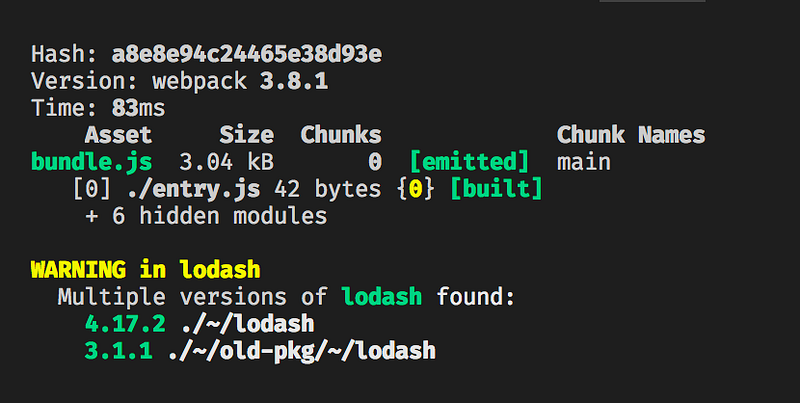
Why?
It might be possible that a single package gets included multiple times in a webpack bundle due to different package versions. This situation may happen without any warning, resulting in extra bloat in your bundle, and it may lead to hard-to-find bugs.
This plugin will warn you of such cases to minimize bundle size and avoid bugs caused by unintended duplicate packages.
Motivation: webpack/webpack/issues/385 and webpack/webpack/issues/646.
Install
npm install duplicate-package-checker-webpack-plugin --save-devUsage
Add the plugin to your webpack config:
const DuplicatePackageCheckerPlugin = require("duplicate-package-checker-webpack-plugin");module.exports = {
plugins: [new DuplicatePackageCheckerPlugin()]
};Conclusion
Thanks for reading. I hope you learned something new. webpack is a great tool for us web developers — make use of all of its advantages. Happy coding!
If you’re new to JavaScript and want to learn the language, I recommend starting with reading books combined with building things. Start with the “A Smarter Way to Learn JavaScript” book and here’s a list of fun apps to build.r


