
VS Code
Boost Your Productivity with the 7 Best Note Taking Extensions for VS Code
Craft a Powerful Customized Note Taking System with Markdown in VS Code

Keeping notes tidy can be hard.
Notebooks and text files can get messy fast. But VS Code has add-ons to help! VS Code has some of the best note taking extras out there. These tools let you connect notes, track tasks, build a knowledge book, and work better.
Let’s look at 7 great note taking add-ons for VS Code.
❗Kind reader, I'd be grateful if you could spare 30 seconds to fully engage
- clap 👏 (50 is ideal!), highlight 🔖, and comment 💬.
Your interaction means a lot 🙏🏻
1. VSNotes
VSNotes helps you make and sort plain text notes. It uses VS Code’s quick commands to help you out.

You can pick a main folder for all new notes. VSNotes lets you tag notes to find them again later. It can also open your latest notes fast, show all tags and notes in the file menu, and open your whole note folder.
VSNotes also lets you add code pieces when making a new note. You can save changes using source control. And you can make notes in workspaces you have open.
For simple text notes, VSNotes is a good pick.
2. VSCode Journal
VSCode Journal is great for folks who use plain text and Markdown for notes, tasks, and more. It makes journaling and note taking easy in VS Code.

You can open or create journal entries for certain dates. It also lets you quickly add notes and memos to your daily journal page. For tasks, you can make task lists and print useful commands and code pieces.
Other neat features are scopes to separate project notes, actions to manage task lists, and date-linked journal entries.
For Markdown journaling and notes, VSCode Journal has lots of goodies.
3. Markdown Notes
If you use Markdown for notes, Markdown Notes brings useful wiki-style linking to your files.

It lets you connect notes using double-bracket links. You also get backlink references and #hashtags for notes. And you can tag notes using @citations. Markdown Notes adds highlighting, autocomplete, and go-to-definition for wiki links between your notes.
With these tools, you can build a Markdown knowledge book quickly.
The add-on makes it easy to find and navigate your notes.
4. Notes
Notes gives you a simple Markdown note taking experience modeled after the classic Mac app Notational Velocity. It uses one spot to store notes for easy syncing across devices.
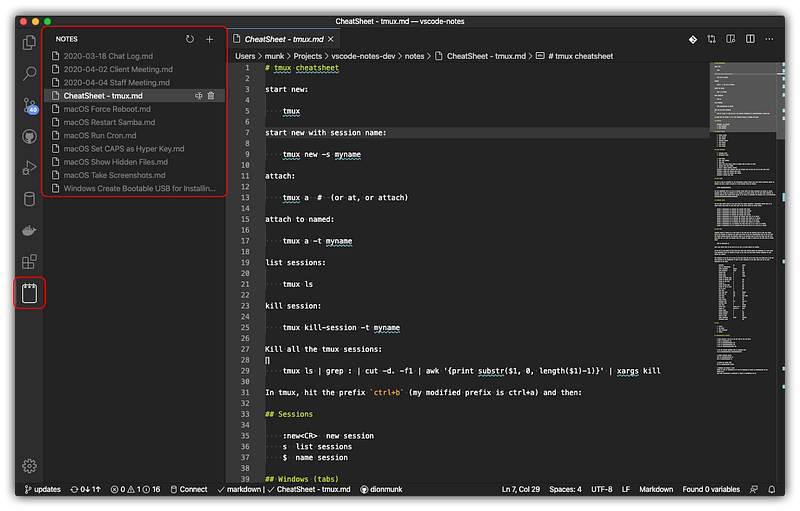
Notes use the .md file type for Markdown cross-compatibility. The add-on has handy shortcuts to make (Alt+N) and access (Alt+L) notes fast. Hover over a note to rename or delete it.
Notes also supports subfolders in your storage folder.
While more basic than other add-ons, Notes is an easy way to start a syncable Markdown notebook in VS Code.
5. Markdown Memo
Markdown Memo helps build a powerful interconnected knowledge book with Markdown. It takes inspiration from tools like Obsidian and Roam Research.

The add-on lets you make deep two-way links between notes. It also syncs links automatically on renames and shows neat hover previews.
You can embed notes and images directly too.
Other great features are backlink navigation, note labels, section linking, and commands like pasting HTML as Markdown.
Overall, Markdown Memo makes building a linked Markdown knowledge base a breeze.
6. Foam
Foam is an open source note taking tool for VS Code with freeform linking and visualization. It makes a local, Markdown based personal knowledge book you can customize.

Cool features include graphing note connections, link autocomplete, link syncing on renames, and unique ID support for links across folders. Foam also has handy link previews, navigation, daily notes, note embedding, sections, templates, tags, and publishing capabilities.
As an open source tool, Foam lets you fully customize and own your book long term.
7. Dendron
Dendron is a powerful Markdown note taking tool made specifically for developers. It acts as a local-first personal knowledge manager right in VS Code.

It has deep linking, tags, and graphs to visualize your notes. Lookups, navigation, and a schema system help you organize notes. Dendron also lets you mix notes in separate Git-backed folders, publish notes online, and integrate with coding tools like VS Code.
For developers who want a souped-up Markdown knowledge book integrated with their coding, Dendron is a top option.
Note: Dendron development has stopped
Get Started with Great Note Taking
Taking notes in VS Code doesn’t have to be messy or confusing. With the right add-ons, you can connect notes, track tasks, and work more efficiently.
The 7 extensions here show the wide range of customizable note taking options available. Whether you need a simple Markdown notebook or a deep interconnected knowledge base, there’s an add-on that fits your needs!
Try out some of these awesome note taking extensions to boost your productivity today!
Thanks for reading! 🫶
I hope you found this article informative and engaging. If so, please share it with others who may also find it valuable. Your support helps worthwhile content reach wider audiences. 👏
🤗 I’d love to hear your thoughts in the comments below. What resonated with you? What would you like to see covered in the future? Your feedback helps guide me in creating content that truly connects with readers.
Once again, I appreciate you taking the time to read. Knowledge becomes empowerment when shared far and wide.
Until next time! 👋


