
Boost Your Blogging Productivity with TextExpander: A Time-Saving Tool for Creators
Streamline Your Writing Process and Maximize Efficiency with TextExpander

As a blogger, writing high-quality content is important, but it can also be time-consuming.
However, there are tools available that can help you be more productive and efficient, and one of them is TextExpander. I wish I knew this tool while I started my writing journey.
okay, I should stop adding further words and start providing something worth your time!🙂
[(press windows button + period (.) to quickly add any emoji] 🤗
Now, let’s look at the actual content.
What is TextExpander?
TextExpander is a productivity tool that allows you to create shortcuts, or word snippets, for frequently used text, images, and even code.
With TextExpander, you no longer have to type out the same words or phrases repeatedly, saving you time and effort. Basically, it is a word replacement tool but in much better way.
Before reading about this tool further, most important thing is, “It’s a paid tool”. However, for individuals it only costs around $40 a year.

How to use TextExpander effectively?
It is simple and easy.
Here are the steps:
Step 1: Sign up for an account on website and download.
To use TextExpander, you need to create an account on the TextExpander website and download the app/software for your device.
Step 2: Create a library of snippets.
Once you have downloaded the app, you can start creating your own library of snippets.
Snippets are shortcuts for frequently used text, such as your email address, signature, commonly used phrases, and more. You can also create snippets for images, code, and even fill-in-the-blank templates.
Step 3: Assign a short abbreviation or keyword to each snippet.
To use your snippets, you need to assign a short abbreviation or keyword to each one.
For example, you can assign “eaddr” to your email address snippet, and “sig” to your email signature snippet.
When you type these abbreviations or keywords, TextExpander will automatically expand them into the full text.
Step 4: Use TextExpander in any application or website where you need to type.
You can use TextExpander in any application or website where you need to type, such as email clients, word processors, text editors, and even social media platforms.
Simply type the abbreviation or keyword for the snippet you want to use, and TextExpander will expand it into the full text. You need to add chrome extention to work with any website.
How can TextExpander maximize productivity for blog post writers?
As a blog post writer, TextExpander can help you be more productive and efficient in several ways:
- Speed up your writing process. With TextExpander, you can quickly insert frequently used text, such as your bio, links to your website or social media profiles, and other commonly used phrases. This saves you time and effort, allowing you to focus on the actual content of your post.
- Reduce errors and typos. When you type the same words or phrases repeatedly, it’s easy to make mistakes. However, with TextExpander, you can eliminate errors and typos by creating snippets for your frequently used text. This ensures that your writing is accurate and professional.
- Maintain consistency. Maintaining consistency in your writing is important, especially if you have a specific style or tone that you want to convey. With TextExpander, you can create snippets for your frequently used phrases, ensuring that you use the same wording and tone throughout your writing.
- Customize your snippets. TextExpander allows you to customize your snippets to fit your specific needs. You can create snippets for different writing projects, organize your snippets into groups, and even use fill-in-the-blank templates to create customized responses for emails or social media messages.
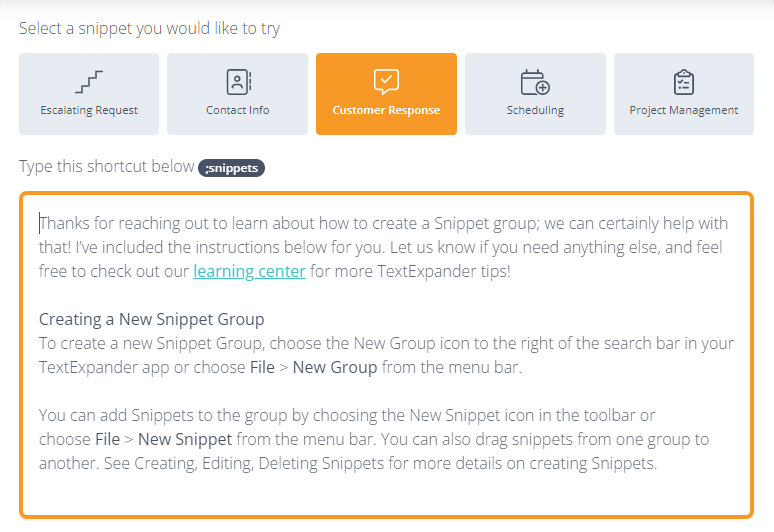
In above screenshot, I just typed in “;snippets” and it gave me whole lot of text which I have added already into the software to replace the text ;snippets.
Simillarly, you can add n number of words and phrases or anything that can be used repeatedly into your writing.
Have a look at my other stories, if you have few minutes! 5 Must Watch Dcoumentaries The Limitiations of Relying on AI tools for Poetic Expressions How Using Quora Can Be Beneficial as A Content Writer 7 TED Talks I Wish I Had Watched Earlier YouTube Channels to Learn Anything for Free
If you like my work, a follow and few claps will encourage me to write more for everyone!
Show your support, buy me a book here.
Thank you for reading till the end!
Read more stories from me and from other brilliant writers by becoming a Member of Medium community.
If you sign up using my link, I’ll eventually earn a small commission. Thanks!