
avatarMedium

Summary

Medium has introduced a blocking feature that allows users to prevent interactions with unwanted accounts, enhancing user control over their experience on the platform.

Abstract

Medium's new blocking feature is designed to empower users by giving them the ability to block other users whose content or interactions they wish to avoid. When an author is blocked, their responses will not be linked from the blocker's post, although they will still be visible on the blocked user's profile and in Medium's search and lists. Blocked accounts cannot follow the user who blocked them, and all previous follows are mutually revoked. The feature filters out the blocked user's content from most lists on the site, and while blocked users can still @mention the blocker, the latter will not receive notifications. Medium does not notify users when they are blocked, but the blocked user will see a message if they try to access the blocker's profile or content. Blocked users are restricted from following, viewing posts or notes, or interacting with the blocker's content while logged in. Users can manage their blocks through a drop-down menu on profiles or posts, and view all blocked accounts in their account settings.

Opinions

  • The blocking feature is considered an important tool for controlling one's experience on Medium.
  • Blocking is seen as a way to hide unwanted content and interactions, which can improve the user experience by reducing exposure to negative or unproductive engagements.
  • Medium's approach to blocking is designed to balance the visibility of content with the privacy and comfort of users, as evidenced by the ability of blocked users to still view profiles and posts, but not interact with them in a logged-in state.
  • The feature is likely intended to foster a safer and more respectful community on Medium by allowing users to curate their interactions according to their personal boundaries and preferences.

Blocking On Medium

Medium now gives users an important tool to control their experience — the ability to block other users.

Important details about blocking

  • If you block the author of a response, it will not be linked from anywhere on your post, for anyone. It will still appear on the blocked user’s profile page with a link back to your post, and be available in search and other lists on Medium.
  • Accounts you’ve blocked can’t follow you, and you can’t follow accounts you’ve blocked.
  • Blocking an account will cause you to unfollow them, and will cause them to unfollow you.
  • Blocking is a useful tool for hiding unwanted content. Notes from blocked accounts won’t be visible to you, and their posts will be filtered out of most lists throughout the site. You can still view their profile, including their posts.
  • Blocked users can still @mention you in notes, but you won’t get a notification.
  • We won’t notify someone when you block them, but they’ll be able to tell they’ve been blocked if they try to visit your profile or posts while logged in.
  • When you block someone, you can still see each other in search results and various user lists across the site. However, the blocked account cannot further view your details or content while logged in.

Blocked users can’t do the following

  • Follow you.
  • View your posts or notes while logged in. This also means they can’t leave notes on, recommend, or otherwise interact with your content.
  • View your profile information when logged in. When a blocked user visits your profile, they’ll see a message letting them know that they’ve been blocked.

Managing blocks

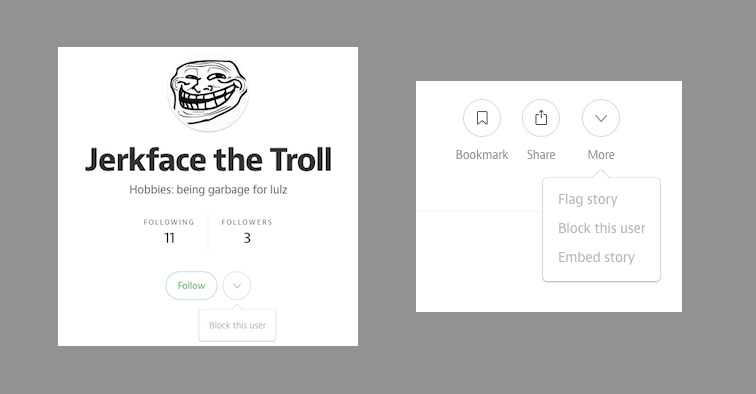
You can block an account via the drop-down menu next to the Follow button on their profile, or the ‘More’ menu at the bottom of one of their posts.
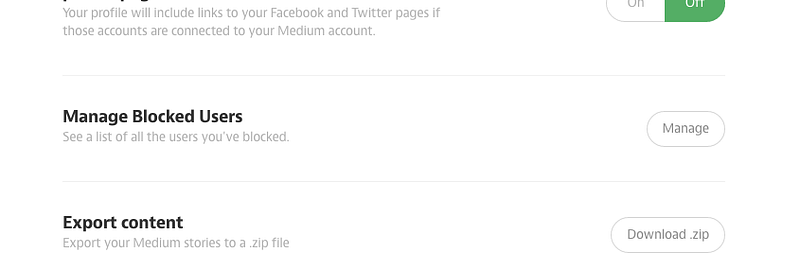
You can view a list of all accounts you’ve blocked in your account settings.
Medium
Blocking
Privacy
Recommended from ReadMedium